Retrotechtacular: The Voder From Bell Labs

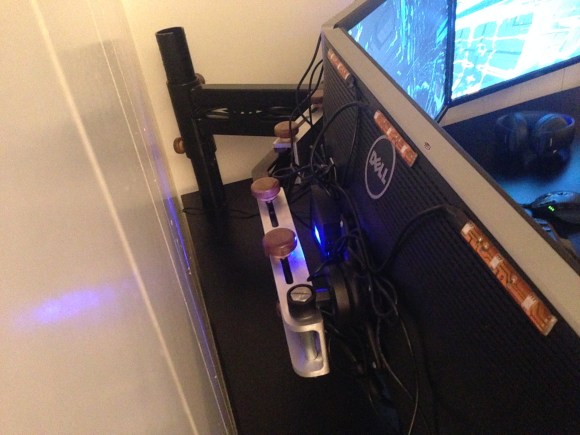
This is the under-the-hood view of the keyboard for the Voder (Voice Operating Demonstrator), the first electronic device capable of generating continuous human speech. It accomplishes this feat through a series of keys that generate the syllables, plosives, and affricatives normally produced by the human larynx and shaped by the throat and tongue. This week’s film is a picture montage paired with the audio from the demonstration of the Voder at the 1939 World’s Fair.

The Voder was created by one [Homer Dudley] at Bell Laboratories. He did so in conjunction with the Vocoder, which analyzes human-generated speech for encrypted transfer and re-synthesizes it on the other end. [Dudley] spent over 40 years researching speech at Bell Laboratories. His development of both the Voder and the Vocoder were instrumental in the SIGSALY project which aimed to deliver encrypted voice communication to the theatres of WWII.

Continue reading “Retrotechtacular: The Voder From Bell Labs”

Cutting Records Out Of CDs

3D Printed Record Lathe

Lovers of records rejoice! Did you know you can cut your own vinyl using something called a record lathe? [Beau Walker] just put the finishing touches on his 3D printed record lathe, and the results speak for themselves!

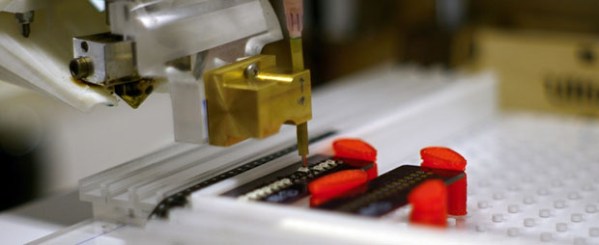
A Recording Lathe was once used for cutting records, and previously, wax cylinders – if you want to get really old school. [Beau], being an analog lover, decided he had to try making his own. He designed the whole thing in FreeCAD and got 3D printing. A single stepper motor drives the lead screw which moves the writing head back and forth as the record spins in place. As to not waste materials, he’s reusing old CD’s for his newly created vinyls. Two 25W speakers cause vibrations in the needle to cut into the disc, via a clever little mechanism.

The system works pretty well, but he wants to replace the turntable with another stepper motor for finer control of the recording — sometimes the turntable slows down during recording under load which messes up the sound. There’s a video of it in action on his site that we can’t embed here, so you should definitely go check it out!

Of course you could skip the middleman and go straight to 3D printing your records…

Hyperlapse Makes Your HeadCam Videos Awesome

hyperlapse First person video – between Google Glass, GoPro, and other sports cameras, it seems like everyone has a camera on their head these days. If you’re a surfer or skydiver, that might make for some awesome footage. For the rest of us though, it means hours of boring video. The obvious way to fix this is time-lapse. Typically time-lapse throws frames away. Taking 1 of every 10 frames results in a 10x speed increase. Unfortunately, speeding up a head mounted camera often leads to a video so bouncy it can’t be watched without an air sickness bag handy. [Johannes Kopf], [Michael Cohen], and [Richard Szeliski] at Microsoft Research have come up with a novel solution to this problem with Hyperlapse.

Hyperlapse photography is not a new term. Typically, hyperlapse films require careful planning, camera rigs, and labor-intensive post-production to achieve a usable video. [Johannes] and team have thrown computer vision and graphics algorithms at the problem. The results are nothing short of amazing.

The full details are available in the team’s report (35MB PDF warning). To obtain usable data, the fisheye lenses often used on these cameras must be calibrated. The team accomplished that with the OCamCalib toolbox. Imported video is broken down frame by frame. Using structure from motion algorithms, hyperlapse creates a 3D models of the various scenes in the video. With the scenes in this virtual world, the camera can be moved and aimed at will. The team’s algorithms then pick a smooth path that follows the original cameras trajectory. Once the camera’s position is known, it’s simply a matter of rendering the final video.

The results aren’t perfect. The mountain climbing scenes show some artifacts caused by the camera frame rate and exposure changing due to the varied lighting conditions. People appear and disappear in the bicycling portion of the video.

One thing the team doesn’t mention is how long the process takes. We’re sure this kind of rendering must require some serious time and processing power. Still, the output video is stunning.

Continue reading “Hyperlapse Makes Your HeadCam Videos Awesome”

PirateCade Is An Impressive Feat Of Woodworking And Design

Retro Arcade Machine Keeps the Classics

A six month journey of blood sweat and tears is finally over for [David Carver] and what he is left with is nothing short of beautiful. He calls it the PirateCade. We call it the perfect arcade cabinet.

This project is actually [David’s] very first Raspberry Pi project – at least it was, until his Pi crapped out on him. After running into too many problems with it and SD card corruptions, [David] decided against the RetroPie project platform and decided to upgrade to a full-blown PC, using an AtomicFE front-end and the Ultimark Ipac.

The entire cabinet is hand made out of solid wood; he didn’t have access to any fancy CNC routers or laser cutters. We gotta hand it to him, he’s quite the cabinet maker for an electronics guy. Continue reading “PirateCade Is An Impressive Feat Of Woodworking And Design”

Adding Features To The DoorBot

network sniffing doorbell

There’s an interesting network-enabled doorbell on the market from Edison Junior called the DoorBot that boasts some useful features, notably that it can make calls to a phone when someone pushes the button for the doorbell. However, [MadBeggar] saw the potential in this device and couldn’t wait to get some more functionality out of it, so he has reverse engineered the communications protocol for the doorbell.

His goals for the project were to implement third-party notifications such as text messaging, VoIP/SIP integration, and maybe even a desktop client. So far he has only been able to analyze the communications protocol but he hopes that others will be able to build upon his work or even add features he hasn’t thought of yet. The makers of the device promise to eventually deliver on some of these features but so far haven’t delivered.

There are some other projects out there that integrate wireless connectivity with a doorbell. However, [MadBeggar] notes that the DoorBot really stands out among all of the internet-enabled doorbell, mostly because nothing else around is as clean or is as easy to install as the DoorBot. He just wishes that the software wasn’t so clunky and that it had its full potential unlocked with these extra features. We’d say he’s on the right track!

Flex Sensing For A DIY Data Glove

cyber

[Cyber] has been testing out intuitive input methods for virtual reality experiences that immerse the user further into the virtual world than archaic devices like a keyboard or mouse would allow. One of his biggest interests so far was the idea of a data glove that interacts with an Arduino Uno to interface with a PC. Since commercial products are yet to exist on a readily available level, [Cyber] decided to build his own.

He started out with a tiny inertial measurement unit called a Pololu MinIMU-9 v2 that tracks orientation of the 3-axis gyro and accelerometer. The USB interface was soldered into place connecting the wires to an Arduino Uno. From there, he hooked up a flex sensor from Spectra Symbol (which were supposedly used in the original Nintendo Power Gloves) and demoed the project by tracking the movement of one of his fingers. As the finger bent, the output printed on the serial monitor changed.

[Cyber] still needs to mount a glove on this system and construct a proper positional tracking method so that physical movement will be mirrored in a simulation.

[Cyber’s] day job has had him busy these last few months, which has forced the project into a temporary hold. Recently though, [Cyber] has been an active member and an influence in the local Orange County VR scene helping to build a nice development culture, so we’re hoping to see more updates from him soon.

To view what he has done up to this point, click the link at the top of the page, and check out the video after the break:

Continue reading “Flex Sensing For A DIY Data Glove”

Raspberry Pi Backup Scripts

Raspberry Pi

[Matthew’s] recent blog post does a good job explaining the basics of the Raspberry Pi’s file system. The Linux operating system installed on a Pi is generally installed on two different partitions on an SD card. The first partition is a small FAT partition. All of the files on this partition are used for the initial booting of the Pi. This partition also includes the kernel images. The second partition is the root file system and is generally formatted as ext4. This partition contains the rest of the operating system, user files, installed programs, etc.

With that in mind you can deduce that in order to backup your Pi, all you really need to do is backup all of these files. [Matt] has written some scripts to make this a piece of cake (or pie). The first script will simply copy all of the files into a gzipped archive. You can save this to an external SD card, USB drive, or network share.

The second script is perhaps more interesting. This script requires that you have one free USB port and a USB SD card reader. The script will automatically format the extra SD card to contain the two critical partitions. It will then copy the “boot” files to the new boot partition and the root file system files to the new SD card’s root partition. When all is said and done, you will end up with an SD card that is an exact copy of your current running file system.

This can be very handy if you have multiple Pi’s that you want to run the same software, such as in a Pi cluster. Another good example is if you have spent a lot of time tweaking your Pi installation and you want to make a copy for a friend. Of course there are many ways to skin this cat, but it’s always fun to see something custom-built by a creative hacker.