Filtering Out Mains Hum From ADC Samples

Hum_filter

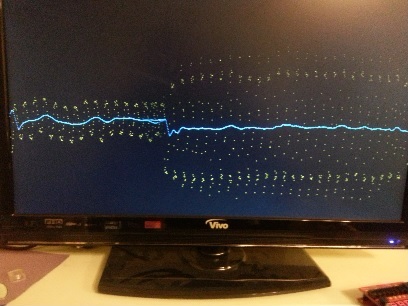
A little light reading means something different to us than it does to [Hamster]. He’s been making his way through a book called The Scientist and Engineer’s Guide to Digital Signal Processing written by [Steven W. Smith, Ph.D]. Being the hacker type, a million different uses for the newfound knowledge popped to mind. But as a sanity check he decided to focus on a useful proof of concept first. He’s come up with a way to filter out the mains hum from Analog to Digital Converter samples.

Mains hum is all around us; produced by the alternating current in the power grid that runs our modern lives. It’s a type of interference that can be quite problematic, which is on reason why we see EMF sensor projects from time to time. Now you can filter that ambient interference from your projects which take readings from an ADC. This would be quite useful for applications which measuring teeny signals, like ECG hacks.

[Hamster] did a pretty good job of presenting his demonstration for the uninitiated. He even provides examples for Arduino or FPGA projects.

Fluorescent Light, Powered By Battery

light

If you’re going camping this summer, or just want a cheap emergency lantern powered by a pair of AA batteries, you probably can’t do much better than [rimstar]’s Joule thief compact florescent lantern.

The circuit for [rimstar]’s battery powered CFL bulb is a Joule thief. While these circuits are usually used as a demonstration to get every last bit of energy out of a battery with a LED, [rimstar] upgraded everything with a better transformer and a power transistor to light up a CFL bulb.

What’s really interesting about this build is it provides a use for blown compact fluorescent bulbs. The normal failure mode of these light bulbs is usually the electronics going bad, not the tube. By replacing the electronics with a homemade circuit, it’s an easy way to reuse these broken bulbs.

Video below.

Continue reading “Fluorescent Light, Powered By Battery”

A Robotic Tattoo Artist

tattoo

Here’s something we thought we’d never see: a robot that turns a computer drawing into a tattoo on the user’s arm.

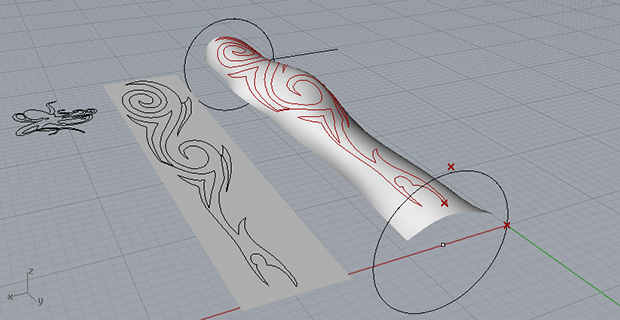
The basic design of the robot is a frame that moves linearly along two axes, and rotates around a third. The tattoo design is imported into a 3D modeling program, and with the help of a few motors and microcontrollers a tattoo can be robotically inked on an arm.

Since the arm isn’t a regular surface, [Luke] needed a way to calibrate his forearm-drawing robot to the weird curves and bends of his ar.  The solution to this problem is a simple calibration process where the mechanism scans along the length of [Luke]’s arm, while the ‘depth’ servo is manually adjusted. This data is imported into Rhino 3D and the robot takes the curve of the arm into account when inking the new tat.

Right now [Luke] is only inking his skin with a marker, but as far as automated tattoo machines go, it’s the best – and only – one we’ve ever seen.

Fun With LED Matrix And Mouse

fun-with-LED-matrix-and-mouse

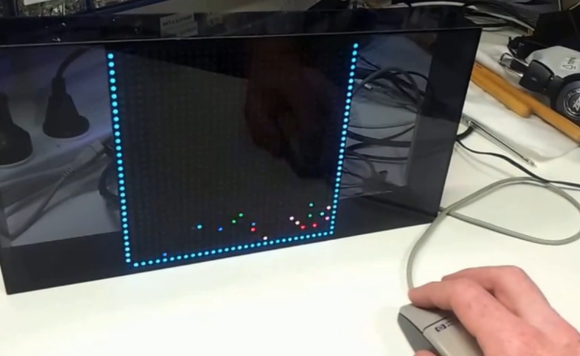
[Brad] just acquired a 32×32 RGB LED matrix and he jumped right into the deep end with his first project. To try out his skills on the device he used an Arduino to drive a slew of pixels with bouncing-ball physics.

The demo starts off with a hail storm of multi-colored falling pixels. In the center of the storm is the cursor, which he controls with a PS2 mouse. That happens to be a ball mouse which makes sense as we don’t remember having seen any optical mice as of late that weren’t USB. The PS2 protocol is easy to read using a microcontroller; more about that in [Brad’s] project write up.

By holding down the left mouse button he can draw persistent pixels on the screen. The falling balls then interact by bouncing off of the obstacles. The image above shows a frame on three sides of the screen which has trapped the pixels near the bottom. He can also erase pixels, which has the effect of draining the trapped balls like a hole in a bucket of water. Neat!

Bouncing ball physics are fun to experiment with. Here’s one being driven by an analog computer.

Continue reading “Fun With LED Matrix And Mouse”

[Massimo] Talks About Arduino Clones

pick one

Back in 2005, the Arduino was just a twinkle in they eyes of [Massimo Banzi] and the other core developers. Since then, you can’t go to any electronics site without hitting something beginning with ‘ard~’ or ending with ‘~duino’. The platform has become so popular, people everywhere are piggybacking on the name to the point of trademark infringement or simply outright counterfeiting one of the many official Arduino boards. Now [Massimo] has something to say about these clones, ripoffs, derivatives, and ‘duino-compatible boards.

On the list of things bad for the open source ecosystem, [Massimo] points to direct clones of existing Arduino boards. While these boards are electrically identical to officially licensed boards, they simply don’t support the Arduino project financially and usually don’t contribute to the existing libraries and code. Even worse are counterfeits; these boards copy the trademarks of the Arduino project – sometimes terribly given the three examples above (guess which one is the real one) – and directly profit off of the Arduino project without giving any support in return.

There are other veins of Arduino that [Massimo] considers more acceptable. Arduino-compatible boards, seen by the dozen over on Kickstarter, usually add something of their own, be it a radio chip, or an entirely different microcontroller. Derivatives, like Teensy and Adafruit’s Flora actually bring new things to the table with improved hardware and new and interesting libraries.

As far as counterfeits and clones go, we can’t agree more with what [Massimo] has to say. You have to admire the folks in the Arduino project being so open about their creations and admiring the Arduino derivatives that bring some new hardware to the table. Then again, that’s the lesson of the Arduino project; you can make hardware open source and still be outrageously popular.

Hackaday Links: Sunday, July 14th, 2013

hackaday-links-chain

Wanting to repair his much-used NES controllers [Michael Moffitt] sourced a replacement for the rubber button pads. They didn’t work all that well but he fixed that by using angle clippers on the part that contacts the PCB traces.

Here’s a neat Claw Game project show-and-tell video. [Thanks David]

We already know that [Bunnie] is building a laptop. Here’s an update on the project.

Hackaday alum [Caleb Kraft] continues his helpful hacking by adding an alternative to clicking an Xbox 360 stick.

[Blackbird] added a camera to the entry door of his house. He didn’t want to forget to shut it off (wasting power) so he built an automatic shutoff.

We’re not really sure what this computational photography project is all about. It takes pictures with the subject illuminated in different colors then combines individual color channels with a MATLAB script.

Finally, [Dave Jones] tears down a Nintendo 64 console on a recent EEVblog  episode.