Raise Your Hand If You Want To Listen To Something Else

This track is awful, someone skip it! This project does just that with a wave of your hand. A laser beam shines across a room and, when obstructed, it sends a command to an iPod. One wave pauses playback, two waves skips to the next track, and a constant obstruction jumps backward one track.

They’re using a textile-compatible electronics platform called Schemer. This is the first time we’ve run across this product which uses a modular system to connect devices via a 1-wire communications bus.

No matter what hardware you use the concept is what interests us. There’s no shortage of iPod remote projects to draw on as examples. This method seems a bit more fun than banging your head for track changes or slapping wildly at an over-sized remote. We’re just a bit concerned about the power consumption of the laser-pointer, perhaps an IR beam would be a more economical choice?

Drink Making Unit

[youtube=http://www.youtube.com/watch?v=iC9l1jO7Lyc]

3 breast pumps, a Meggy jr RGB (slightly modified) and copious amounts of alcohol. This sounds like a typical weekend at HAD headquarters, but it is in fact the parts list for the Drink Making Unit by Evil Mad Scientist Laboratories. Created for the upcoming Barbot 2010 event, this unit is a cocktail mixer. Load 3 liquids in, program the Meggy and you can push a button to dispense. We are pleased to see how much they modified off the shelf components to make this happen. Yes, there could be major improvements like mixing, more liquid reservoirs, and a better cooling system, but we think this thing is pretty slick.

Binary Clock Uses DS3232 RTC

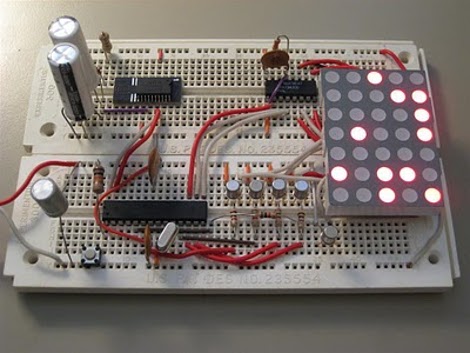
[Kenneth Finnegan] quenches our clock-a-day compulsion with his Arduino based binary timepiece. The clock uses a 5×7 LED matrix as a display and shows month, day, and time. He sourced a DS3232 real-time clock which automatically compensates for temperature to achieve very accurate time keeping. We like the super-cap circuit he added to keep the RTC running if the power is cut.

Is an Arduino overkill here? Well, the code is certainly not filling the 16k available on the ATmega168. At $4.32, the $1-2 you could save by using a lower-grade chip is not worth having to rewrite the code developed during prototyping. [Kenneth] also mentions that these projects usually only hang around for a few weeks before they’re re-purposed for the next endeavor.

Take a look at [Kenneth’s] superb hardware walk through in the video after the break.  If you’re a fan of clean breadboarding, he’s also made a time-lapse of the circuit building process.

Continue reading “Binary Clock Uses DS3232 RTC” →

Repairing Your TV EDID

[Andreas] found that his home theater PC would not boot one day. Oddly, if he disconnected his HDMI cable from his TV, it would boot fine.  While most of us would have dug into the PC, he realized that it was a signal from the TV that was incorrect.  Luckily, LG had included a full schematic with the TV.  What he was able to figure out, using a home made snooper was that the EDID eeproms had somehow become corrupted. Not to worry, [Andreas] slapped together a full blown I2C interface and prepared to reprogram them with the correct data.  He noticed, however, that the eeproms were write protected.  On a whim, he decided to write to them any way and found that it was successful. He has some theories as to why they were writable, but says that he doesn’t want to pull the TV back apart to confirm.

[thanks evlapix]

Ultimate Flame Bait: Liquid Cooled Arduino

[youtube=http://www.youtube.com/watch?v=-U-cc_Qcf-w]

We do so many things around here  just because “we can”. Though this guy cites this as his reason, we somehow can’t help but wonder if he’s doing it just to troll the Arduino hating crowd. He has decided to overclock his Arduino by replacing the crystal and dropping it in some non conductive liquid coolant. Can you guess what sketch he’s running? That’s right, he’s blinking an LED.

Normally we would point out that we have no preference when it comes to Arduino. We simply post what is submitted. Though we are often accused of being Arduino lovers, it is simply just another tool to us. We sometimes delete obnoxious comments that get off topic, threatening, or vulgar because that’s just good house keeping. That being said, we know what to expect here. Go ahead, bash the Arduino. Get it out of your systems. Just keep it non offensive or it will be moderated.

[thanks jfreak09]

The Mini-Markade

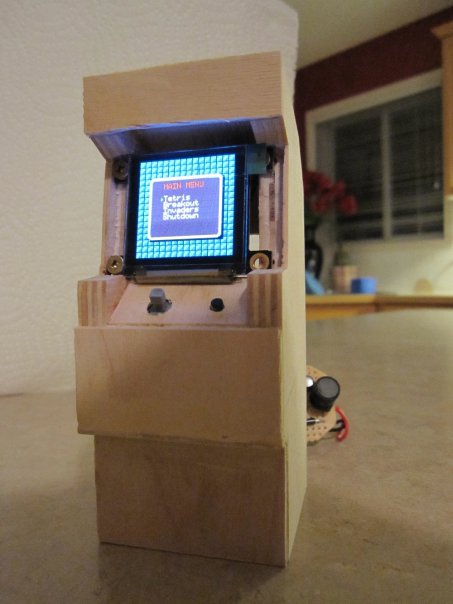
We love arcade games. Who doesn’t? We feel that the “arcade” feeling just can’t be replicated in any other form factor than an arcade cabinet. [Moslevin] must feel the same way too. He has built, what could possibly be the worlds smallest arcade cabinet. Aside from a coin mechanism, it is fully functional. It is an ATMega328p running his own custom software. The games he has available are Tetris, Invader, and Breakout, all coded by himself as well. We’ve seen small arcade cabinets before, but none this small.

Adding Words To Catch Phrase

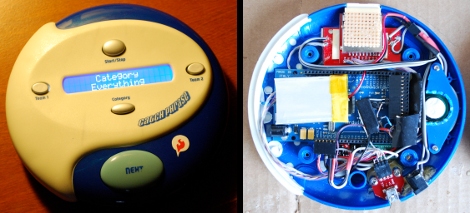
[Brandon Meyer] spared no expense in modding the Catch Phrase game to use custom word lists. The altered version of the game, normal sold for around $25, now comes in at a whopping $230! That’s because the internals were gutted and replaced with an Arduino, 20×2 LCD display, and some other interesting bits. The device now features an SD slot for storing your own lists and a USB port for programming.

At first glance we were hoping some simple EEPROM hacking had unlocked the secrets of the device but that wasn’t he case. We’d love to see some more economical versions of [Brandon’s] prototype. Perhaps reusing the original LCD, replacing the Arduino with the ATmega168 that makes up its core, and using a diy SD cradle for a card reader.

So yes, this version is a bit of overkill but still very nicely done!

[Thanks Zoidberg]