
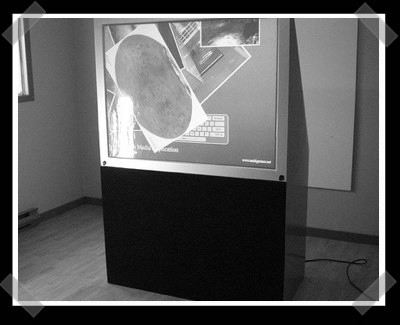
[Christopher Jette] did a amazing job converting a 56″ rear projection television into a multitouch display. His original inspiration came from this drafting table project. The screen is a large sheet of 1/2″ acrylic with a screen material attached to the back side. The screen edge is surrounded by 168 IR LEDs. When a finger tip touches the surface it scatters the LEDs’ IR light. A webcam sees this scattered light and determines where the fingers are. Inside the box is a standard video projector. This is a great reuse of old equipment and we love to see a hobbyist making up ground where manufacturers aren’t. For more info on multitouch projects, we suggest the Natural User Interface Group. Here’s a video of [Christopher]’s display in action:
classic hacks2817 Articles
Bump Key Experiments
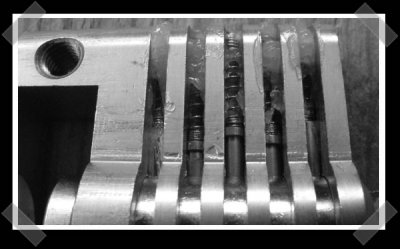
[Barry] took one of his blog readers comments to heart and started wondering just what happens when you bump a lock. As suggested, he made a cut away lock core and started experimenting. [Barry] doesn’t have a high speed camera, so he tried some alternatives like filling the chambers with grease to indicate pin movement. Master Lock put together a nice video demo of lock bumping (in order to sell their new bump stop gear).
USB Microcontroller Dev/emulation Sticks
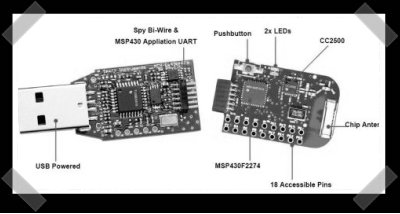
[nazerine] sent in [Emanuele]’s list of interesting USB micro-controller development tools. Some of them are surprisingly cheap for what you get. The wireless dev/emulator stick looks extra interesting for developing remote projects. (The purchase links are through the manufacturer – at first I thought he might be selling the things)
How-To: Scavenge A Mouse For Parts
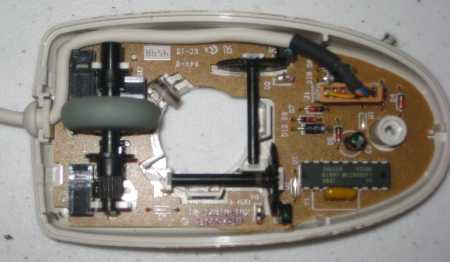
Chris Kiick posted about swarm robotics earlier in the week and today publishes his first Hack-A-Day How-To.
Old computer mice are being abandoned in droves. They’re tossed out because of dirt, obsolescence, or for being entirely too beige. Anyone who has a computer usually has more than one mouse and you can get them for pennies, if not free just for asking. Fortunately for the discriminating (read: cheap) hacker, these little widgets are chock-full of project parts. Today’s How-To will dissect a computer mouse, extract the useful parts, and give some ideas about how to use them.
Syringe Logic Probe
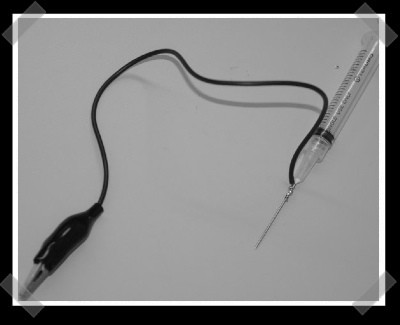
[Travis] sent in his oh so simple(why didn’t I think of that) syringe logic probe. that he put together for his version of the sump logic analyzer. Real probes tend to be pretty expensive. With some effort, you can probably fit an led/diode/resistor in there and make a simple 5v logic probe. If you’d like a nice logic analyzer, Spartan-3 board that it’s based on is only $99.
Interfacing Your Laptops Onboard I2c
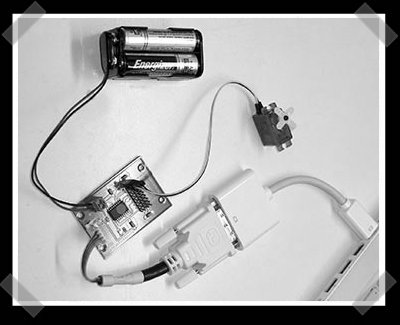
[ladyada] ran across this excellent hack by [phillip]. Apparently there’s a clock, data, 5v and ground connection available in most modern video connections. (He even notes HDMI cable pins) He wrote some drivers and can now control i2c hardware directly from the PC Mac. [Ladyada] notes that most laptops use an i2c bus for extra sensors as well. For now, the code only works on Mac OS X.
Pocket Hitchikers Guide To The Galaxy (Wikipedia Style)
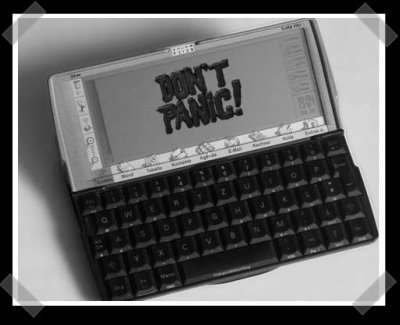
[PKM] decided to breathe new life into a Psion 5mx handheld. He slapped linux on it, added a wikipedia dump to a CD card, and voila: pocket wikipedia. It’s the closest thing to an actual hitchhikers Guide to the Galaxy I’ve ever seen. So long and thanks for all the fish!









