DIY Laser Cutter From Non-DIY Parts

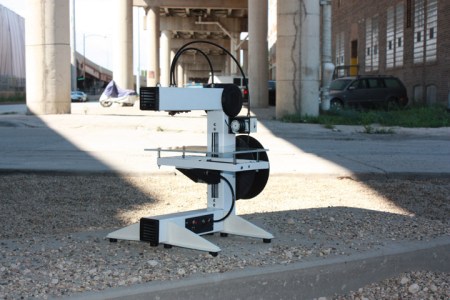
[Jerry] missed the laser cutters he had been using at the local TechShop. It closed down and after seeing some hardware in a surplus store he decided to build a laser cutter to call his own. You won’t be disappointed by his build log. It’s got a ton of hi-res images and plenty of explanation.

Often, cost is the key consideration in these types of builds. [Jerry] spent a little more than average, but look what he got back out of it. This started as a CNC machine aimed at loading silicon wafers for a company making electron microscopes. It’s barely been used, and the light-duty specs will work just fine with a laser cutter as the gantry won’t be moving much weight or fighting the rotational force of a mill motor. He tore out the stock controllers and built his own, adding a q-switched 355nm Frequency Tripled DPSS laser along the way. We’re not quite sure what that means… but in laymen’s terms it’s an ultraviolet laser source. See the finished unit cutting out some Kapton in the clip after the break.

Continue reading “DIY Laser Cutter From Non-DIY Parts”

Portable Radio Station Gets A Beautiful Case

[Martin] put together a simple portable radio unit to take some MP3s with him while he’s out and around. The build was simple; just a no-name Chinese MP3 player, a battery, and an FM radio transmitter. To give his project a little more pizzazz, he came up with a very handsome laser cut wooden case to turn what would be a bunch of wires and components into an attractive build.

[Martin]’s case makes wonderful use of the kerf bending technique. By cutting small staggered lines in a piece of plywood, [Martin] was able to bend his laser cut enclosure into a surprisingly tight radius. With the help of a pair of laser cut forms and a bit of hot water and glue, he was able to make the shape of his case permanent.

The top and bottom of his case are also laser cut plywood, but [Martin] included a translucent plexiglas logo on the top. When his radio unit is activated a LED inside his project box lights up, illuminating his personal logo.

Kerf bending is something we’ve seen before, and we’re looking forward to seeing more project boxes use it in the future, hopefully with the application of a veneer to cover the diamond-shaped holes.

Inebriator Servers Up All The Cocktails

The robotic bartender, lovingly named the Inebriator, is a work of mastery. We think you’ll be surprised by the simplicity and grace of its beverage dispensing system.

The most obvious part is the lineup of nine liquor bottles across the top with LED backlight for style. Each has a valve on it that is meant to be pressed on by the rim of a glass in order to dispense its payload. To dose the glass with alcohol the Inebriator drives a trolley along one axis beneath the line of bottles. When in position it has an actuator arm the rises up and depresses the bottle’s valve mechanism. Once all the liquor is in the glass it moves to the left side to be topped off with mixers. These are stored in bottles in a cooler under the table. They are pressurized with nitrogen, and an electronically actuated value lets the liquid flow. Drinks are selected on a character display, and there’s a weight sensor in the trolley to ensure that a drink isn’t mixed without a vessel to receive it.

You don’t want to miss seeing this in action after the break.

Continue reading “Inebriator Servers Up All The Cocktails”

Multicolor Print Head Allows RepRap To Print Rainbows

Multicolor 3D printers have been around for a while, but most of these machines – like the Makerbot Replicator – suffer from alignment problems and the inability to mix colors on the fly. [RichRap] came up with an interesting solution to this problem by having three filament extruders feed into a single hot end, allowing him to change and mix colors on the fly.

To print in multiple colors, [RichRap] developed a three-extruder x carriage that sends colored filament to a single hot end. Unlike the Makerbot Replicator, [Rich]’s extruder can mix and blend different colors into each layer of a print.

The electronics portion of the build, [RichRap] controlled the X, Y, and Z axes of his printer with a RAMPS board, but used a slightly modified Sanguinololu board for the extruder motors. A single motor driver for the extruders is connected to a trio of toggle switches, allowing [RichRap] to switch between filaments on the fly.

[Rich] has a very cool build on his hands, but it’s far from a perfect solution. Right now, any one of the three colors can be used to print, but printing with two or three colors simultaneously requires a change in the firmware. We expect someone to solve this problem in the near future, allowing the holy grail of a CMYK print head to come to fruition.

You can see a demo video of [RichRap]’s tri-color print head after the break.

Continue reading “Multicolor Print Head Allows RepRap To Print Rainbows”

Help Us Decide If This Huge Reprap Array Is The Largest Fleet To Date

30-repraps

Take a minute to think about what your dream job might be.

Done imagining you are a ridiculously wealthy bachelor?  Good.

Back here in the real world, [Caleb Cover] has come into what might be one of the coolest hacking-related jobs we’ve seen in awhile. He recently snagged a gig working for Aleph Objects as the fleet master for a large array of 3D printers. His duties include the care and feeding of 30 MiniMax-style repraps, a job description we sure wouldn’t mind having.

Aside from merely gloating about his newfound employment, [Caleb] wrote in asking if we knew of a reprap setup larger than the one he is responsible for. We couldn’t come up with one, but perhaps you can.

Right now, [Caleb] says that he’s working on seeing how well the machines can produce parts to replicate themselves, which will certainly make this the largest collective set of production 3D printers sooner or later.

While you hunt down other large reprap setups at your monotonous desk job, check out the video below to hear the symphony of 3D printing that greets [Caleb] at the door each day.

Think you might have seen a 3D printing setup more massive than this one?  Pics Vids or it didn’t happen.  Seriously, we want to see em!

Continue reading “Help Us Decide If This Huge Reprap Array Is The Largest Fleet To Date”

Rendering OpenSCAD In The Browser

If you haven’t heard of it, OpenSCAD is a really wonderful tool for 3D modeling.  While it doesn’t have the traditional graphical interface of AutoCAD – it’s basically a programming language for 3D models – OpenSCAD is able to create very complex parts with only a few lines of code.

That’s all well and good, but what if you wanted to edit OpenSCAD parts in your browser? Enter OpenJsCAD, an OpenSCAD interpreter written entirely in Javascript and able to be embedded in a web page.

OpenSCAD allows for two types of modeling – constructive solid geometry, or taking 3D primitives and stretching, scaling, and intersecting them to create a 3D shape, or extrusion from a 2D outline. Quite a few RepRap parts were designed in OpenSCAD, and the lightweight interface and open source nature means it’s perfect for designing stuff to print on your Makerbot.

Tip ‘o the hat to [Gordon] for sending this one in, and we really have to commend him for writing his own online scriptable CAD exporter before finding out about OpenJsCAD. He may be a little late to the online OpenSCAD party, but we have to agree with him that an online 3D solid editor would be an awesome feature for Thingiverse to roll out.

Turning [M. C. Escher] Prints Into Real Objects

September is coming, and soon college freshmen the world over will be decorating their dorm room walls with Dark Side of the Moon posters and [M.C. Escher] prints. Anyone can go out and simply buy a prism, but what if you wanted a real-life version of objects and buildings from [Escher]’s universe? Professor [Gershon Elber] at the Technion at the Israel Institute of Technology decided to turn [Escher]’s prints into reality.

First beginning with simple shapes such as a Penrose Triangle and a Necker Cube, [Elber] decided to branch out into much more impossible shapes such as [Escher]’s Waterfall, Belvedere, and Relativity. These buildings are extremely hard to visualize in any traditional computer design program, so [Elber] wrote a plugin for his IRIT computer modeling program to design the buildings before committing them to a 3D printer.

In the video after the break, you can see a few rotating views of the resulting [Escher] buildings. Of course they only work from exactly one point of view – and even then, only with one eye closed – but it’s amazing to see these famous architectural studies brought into the real world.

Continue reading “Turning [M. C. Escher] Prints Into Real Objects”