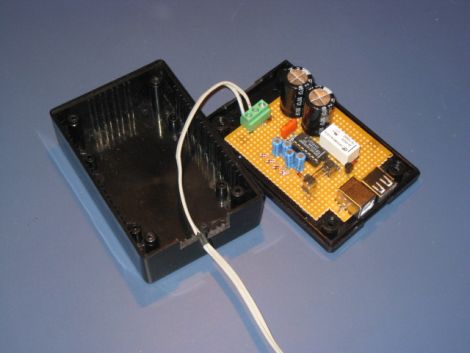
Emulating Oric-1 Floppy Disk Hardware

This device is called the Cumulus and it’s used to emulate the floppy disk hardware for Oric-1 and Oric Atmos computers. These 1980’s era computers included an expansion slot to which you could connect a floppy drive. That module, called a Microdisc system, also included the driver circuit which means you can’t just use a modern-day floppy drive as a replacement. [Retromaster] sidestepped the need for magnetic media all together by building an SD card interface which emulates the original module. We can tell by the use of a color screen and clean board layout that a lot of love went into the project. A CPLD implements the communications protocol used by the Microdisc system and creates all of the registers that would have been found on the original hardware. A PIC takes care of the SD card communications and the user interface.

With the exception of comforting noises, we’d bet there are few who have fond memories of using floppy disks. No wonder we’ve been seeing hacks to replace them quite a bit lately.

Grinding Down Your Computer To Just 8.5 Watts

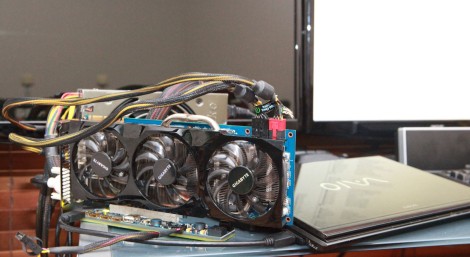
What can you do to make sure your system is running as efficiently as possible? Take a page out of [Mux’s] book, who went to great lengths to measure and adjust his system for ultimate efficiency (translated). What he ended up with is 8.5 Watts of consumption at idle and about 50 Watts under load. Luckily he posted a six-part series with all of the details.

Some of the changes he made were in software, like reducing voltage to certain hardware by adjusting BIOS settings, and installing display drivers that put the screen into the proper sleep mode. Others were hardware changes like swapping out the power supply with a hacked PicoPSU and removing unnecessary parts from the motherboard like the MAX232 com-port chip. Looks like we need to audit our always-on MythTV box and see if we can apply any of these power-saving techniques.

[Thanks Gijs]

Analog Computer Does Math

This analog computer can multiply, divide, square numbers, and find square roots. It has a maximum result of ten billion with an average precision of 2-3%. [Miroslav’s] build recreates something he saw in a Popular Electronics magazine. It uses a resistor network made up of three potentiometers with a digital multimeter is an integral part of the machine. To multiply a number you set the needles on the first two knobs to the numbers on which you are operating. To find the result turn the third knob until the multimeter has been zeroed out and read the value that knob is pointing to. It seems much more simple than some of the discrete logic computers we’ve seen, yet it’s just as interesting.

Etch-a-Sketch Computer Is A Surprisingly Simple Hack

We’re not sure whether to call this an Etch-a-Sketch upgrade or a computer interface downgrade but either way it’s unique. [Martin Raynsford] added a familiar red frame to his computer monitor with classic white knobs that control horizontal and vertical cursor movement. There’s even the click option by pressing the buttons in and, as you can see after the break, the modifications result in a perfectly usable digital Etch-a-Sketch. We’ve seen a lot of computer controlled versions of the toy which use fancy parts and take quite a bit of skill to build. This mimicry of the functionality is easy to build and the idea is genius in its simplicity. [Martin] separated the encoder wheels from a mouse. He placed each on one of the knobs and ran wires for sensors and micro-switches back to the original PCB which is stuck to the back of the monitor. From the computer’s point of view it looks and acts like a normal mouse but this is so much more fun (and less productive). Continue reading “Etch-a-Sketch Computer Is A Surprisingly Simple Hack”

Touch Screen Jukebox

We went “live” with our forums less than 24 hours ago and we already have our first project ready for the front page.  [Elementix] has shown us his touch screen jukebox build. Using an assortment of car audio speakers and amplifiers hooked up to an old Pentium 4 PC with 120 Gigs of storage, he put together the base cabinet. The touchscreen is an ebay find and he built a custom enclosure for that part. For the interface, he started with “Jukebox Arcade”, a jukebox front end for mame cabinets but found he could easily manipulate the layout since it used an xml file for the settings. After some trial and error, and a little work with the gimp, he got it looking the way he wanted. If you haven’t been there already, you should really check out our new forums.

Intermediate Concepts: Building Discrete Transistor Gates

[Simon Inns] has put together a lesson in digital logic which shows you how to build your own gates using transistors. The image above is a full-adder that he fabricated, then combined with other full adders to create a 4-bit computer.

Don’t know what a full adder is? That’s exactly what his article is for, and will teach you about binary math and how it is calculated with hardware. There’s probably at least a week’s worth of studying in that one page which has been further distilled into the five-minute video after the break. Although building this hardware yourself is a wonderful way to learn, there’s a lot of room for error. You might consider building these circuits in a simulator program like Atanua, where you can work with logic gate symbols, using virtual buttons and LEDs as the outputs. Once you know what you’re doing with the simulator you’ll have much more confidence to start a physical build like the one [Simon] concocted.

Finding this project a little too advanced? Check out our Beginner Concepts articles to help get you up to speed.

Continue reading “Intermediate Concepts: Building Discrete Transistor Gates”

Outside-air Cooled PC

[Brian] came up with an interesting PC cooling setup. He lives up north where it’s chilly in the winter. Using a bit of dryer ductwork and he was able to harness the outside air to cool his box. The system uses a window insert along with a dryer hood to suck in the outside air with a PC fan. We hope the air is adequately warmed, as it is exhausted into the room. Join us after the break for more pictures of his setup.

Continue reading “Outside-air Cooled PC”