Custom Desk Is A Custom Computer Case

desk

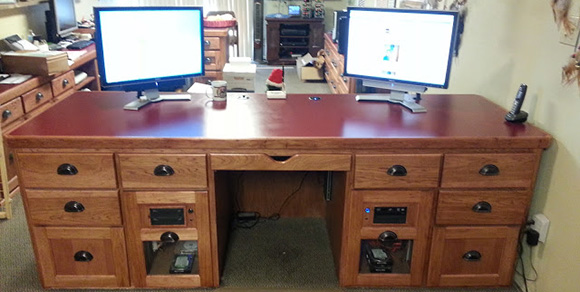
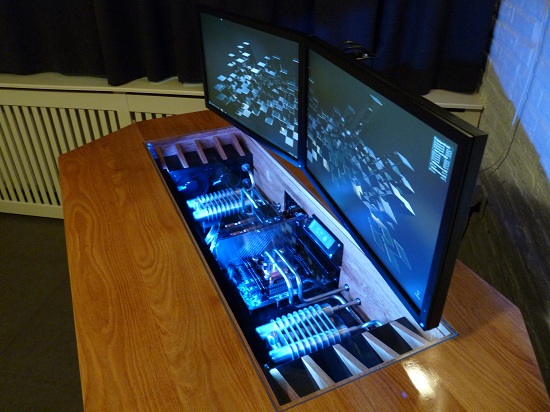
[Paul] had been kicking around his idea of a perfect computer desk for some time, and when given the opportunity to remodel his office decided it was time to build his dream computer case.

The desk itself is made of hickory with a formica top to match the other workbenches in [Paul]’s workspace, The two largest drawers house an ATX motherboard, power supply, disk drives, and a pair of CD drives. On top of the desk are two 24″ monitors – one for each computer – and a built-in powered USB hub that allows [Paul] to charge his phone or use an external drive.

As a computer tech, [Paul] needed a way to connect customer’s drives. He did this by putting two Startech UniDock2U USB to SATA and IDE converters in the top right drawer. It’s one of his most used features and very handy for duplicating bare drives.

Also included in [Paul]’s desk is a large UPC, and a pair of 120mm case fans venting to the front of the desk. It’s a wonderful piece of workmanship, and the removable computer cases make cleaning and upgrading a breeze.

USB NeXT Keyboard

USB NeXT Keyboard

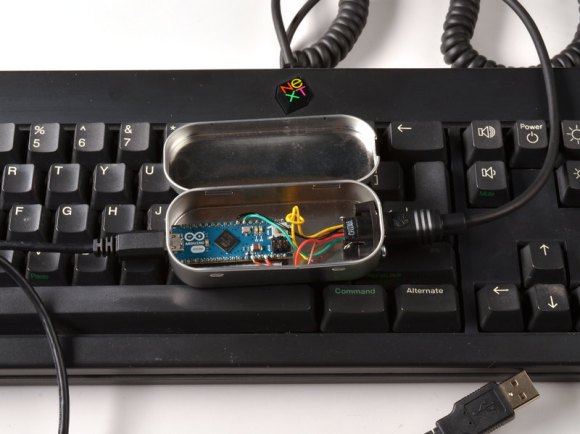
[Ladyada] and [pt] had an old keyboard from NeXT, but since it used a custom protocol it wasn’t usable with modern hardware. So they built a custom device to convert the NeXT protocol to USB.

The device uses a Arduino Micro to read data from the keyboard and communicate as a HID device over USB. It connects to the keyboard using the original mini-DIN connector, and is housed in the classic Altoids tin enclosure.

Since the protocol used by NeXT isn’t standard, they had to figure it out and write some code to interpret it. The keyboard communicates bidirectionally with the computer, so they needed to send the correct frames to key data back.

Fortunately, they hit on a Japanese keyboard enthusiast’s site, which had protocol specifications. They implemented this protocol on the Micro, and used the Keyboard library to create a HID device.

The final product is an adapter for NeXT to USB, which allows for the old keyboards to be used on any computer with USB. It’s a good way to bring back life to some otherwise unusable antique hardware.

World’s Oldest Functioning Digital Computer Reminds Us Of A Telephone Exchange

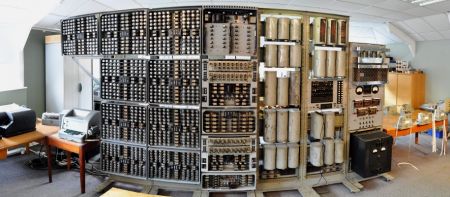
This is the WHICH, the Wolverhampton Instrument for Teaching Computing from Harwell. It is the oldest functioning digital computer and thanks to a lengthy restoration process you can go and see it in person at The National Museum of Computing in Milton Keynes (Northwest of London in the UK).

The system was first put into operation in 1951. It’s function is both familiar and foreign. First off, it uses decimal rather than binary for its calculations. And instead of transistors it uses electromechanical switches like are found in older automatic telephone exchanges. This makes for very noisy and slow operation. User input is taken from strips of paper with holes punched in them. As data is accumulated it is shown in the registers using decatrons (which have since become popular in hobby projects). Luckily we can get a look at this in the BBC story about the WITCH.

According to the eLinux page on the device, it was disassembled and put into storage from 1997 until 2009. At that point it was loaned to the museum and has been undergoing cleaning, reassembly, and repair ever since.

[Thanks David]

.NET Micro Framework Used For A Prompt-based Computer

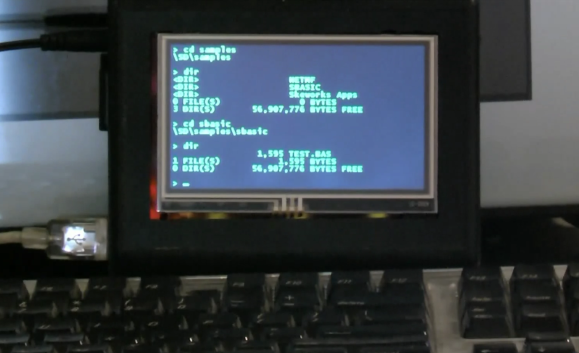
[Tom] is doing a little show and tell with his latest .NET Micro framework based project. He managed to get a prompt-based computer running on a FEZ Cobra board.

A USB keyboard serves as the input device. To give himself a familiar way to navigate and execute programs [Tom] mimicked the functionality of DOS. Above you can see the familiar format of the directory listings as he navigates the data on an SD card. But this goes deeper than changing directories and listing files. He also has access to commands which control peripherals, showing manipulation of the WiFi connection and demonstrating some simple code to show images on the screen. Since the hardware centers around the .NET MF, any compiled binary for that environment can be executed from the prompt as well.

See a complete demonstration of the project embedded after the break.

Continue reading “.NET Micro Framework Used For A Prompt-based Computer”

A Nostalgic Look At What A 13 Year Old Can Do With A C64

[Armin] recently pulled out his Commodore 64 and looked back on the projects he did as a kid. The surprising thing is that we’re not talking quite as far in the past as you might image. He was 13 in 2002 and the family didn’t have a PC. But more than a decade before his father had purchased a C64 and [Armin] dug into the manual to teach himself how to code. This week he connected the old hardware to his video capture card to give us a demonstration on what he accomplished.

He had seen Windows 95 at the local computer club and figured why not program a clone of the software for the machine at hand? He called it Windows 105 (because that number is higher than 95) and worked out ways to mimic programs like DOS, Corel Draw, Notepad, and some of the programs from Microsoft Office. They didn’t include all the functionality of the real thing, but the look was there.

The story does have a happy ending. [Armin’s] parents saw what he was doing and managed to pick up a PC for him to play with. Now he’s a professional programmer looking back on the formative years that got him there. We’ve embedded one of his demo videos after the break for your enjoyment.

Continue reading “A Nostalgic Look At What A 13 Year Old Can Do With A C64”

Hardsync – DDR Reimagined For The C64

hardsync

For those of you that like to play dance games, but [DDR] for the [PS2] uses too modern hardware for your tastes, [Hardsync] may be for you. Although the chiptune-style music coming out of the [C64] may not appeal to everyone, one would have to imagine that a game like this could have been a huge hit 30 years ago.

As for the hardware itself, it does indeed use one PS2 element, the dance mat. It’s hooked into one of the C64 joystick ports. In this case, the cable was cut, but it would also be possible to make a non-destructive adapter for it so as not to interfere with any future PS2 fun.

The program is made so that fellow retro-dancers can make their own songs. Each song is a discreet file, and can be reconfigured to your own personal mix. Be sure to check out the video after the break of this old-school dance machine in use after the break! Continue reading “Hardsync – DDR Reimagined For The C64”

Laptop Motherboard Reborn As A Low-wattage Server

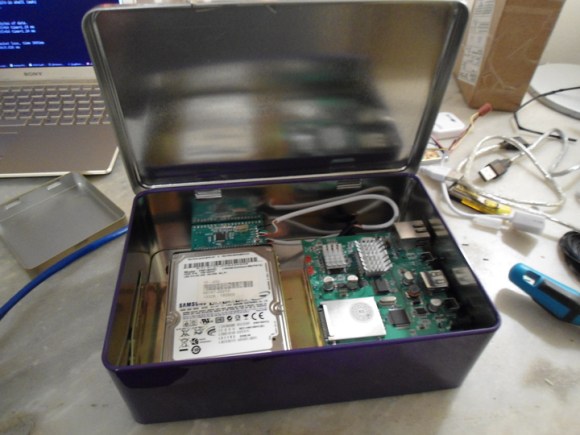
[Darknezz] sent us a set of photos and some details about his damaged laptop motherboard turned into a server. A client brought him a Dell 1525 on which nothing was showing up on the LCD screen. The HDMI and VGA still worked, and he traced the problem to no signal coming out of the motherboard. He swapped the board out to get the laptop working again, but he client said he could keep the damaged one.

It has a dual-core CPU which meets his needs and since it’s meant to run off of a battery it’s as energy-efficient as possible. [Darknezz] dug through his parts bin and found a PSU that could supply the needed 19.5V at 3.5A. The connector didn’t match but it didn’t take him too long to patch into it using a spare Molex connector. He also needed a power button and ended up soldering a momentary push switch to a couple of pads which he traced out form the original connector. The only thing he actually ended up purchasing were the memory modules. Check out the photos he took of the alterations in the gallery after the break.

Continue reading “Laptop Motherboard Reborn As A Low-wattage Server”