Building A Classic Coin-op Game In An FPGA

This game of Bomb Jack is the same as the original arcade version. The difference is that this hardware was built in an FPGA using schematics found on the Internet.

We’re a little shocked by the complexity of such a project. We’ve been impressed before by the use of FPGAs to implement classic CRT vector graphics. But that project used a library that had already implemented the original game. For this effort, [Alex] wanted to find a game that hadn’t ever been translated to an FPGA, and used stock parts. Bomb Jack is a 1984 platformer which ran on a Z80 processor, AY-3-8192 sound generators, and common TTL logic chips. This meant he didn’t have to write the cores himself, but rather use already existing versions of the chips and code together the hardware.

You can read about his experience at the page linked at the top, or just jump after the break to see video of the final project. You can see the monitor is on its side, and the game sounds great and runs flawlessly.

Continue reading “Building A Classic Coin-op Game In An FPGA”

Adding Features To A DX6i Transmitter

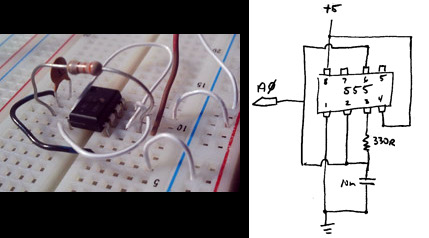
About thirty cents and some wire are all it takes to start hacking extra features into this DX6i transmitter. The DX6i is a six-channel, two-mode transmitter used to control hobby airplanes and helicopters. There are several built-in features but [Ligius] found an easy way to add a few more. In the upper left portion of the case you can see the eight-pin microcontroller he brought to the project.

It’s a PIC 10F222 mounted in a DIP socket so that it may be removed for reprogramming. The hardware page of the wiki shows the connections he made. By reading from the throttle, and tapping into the trainer wire, he is able to add features without any apparent alterations to the controller (no extra buttons, etc). You can see in the clip after the break that the throttle position when power is switched on selects between different modes. This can be the delay for turning off the LCD backlight, or presets for helicopter or airplane modes. [Ligius] thinks there’s a lot more potential here, even the possibility of fixing a bug in this particular model of transmitter.

Continue reading “Adding Features To A DX6i Transmitter”

Preorder TI’s ARM Cortex-M4 Launchpad For $5 Delivered

Texas Instruments just open preorders for the new Stellaris LaunchPad. The boards won’t ship until the end of September, but if you don’t mind the wait you can get one for $4.99 including delivery (we’d wager non-U.S. addresses have to pay for delivery, but leave a comment if you know for sure several readers have reported that international shipping is free).

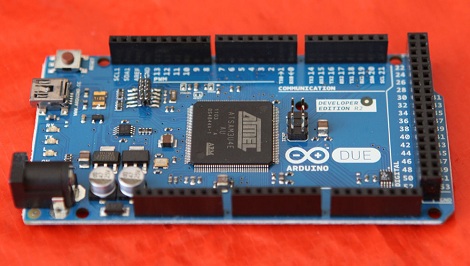
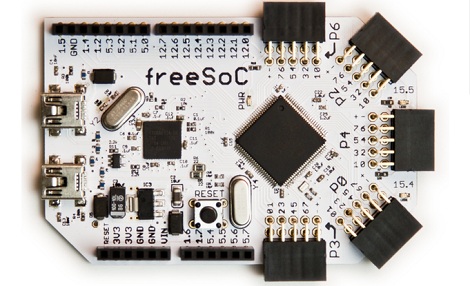
We routinely pay more in shipping for parts orders so we already jumped at the opportunity and put in our own order. Earlier in the month we heard the first murmurs about the device. We’re glad to see they hit the $4.99 target price, but the TI website mentions that this is a promotional price that will be available for a limited time only. The board boasts an ARM Cortex-M4 processor, the Stellaris LM4F120H5QR. It includes 256 KB of flash memory, 32 KB of SRAM, and more peripherals than you can shake a stick at. To get you up and running quickly they’ve included two user buttons and an RGB LED. As with the 16-bit Launchpad, the board acts as its own programmer. It has a microUSB jack, but they’ve included a micro B to USB A cable in the kit to make sure you don’t need to also put in a cable order.

We’ll give a follow-up post once we finally get our hands on the board. We hope this will be easy to get working with a Linux box!

[Thanks Chris]

Building Touch Sensors From Digital Barometer Chips

A couple of Harvard researchers have developed a method of using digital barometers as a touch sensor. The good news for us is that they’ve open sourced the project, including Eagle board files, firmware, and details about the materials they used.

The digital barometers were chosen for their characteristics, availability, and low-cost. The sensor uses an array of Freescale MPL115A2 chips, a MEMS Barometer designed for use in altimeters. The mass production makes them cheap (Octopart found some in single quantities for $1.71 at the time of writing). The chips are soldered onto a board which is then cast in rubber. This distributes the force while protecting the sensors. The video after the break shows them standing up to rubber hammer blows and supporting a 25 pound weight.

There are a few tricks to reading the array. The first is that the devices are designed to be used one-to-a-project so they have a fixed i2 address. A separate chip must be used to address them individually. But one it’s up and running you should be able to use it as feedback for the fingertips of that robot arm you’ve been building.

Continue reading “Building Touch Sensors From Digital Barometer Chips”

AVR Fuse Bits Explained

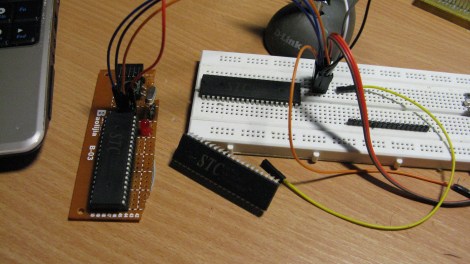
Every AVR microcontroller, from the ATtiny in your thermostat to the ATMega in your Arduino, stores its configuration in a series of fuse bits. These fuse bits control settings such as the multiplier of the internal oscillator (and thus the speed of the chip), or if the reset pin can be used as a GPIO pin. [YS] just put up an awesome tutorial for understanding these fuse/lock bits, and it’s just the reference guide you’ll need when you find your AVR is running 8 times slower than you would like.

As an example, [YS] uses the ATMega48 default settings. From the factory, the ‘Mega48 ships with it’s fuse bits set to use an 8MHz internal RC oscillator with the CKDIV8 bit set. This results in the chip operating at 1MHz, a bit slow for [YS]’ liking.

By looking at the datasheet for the ATMega48, [YS] found the CKDIV8 fuse was the 7th bit in the low fuse byte. From the factory, the default value for this byte is 0b01100010. To remove the ‘divide clock by 8’ bit, [YS] needed to change the low byte to 0b11100010, or 0xE2. This is done via AVRdude by appending lfuse:w:0xE2:m to the commands entered when programming.

Fuse bits don’t need to be scary. As long as you can convert between binary and hex, can remember there are 7 bits in a byte (remember to start counting from 0), and have access to an easy to use fuse calculator, it’s possible to change all the settings on any AVR you have on hand.


USB Business Card Packs An ARM Processor

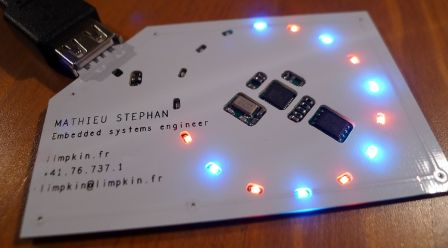
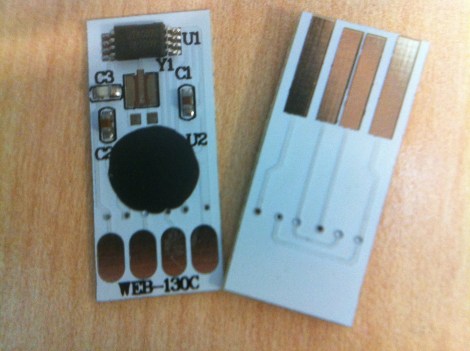
Over on the Hackaday forums, [Brian] introduced himself by showing off his new business card. Given his expertise is creating unique circuit boards, we can’t imagine a better way to show off his skills than an ARM-powered business card.

[Brian] posted a more detailed write-up on his blog that covers his development process. He decided to use a 48-pin LPC1343 ARM Cortex M3 as a USB Mass Storage Class device. All the heavy lifting for instantiating a USB storage device is handled by the microcontroller, so all [Brian] had to do was wire up a Flash memory chip and access it over an SPI interface.

The finished business card functions just like a USB thumb drive with a whopping 1 Megabyte of storage. That’s not a lot of storage, but it has more than enough room for [Brian]’s resume, a link to his website, and the full source code for his card.

IR Remote As PC Input

As a learning experience [GeriBoss] put together an IR remote control receiver board for his PC. His want of volume control from across the room was reason enough to undertake the project, and he got to work with a 38 kHz receiver module and Manchester encoding in the process.

The decoder portion of the project is built around an ATtiny2313 chip. The external interrupt pin (INT0) is connected to a TSOP31238. When it decodes a valid remote code it pushes a character to the RS232 chip connecting to the computer’s serial port.

We think this is a wonderful accomplishment for [GeriBoss], but we encourage him to refine the design further. You’ll notice in the image there’s a USB port on the board which is only used to provide regulated power. We know it’s possible to use V-USB with the ATtiny2313 to add USB functionality and this would be a great way to learn about it. We’d also like to mention the resistor and capacitor suggested for filtering the IR receiver module signal. We’ve included the recommended application schematic for that part after the break.

Continue reading “IR Remote As PC Input”