The Passing Of Bob Pease

We are saddened by the recent passing of [Bob Pease]. You may not be familiar with the man, but his work has touched your lives in more ways than you can count. As an electronics engineer who specialized in analog components he was responsible for hardware that made some of the electronics in your life possible, and designed components that you’ve probably used if you dabble in electronic design.

EDN has a lengthy obituary celebrating his life and accomplishments. [Bob] was part of the 1961 graduating class at MIT. He started his career designing tube amplifiers before finding his way to a position at National Semiconductor about fifteen years later. Throughout his career he worked to promote education about analog electronics both through written text, and more recently as the host of Analog by Design, an online video program where a panel of experts discuss the ins and outs of electronics.

[Bob] was killed in an automobile accident on June 18th at the age of 70.

[via Make]
360 Degree Photography Uses Very Easy Post-processing

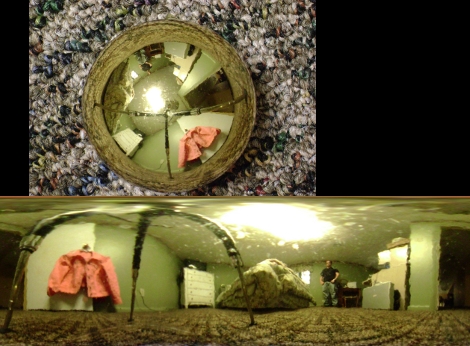
[Pixel_Outlaw] has been working on a method to capture 360 images with his camera. He’s using a shiny Christmas ball ornament to reflect the entire room into the lens of the camera. In the unwrapped image you can make out the three legs of his tripod. In that snapshot he laid the ornament on the floor and pointed the camera straight down from above.

What catches our attention is the post processing he used to unwrap the image. He loaded up The Gimp, an open source image manipulation program, and used just three steps to unwrap the image. First he cropped the picture so that it was square and the spherical ornament was perfectly centered. Then he ran the polar coordinates filter. Finally he scaled the image, setting the width to be Pi times the height. Works pretty darned well for something that doesn’t take much fiddling.

The ornament wasn’t perfectly smooth (or maybe it was a bit dirty) but you can get a much better starting image if you use a bulb with a silver reflector like we saw in this older hack.

Mouse And HDD Combo Show Off Your Data Gluttony

databot_mouse

So we know you’ve got a lot of porn on your computer, but just how much is a lot? This concept mouse and hard drive combo aims to show you just how much digital junk you have acquired through physical feedback.

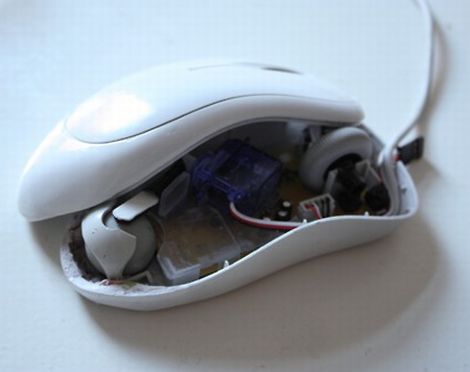
The DataBot mouse looks like a typical run of the mill scroll mouse that you might get with a new computer. Inside however, the designers have added a small servo which alters the ease with which the ball moves. The more files you have stuffed into the folder you are moving around, the more the mouse resists, giving you a sense of the physical “weight” of your computer’s contents.

The DataBot hard drive gives you a sense of how full your computer is by growing and shrinking based on space usage. During file transmissions the hard drive blinks its LEDs to indicate how fast or slowly your files are moving. When the inevitable file access error occurs, the LEDs switch to a bright red hue and the drive shakes to indicate there is a problem afoot.

With the price of data storage decreasing by the day, it’s easy to get lost in a glut of information without realizing just how much data you have. This is definitely an interesting way to get a different look at your data consumption.

Check out the videos below to see the pair in action.

[via Dvice]

Continue reading “Mouse And HDD Combo Show Off Your Data Gluttony”

AVRcam For Small Robot Machine Vision

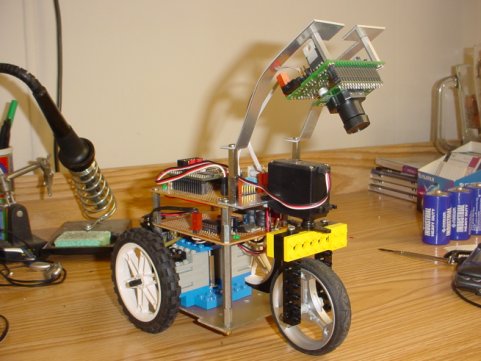
It’s neat how a project from 2004 can still be relevant if it’s done really well. This is the case with AVRcam.  It uses an Atmel AVR mega8 and can do some pretty impressive things, like track up to eight objects at 30fps. The hardware and software is also open source, so it should be possible to build one yourself. There are many projects like it on the internet, though often they require much beefier hardware. Although, these days you can fit a computer inside a match box, so we see more and more projects just throwing a full USB camera on a robot to do simple things like line following.  It’s debatable which solution is more elegant, but maybe not which one is more impressive.

Stripping DRM From OverDrive Media Console EBooks

stripping_drm_from_overdrive_media_center_ebooks

[Armin Tamzarian’s] local library recently started lending eBooks via the OverDrive Media Console system. He checked out a couple of books, which got him thinking about how the copy protection scheme was implemented. He wondered what recourse users had if they wanted to view a book they have already checked out on a different, or unsupported piece of hardware.

His research centers around Adobe’s ADEPT digital rights management scheme, which is used to protect the books offered on loan by OverDrive. The topic is broken down into three parts, starting with an introduction to the EPUB file structure, the OverDrive Media Console, as well as the aforementioned ADEPT DRM scheme.

The second part takes a close look at the OverDrive Media Console itself, where he uses the ineptkey and ineptepub utilities written by [I♥CABBAGES] to pull the RSA cipher keys from the EPUB data he uncovered. When he then tries to strip the ADEPT DRM layer from his books however, he discovers that OverDrive is using a non-compliant version of the ADEPT standard, which renders existing tools useless.

The final part of [Armin’s] discussion digs even deeper into the OverDrive Console’s inner workings, where he finds that the OverDrive Media Console stores quite a bit of information in an SQLite database. After a bit of digging, he finds all the data he needs to strip the DRM from his books. [Armin] also took the time to wrap all of his findings up into a neat little tool called OMCStrip, which as you may have guessed, strips the DRM from ADEPT-protected eBooks with ease.

Wireless Mouse Li-Poly Retrofit With USB Charging

wireless_mouse_lipoly_retrofit

It’s no secret that wireless mice can eat through batteries pretty quickly. Rather than keep a fresh supply of AAs on hand at all times, [Phil] decided he would convert his mouse to use a rechargeable lithium polymer battery instead.

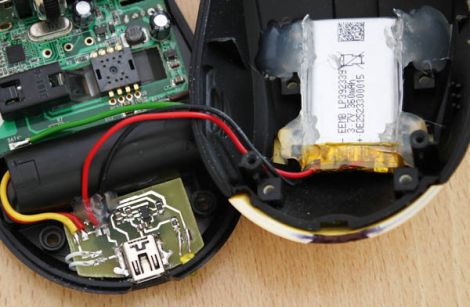
This isn’t the first time we’ve seen a cell phone battery crammed into a mouse to increase capacity, but we think this one has been done quite nicely. [Phil] managed to fit a 2.7 – 4.2v Li-Poly battery in the mouse’s palm rest, where there was a little extra empty space. The battery can be charged from any USB port via a custom-built charging module, which he constructed using a MAX1555 charge controller. Another custom-built circuit resides in the space previously occupied by the AA batteries, which uses an MC340063 DC to DC converter to drop the battery’s voltage down to the 1.25v required by the mouse.

The only part of the build that [Phil] is not pleased with is the power switch on the bottom, but since you rarely see that, we could care less. We think it is quite well done, and with a second version already in the works, we anticipate that it will get even better.

Be sure to check out [Phil’s] video tour of the hack, which you can see below.

Continue reading “Wireless Mouse Li-Poly Retrofit With USB Charging”

Help 2600 Magazine Compile A List Of Dates For Their Hacker Calendar!

2600, the magazine familiar to many as a preeminent hacking quarterly, is publishing a calendar. While, according to the 2600 site, most calendars only mark holidays, 2600 intends to “provide as complete a guide to milestones in the hacker world as humanly possible.” Not an easy task considering that, depending on your definition, hacking could extend to the discovery of fire, or at least the wheel.

2600 gives some examples in which they only list events back to March 3, 1885, when AT&T was founded.  If this example is followed, that “only” gives one 126 years to work with, but compiling a full list of hacking dates is still a daunting task. If you can think of any dates worthy of consideration, email them to: calendar@2600.com.  We think maybe September 5th, 2004 might be a notable date to include. We’ll leave it up to figure out what that date is, in case it wasn’t painfully obvious.