Juggling With Kinect

kinect_juggling

Some of the Kinect hacks we have featured here are quite useful in the realm of assisted living, others showcase what can be done with the clever application of video filters. Some…are just plain fun.

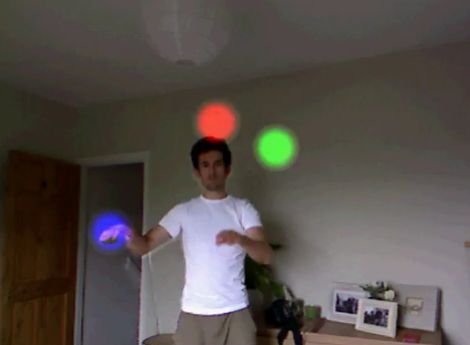
This pair of Kinect hacks are not necessarily going to win any awards for usefulness, but they are big on fun. [Tom] put together a neat juggling application that watches for your hands to disappear behind your back, generating a glowing ball once they return to the camera’s field of vision. The balls can be tossed away or juggled as you can see in the video below. It looks like it could be pretty fun and most definitely easier than chasing balls around while learning to juggle.

[Tom’s] hack was based off code he saw demonstrated in a video by YouTube user [hogehoge335]. His application for the Kinect allows him to replicate the Kamehameha attack from Dragonball Z, flowing hair and all.

Check out the videos below for a demonstration of both Kinect hacks, and swing by the respective Google Code sites if you want to give them a try.

Continue reading “Juggling With Kinect”

Photon Banner

The Revision 2011 demo party that brought us” table for two” a little while ago along with some super demos for PC’s, retro, and state of the art, has also brought us the Photon Banner(google translate). The Photon Banner is a 96X24 led matrix that was made with (of course) 2304 5mm leds, and a atmega 644 clocked at 20MHz.

The end result is a 192cm X 48cm display area that uses the single micro controller, that has been beefed up with 2 megs of SPI flash memory, 6 driver boards, and took about a month just to construct. The software to drive the show took another 15 days, and it is pretty darn impressive.

The website above contains a bunch of photos, parts lists, and schematics. Before you go running off you should join us after the break for a couple of quick videos.

Continue reading “Photon Banner”

raspberry_pi

Miniature PC Packs A Big Punch

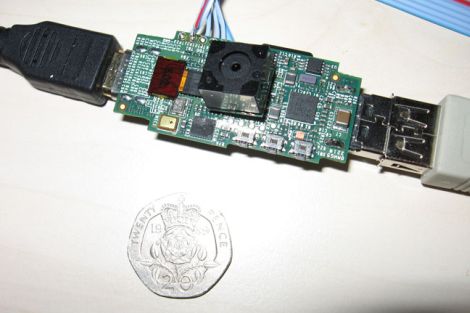
We are always looking out for smaller yet capable computers for our projects, and this newest offering by [David Braben] is looking mighty nice. [David] is the head of a UK-based games studio, but has recently been focusing on bringing small, affordable PCs to classrooms around the world.

The computer, called Raspberry Pi,  is about the size of your standard USB thumb drive and contains a 700 MHz ARM 11 processor as well as 128 MB of memory. It has an HDMI port which can display 1080p video on any compatible screen, along with a USB port for input peripherals. Mass storage is provided courtesy of an on-board SD card slot, and it looks like the ability to utilize add-on modules will be available as well.

There is sure to be no shortage of willing buyers if [David] is able to bring these computers to market within a reasonable timeframe. With a projected cost of about $25, this will certainly give the OLPC and others a run for their money.

Thanks to everyone who sent this story in… all of you. You can stop now… please. (don’t stop sending us tips, we’re just joking around)

Tiny Atari 810 Disk Drive Upgrade

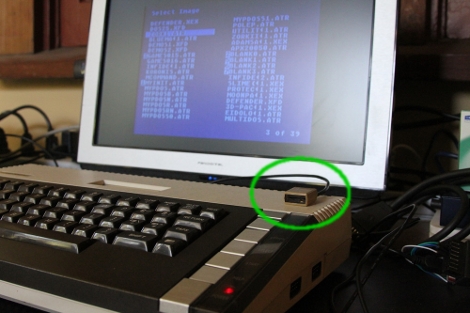
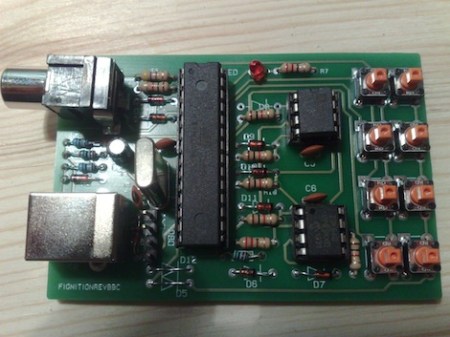
Everything gets smaller as technology improves. [Rossum] reduced the space needed for an Atari 810 disk drive by building this tiny replacement. Of course it doesn’t use floppy disks, but takes a microSD card instead. And it doesn’t stand in the place of one floppy drive, but can emulate up to eight different drives. The best part is that [Rossum] went to the trouble of designing an enclosure and having it fabricated via 3D printing in order to look just like a doll house version of the original hardware. It uses an LPC1114 ARM Cortex-M0 microprocessor to translate data transmissions to and from the Atari hardware, storing it on the 8 GB card.

As usual, you’ll soon find the schematic, board artwork, and code up on his git repository soon.

BBC Covers An Old-school Hacker

Yesterday, the BBC posted an article on [Julian Skidmore]’s AVR-based homebrew computer.

[Julian]’s project uses an AVR and a derivative of Forth to recreate the capabilities of the 8-bit computers of yesteryear. With 8kB of RAM, [Julian] got a TV-out up and running, and even included code for a Lunar Lander game.

We’re happy for [Julian] getting some notoriety as an old-school solder monkey, but we’re wondering why the BBC is covering a project not unlike the something that could be seen on hackaday once a week. Could it be the first inkling of respect for the hacker and DIY community in the general public’s eye?

In any event, we love the initiative shown in [Julian]’s quote at the bottom of the BBC article: “Building the machine is a way to learn the essentials of what a computer is all about.” If you want to understand something, you’ve got to build it yourself. Truer words…

A Visual History Of The Computer Mouse

mouse

As we all go about our day to day activities, it’s easy to get lost in technology and take for granted things that have slowly evolved over long periods of time. Take for instance the mouse on your desk. Whether it’s a standard 2-button mouse with a scroll wheel or a magic mouse with no buttons at all, we’re all a bit spoiled when you think about it.

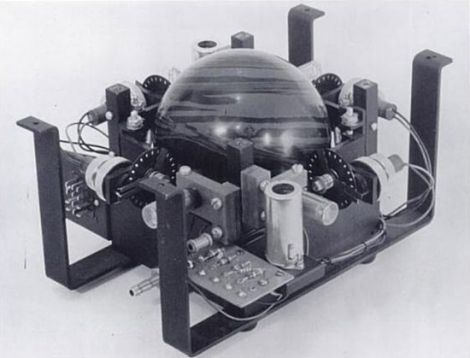
Dvice recently published a visual history of the computer mouse, which is quite interesting. The first pointing device that relied on hand motions to move a cursor was created by the Royal Canadian Navy in 1952. This trackball device, which is predates all other mechanical pointing devices, was crafted using a 5-pin bowling ball and an array of mechanical encoders that tracked the ball’s movement.

As time went on, other mouse-type devices came and went, but it was 30 years ago yesterday that Xerox unveiled the world’s first optical mouse at its PARC facility. The mouse used LEDs and optical sensors along with specialized mouse pads to track the user’s movements. The tech is primitive compared to today’s offerings, but it’s a nice reminder of the humble beginnings something you use every single day.

Be sure to swing by the Dvice site and take a look at how the mouse has evolved over the years – it’s a great way to kill a few minutes.

Playstation Network Breached, No End To Downtime In Sight

psn_logo

If you are not a gamer, or simply a casual player, you may not have heard about the recent breach of Sony’s Playstation Network. In short, the network was infiltrated on April 17th, and the service was completely shut down on the 19th as a precautionary measure. Now, more than a week later services have yet to be restored, but Sony is finally starting to talk a bit more about what happened.

At this point, nobody knows the total extent of the data stolen, but stories are emerging that indicate just about everything that could be accessed was accessed. Sony admits that information such as names, addresses, passwords, and security questions have all been accessed by an unauthorized third party. They have also not completely ruled out the possibility that credit card data has been stolen as well.

It seems the situation has turned from a mere inconvenience to PSN users into a full-blown security and PR nightmare. After a breach like this with so many questions left unanswered, and the gaming network rendered completely useless, we have to ask:

When everything is “fixed” and back to normal, what could Sony possibly do to regain your trust?