Troubleshooting Video Delay On The Raspberry Pi

The Raspberry Pi line of single-board computers are great little devices, and they can do great things with cameras and video. However, there can be a fair bit of latency involved in these tasks depending on the board you’re using and just what you’re doing. You need to have things set up just so to get peak performance. [MattKC] has tangled with this issue in a personal project, and recently had somewhat of a breakthrough.

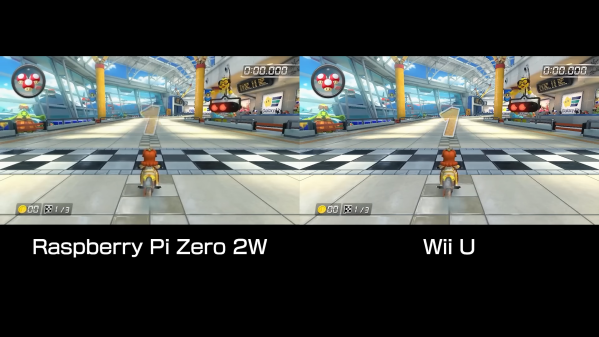
The issue came up during [MattKC’s] work on cloning the WiiU gamepad. The idea was to receive the video stream from the WiiU console and display it using a Raspberry Pi Zero 2W. He had some problems with latency, wherein there was a strange 3 frames of latency in the video pipeline that just wouldn’t go away. Even substituting in some dummy frames into the pipeline and ignoring them at output time didn’t work—the latency stuck around. Eventually, [MattKC] realized the delay wasn’t about a certain number of frames—it was about time. About 50 milliseconds, in fact.

Drilling down further revealed that there was a problem in the way frames were being fed into and received from the decoder. The first frame would take about 50 ms to decode, while later frames would take far less—as little as 5ms. However, [MattKC’s] code wasn’t set up to grab frames as soon as they were done, so the lag carried forward. The video explains it in greater detail, and how polling the decoder regularly helped solve the issue. The final result was a Raspberry Pi Zero 2W that could process and display the WiiU video feed as quickly as the original Nintendo WiiU gamepad.

If you dug this, it’s worth going back and checking out where the WiiU gamepad project started, too. Video after the break.

Continue reading “Troubleshooting Video Delay On The Raspberry Pi”

Functional Jumping Pokéball From An Ancient Pokémon World

When playing a game about Pocket Monsters, there’s one thing you can’t avoid using no matter what you do, and that’s a pokeball. Whether it’s a new or old game, you can’t avoid it. Many from different generations or spin-off games have their own fun spin, and that’s what [Kiara] wanted to explore with her custom made replication of an older style of ball.

Continue reading “Functional Jumping Pokéball From An Ancient Pokémon World”

Graphics Upgrade For Nintendo Entertainment System

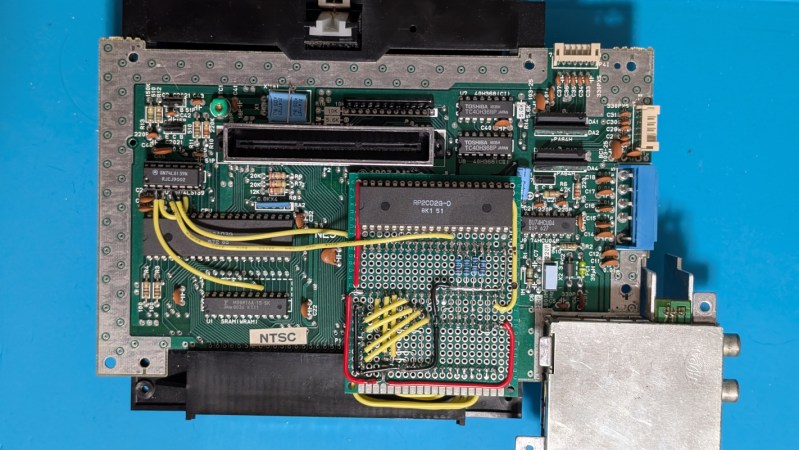
Modern video game consoles rarely have expansion ports, but in the 80s and 90s it was practically guaranteed. With the speed that hardware was advancing it made sense to build in some way to upgrade a system’s capabilities throughout its lifespan. But while this gave us things like the Sega CD and N64 Expansion Pak, many ports ultimately went unused. Given this recent project from [decrazyo], one wonders if unused port on the bottom of the Nintendo Entertainment System could have been used to expand its graphical capabilities.

The basis of this upgrade is the fact that the Picture Processing Unit (PPU) on the NES has four pins that are grounded. These four pins tell the NES to display the background color if the pixel is transparent. Since they’re normally grounded, this means the NES can only display a limited background image, but there’s no reason these pins must be grounded. By using a second PPU configured to output graphics information and wiring it to these four pins on the first PPU, the NES can be given all kinds of new abilities, such as adding parallax effects to backgrounds, rendering more sprites, and showing more colors in the backgrounds.

Of course, the hardware requirements for this will require a donor NES to get the second PPU as well as the necessary memory chip for it, and we don’t recommend tearing apart perfectly good retro consoles for experimentation if it can be avoided. Presumably, you could use this open-source NES hardware alternative instead. But for those with the parts and the gumption, creating a demo or adding graphics features to homebrew games using this second graphics chip is within reach.

Continue reading “Graphics Upgrade For Nintendo Entertainment System”

Hackaday Links Column Banner

Hackaday Links: June 14, 2026

Times are tough out there, and many are starting to feel the pressure at the grocery store checkout line or the gas pump. But whenever you start to worry about affording life’s necessities, take comfort in the knowledge that somebody is so flush with cash that on Friday they decided to treat themselves and spend $3 million for a sealed copy of Super Mario Bros for the Nintendo Entertainment System.

Although we’re not going to say it necessarily justifies the insane price — a new record for the most ever paid for a video game, incidentally — Heritage Auctions does note in their press release that this is an exceptionally rare version of what’s admittedly one of the most iconic pieces of software ever produced. This is only one of three copies of this particular variant known to exist, which Nintendo apparently distributed to test markets in the United States ahead of the game’s official 1985 release.

In slightly more modern gaming news, Asha Sharma, the new head of Microsoft’s Xbox division, has been making some big swings to try and get Microsoft’s gaming division back on track after years of declining sales. As part of that effort, she recently penned an article detailing some of the challenges the company is facing, which includes some interesting hardware details.

According to the blog post, she claims that in February, the cost of memory and storage components for the Xbox console had doubled compared to the previous year. But those numbers have jumped again, and by the time the holidays roll around, she expects they’ll be paying five times what they did in 2024. That’s bad news for anyone looking to put an Xbox under the tree come Christmas, but even worse news as the company works on the console’s successor. Considering that today’s hardware from Sony and Microsoft can already set you back $700 USD depending on which version you get, it seems like we’re approaching a point where gaming consoles could price themselves out of the market.

Continue reading “Hackaday Links: June 14, 2026”

GameCube Bot Records Your Play In A Weird Way

If you wanted to record yourself playing on a GameCube, you could use a VCR to capture the video output on tape. But there is a more interesting way to do it—which is precisely what [jiinurppa] built GameCube bot for. 

The concept is simple—GameCube bot is a small device that captures controller inputs and records them to an SD card. It can then play them back on command, allowing it to recreate gameplay as it happened the first time right on the console. A Raspberry Pi Pico is the brains of the operation, which is able to intercept signals from a standard GameCube controller. It’s paired with the aforementioned SD storage as well as an ST7735 display for showing status information. The device records in the DTM (Dolphin TAS Movie) format, which can be played back on the device when hooked up to a GameCube console, or in emulators like Dolphin itself.

[jiinurppa] notes that the device isn’t accurate enough to use for tool-assisted speed runs. Most notably, small errors in optical drive reads can lead to desyncs compared to the original machine state that make frame-accurate replays impossible. Still, it’s a neat build that can be useful for capturing game play and later analysis.

We’ve explored the world of Tool Assisted Speedruns before, though this device isn’t directly applicable to that world. Video after the break.

Continue reading “GameCube Bot Records Your Play In A Weird Way”

Game Cube Hot Tub Animation Brought Into Real World

Unlike the current era where most consumer electronics are black rectangles, or the early 90s where most consumer electronics were black rectangles, we got a brief glimmer of color, light, and hope in the 2000s. Cell phones had all kinds of shapes and sizes, laptops came in bright colors, and even video game consoles got in on the fun. The Nintendo GameCube not only featured its namesake shape but came in several vibrant colors, most famously a bright purple. In fact, its design was such a hit that it continues to inspire artists and console modders alike. An animator named [kidd.gorgeous] recently envisioned a GameCube as a hot tub, and [BigRig Creates] set out to make this animation a reality.

Of course, this won’t be a life-sized hot tub capable of holding a human, but [BigRig Creates] did want it to be a usable, playable Game Cube with all of the features from the animation present in the final version. Since the lid won’t be operational with a hot tub model on the top lest all of the water spill out every time a game is changed, he’s modified it with some modern tools to hold his games inside the console itself. With the case open he’s also added the LED accent lighting featured in the animation as well as added the 3D-printed hot tub to the top. The hot tub is filled with mineral oil for electronics safety, and has a small pump built in to give the appearance of a working hot tub.

The buttons around the outside are functional as well, toggling the various lighting features and hot tub operation. And of course, the console diorama is fully playable, with the staircase railing able to easily detach in order to access the leftmost controller ports. It’s a faithful adaptation of the original animation, and [BigRig Creates] has a few games on queue that are properly themed for the new hot tub addition like Wave Race 64, Super Mario Sunshine, and Pool Paradise.

Continue reading “Game Cube Hot Tub Animation Brought Into Real World”

Nintendo’s Family BASIC Keyboard Gets USB Upgrade

America knew it as the Nintendo Entertainment System, but in Japan, it was the Family Computer (Famicom). It was more than just a home console—it was intended to actually do a whole lot more. All you had to do was plug in the keyboard and chuck in the right Family BASIC cartridge, and you had a computer hooked up to your TV! [Lucas Leadbetter] came across an old Family BASIC keyboard recently, and set about making it more useful in our modern age with a simple USB upgrade.

[Lucas] started with research, and soon found plenty of schematics and details on the keyboard on the NESdev wiki page. Hunting further turned up a video from [Circuit Rewind], who demonstrated how to hook up the keyboard to a Raspberry Pi Pico, including how to interface with the onboard chips to scan the keys. These resources told [Lucas] enough to get going—and that it should be as simple as wiring some custom hardware up to the internal keyboard matrix connector to get it speaking to USB.

[Lucas] went a slightly different path to [Circuit Rewind], implementing the popular QMK firmware to suit the Family Basic keyboard on an Adafruit KB2040. The Adafruit part is basically an RP2040 microcontroller slapped onto a tiny PCB in a form factor that’s ideal for making custom keyboards. [Lucas] was able to reimplement the scanning logic that [Circuit Rewind] had reverse engineered previously, and had the keyboard up and running in short order with all the usability benefits of the QMK firmware. Files are on Github for those eager to recreate the work.

As far as usability goes, [Lucas] notes that the Family BASIC keyboard is more of a conversation piece than a daily driver, thanks to its rather poor feel. Duly noted. We’ve explored how software development is done in Family BASIC before, too. Video after the break.

Continue reading “Nintendo’s Family BASIC Keyboard Gets USB Upgrade”