Super VMW CPU Meter

After many delays, restarts, and years, [Vince ] has finally finished his Super VMW CPU Meter. Featuring six alphanumeric red led displays, two 10 segment bar graphs, twelve red LEDs, and six color LEDs its got plenty of “screen” space to show all sorts of useful information.

Electrically its driven by four SAA1064 LED driver chips attached to an i2c bus which is banged by a PC’s parallel port and driven by software in linux. The software allows you to build displays for what ever application you may want, and even includes a color ASCII output so you can see what it will look like before you even have hardware.

Four examples are given, one is a cpu meter which uses the bar graph displays to show load per core. Another uses the bar graphs as a VU meter for your music while displaying the song’s information. There is a clock in all the normal formats + UNIX time, and some scrolling text demos.

Construction gets a little odd as overhang of chips and connectors was not really taken into account so some “lofting” was needed to raise the trouble spots above the rest of the board. It is not something we would want to do, but a handy trick if we are ever faced with that situation.

Join us after the break to see this wild light show in action. Continue reading “Super VMW CPU Meter”

Alternate Keyboard Layouts – For Geekiness And Other Reasons

[BiOzZ] wanted to try a different keyboard layout than the ubiquitous Qwerty, so he grabbed an old keyboard and converted it to the Dvorak setup. This was accomplished by first popping off all of the keys from the black keyboard seen above, and boy did he find a mess underneath. It was nothing that a trip through the dishwasher (for the case only) wouldn’t fix, and the next step was to replace the keys in a different order. He found that a couple of them wouldn’t just go back in a different place, but had to be rotated 90 degrees to fit. Not a huge problem, you can see that he overcame the visual speedbump of letters facing the wrong way by adding his own letter labels. From there he walks us through the process of getting Windows to switch to the Dvorak layout.

I went through a similar process at the end of last year. I was experiencing a lot of pain in my hands from my prolific feature writing here at Hackaday so I chose to try out the Colemak keyboard. The white keyboard above is the one I repurposed using that layout. I found it quite easy to switch between two keyboard layouts using Ubuntu. After you’ve set it up in the keyboards dialog a layout icon appears on the panel. It wasn’t hard to pick the new key locations up, but it did reduce my typing speed by a factor of 8. In the end I found that adjusting my chair height and keeping my hands warm did the trick and I’m back on the Qwerty where I belong.

Redeye Printer Interface

This handy printer interface started out as a request on our very own forums when forum member [victorf] needed some output via thermal printers. He had scored a number of HP82240B thermal printers intended for use with HP calculators, but of course they used the somewhat arcane HP protocol first drafted in the 1960’s and needed some help.

Fellow forum member [wireb] started to look into it, found out it uses a standard 32KHz carrier signal, and started asking questions about its use. Grabbing a pdf of the manual he was able to find out all the details to what the printer was expecting in the form of communications.

After a few weeks, [wireb] was able to make a convenient, logic level serial to HP-IR adapter based around a PIC16F1824 who’s firmware supports 9600 8N1 or 2400 8N1 speeds, ASCII text, and the printer’s “advanced” graphical modes via escape sequences.

If you have not checked out our forums yet we suggest you do!

Hacking Game Port Peripherals To Work With Modern PCs

gameport_hack

[Atiti] has a bad habit of hanging on to old things. Some people call this sort of behavior “hoarding”, but around here we understand his affliction. It turns out that in his collection of old computer peripherals, he located a Thrustmaster Formula 1 racing wheel he used back in the day. Analog racing wheels can cost a pretty penny nowadays, depending on what you buy, so he decided to see if he could hack this outdated controller to work with his new PC.

You see, the problem with this wheel is that it utilized a “game port” connecter to interface with the computer. If you don’t remember the game port, go dig up an old PCI sound card and take a look on the back. That 15-pin connector? That’s a game port. Microsoft discontinued support for the game port once Vista was released, so [Atti] had to figure out how in the world he would get it to work on his new PC.

His solution was an Arduino, which is used to read the analog signals output by the wheel. Those signals are processed and sent to a parallel port joystick emulator, enabling him to use the wheel with any game supporting a standard joystick.

Obviously he could have just gone out to the store and bought a USB wheel, but where’s the fun in that?

Stay tuned for a video demo of his refreshed wheel in action.

Continue reading “Hacking Game Port Peripherals To Work With Modern PCs”

HIDUINO: Your Arduino Is Now A MIDI Interface

[Dimitri Diakopoulos] dropped into our tip line to let us know his HIDUINO project. The HIDUINO is a set of firmware for the ATmega8u2 used in the new revisions of the Arduino  (Uno, and Mega2560 for example).  Once the HIDUINO is loaded your Arduino can show up as any HID compliant device you wish, no extra drivers necessary. This means that using this firmware, music software such as Max, Ableton, Reaktor etc can read and write MIDI directly to/from the Arduino. Currently the project is for direct USB-MIDI communication but could be altered to act as a variety of HID devices.

Flashing the ATmega8u2 with your own device type or name requires a bit of work on the developers part like owning an ISP programmer, soldering header pins to the board, and re-flashing the ATmega8u2 every time you want to load new code into the Arduino. Users without an ISP can still flash HIDUINO using Atmel’s FLIP software (Windows) or the DFU programmer (Mac OS X and Linux) and a precompiled HIDUINO firmware. They still have to solder a jumper on the underside of the board to use the DFU bootloader.

This firmware could certainly benefit anyone building an Arduinome , Joystick, or any variety of devices that users simply want to interface to a PC without additional software.

A guide for ISP flashing can be found at [Dimitri]’s site.

Bubble Display

As hackers we have come up with some pretty wild and unique ways to display data, but that never stops us from creating even wilder ways such as this Bubble Display. Inspired by a Hackaday article called Liquid Display the bubble display started out as a one column lexan tank so the team could check out different liquids, and build methods, which gave them the opportunity to test out their wet/dry vacuum in the basement as well.

After the leaks were solved in the prototype, different fluids were tried out to see what would work best,  glycerine (though the most expensive out of the 3 items tested) gave the best performance in how the bubbles rose to the top, and the uniformity of each individual bubble.

The final tank design features (24?) channels to keep bubbles from interacting with each other and are fitted with some Parker A005-C23-2P pneumatic valves hooked up to a standard air compressor. Electrically it’s pretty standard, with the solinoid driver stuff all run by a PIC18F4455 clocked at 48MHz.

Software wise the device has 3 modes, one mode allows users to enter text or simple bitmaps from a computer using a homebrew GUI written in Visual Basic, there is also a demo loop for when you still want to show it off, but there is not someone there to constantly bang data into it, and finally a live keyboard mode which acts as a bubble music visualizer when there is a keyboard connected via MIDI. Check all 3 out in a short video after the break.

Continue reading “Bubble Display”

Kinect, Mouse, And Nerf Gun Combine For House Of The Dead

[Tony Blanch] built his own motion controller for playing House of the Dead. It should work with any shooter that follows the ‘rail’ type of game play (your character is not free walking, but moves along a set path beyond your control).

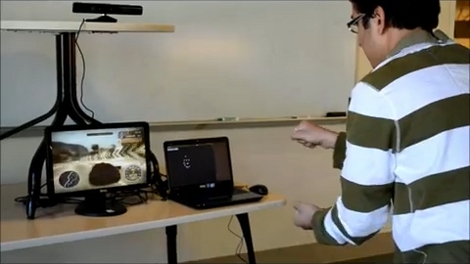
Two parts come together to make this happen. The first is the Nerf dart gun that you see above. The circuit board fitted into the top portion of the plastic housing is from a five-button wireless mouse. The buttons are used to sense trigger pulls from the player. The second portion of the controller is a Kinect. It has been set up to work with a Windows 7 machine. [Tony] used the Flexible Action and Articulated Skeleton Toolkit (FAAST) to bind and track the gun controller, moving the mouse cursor on the screen to match the movements of the weapon. Check out the video after the break to see how responsive this system is.

This is a very interesting departure from the gun controllers we’ve seen before.

Continue reading “Kinect, Mouse, And Nerf Gun Combine For House Of The Dead”