Granted, she was standing there for long enough that the police were eventually called, but still. Previous reporting indicates that Carolyn Marvin has a history of blocking delivery robots as a form of protest, but this is the first time law enforcement got involved. We’re not lawyers here at Hackaday, so we can’t say for sure whether or not blocking the progress of a robot engaged in commercial operation actually violates any laws. But we do know that refusing a lawful request from a police officer will get you in trouble, and that seems to be what Marvin was actually charged with when she refused to move.
To quote commenter [douyarou], “It’s like our little version of a Precambrian explosion”. A bunch of hackers have discovered, independently and building on each other’s work, software-defined radio (SDR) capabilities in more places than you can shake a stick at.
It all started with [Espargos] and [h0m3us3r] apparently independently discovering that the ESP32 family of chips had a “secret” debug mode that allowed direct access to the radio that’s normally used for WiFi. While the 2.4 GHz radio signal is almost always immediately converted into data by the MAC hardware, here they found a way to listen in upstream, to the raw IQ data.
Seeing this, folks were immediately inspired to find out if they could transmit as well. [marble] not only got transmit functionality working, but integrated the part in with the standard osmosdr data flow, which meant that a whole bunch of existing tools were ready to go. We didn’t know about it at the time, but apparently [jochenhammes] and [z1000biker] concurrently had their TX-capable hacks up and running: here and here.
At this point, folks have already started to use the capabilities for broadcasting digital TV signals, voice signals, FM Hell, and other hijinks. This reminds us of the early days of the RTL-SDR project, when a competent, if receive-only, SDR functionality was found in a bunch of USB TV-tuner dongles. Once the hardware capabilities were sussed out, people started writing all sorts of useful software, and it gave rise to all manner of radio projects, from simply poking at domestic wireless devices to tracking all the airplanes in the world as they fly by.
[Tom] and I were discussing this on the podcast, and he remarked that of course there are SDRs hidden everywhere there is a radio unit these days, and the question is just whether or not we could hack them into usability. And before the podcast was even finally edited, [Samson1te] told us about his find in the LR2021 LoRa chip. This is a radio that’s designed to be a radio, with 16-bit resolution, and covering lower frequencies from 150 MHz to 960 MHz.
Compared to the RTL-SDR revolution, this is all happening at incredible speed. Each of these hacks will enable us to use different slices of radio spectrum with different degrees of ease, but it’s clear that the cost of entry into playing around with digital radio has just dropped precipitously. We will see hundreds of new signals hacks in the next few months – the floodgates have been opened.
This article is part of the Hackaday.com newsletter, delivered every seven days for each of the last 200+ weeks. It also includes our favorite articles from the last seven days that you can see on the web version of the newsletter.
Want this type of article to hit your inbox every Friday morning? You should sign up!
Hackaday Editors Elliot Williams and Tom Nardi start this episode off with a discussion about Philadelphia’s budding hacker conference and the imminent retirement of the EZ80. After considering the parallels between the wide world of aviation headsets and our personal projects, talk moves on to the exciting developments in the world of software-defined radio on the ESP32, a Meshtastic pager from a bygone era, and how all the wild flying machines entered into DARPA’s Lift Challenge ended up losing to a simple helicopter.
You’ll also hear about turning plastic bottles into printer filament, pushing e-ink screens to their limits, and browsing the web on the PSP in 2026. To wrap things up they’ll marvel at all the modern abstraction sitting between software and the memory it’s running on, and revisit some RF concepts that might be particularly useful now that everyone is playing with a new SDR device.
Check out the links if you want to follow along, and as always, tell us what you think about this episode in the comments!
Critical Internet keys changed this week. Did you notice? The keys behind DNSSEC, the system for cryptographically validating DNS responses, rolled over on October 11 2026. This is the second time the DNSSEC keys have rotated since the system was implemented, and the first time in 2018 didn’t exactly go entirely smoothly.
DNS is what resolves a host name and turns it into an IP address. It underpins web browsing, email, and just about every other connection. It’s also a very early Internet protocol, written in both a simpler, less paranoid era, and an era where encryption was computationally expensive and legally problematic. DNS offers little protection against malicious actors spoofing responses, and the impacts range from phishing to redirecting email to just about any other manipulation of connections you can image.
DNSSEC addresses this by creating a chain of trust between DNS resolvers — the servers that forward the DNS query into the DNS infrastructure and return the results — and the global DNS servers. Part of this chain of trust is the root key that each resolver must have and trust, and this key is what changed this week. DNSSEC resolvers automatically watch for a new root of trust key, but the key must be signed by the previous root of trust, and is checked for at least 30 days before it is trusted. If someone were able to issue a bogus certificate, they would have to maintain control of the infrastructure for over a month before DNS resolvers would trust it.
The process of distributing the new key actually began more than a year ago, on January 11, 2025, to give DNSSEC resolvers time to get the new key. DNSSEC services should have had plenty of time to obtain and trust the new key, and unless DNS stopped working for you this week, they did their job.
The next major change for DNSSEC will require more profound changes to deploy a new signing algorithm that will be post-quantum secure.
Supercon is Hackaday’s annual gathering, and you absolutely need to be there.
Today, we’re pleased to announce our lineup of workshops, and it’s more than we’ve ever offered, thanks to moving to a bigger venue and to our awesome community of hackers stepping up to give them. There’s something here for everyone, so if anything strikes your fancy, be sure to book yourself a slot soon. (If you have a ticket already, you sign up for the workshop as an “add-on”, BTW.) Workshops always fill up fast, due to the small and hands-on nature of the beast.
If you already know what a nonius is, you can probably skip this post. But, if like us, you would have to look it up, we’ll tell you what we found out. It turns out, a translation mistake taught us a new word and some history we weren’t aware of.
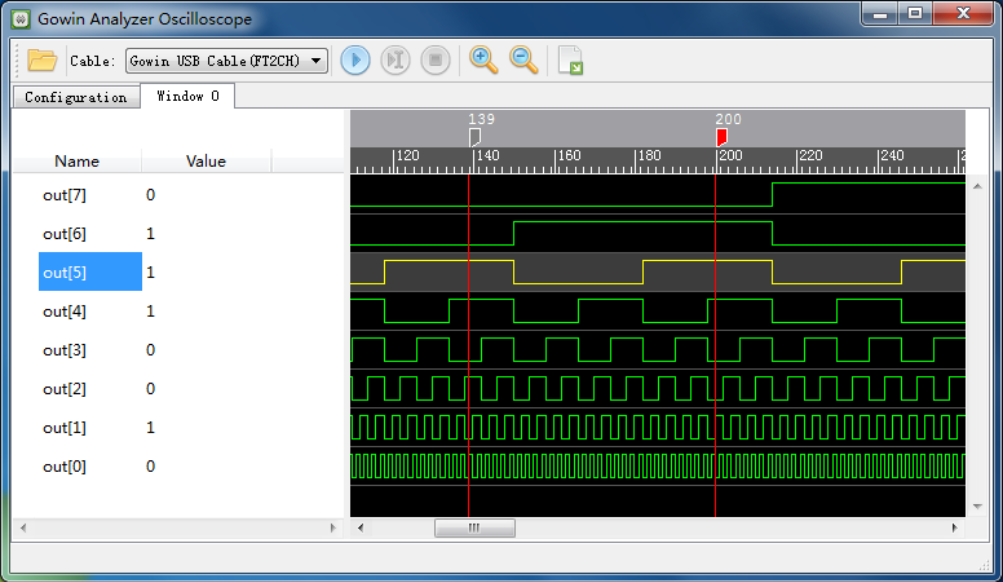
In the manual, this is captioned: Figure 4-7 Nonius Display (Standard Mode)
Have a look at the adjacent graphic from a waveform display. What would you call the vertical red lines at positions 139 and 200?
We’d probably call them markers. Or maybe cursors. The manual, however, calls each one a “nonius”. It refers to them that way multiple times.
Oddly, the manual also has sentences like “Select one nonius and right-click, and then select ‘Remove Marker’ in the next window to delete the nonius.”
So, clearly, a nonius is the vertical line marker or cursor. But that, of course, begs a question…
What is a Nonius?
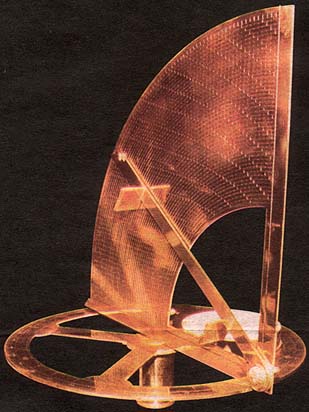
“Nonio originale” by [Henrique Leitão]Have you ever heard of the vernier scale? If you’ve done navigation, used a traditional caliper, or tuned an old shortwave receiver, you probably have. [Pierre Vernier] developed it in 1631 as a way to better interpolate values on a scale.
However, there was an earlier version used to improve measurements on astrolabes. A Portuguese navigator named [Pedro Nunes] created this type of astrolabe in 1542. The Latinized version of his name is [Petrus Nonius]. What are the odds of him inventing… oh wait, they named it after him. That does make more sense.
The nonius is a series of concentric circles traced on the instrument. Working towards the center, each circle has fewer divisions than the previous one. In fact, if the outer ring had 90 marks for 90 degrees, the next ring would have 89, and the following one would have 88.
In the last few installments, we looked at using the Tang Nano 20K with both the GOWIN tools and some open-source tools. The open-source tools certainly had the advantage of letting you simulate and debug your design before sending it to the actual chip. However, as we’ll see, the GOWIN tools include a very easy-to-use, capable logic analyzer.
Setup
First, you’ll need a GAO config file. When you create one in the editor, you are given a number of complex options. With an active GAO file, the tool builds a logic analyzer into your design, and the file sets the trigger conditions.
Here’s a tip. You can only have one active GAO file. Sometimes you don’t want the logic analyzer. Other times you might want an alternate configuration. If you right-click almost any file in the IDE’s Design tab, you’ll see you can disable it. That gives it a big red X and excludes it from future builds. Well, at least until you enable it again. This lets you pick between multiple GAO files, or even multiple Verilog files, for a particular build (e.g., one for tests and another for production).
If you create a GAO file from scratch, it will ask you if you want “Lite Mode.” As far as I can tell, you will never want this mode. Always use Standard Mode. In addition, you nearly always want RTL mode, which shows you (mostly) the symbols you’ve defined and not the ones added during processing.
You can find the entire manual online, of course. However, the video below and the rest of the post will get you started quickly.
GAO Basics
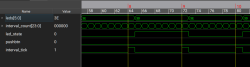
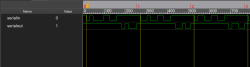
To set up probing, we need to understand the design, so the rest of this post covers the Verilog we’ll use to test the logic analyzer feature, and you’ll see how the analyzer works in a video. Here are a few sneak peeks at what the analyzer output we’ll see at the end looks like:
Segmented capture of interval logic
Low-rate serial data capture
The left-hand image shows the pulse that flips the LEDs, which is tricky because the sampling clock is 27 MHz. The right-hand side shows serial data and uses a slower clock specifically used for debugging.