BlocksCAD Is Browser-Based 3D Modeling That Teaches You CAD

Considering all of the projects the Raspberry Pi is used for now, the fact that it was originally envisioned to be an educational tool is sometimes forgotten. One of the tools commonly available with it is Scratch, a programming language that is easy to learn and can be seen as a gateway into other computer science realms. Building on this principle, MIT has come up with a new block-based educational tool called BlocksCAD.

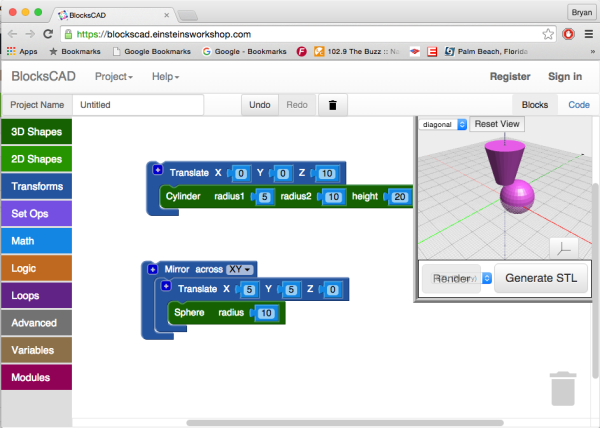
BlocksCAD is essentially Scratch combined with OpenSCAD and allows the user to use blocks (similar to Scratch) to build a 3D model. The interface is fairly intuitive, and with some practice even complex shapes can be created using the tools available. Also, everything runs in a browser like the 3D modeling tool we featured a few days ago, so there isn’t anything to download or install.

The key to this project (like the key to Scratch) is that the user isn’t bogged down by syntax, which is often one of the largest hurdles for anyone who is just starting to learn to program. Since it’s possible to avoid syntax but still develop 3D models, this new tool should help anyone interested in the field of 3D modeling or CAD get a start without getting scared away too easily. Of course, if you do end up deep in the field of computer science and want to learn more about this project, the developers have opened up the source code as well.

Thanks for the tip, [Matt]!
3D Printing With 2D Inkscape Projections

If you had a formal drafting class, you probably learned about making orthographic projections–engineering drawings with multiple views (for example, top, front, and right). Even if you didn’t take the class, you’ve probably seen drawings like this where you view a 3D object as a series of 2D views from different angles.

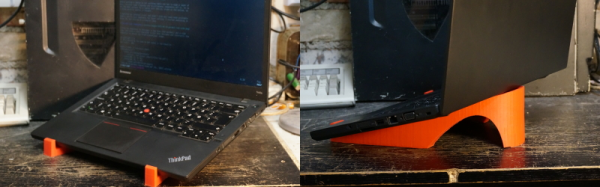
These days, you are more likely to create a 3D model of an object, especially if you are going to 3D print it. After all, the 3D printer software is going to expect a model. When [Nightshade] wanted a laptop stand for his workbench, he started trying to do a 3D model. His final product though, was made by creating two views in Inkscape. They aren’t exactly orthographic projections of the final product, but the idea is similar.

Inkscape is a vector graphics program and generally creates SVG files, although it can also save EPS files. [Nightshade] used pstoedit to convert the EPS output to DXF format. DXF files are still two dimensional, but OpenSCAD can extrude DXF files into 3D shapes.

Just having a 3D shape of one view isn’t sufficient, though. The OpenSCAD script rotates the objects to the correct orientation and intersects them to form the final object. This is different from the usual cases of using Inkscape to trace a scan or generate simple text.

Continue reading “3D Printing With 2D Inkscape Projections”

3D Printing Helps Rekindle Old Love With An Uncommon Truck 

People may know many name and brands of cars and trucks, and there’s tons of scale models available for the average popular ones. What happens if your favorite truck is a 1960 Bucegi? You could do what [Arin] did and 3D print your own custom model.

[Arin] used to drive these machine back in his youth and it made an impression on him. In the few years of production, the 140HP V8 truck was adapted to all sorts of uses from farm trucks to military vehicles and even cranes.  The base truck and the desired configuration is modeled up in quite a bit of detail, then it’s 3D printed.

Once the printing is done the models are smoothed out using body filling primer paint, (and we imagine some fine sanding) , painted with acrylic paint, and assembled into an accurate model complete with working steering systems.

Below is a video showing assembly and painting and a second video showing off the steering system.

Continue reading “3D Printing Helps Rekindle Old Love With An Uncommon Truck “

Otherworldy CAD Software Hails From A Parallel Universe

The world of free 3D-modeling software tends to be grim when compared to the expensive professional packages. Furthermore, 3D CAD modeling software suggestions seem to throw an uproar when new users seek open-source or inexpensive alternatives. Taking a step apart from the rest, [Matt] has developed his own open-source CAD package with a spin that inverts the typical way we do CAD.

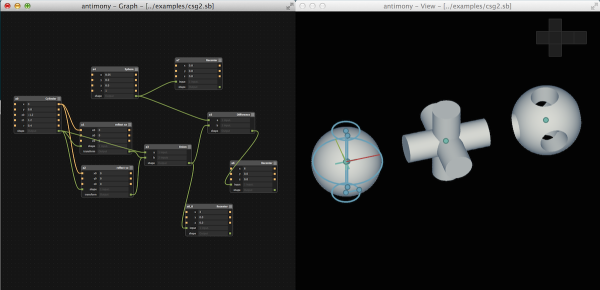
Antimony is a fresh perspective on 3D modeling. In contrast to Blender’s “free-form sculpting” and Solidworks’ sequential extrudes and cuts, Antimony invites you to break down your model into a network of both primitive geometry and operations that interact with that geometry.

Functionally, Antimony represents objects as a graphical collection of nodes that encode both primitives and operations. Want a cylinder? Start with a circle node and pipe it into an extrude node. Need to cut out some part geometry? Try defining it with one or more primitives, and then perform a boolean intersection operation. Users can even write their own nodes with custom scripts written in Python. Overall, Antimony boasts the power of parametric design similar to OpenSCAD while it also boosts readability with a graphical, rather than text-based, part description. Finally, because part geometry is essentially stored as a series of instructions, the process of modeling the part does not limit the resolution of the output .STL mesh. (Think: vector-based images, versus pixel-based images).

Current versions of the software are available for both Mac and Linux, and the entire project is open-source and available on the Githubs. (For the shrewd-eyed software developers, most of the project is written with Python that interacts with lower-level routines handled in C++ and exposed through Boost.Python.) Take a video tour of an Antimony workflow with [Matt] after the break. All-in-all, despite that the software is still in its alpha stages, it’s highly functional and (for the block-diagram fans) intuitive. We’re thrilled to put our programming hats on and try CAD from, as [Matt] coins it “a parallel universe.”

Continue reading “Otherworldy CAD Software Hails From A Parallel Universe”

SPATA: Shaving Seconds And Saving Brainpower Whilst 3D-modeling

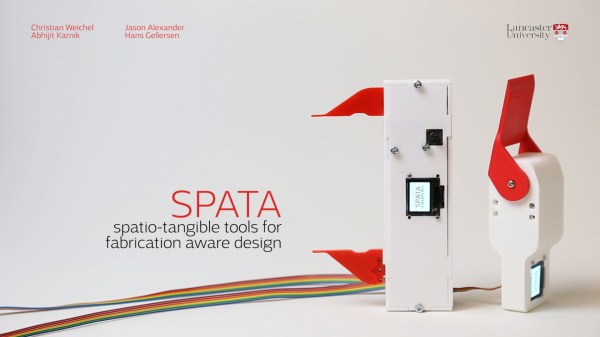
If you’ve spent some late nights CADing your next model for the 3D printer, you might find yourself asking for a third hand: one for the part to-be-modeled, one for the tool to take measurements, and one to punch the numbers into the computer. Alas, medical technology just isn’t there yet. Luckily, [Christian] took a skeptical look at that third hand and managed to design it out of the workflow entirely. He’s developed a proof-of-concept tweak on conventional calipers that saves him time switching between tools while 3D modeling.

His build [PDF] is fairly straightforward: a high-resolution digital servo rests inside the bevel protractor while a motorized potentiometer, accelerometer, and µOLED display form the calipers. With these two augmented devices, [Christian] can do much more than take measurements. First, both tools are bidirectional; not only can they feed measurement data into the computer with the push of at button, both tools can also resize themselves to a dimension in the CAD program, giving the user a physical sense of how large or small their dimensions are. The calipers’ integrated accelerometer also permits the user to perform CAD model orientation adjustments for faster CAD work.

How much more efficient will these two tools make you? [Christian] performs the same modeling task twice: once with conventional calipers and once with his tools. When modeling with his augmented device, he performs a mere 6 context switches, whereas conventional calipers ratchet that number up to 23.

In a later clip, [Christian] demonstrates a design workflow that combines small rotations to the model while the model is sculpted on a tablet. This scenario may operate best for the “if-it-looks-right-it-is-right” sculpting mindset that we’d adopt while modeling with a program like Blender.

Of course, [Christian’s] calipers are just a demonstration model for a proof-of-concept, and the accuracy of these homemade calipers has a few more digits of precision before they can rival their cousin on your workbench. (But why let that stop you from modifying the real thing?) Nevertheless, his augmented workflow brings an elegance to 3D modeling that has a “clockwork-like” resonance of the seasoned musician performing their piece.

[via the Tangible, Embedded, and Embodied Interaction Conference]

Continue reading “SPATA: Shaving Seconds And Saving Brainpower Whilst 3D-modeling”

Geodesic Structures That Aren’t Just Domes

Geodesic structures

[Brian Korsedal] and his company Arcology Now! have developed a great geodesic building system which makes architectural structures that aren’t just limited to domes. They 3D scan the terrain, generate plans, and make geodesic steel space frame structures which are easy to assemble and can be in any shape imaginable.

Their clever design software can create any shape and incorporate uneven terrains into the plans. The structures are really easy to construct with basic tools, and assembly is extremely straight forward because the pole labels are generated by the design software. Watch this construction time lapse video.

At the moment, ordering a structure fabricated by the company is your only option. But it shouldn’t be too hard to fabricate something similar if you have access to a hackerspace. It may even be worth getting in touch with Arcology now! as they do seem happy collaborating to make art like the Amyloid Project, and architectural structures for public spaces and festivals like Lucidity. Find out what they are up to on the Arcology Now! Facebook page.

Would this be perfect for what you’ve been thinking about building? Let us know what that ‘something’ is in the comments below. Continue reading “Geodesic Structures That Aren’t Just Domes”

DesignSpark Mechanical – The Gift Of Invention

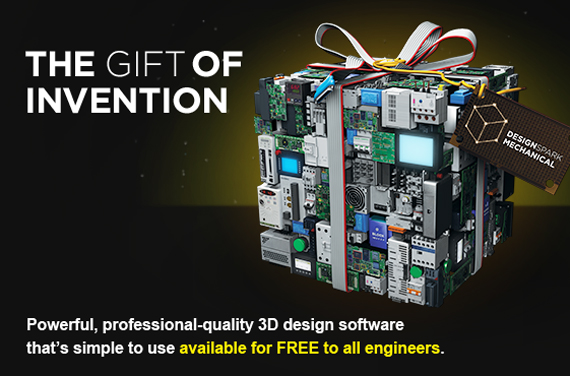
Ever heard of DesignSpark? They are releasing a powerful CAD package on September 16th — for free!

The company is owned by RS Components, a distributor of electronics and maintenance products. They offer a large library of 3D models of parts that they sell, dubbed the ModelSource. So if you are wondering how they are giving out software for free, that’s how. They also have free PCB designing software, and something called DesignShare which hosts open-source project collaboration, sharing and discussions.

By the looks of the demo video, DesignSpark Mechanical is a well laid out CAD package that is rich in features. The software allows for the import and export of several file types, and it looks like ECAD, OBJ, Sketchup, STEP, DXF and STL are all there, as well as the native file types. While it looks like you can import any files, we are willing to bet adding ModelSource files are by far the easiest and most convenient because of the integrated ModelSource library. But we think that’s a small price to pay for an alternative to SketchUp. After all, the component models will be useful for assemblies, even if you don’t order through them. Oh, and it’s perfect for making free models for 3D printing as it includes the ability to export STL files.

Watch the software demo after the break.

Continue reading “DesignSpark Mechanical – The Gift Of Invention”