Top 10 Features We’d Like To See In Android 3.0

UPDATE:

Hello HaD readers,
Sorry for the delay in updating this. I was on probation while the editors worked with Jason to figure out some things.

Clearly, for my recent debut article, I didn’t research Android OS well enough. After reading each of your comments, I realize that the article fell short of HaD’s and its readers standards for high-quality writing and reporting. Every point I made in the article were problems I noticed in my experience with Android, but I should have done more research on others’ experiences and the capabilities of each version of the OS. To each reader, I am sorry and will do better by you in future posts.

Poor Google. Despite its numerous capabilities with smartphones spread across a variety of carriers, Android still struggles to garner the prestige and positive perceptions of iOS 4. Sales continue to rise, but at the end of the day, the average person is still left lusting for an iPhone. Well, here are 10 features  that should be added to Android 3.0 that could change the tide.
1. A no-brainer task manager.
Google says Android doesn’t need a task manager, that it closes programs efficiently without any user-intervention, substandard apps often suck memory dry. Because of this, Android users are forced to download complicated task-managers, each with its own odd UI, and weigh which one works the best. Google, please fess up to the problem and put something in there a computer novice could use.  Something with big buttons would be nice.

RobotsEverywhere

[youtube=http://www.youtube.com/watch?v=WWh6MFUCZ-U]

[Spiritplumber] has been sending us updates on a promising project he’s working on called RobotsEverywhere. We’re not completely sure if that name covers the project itself, or just the name of his group that is selling robots (and giving us schematics and source code). Either way, they have some really cool stuff. The really cool part about many of the bots is that they are using Android phones as their brains and they use the same system on land, air, and water. There’s tons of information sprinkled around the site and the Wiki, take a few minutes and look around.

Joojoo Alternative OS Installations

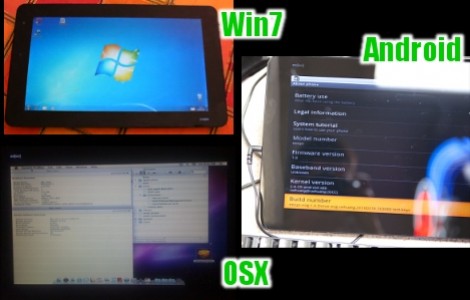
Joojoo hacks are starting to trickle in as non-fanboys get their hands on the iPad alternative. The custom OS forum for the device tells the tale of successful installs of Windows 7, OSX, Android, and Jolicloud.

So far the only one to have a how-to is Windows 7, but we’re sure that will change quickly. When Microsoft’s offering is installed on the device it get about four hours of use per charge which is fairly decent. We’d love to get our hands on one and try it out with Android but the $499 price tag is still a hurdle for us. We’re not saying it’s over priced, as it comes with a lot under the hood. Even at that price we think it blows the aPad out of the water.

[Thanks Andy]

Careful! That Gas Pedal Is A Nexus One

Indeed, the gizmo above is meant to be used as a gas pedal. [Grant Skinner] came up with the idea to control slot cars using an Android phone as a gas pedal. He coded the software for the handset and a computer using Adobe AIR. Once connected, the computer is sent the accelerometer data from the phone, relaying the speed control to the slot car track with the aid of a Phidgets motor controller. See it ‘go’ after the break.

We’ve seen the Phidgets board used in several projects like the augmented vending machine and the plotter white board. What we haven’t seen is hacks that make use of AIR, a framework we looked at two years ago. If you’ve got hacks that make use of AIR we want to hear about them.

Continue reading “Careful! That Gas Pedal Is A Nexus One”

Android Meets Arduino

This new toolkit, called “Android” meets Arduino, allows you to connect an Arduino to your device and communicate back and forth. You could trigger external events at the Arduino end when an event happens on your phone, or even trigger things on your phone side when something happens at the Arduino.  We can’t wait to see the stuff people come up with beyond simple notifiers.

[via littlebirdceo]

Toddler Android

We came across a couple of videos of this toddler android. It sits up, rolls over, and responds to humans around it using visual, audio, and sensor inputs. After the break you will see that the movements are quite like that of a young child. The giveaway is the weight of the robot which is evident when its handlers trying to help it get untangled from that blanket. It seems to respond to individuals around with a smile and a twinkle of its… errr… camera eye. We wonder if it would find delight in knocking down some dominoes.

Continue reading “Toddler Android”

Augmenting A Cheap Android MID

We’ve been on the prowl for a low-cost Android MID that, you know, works well. We were originally excited by the Eken M001 but early reports about poor battery life, coupled with the fact that it only runs Android 1.6 soured our interest. [Carnivore] didn’t let those things turn him away, instead he modified the M001 to meet his needs. He added a USB hub and flash drive inside as well as a few additional connectors for external devices. He’s also inserted a front-facing camera and improved battery life from a 1600 mAh capacity up to 5200 mAh. This means he can now depend on 7-12 hours of use depending on the power saving features he chooses. This does come at a cost, he had to add room inside the case so he annexed a project box for the back cover. As you can see above, he did a beautiful job of making it look right, but it’s lost that thin-sexiness it once had. See [Carnivore’s] feature walk through after the break.

Continue reading “Augmenting A Cheap Android MID”