Bluetooth Wristwatch Based On An Arduino

We hate to admit it, but we missed out on the TI Chronos watch deal last week. While we’re still a little bit burned over the fact that these watches sold out so fast, [Ahmet] sent in his Open Source Bluetooth Watch and we’re thinking this could eventually be a decent replacement.

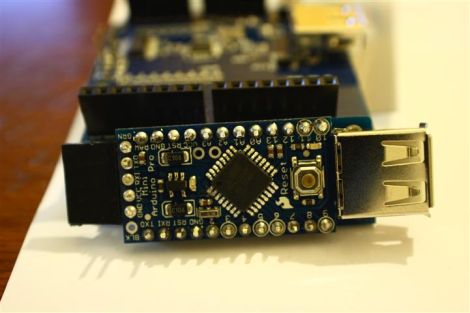
The watch is built around an Arduino Pro Mini, a scavenged Nokia LCD, and a BlueSMiRF Gold. The Bluetooth connects to a Nokia N900 with a little Bluetooth client app [Ahmet] wrote. He also wrote a small GUI for the watch’s LCD display. Afterwards, he was able to display missed calls, new email, and is now working on support for changing songs on his N900’s media player.

Admittedly, a little work needs to be done on the enclosure. Still, the potential for this watch is much greater than the iPod as a watch project we saw last year. Right now, we’re thinking about what could be added to [Ahmet]’s watch. An accelerometer would probably be on the top of our list, but if you have any ideas feel free to leave them in the comments.

Check out the walk through of the watch’s functions after the break.

Continue reading “Bluetooth Wristwatch Based On An Arduino”

High Voltage: Controlling A Flyback Transformer With An Arduino

If you’d like to build a Jacob’s ladder, an ignition system for a flamethrower, or for some ungodly reason you need 15 kilovolts for a prop replica or cosplay build, this one is for you. It’s an easy to build high voltage power supply that interfaces with an Arduino.

After harvesting a flyback from the power board of a CRT, [Andrew Moser] added a new primary coil to the transformer. This boosts 12 volts that can be easily controlled by an Arduino to something that will arc an inch and a half. The next step building the flyback driver. [Andrew] used a MOSFET and MOSFET driver for this circuit (although he says this guy works without the driver). After that, all that’s left to do is write some software and test it out.

Of course this comes with the boilerplate warning, “If you don’t know what you’re doing, you might die.” That being said, if you ever wanted to test out an Arduino’s resistance to EMP, this is the project for you. Check out the flyback powering a Jacob’s ladder after the break.

Continue reading “High Voltage: Controlling A Flyback Transformer With An Arduino”

Homebrew Weather Station Plus A Pan And Tilt Camera Rig

[Sebastian] wrote in to share his web site, where he has a bunch of different electronics projects. After looking through them, we found a pair that we thought you might find interesting.

The first project is a homebrew weather monitoring station that [Sebastian] put together. He designed a weather shield, incorporating humidity, pressure and light sensors, along with digital I/O ports for monitoring an anemometer. The entire setup is powered using solar panels, and data is relayed to his computer via an Xbee.

The second item that caught our eye was a digital camera pan and tilt rig. The system was built using a Lynxmotion pan and tilt kit, which is controlled by an Arduino. The code he provides allows him to capture very large composite images without having to spend too much time “sewing” them together. While this second project mostly consists of schematics for a base plate and pan/tilt code, it struck us as something that could be very useful for any budding photographers looking to take panoramic shots.

All of the schematics and code for his projects are available on his site, so be sure to look around – you might find something interesting!

Robotic Arm And Claw Sculpted Entirely From ShapeLock

shapelock_robotic_claw

[Alexey] wrote in to share a mechanical claw (Google Translation) he has been hard at work on for quite some time. While a lot of people will turn to some sort of 3D plastic printer such as the MakerBot if they need plastic parts built, [Alexey] didn’t have access to one. Instead, he carefully crafted the entire mechanism from polycaprolactone, or as it’s more commonly known, Shapelock.

Using a wide range of tools from hair dryers and knives to lighting fixtures, he manually sculpted the claw and its control arm out of plastic, piece by piece. We are particularly impressed by the gearing he was able to cut from the plastic, which can be finicky at times.

As you can see in the video below, The claw mimics each movement he makes with the control arm via a handful of Arduino-driven servos. Everything seems to work quite well, and despite the rough translation by Google, we think this is a great project. If you are looking to do something similar yourself, he has plenty of pictures on his site, which should give you a pretty good idea as to how things were put together.

Continue reading “Robotic Arm And Claw Sculpted Entirely From ShapeLock”

Restoring A Jukebox With An Arduino

[Jim] just finished restoring an old Seeburg USC1 jukebox for his father using an Arduino, replacing an electromechanical rats nest of wires. The stack of 45 records were replaced with an Arduino Mega 2560 with an Sparkfun MP3 player shield, and he jukebox lights are now controlled with 74595 shift registers. Because his jukebox isn’t taking in money, the dollar bill validator has been modified into a ‘skip song’ button, and when there are no songs in the jukebox queue, there are 500 additional songs on the SD card that will randomly play.

We’ve seen one of [Jim]’s builds before. Earlier this year he repaired a thirty year old Pachinko machine using the same Arduino + MP3 shield setup. It looks like [Jim] is pretty skilled at revitalizing bulky old electronics. The jukebox restoration is great and has a lot more class than the internet-connected touch screen monstrosities that we still pump money into.

Check out the video after the break for a walk through of this restoration.

Continue reading “Restoring A Jukebox With An Arduino”

A Stackable Motor Driver Shield For The Arduino

The Arduino has been used for many purposes, and  “shields” are available to make many common tasks easier.  However, [Nick] wanted a stackable motor driver shield, so he build one himself!. There are many motor driver shields available for the Arduino, however, there aren’t any that allow one to drive as many motors as were needed for his project, and none that were stackable.

[Nick] had no experience designing and fabricating a custom board, but decided to try his hand at it anyway. Armed with a free version of [Eagle] PCB design software, he designed the board that he needed then sent it to [Seeed] to be manufactured. According to his article, a quantity of 10 Arduino-sized boards can be purchased for the price of $25. At that price point, some hobbyists may want to consider this option rather than manually creating their own circuit.

According to [Nick], he was able to manufacture his first board with no errors on his first run! Not bad for his first try at something like this.

Clicking And Counting With Push Wheel Switches

getting_started_with_push_wheel_switches

Push-wheel switches are somewhat older technology, but [John Boxall] from the Little Bird Electronics blog shows us that they are still quite useful today.

In a quick but thorough demonstration, he discusses how this input technology works, showing off both single digit and multi digit inputs. The former is pretty straightforward, with each of the counter’s outputs tied to an I/O pin on his Arduino. Using multiple counter units is ever so slightly more complicated, but the job is made easier through the use of an NXP 74HC4066 bilateral switch. He shares a snippet of Arduino code that toggles through each of the switches, reading in their values one by one.

His walkthrough is a must-see for those who are just getting their feet wet with Arduinos and various input methods. These counters are great for 1-4 digit input needs, but if you require more digits [John] says that a 12-digit keypad would probably be a better way to go.

Stick around to see a short video demo of the switches doing their thing.

Continue reading “Clicking And Counting With Push Wheel Switches”