Bread Head Makes AVR Programming A Snap

bread_head_quick_avr_programming_header

[Quinn] over at Blondihacks has been working with AVR microcontrollers a lot recently, and wanted a quick way to program the ATtiny13a (her current AVR of choice) while the chip is still seated in a breadboard.

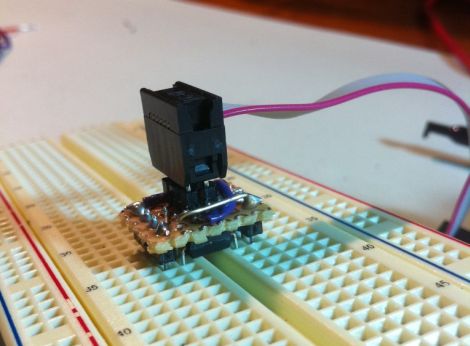
To speed up code revision and testing, she built a small programming header that she calls the Bread Head. The device is wonderfully simplistic, consisting of little more than snappable header pins and a bit of upside-down protoboard.

She soldered six headers to the top (formerly the bottom) side of the board, while a set of eight oversized headers were soldered to the opposite side of the programmer. Small bits of wire were soldered in to connect all of the appropriate pins together before [Quinn] slipped the header snugly over the top of the ATtiny and gave it a quick test. Everything worked perfectly, so she slathered in in epoxy for sturdiness and called it a day.

She says that the programmer works so well that she’s likely to make a similar header for other common AVRs too.


ATtiny Hacks: Robot Halloween Costume

When it comes to Halloween costumes, [Michael] doesn’t like buying expensive and poorly made bits of cloth and fabric that resembles [random Disney character]. Last year, his son decided to be a robot for Halloween and although gray spray paint and dryer vent hose make a very good costume, that only goes so far. The robot needed lights, so [Michael] spent a little time on this build that blinks a few LEDs in a random pattern.

The build is very simple; an ATtiny13 drives two 74HC595 shift registers. The code – all 30-odd lines of it – uses the random() function to shift high or low values to the shift registers. After pausing for a little bit, the cycle continues and a new patterns of LEDs light up.

The electronics of the robot costume could be easily transferred to another theme – astronauts need LEDs on their backpack, and of course aliens communicate with blinking lights. In any event, it would avoid last year’s fiasco with a dozen [Heath Ledger] Jokers. Check out the video of [Michael]’s intergalactic robot son after the break.

Continue reading “ATtiny Hacks: Robot Halloween Costume” →

ATtiny Hacks: SerialCouple – A Standalone Thermocouple ADC Board With Serial Out

ATtiny Hacks Theme Banner

serialcouple_thermocouple_adc_board

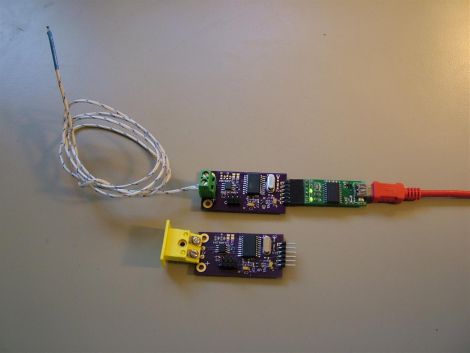
Since we are in the midst of featuring a wide assortment of ATtiny hacks, [Kenneth] wrote in to share a project he has been developing over the last few months, the SerialCouple.

Most all development platforms have the ability to function as an analog to digital converter, but you don’t always need a full-featured board when all you require is serial output for your computer. With his SerialCouple board, [Kenneth] is trying to take some complexity out of the process by building a standalone thermocouple ADC board. The SerialCouple is designed to take analog readings from a thermocouple, converting them to digital values that can be sent to any device over a serial connection. The grunt work is done by a Maxim MAX31855 chip, which converts the thermocouple’s analog data to digital temperature readings. The digital representation of the temperature is then retrieved by the on-board ATtiny2313, which sends the data out the serial port.

If a standalone thermocouple ADC board is something you’ve been looking for, be sure to swing by his site to take a look at his code and schematics.

Continue reading to see a short video demo that explains how the SerialCouple works.

Continue reading “ATtiny Hacks: SerialCouple – A Standalone Thermocouple ADC Board With Serial Out” →

ATTiny Hacks: Run Your Arduino Project On An ATTiny!

Yup. We have all been there. You throw together a really elaborate Arduino project that only really needs a couple pins, far fewer than the Arduino’s native microcontrollers have to offer. Well fear not, [Thatcher] has solved just this problem by adding some ATTtiny cores to the Arduino IDE. His blog details the process from grabbing the MIT developed core files and loading them up in your Arduino software directories. The modification looks simple and although [Thatcher] shows the whole process on a Mac it only involves unzipping and tossing files into a folder. With ATTiny chips only a few bucks each this is perfect for those simple software driven hacks that don’t require an entire Uno duct taped to the outside of an enclosure.  Nice work [Thatcher]!

Announcing Our Next Theme: ATtiny Hacks

ATtiny Hacks Theme Banner

It is time once again to announce a new theme. This time around, we have chosen to highlight projects built around the ATtiny series of processors. These are 6 to 32 pin AVR processors that run up to 16 MHz and have anywhere from 512 Bytes of flash with 32 Bytes of RAM to 16K of Flash with 512 bytes of RAM. We’re guessing that this will be a pretty popular theme since so many people are using Atmel processors these days. If you have a project that you would like to see on Hackaday that is using an ATtiny processor, please hit us up on our tip line. If we like it, we may we choose to feature it in one of our daily themed hacks.

To kick off this theme, here is a nice write up about a stepper motor driver based around the ATtiny13. This project reads the analog value on pin B4 and adjusts the speed of the stepper motor. It is well documented and includes source code.

VGA Video Output With An ATtiny

vga_video_attiny

[Fernando] is working on creating a game at home, with live scoring displayed on a large LCD TV. He’s keeping mum as to what the game entails, but he was more than happy to spill the details on how he planned to use the television as a wireless scoreboard.

The writeup is the first part in what will likely be a substantial series of progress reports, covering how he used an ATtiny45 to drive his LCD display. Eventually, the scoreboard will use a Bluetooth adapter for wireless input, but his immediate goal was to get the display running properly.

He explains how he uses the tiny micro and its limited set of I/O pins to drive the display, dipping into some of the technical details along the way. He discusses how he worked out the timings of the VSYNC and HSYNC pulsing, as well as how how the characters are actually drawn on the screen.

The article isn’t overly heavy on the technical details, and he has sample code available so you can take a look at how the VGA magic was done, so be sure to check it out.

Tiny External System Monitor Makes It Easy To Keep Tabs On Your PC

tiny_pc_resource_monitor

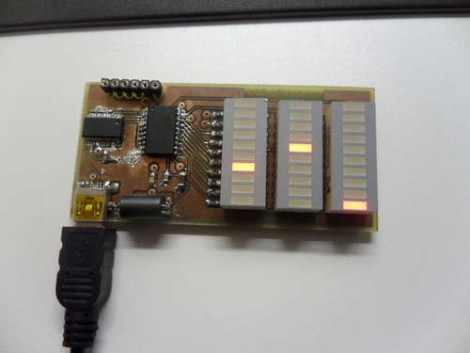
Instructables user [Jan] likes to keep close tabs on his computer’s memory usage, but wanted something more interesting to look at than the standard resource manager. He preferred to have an external display available that would show his computer’s status with a quick glance, and thus this system monitor was born.

His status panel contains a trio of constantly updated LED bars that show his computer’s CPU usage, available physical memory, and virtual memory consumption. With a small footprint being a priority, [Jan] kept the indicator’s size down by using SMD components and by including an on-board UART to USB converter to go along with his ATTiny microcontroller.

He uses a Python script to gather usage information from his computer, feeding it to his display over USB. The system works pretty well as you can see in the video below, though the virtual memory indicator doesn’t seem to get a ton of action – perhaps it could be used to indicate hard drive activity instead.

If you are looking to build something similar, [Jan] has made all of his code and schematics available for anyone’s use.

Continue reading “Tiny External System Monitor Makes It Easy To Keep Tabs On Your PC” →