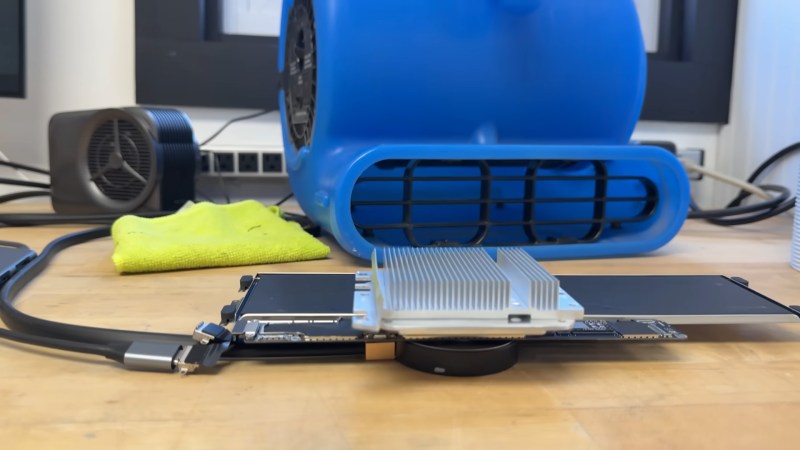
Yes, that's a MacBook Neo. The important parts, anyway.

Unlocking The True Power Of A MacBook Neo By Cooling It

Mobile devices generally have one Achilles’ heel when it comes to computing power: thermal throttling. Outside of bulky desktop and server systems, chips have to run at a fraction of their true potential to keep from cooking themselves to death. The MacBook Neo, with its iPhone-derived A18 processor, is no exception. Since Apple’s budget offering first came out, though, there’s been an arms race on the benchmark sites to see just how far you can push it, and [Salem Techsperts] briefly claimed the accolade of ‘fastest MacBook Neo’, and of course provided a video showing how it’s done.

It’s hardly rocket science: you cool the chip. Outdoing Apple’s cost-cutting design in that regard is not difficult; you can evidently get notable performance increases just with decent thermal paste. [Techsperts] goes further than that, combining PTM7950 phase-change thermal paste with a peltier cooler to actively suck watts of heat out of the SOC, heatsinks that likely weigh more than the laptop itself, and an industrial air blower to serve as the highest CFM air cooler we’ve probably ever seen.

By this point it’s hardly a laptop anymore, with the logic board removed to sit inside a cooling sandwhich– water cooled with the peltier on one side, and air-cooled by the blower on the other–but the point wasn’t to have a light, practical daily-driver here. Apple already covered that. The point was to go fast. With 41.47% higher Cinebench scores than the stock laptop, and a power draw of 11W compared to the stock 4W, we can say he’s succeeded in that. Interestingly enough, [Techsperts] could not best the top 3DMark score, in spite of his Cinebench success. It’s possible he just lost the silicon lottery when it comes to the GPU section of this particular A18 chip, but if you have another theory, be sure to let us know in the comments.

Of course you could go colder. For all the absurd impracticality of this setup, it’s not liquid nitrogen cooling, which means there are still gains to be made-– we saw a Pi 5 clocked at 3.6GHz that way last year— and that just means the crown is laying in the gutter, waiting for anyone to pick it up. Unless they already have by the time this prints. In which case, all hail the cryogenic king, and please send us a tip so we can hail their glory.

Continue reading “Unlocking The True Power Of A MacBook Neo By Cooling It”
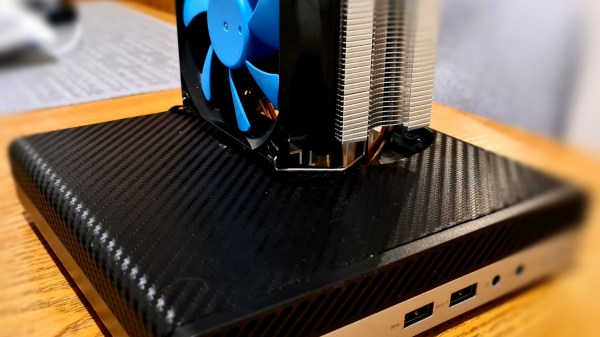
Mini PC with the mod described, a large tower fan sticking out of a hole in the top cover

MiniPC Surgery Makes It 50% Cooler

[G3R] writes to us about a mod they did on a HP ProDesk/EliteDesk 400 G3 miniPC they use as a home emulation center. The miniPC would overheat as soon as the CPU load increased, resulting in frame drops and stutters, as well as throttling CPU. [G3R] took the original cooling solution, threw out half of it and modified the remaining half to accept a tower CPU cooler.

The modification is invasive in all the right ways. [G3R] shows how to de-fin the current heatsink and smooth it over with a… welder? Our guess is that the heatsink fins were soldered to the heatsink base, and in that case, a heat gun should also work. Afterwards, you’re supposed to cut a hole in the upper case, then re-wire the fan connections, and create custom brackets to attach the tower fan – [G3R] explains how to do it all and what to watch out for.

The results are fascinating. After performing the mod, both idle and under-load temps got cut down by 50%! Idle temps went from 50 to 25 °C, and under-load temps dropped from 79 to 40 °C – surely, with way less throttling involved. Not only this lets [G3R] play Breath Of The Wild without hiccups, it also certainly improves overall lifespan of the mini-PC, despite the intervention being mechanically harsh.

Making our devices, quite literally, cooler is a venerable tradition of hackers. Just a few weeks ago, we covered a simple 3D printable LGA 1700 CPU bracket which can gain you some much-desired thermal contact. Sometimes we encounter proprietary and weird cooling fans that fail, and then we understand their workings and build a substitute. And, even if your GPU was never meant to have a fan, you can add one anyway!

The Best Part Of Waking Up Just Got Better

If you ask us, one of life’s greatest pleasures is sitting down with a nice, hot cup of something of coffee, tea or hot chocolate. Of course, the best part of this ritual is when the beverage has cooled enough to reach that short window of optimal drinking temperature.

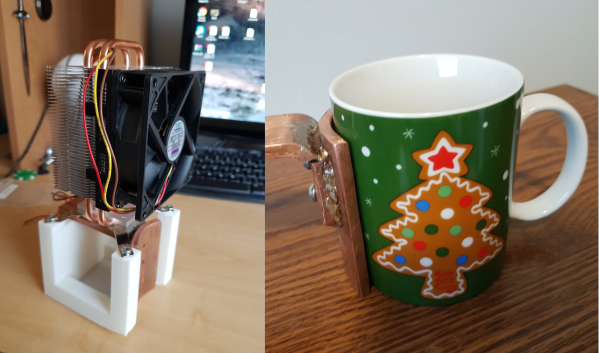
Often times the unthinkable happens—we sip too early and get burned, or else become distracted by watching cat videos reading our colleagues’ Hackaday posts and miss the window altogether. What’s to be done? Something we wish we’d thought of: using the beverage’s heat to cool itself by way of thermal dynamics. For [Scott Clandinin]’s entry into the 2018 Hackaday Prize, he hopes to harness enough heat energy from the beverage to power a fan that will blow across the top of the mug.

[Scott] enlisted a friend to smith a thick copper slab in a right angle formation. The gentle curve of the vertical side pulls heat from the ceramic mug and transfers it to the heat sink of a CPU cooler. Then it’s just a matter of stepping up the voltage produced by the thermoelectric generator with a boost converter. Once he’s got this dialed in, he’d like to power it with supercaps and add a temp sensor and a microcontroller to alert him that his moment of zen is imminent. We’ll drink to that!