Just Put Your Lips Together To Turn On A Lamp

whistler-lamp-control

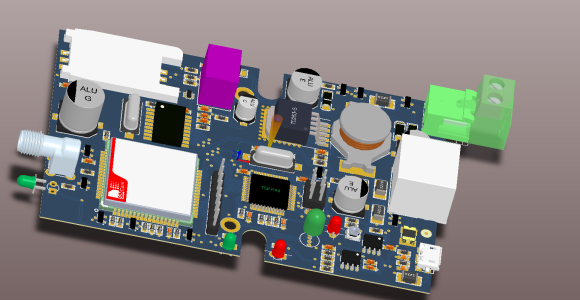
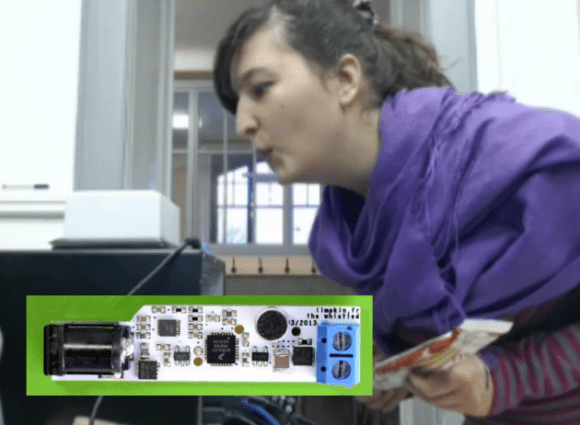
The inlaid image is a controller board which [Limpkin] developed to add whistle control as a home automation option. It has an effective range of around fifteen feet and does a good job of detecting whistles from many different people. Here is one of the test subjects (captured with a hidden camera) whistling to the white LED lamp in order to switch it on.

The board is quite small. [Limpkin] holds it up in the beginning of his test video, which gives a good sense of scale. One end has a barrel jack through which the board gets power. The other end has a two conductor screw terminal which is used for switch your devices. An N-channel MOSFET protects the circuit when a heavy external load is connected. It is capable of driving a respectable 90 watts. If you’re looking to switch mains rated devices you’ll need to bring your own relay to the party.

Audio processing is handled by the Freescale ARM Cortex M4 chip at the center of the board. The Serial Wire Debug (SWD) clock and data pins are both broken out to solder pads so the thing is hackable. [Limpkin] posted the schematic, gerbers, and a code template. But he didn’t release the algorithms he uses for processing so if you want to make this at home you’ll need to figure that out for yourself. If you need help you should check out this whistle-based remote control.

http://www.youtube.com/watch?v=1eIxAMKNphw

Pebble Watch Hack Makes It A Home Automation Controller

[Enrico] loves his Pebble watch, and recently had a chance to explore the code package used to customize its function. It turned out to be really easy to work with so he set out to make the Pebble watch into a home automation controller (dead link; Internet Archive).

So far the two bits of hardware used in his experiments are shown in the image above. The watch itself serves as the controller, interacting with the Ethernet relay board seen in the background. The watch communicates via Bluetooth but you don’t have to know much about that thanks to the example files available from the repository. With communications taken care of he needed a menu system to access commands on the watch. Instead of coding his own he hacked a playlist into the built-in music menu. This allows him to switch the relays on and off again as if he were playing or pausing audio tracks. See it in action after the break.

Continue reading “Pebble Watch Hack Makes It A Home Automation Controller”

Hidden Servo Automates Slat-style Window Blinds

slat-blind-automation

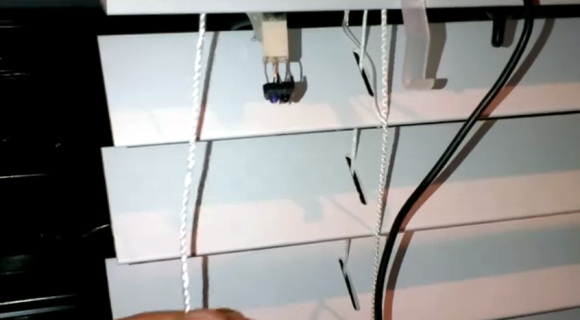
[Home Awesomation] has been working on automating his slat-style window blinds. His focus has been on adjusting the angle of the slats, not on completely retracting the shades. Since the slat angle adjustment requires little torque a servo motor turns out to be just perfect for the job. The good news is that the existing blinds in his house have room in the top enclosure to completely hide his add-on hardware.

The image above is a screenshot from the demo which you can watch after the break. The top enclosure for the blinds is just shown at the top of the frame. Here [HA] is demonstrating a few different control designs which he has been trying out. You can see what looks like a Molex connector with some type of component attached to it. That’s an IR motion sensor and he’s really happy with its performance. He feels the same way about the black momentary push switch sticking down next to the power cable. But his DIY solution that works quite well is the pull string attached to a flexible piece of metal. When that metal bends enough to touch a stationary conductor it completes the circuit, telling the Arduino to start driving the servo.

The main idea behind the project is to poll a temperature sensor, closing the blind automatically to help keep the place cool during the day. We figure if he’s already using a microcontroller to drive the project he might as well throw a cheap Bluetooth in module there and make it controllable with a smart phone.

Continue reading “Hidden Servo Automates Slat-style Window Blinds”

Home Security Hardware Makes You The Monitoring Service

diy-home-security

[Nick] and [Simon] both have home security systems with a monitoring service who will call whenever an alarm is tripped. For [Simon] this ends up happening a lot and he wanted to change the circumstances that would trigger a call. Because of company policy the service is inflexible, so he and [Nick] went to work cutting them out of the loop. What they came up with is this custom electronics board which monitors the security system and calls or texts them accordingly.

They started with the self-monitoring alarm system design we looked at back in September. This led to the inclusion of the SIM900 GSM modem, which is a really cheap way to get your device connected to the cellular network. It also uses a DTMF touch tone decoder to emulate the phone line to keep the security system happy. [Simon] highlights several changes he made to the design, as well as the reasons for them. One idea he has for a possible revision is to do away with the MT8870 chip which handles the touch tones. He thinks it may be possible to use the SIM900’s DTMF features to do that work instead.

SenseLamp Automates Rooms By Replacing Light Fixtures

senselamp

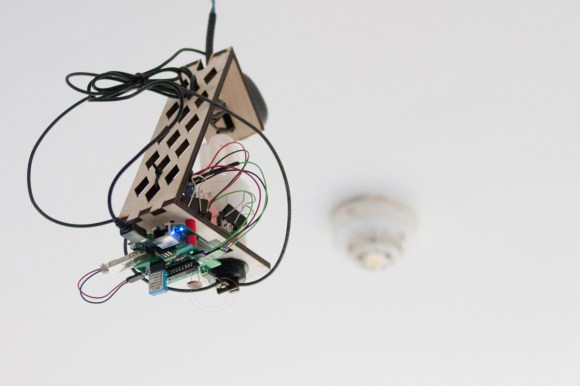
Would you believe that this beautiful light fixture is actually a hacked together home automation project? Okay, so this wire mess is the second of three versions that [Christian] built. It replaces a light fixture in the room, but if you look closely you’ll see that there is a compact fluorescent bulb included in the build. The laser-cut frame acts as a bit of a lamp shade, while providing a place to mount the rest of the hardware.

The final version cleans things up a bit, and adds a footprint for the PIR motion sensor that he forgot to design into this version. The idea is that each lamp monitors motion in the room, switching the light on and off again as necessary. A light-dependent resistor ensures that the bulb is only powered up if the room is dark so as not to waste electricity during the day.

The build includes a sensor package that reports back temperature and humidity data. Communications are provided by a WR703N router rolled into each of the four units installed in his house. With this kind of hardware at his disposal it should be a snap to control every IR remote control device in his house via the network by adding an IR LED and some code to the lamps.

Automatic Closet Lightswitch

closet-door-switch-box

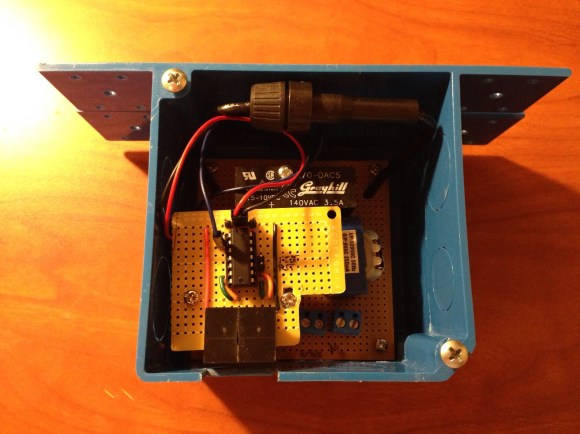
[Dillon] wrote in to tell us about his latest project, an automatic light switch for a the hallway closet in his house. Although this project could probably be done very simply, [Dillon] accomplished everything in a way that actually looks professionally done and has some neat features. Check out his site for more pictures of the build.

Not that we at [HAD] mind a bit of messy wiring, but if it’s going inside a house, neater is always better. On the other hand, this project took nearly a year to go from idea to implementation, so please keep submitting your spaghetti-wired projects.  We understand.

As an electrical engineering major, [Dillon] didn’t skimp on basic electrical components, and has schematics available on his site. A MSP430 microcontroller provides the “brains” for everything, turning the light off after 5 minutes if the doors are not shut. Be sure to check out his video overview after the break with footage of it in action. Continue reading “Automatic Closet Lightswitch”

Remote Control Command Center Includes RF And IR Functions

all-in-one-remote-relay-includes-RF

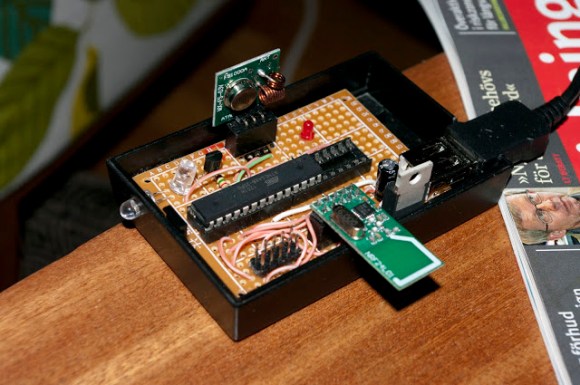
We’re still not quite sure what to call these projects, but as we’ve said before, it’s a pleasure to see what people are doing to use one remote control to rule them all. The project being developed by [Kalle Löfgren] seeks to simplify the remote controlled items in his home by combining all control into one smart phone app. The linchpin of the system is this command center which lets a smart phone send IR and RF commands to various devices (translated).

We’ve seen this done with pretty beefy microcontrollers, like this project that uses a PIC32. But the communications going on between the smartphone and the base station are very simple, as are the remote control commands which are being relayed. So we’re not surprised to find that this setup just uses an ATmega88, IR LED, Bluetooth Module, and RF module. There is no connection to a computer (the USB simply provides power via a cellphone charger). If you’re interested in how [Kalle] sniffed the protocol for each remote he wrote two other articles which you can find in the write-up linked above.