Learning Letters, Particularly R, F, I, & D

8993376562_55ff3846b3

After [yohanes] picked up a toy at a yard sale – a Leap Frog Letter Factory Phonics – he thought he could do better. The toy originally asked a child to find a letter, and after digging one of 26 plastic characters out of a plastic tub and placing them on the Letter Factory’s sensor, would play a short musical ditty. [yohanes]’ version does the same, but because he made it himself it is infinitely more expandable.

The letters for [yohanes]’ version are RFID tagged. This, combined with a cheap RFID module and a bluetooth module means a Raspberry Pi can read RFID cards from across the room. From there, it’s a simple matter of writing up some Python to ask his toddler for a letter, reading the bits coming from a bluetooth, and keeping score.

The build isn’t over by a long shot. [yohanes] still needs to make his build multilingual by adding Indonesian and Thai. There’s also a possibility of adding a spelling game to make it more interesting.


Raspi Internet Radio With Google Music

SAMSUNG

It’s not his first Internet radio, but [Matthias]’ modernization of a classic Bakelite radio is a real, functional piece of art. Not only does it retain the look of an old radio, it also has the capability to listen to streams and his entire MP3 collection through the Internet.

For the software, [Matthias] used jquery to pull down web radio streams and soon figured out how to play all his MP3s through Google Music. This, and a web-based remote for his mobile device, allows the new old-school Internet radio to play everything [Matthias] would ever want to listen to.

The controls for the radio are rotary encoders, with indication provided by a really fabulous numbered LED display (seen above) replacing the 70-year-old tuning dial. These numbers indicate both the current Google Music playlist or the currently playing Internet stream, depending on what mode the selector knob is at.

It’s a beautiful piece of work, and the knobs and dials look like something that could have come from a real 70-year-old radio. That’s a win in our book.

Hackaday Links: Sunday, June 2nd, 2013

hackaday-links-chain

Who knew you could build your own digital computer out of paperclips? EMSL did a great feature on the guide which was published in 1968.

Trying to keep your Raspberry Pi from overheating? Make it log its core temperature on the web.

[Lennart] must be some kind of Eagle CAD guru. Check out these PCBs that incorporate his logo in a very artsy way.

No need for a tripod when you can just strap the video camera to your safety glasses for some POV project videos.

Turn your Pogoplug E-02 into a Shairport (Airplay clone) music hub. Just follow this guide which installs Arch Linux and all the supporting packages you need.

We don’t have the background to judge the quality of this build. But you have to admit it’s pretty neat to see a radio telescope built using a tin can and an umbrella.

Dead rodent email: get a notification every time your mouse trap springs.

Arduino-compatible, Quad-core ARM Dev Board

The Advent of the Raspberry Pi has seen an explosion in the market for ARM dev boards, sometimes even with pinouts for Arduino shields. The UDOO, though, takes those boards and ramps up the processing power for some very, very interesting builds.

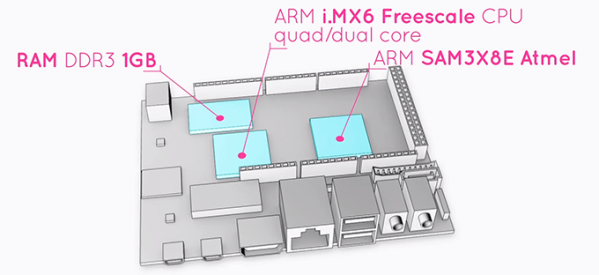
The UDOO comes equipped with a dual or quad-core ARM CPU running at 1GHz with 1 GB of RAM. Also on board is the Atmel SAM3X8E – the same chip in the new Arduino DUE – and has pinouts for all those Arduino shields you have lying around.

In addition to serving your next project as a souped-up Raspberry Pi, UDOO also includes 78 (!) GPIO pins, Gigabit Ethernet, a camera connector, one SATA port (on the quad-core version), and an LVDS header for attaching LCD monitors. Basically, the UDOO is the motherboard of an ARM-powered laptop with the pinouts to handle Arduino shields. It’s just like [Bunnie]’s laptop, only this time you can actually buy it.

The UDOO doesn’t come cheap, though: on the UDOO Kickstarter, the dual-core version is going for $150 while the quad-core is priced at $170. Still, if you need the power to run a pair of Kinects or want to build an awesome torrent box, you’d be hard pressed to find a more powerful board.

HP16500B Logic Analyzer Controlled With RS-232 And More

hp16500b-logic-analyzer

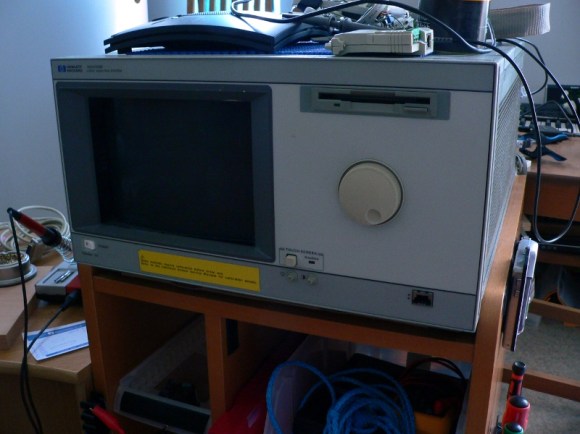
We’re pretty spoiled these days in that hobby electronics has made a lot of cool tools available on a budget. It’s hard to think of a better example than a logic analyzer, which you can get for a day or two of pay. Consumer-level devices just didn’t exist until a few years ago. [Jouko S] has this HP16500B industrial grade logic analyzer in his shop. It’s from the early 1990’s and it’s got a ton of features. Grabbing a still functional yet super-old model used to be the only way for hobbyists. But one thing you won’t find on it is the ability to connect it to your USB port to get screen captures. Younger readers might not recognize the slot at the top for magnetic media called a floppy disk which is the in-built way of recording your sessions. He set out to find an easier way to get color screen captures and ended up adding RS-232 control to the old hardware.

There is a 25-pin port on the back of the old hulk. But it is a female connector and he didn’t have the adapters on hand to make it work with his serial-to-USB converter. During development he used a breadboard and solder-tail connector to patch into the necessary signals. This was all hooked up to a Raspberry Pi which he planned to dedicate to the system. It worked, and he was able to use an interactive terminal for the rest of his sleuthing. With much trial and error he figured out the commands, and wrote some Python code for the Pi side of the equation. He can now pull color screenshots with ease thanks to the utilities available in the Python Imaging Module.

Programming Microcontrollers With A Raspi

rasduino

The advent of the Arduino brought the world of microcontrollers to hobbyists, students, and artist the world over. Right now we’re in the midst of a new expansion in hobbyist electronics with the Raspberry Pi, but we can’t expect everyone to stay in the comfortable, complex, and power-hungry world of Linux forever, can we? Eventually all those tinkerers will want to program a microcontroller, and if they already have a Raspberry Pi, why not use that?

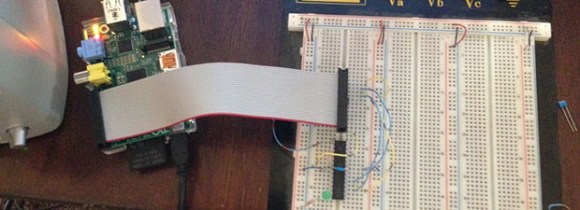
[Kevin] wanted to turn his Raspi into an AVR development workstation, without using any external programmers. He decided to use the Raspi’s SPI port to talk to an AVR microcontroller and was able to make the electrical connections with just a few bits of wire an a handful of resistors.

For the software, [Kevin] added support for SPI to avrdude, available on his git. Theoretically, this should work with any AVR microcontroller with the most popular ATMegas and ATtinys we’ve come to love. It doesn’t support the very weird chips that use TPI programming, but it’s still extremely useful.

An Overkill Network Adapter For Retrocomputers

amiga

If you want to get an old Apple, Commodore 64, Amiga, or any other retrocomputer up on the Internet, this is for you. [Stian] had an Amiga 500 lying around and wanted to put it on a network. The A500 isn’t expandable, so he needed to look at some sort of adapter to put it on a network. The solution came to him in the form of a Raspberry Pi, a null modem cable, and a few bits of software.

To connect his Amiga to his network, [Stian] made a small serial converter board for his Raspi that breaks out the Tx and Rx pins on the Pi to a 9-pin serial port. With the physical connection to the Pi made, the only thing left to do was to get some software for the Amiga, namely AmiTCP and PPP. It’s not exactly a fast network connection, but this build allows [Stian] to connect to WiFi networks with ancient hardware.

One interesting aspect of [Stian]’s build is the fact it’s completely transferable to other retrocomputers – everything from old S-100 bus computers to classic macs, apples, and pretty much anything else with a serial port that supports PPP. Even with the expense of a Raspberry Pi, it’s much cheaper than absurdly expensive second-hand SCSI to Ethernet controllers and other tomfoolery.