Two Motor Walking Robot With A TI Launchpad

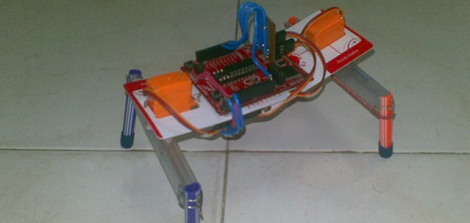
Last month, [Vinod] bought a pair of hobby servos on a whim. These servos sat on the shelf for a while until [Vinod] asked his friend what he should use them for. [Achu] suggested using the servos for a walking robot, so after checking out a few YouTube videos of some servo-powered walkers, [Vinod] built his own.

The robot is built around a TI Launchpad housing an MSP430 microcontroller. An extremely simple circuit (just some servos and a cap) power the robot along by alternating the direction the servos turn.

[Vinod]’s two-servo locomotion mechanism is very reminiscent of BEAM robots, extremely simple walking (or rolling) robots made out of just a few logic circuits. This TI Launchpad is in some ways even simpler; where [Mark Tilden]’s Walkman robot used several 74-series octal buffers, [Vinod]’s project is just a Lanuchpad and a pair of servos.

All the code is available on [Vinod]’s blog. Check out the demo video after the break.

Continue reading “Two Motor Walking Robot With A TI Launchpad”
Turning An IBM Selectric Into A Printer.

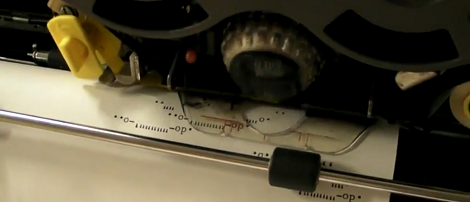
In the days when computers took up an entire room, a CRT monitor was a luxury. Most of the time, input and output was handled with a teletype – a typewriter connected directly to the computer. [Josh] wanted his own typewriter terminal, so he took apart an IBM Selectric II and got to work.

Instead of an electronic keyboard, the IBM Selectric II uses and electromechanical keyboard to tilt and rotate the Selectric’s typeball. In normal operation, a series of shafts underneath the keyboard are engaged. [Josh] added parts of an erector set to those levers and tied each one to one of 16 solenoids.

With a set of solenoids able to print any key with the help of an Arduino, [Josh] had a fully automated typewriter from the early 1970s. [Josh has been printing out a lot of ASCII art lately in preparation for the Kansas City Maker Faire later this month. You can check out the build videos after the break.

Continue reading “Turning An IBM Selectric Into A Printer.”

Scraping Blogs For Fun And Profit

Sometimes when you’re working on a problem, a solution is thrown right at your face. We found ourselves in this exact situation a few days ago while putting together Hackaday’s new retro edition; a way to select a random Hackaday article was needed and [Alexander van Teijlingen] of codepanel.net just handed us the solution.

To grab every Hackaday URL ever, [Alex] wrote a small Python script using the Beautiful Soup screen scraping library. The program starts on Hackaday’s main page and grabs every link to a Hackaday post before going to the next page. It’s not a terribly complex build, but we’re gobsmacked a solution to a problem we’re working on would magically show up in our inbox.

Thanks to [Alex], writing a cron job to automatically update our new retro edition just got a whole lot easier. If you’d like to check out a list of every Hackaday post ever (or at least through two days ago), you can grab 10,693 line text file here.

Brute Forcing The Password On A Terribly Insecure Hard Drive

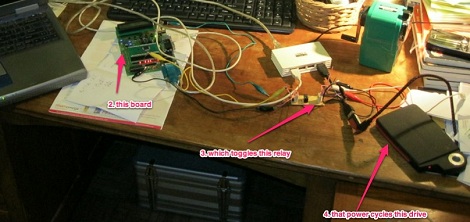
While at work one day, [Marco] was approached by a colleague holding a portable USB hard drive. This hard drive – a Freecom ToughDrive – has a built-in security system requiring a password every time the drive is mounted. Somewhat predictably, the password on this hard drive had been lost, so [Marco] brute forced the password out of this drive.

The Freecom ToughDrive requires a password whenever the drive is plugged in, but only allows 5 attempts before it needs to be power cycled. Entering the passwords was easy to automate, but there was still the issue of unplugging the drive after five failed attempts. [Marco] called upon his friend [Alex] to build a small USB extension cable with a relay inserted into the 5 V line. An easy enough solution after which the only thing needed was the time to crack the password.

The rig successfully guessed the password after 500 attempts, or after cycling the power 100 times. This number is incredibly low for getting a password via brute force, but then again the owner of the hard drive was somewhat predictable as to what passwords they used.

Open Rail, Or, Why Didn’t We Think Of This?

Hackaday readers familiar with the with the CNC and automated machinery scene will be familiar with MakerSlide, the open-source linear bearing system. This linear movement system composed of special aluminum extrusions and mounting plates riding on v-wheels has been used in a lot of awesome builds including the Quantum ORD Bot 3D printer and the Shapeoko CNC router. If there’s one downside to the MakerSlide, it’s the hard-to-source aluminum extrusion with the requisite v-wheel guides. [Mark] and [Trish] of Phlatboyz have an ingenious solution to this problem: just have bolt-on v-wheel guides. It’s an idea so simple we’re kicking ourselves for not thinking of it first.

Open Rail is completely compatible with the MakerSlide linear bearing system. Instead of requiring a special aluminum extrusion, the Open rail system uses regular, plain-jane aluminum extrusions available at any reputable hardware store. Just pop a few t-nut into the Open Rail and attach it to your extrusion. Couldn’t be easier.

Considering how easy it is to find surplus aluminum extrusion, we’ll expect a few gigantic MakerSlide and Open Rail derived CNC projects in the very near future.

Adding The Apple ‘breathing LED’ To A Motorcycle

[spiralbrain] has a beautiful KTM Duke 200 motorcycle, but he’s found the factory configuration is a little bit plain. Wanting to add his own unique touch to his bike, he decided to add a ‘breathing LED’ to the parking light that slowly changes its brightness much like the LED on recent Macs.

From the factory, [spiralbrain]’s bike uses extremely inefficient (and somewhat ugly) T10 lamps for the parking light. This was changed over to a 12 Volt white SMD light bulb, but what really makes this build special is the way [spiralbrain] is controlling this lamp.

[spiralbrain] added a very tiny circuit consisting of an 8-pin microcontroller (a PIC12F683) that slowly dims the new SMD light bulb using the built-in PWM module. When the bike is taken out of neutral, the microcontroller stops at the highest PWM setting so the ‘breathing’ LED function is only engaged when not moving.

It’s an interesting mod that’s sure to draw some attention when [spiralbrain] is showing off his bike. As a bonus, the mod is completely reversible, so the bike’s warranty is still good.

Hackaday Links: June 12, 2012

Amazing 3D rendering in real-time

Ah, the 90s. A much simpler time when the presenters on Bad Influence! were amazed by the 3D rendering capabilities of the SGI Onyx RealityEngine2. This giant machine cost £250,000 back in the day, an amazing sum but then again we’re getting nostalgic for old SGI hardware.

Well, Mega is taken… let’s call it Grande

[John Park] needed to put something together for last month’s Maker Faire. A comically large, fully functional Arduino was the obvious choice. If you didn’t catch the demo last month, you can grab all the files over on Thingiverse.

Is that an atomic clock in your pocket or… oh, I see.

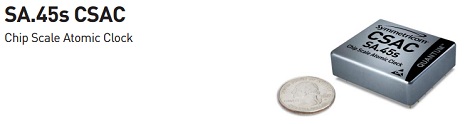
Here’s the world’s smallest atomic clock. It’s made for military hardware, so don’t expect this thing to show up at Sparkfun anytime soon; we can’t even fathom how much this thing actually costs. Still, it’ll be awesome when this technology trickles down to consumers in 10 or 20 years.

Converting a TRS-80 keyboard to USB

[Karl] is working on an awesome project – putting a Raspberry Pi inside an old TRS-80. The first part of the project – converting a TRS-80 keyboard to USB – is already complete. We can’t wait to see this build finished.

 A DIY Propeller dev board

Last week we complained about the dearth of builds using the Parallax Propeller. A few noble tinkerers answered our call and sent in a few awesome builds using this really unique micro. [Stefan]’s Propeller One is the latest, and looking at the schematics it should be possible to etch a single-sided board for this project. Awesome work and thanks for giving us a weekend project, [Stefan].