Panning GoPro Mount Catches Bad Drivers On Video

gopro-mount

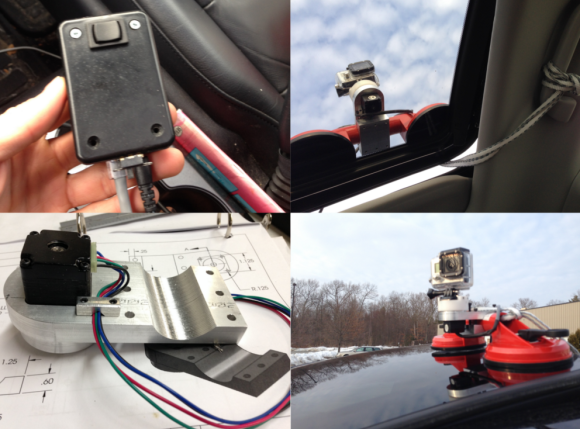
[Chris] must live in a neighborhood with a lot of bad drivers. He built this motorized panning GoPro mount so he can record and share his neighbors’ mobile misadventures with the world. He started with a custom machined aluminum frame. The frame clips onto a suction cup mount grab bar. The stock GoPro mount sits on a machined HDPE puck, which is rotated by a NEMA 11 stepper motor. [Chris] used a Pololu A4988 stepper motor driver to handle the coils. Initially he used an Arduino to generate pulses for the stepper driver. A true Hackaday fan though, he decided that an Arduino was overkill, and broke out a 555 timer. A DPDT switch powers up the 555 and controls the stepper driver’s direction input. The electronics all fit neatly in a small project box which doubles as a hand controller.

While setting up for a test drive [Chris] found that he could only lock down one suction cup on his car’s curved sunroof. Considering the light weight of the GoPro, one suction cup is probably enough. Just to be safe, [Chris] added a rope leash down through the sunroof.

We think the stepper motor was a good choice for this project. Since the motor is direct drive, there are no gears to strip. The stepper’s holding torque also keeps the camera pointed in the right direction at highway speeds. With no wires directly connecting the GoPro to the car, [Chris] can spin the camera 360 degrees without worrying about tangles. Verifying the camera’s direction is just a matter of looking up through the car’s sunroof. Click past the break to see [Chris’s] camera mount in action. 

Continue reading “Panning GoPro Mount Catches Bad Drivers On Video”

Build Your Own Elektrosluch 2 And Save €45

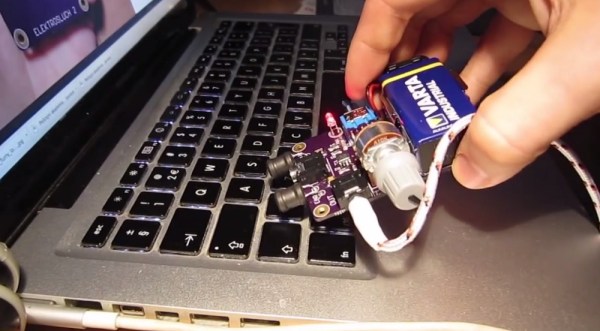
[Jonas] over at LOM Instruments is running an Indiegogo campaign for his newest creation, Elektrosluch 2. Like it’s predecessor, Elektrosluch 2 is a means to listen to the electromagnetic sounds of the world around you. Fans, computers, cell phones, routers, and just about anything electronic create strange and interesting sounds when probed with Elektrosluch 2. The campaign seems to be doing well enough with its target audience of experimental music and audio folks. However at €45 ($62.37) it’s a bit pricey for our blood. Unfortunately, [Jonas] hasn’t open sourced the project. All hope is not lost though, as Elektrosluch 2 appears to be simple enough that our astute readers should be able to build their own.

The concept is easy to understand: a coil of wire placed within a magnetic field will have an induced current proportional to the strength of the field. Electric Guitar pickups operate on the same basic principles. [Jonas] appears to be using two coils – probably tuned to different frequencies. We’re talking about relatively small magnetic fields here, so the signal will need to be amplified. In the Elektrosluch 2, the amplifier is an 8 pin SOIC which we can’t quite make the label out on. A few capacitors and resistors limit the bandwidth to audio frequencies.

[Alan Yates] created a similar circuit to diagnose dead Christmas lights. In [Alan’s] case, he used a pin instead of a coil. Two transistors and a handful of discrete components performed the amplification duties.

Continue reading “Build Your Own Elektrosluch 2 And Save €45”

Black Orb Just Wants Someone To Talk With

spaceReplay

A team at the Royal College of Art has created Space Replay, a floating black orb that records and plays back conversations from passers-by. Space Replay is a neutrally buoyant helium balloon carrying a small payload. An Arduino, an Adafruit Wave Shield, and a small speaker make up the balloons’ brain. The team used the waverp library to record and play back sounds through their shield. 3 lithium coin cells power the system. A small vacuum formed plastic housing keeps all the internal parts together, as well as acts as a small speaker cone to amplify sounds entering and leaving the orb.

As the video shows, the final result is rather creepy. A slight breeze in a subway station caused the orb to move slowly down the hallway. One would think that space replay would freak a few people out, or at least entice the curious to touch it. Other than one amused elevator rider, the unflappable London public paid no mind to it. Maybe if it had some tea…

Continue reading “Black Orb Just Wants Someone To Talk With”

Welcome To Droning On

droning-on-logo

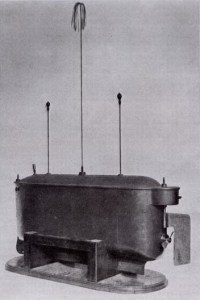
Tesla_boat1Welcome to Droning On, Hackaday’s new column covering all things unmanned. In this column we will primarily focus on aerial vehicles, both fixed and rotary wing. Expect to see traditional R/C, as well as First Person View (FPV) models, computer controlled autopilot systems, as well as anything new that shows up on our radar.


First, a little bit of history. The earliest radio control vehicle in history was designed by a man known well to Hackaday, Nikola Tesla. Tesla presented a radio controlled boat at an electrical exhibition in New York in 1898. Tesla called the system “Teleautomaton” and said the craft utilized a borrowed mind. In addition to cruising around a man made pond, the boat could solve equations by blinking lights atop two of its masts. Tesla would encourage viewers to call out math equations, then flash the lights from the boat’s control panel.

For many years R/C as well as its cousins Free Flight and control line were hobbies occupied solely by hackers. One needed to have metal machining skills to build engine parts, draftsman skills to read plans, and carpentry skills to build airframes. Radios were built from tubes. Control, if it may be called such, was all or nothing – so-called “bang-bang” systems. Much like their model railroad compatriots, R/C plane modelers built with the parts they had on hand. Several early DIY R/C planes were controlled by rotary telephone dials. Dial 1 to pull up, 2 to turn left, etc. Control surfaces were moved by rubber powered escapements rather than the servos we’ve come to know and love. Aerodynamics also came into play. With such rudimentary control systems, planes were designed to be inherently stable. Thankfully there were numerous proven air frame designs available from the free flight arena. Slow flight, high dihedral, and docile stall behavior were the rule of the day. Early R/C planes could be thought of as free flight vehicles with occasional suggestions via radio control. Click past the break to find out more about drone history, and to read about the recent FAA judgement.

Continue reading “Welcome To Droning On”

The Tannin DIY MIDI Controller

tannin-ctlr

[Shantea] needed a DJ controller. While there are commercial controllers out there, none of them fit what he was looking for. He solved the problem by building the Tannin DIY MIDI controller. Tannin features 19 buttons, 16 potentiometers, and 4 LEDs. Buttons can send different MIDI messages for short presses and long presses. Pots can send 6 note on/off messages as well as MIDI control messages depending on their position. The LEDs blink in beat with the MIDI in clock. Everything is programmable and can be mapped thousands of different ways. The heart of the system is an Arduino Nano. [Shantea] used the hairless-midi library to convert MIDI to serial. The Arduino interfaces to a PC via serial over USB. On the host PC side, he ran loopbe30 to create a virtual MIDI cable to Traktor, his DJ software.

We love a build that looks just as good on the inside as on the outside, and Tannin doesn’t fail to impress in this respect. The frame is MDF, and the control panel is laser etched plastic on 3mm of Plexiglass. We really like Tannin’s flavone flair. Inside the case, wiring is kept organized and neat by zip ties and strips of wood below the button grid. [Shantea] had some noise issues connecting pots to flying wires, so he used a custom printed circuit board with a ground plane to gang the pots into 2 banks of 8. The results are something any controllerist would be proud of. Click past the break to see Tannin in action.

Continue reading “The Tannin DIY MIDI Controller”

The Flaming Yinlips

furan-yinlips

No, that’s not a Playstation Vita up there, it’s a “Yinlips YDPG18A” portable game system. [Ian] found that his Yinlips was lacking in the flash memory department, so he fired up his soldering iron. The Yinlips is based on an Allwinner Sunxi series processor, and uses a standard TSOP48 footprint flash. There is some standardization in flash pin out and packages, so [Ian] picked up the largest pin compatible chips he could find – a pair of 256 gigabit (32 gigabyte) chips from Micron. Desoldering the existing flash proved to be a bit of an adventure as the flash was glued down. [Ian] also didn’t have his hot air gun handy, making things even more interesting. Careful work with a razor blade broke the glue bond.

It turns out that the soldering was the easy part. All flash chips have geometry, die count, page size, block count, sector size, etc. The geometry is similar to the geometry in a hard drive. In fact, just like in modern hard drives, a system will read some basic information before accessing the full storage array. In the case of NAND flash, the processor can access the first page of memory, and query the flash for its part number. Once the part number is known, the geometry can be determined via a lookup table. [Ian] checked the NAND table on github, so he knew going in that his flash chips were not supported. Due to the complexities of booting Allwinner processors into Linux or Android, the table and the NAND driver that uses it exist in several places. The bootloader’s axf file, U-Boot, and several flash application binaries sent from the PC based LiveSuit flash app all required modification. Most of these files were packed into a single flash image. [Ian] used imgrepacker to unpack the image, then opened the hex files. The fact that he knew what the original flash parameter tables looked like was key. He searched for an existing Micron flash table entry, and replaced the parameters with those of his new chips.

With all the files modified, [Ian] re-packed his flash image and sent it over. The Yinlips rewarded his hard work by continually resetting in a bootloop. [Ian] wasn’t going to give up though. He wired into the boot console, and discovered that a CRC check failure on one of his modified files was causing the reset. He then disassembled binary issuing the reset. Changing the return value of the CRC to always pass fixed the issue. [Ian’s] now has a collagen infused Yinlips with 58GB of internal storage. Pretty good for a device that only started with 2GB.

A Low Cost Arduino FPGA Shield

[technolomaniac] is kicking butt over at Hackaday Projects. He’s creating a low cost Arduino based FPGA shield. We’ve seen this pairing before, but never with a bill of materials in the $25 to $30 range. [technolomaniac’s] FPGA of choice is a Xilinx Spartan 6. He’s also including SDRAM, as well as an SPI Flash for configuration. Even though the Spartan 6 LX9 is a relatively small FPGA, it can pack enough punch that the Arduino almost becomes a peripheral. The main interconnect between the two will be the Arduino’s ability to program the Spartan via SPI. Thanks to the shared I/O pins though, the sky is the limit for parallel workflow.

[technolomaniac] spent quite a bit of time on his decoupling schematic. Even on a relatively small FPGA power decoupling is a big issue, especially when high speed signals come into play. Thankfully Xilinx provides guides for this task. We have to mention the two excellent videos [technolomaniac] created to explain his design. Documenting a project doesn’t have to be hours of endless writing. Sometimes it’s just easier to run a screen capture utility and click record. As of this writing, the schematic has just been overhauled, and [technolomaniac] is looking for feedback before he enters the all important layout stage. The design is up on his github repository in Altium format. Due to its high cost, Altium isn’t our first pick for Open Hardware designs. There are free viewers available, but [technolomaniac] makes it simple by putting up his schematic in PDF format (PDF link). Why not head over to projects and help him out?

Continue reading “A Low Cost Arduino FPGA Shield”