Ask Hackaday: Wiping Your Bum With An Arduino?

TP

Over or under? Standing or sitting? Truly, toilet paper has been the focus of the most irreconcilable arguments ever. The folks on the Arduino Stack Exchange have a far more important question: how do you trigger an alarm when your TP supply is low?

[user706837] asked the Internet this question in response to his kids never replacing an empty roll. This eliminates the most obvious means of notifying someone of an empty roll – looking at it before you sit down – and brings up a few interesting engineering challenges.

Most of the initial ideas deal with weight or some sort of light sensor that can differentiate between the white TP and the brown roll. A much, much more interesting solution puts a radioactive source in the TP holder’s spring-loaded rod and uses a sensor to detect how much TP is left. A quick back-of-the-wolfram calculation suggests this might be possible, and amazingly, not too dangerous.

We’re turning this one over to you, Hackaday readers. How would you design an empty toilet paper alarm? Bonus points awarded for ingenuity and cat resistance.

Image source, and also one of the longest and most absurd Wikipedia articles ever.
A Cocktail Shaker With Android And Arduino

drinks

The most rewarding part of any project must be sitting down to see the fruits of your labors set in action for the first time and relaxing with a nice drink. [Tony DiCola] is really showing off his ability to think ahead, because his smart cocktail shaker takes care of the post-build celebration, measuring out drinks with exacting precision.

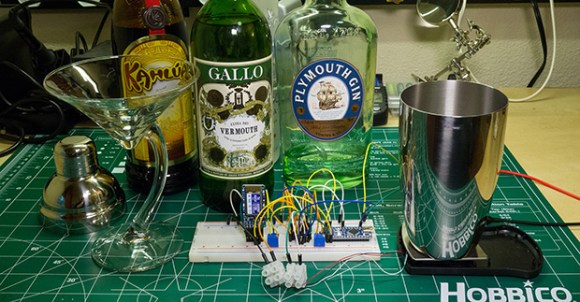
The build measures out precise amounts of any liquid with the help of a small electronic scale [Tony] picked up from Harbor Freight. Instead of trying to interface with the electronics in the scale, he instead connected a INA125 instrument amplifier to the load cell. An Arduino micro measures the weight on the load cell, and with the known densities of gin, vermouth, and Kahlua, [Tony] can get a very good idea of how much liquid is in the cocktail shaker.

The really neat part of this build is the interface: [Tony] wrote an Android app for his tablet that talks to the Arduino with an Adafruit Bluefruit Bluetooth adapter. The app receives the current weight on the load cell, displays the current amount of liquor in the cocktail shaker, and provides step-by-step instructions for making any cocktail.

It’s a handy little device to keep around the liquor cabinet, and with an absurd amount of pumps and valves could easily become the basis for a very cool cocktail bot.

Continue reading “A Cocktail Shaker With Android And Arduino”

I Can Fix The Space Station With A Metronome, A Metronome, A Metronome

ISS

If the space station were left to its own devices, the living quarters would get incredibly hot. There are computers, hardware, and six crew members, all generating heat that must be gotten rid of. To do this, there are two heat exchangers inside the station that take warm water, dump that heat to ammonia, and send that ammonia out to panels outside the station. On December 11, 2013, Loop A of the thermal control system shut down, putting the station one failure away from evacuation. Plans for a spacewalk were tabled, but the ground crew managed to fix this hardware failure by telling the astronauts to push buttons, a metronome, and a software patch.

The problem with Loop A of the Internal Thermal Control System was a flow control valve that regulated the amount of ammonia flowing through the heat exchange. Too much ammonia, and the station would be far too cold. Too little, and it would be too hot. This valve is electronically controlled and takes exactly 13 seconds to move from open to closed. The first attempt at fixing the problem was having ground crew send the command to open the valve and cut the power halfway through. This involved using a metronome app on a phone to send two commands 6.5 seconds apart. It worked, but not quite well enough.

The failure of the metronome technique led [Todd Quasny] to write a script to turn the ‘on’ and ‘off’ commands from the ground to the ISS with millisecond resolution. This meant the commands to control the valve could be sent with the right delay, but they weren’t received with the right delay. This is a problem that had to be fixed from the station’s computers.

To finally solve the problem, ISS software engineer [Steve Joiner] was called in to write a software patch for the thermal control system. This is spaceflight and writing software is a long a laborious process of testing and code reviews. Nevertheless, the team managed to write and upload a patch in just two days.

This patch gave controllers the ability to control the valve with a resolution of 100 milliseconds, good enough for very fine control of the thermal system, and all without requiring the massive amount of planning that goes into a spacewalk or resupply mission.

Ups to [Ed Van Cise] for this tip. If you’re curious about the headline….

SOAP: The Home Automation Router And Kickstarter Scam

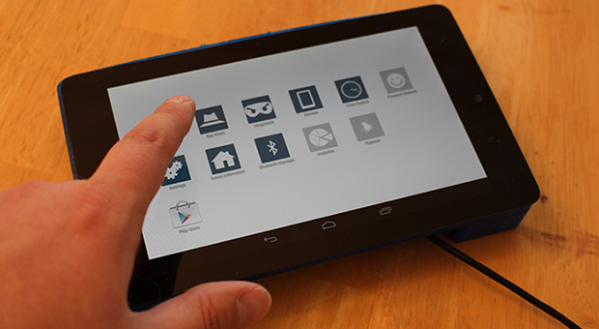
How would you like a 7″ tablet with a Quad-core ARM Cortex A9 processor, USB 3.0, 32 GB of storage, 802.11ac, four ports of Gigabit LAN, Bluetooth 4.0, NFC, SATA, HDMI, built-in Zigbee and RFID modules, a camera, speaker and microphone, all for $170? Sound too good to be true? That’s because it probably is. Meet SOAP, the home automation router with a touchscreen, that’s shaping up to be one of the largest scams Kickstarter has ever seen.

There have been a few threads scattered over the web going over some of the… “inconsistencies” about the SOAP kickstarter, mainly focusing on the possibility of fake Facebook likes and Twitter followers. There’s also the question of their development process: they started building a router with an Arduino, then moved on to a Raspberry Pi, a Beaglebone, Intel Atom-powered Minnowboard, the Gizmo Board, PandaBoard, and Wandboard. If you’re keeping track, that’s at least six completely different architectures used in their development iterations. Anyone who has ever tried to build something – not even build a product, mind you – will realize there’s something off here. This isn’t even considering a reasonably accurate BOM breakdown that puts the total cost of production at $131.

The most damning evidence comes from screenshots of the final board design. These pics have since been removed from the Kickstarter page, but they’re still available on the Google cache. The SOAP team claims they’re putting USB 3.0 ports on their board, but the pics clearly show only four pins on each of the USB ports. USB 3.0 requires nine pins. A closer inspection reveals these screenshots are from the files for Novena, [Bunnie Huang]’s open source laptop.

Continue reading “SOAP: The Home Automation Router And Kickstarter Scam”

Turning A Router Into An Arduino Yún

yun

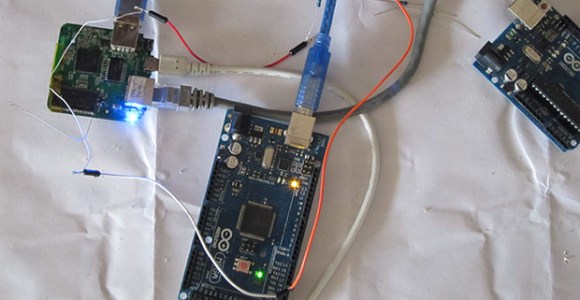
The Arduino Yún was the first of a new breed of Arduinos that added a big honkin’ Linux System on Chip to the familiar ATMega microcontroller and unique pin headers. It’s a surprisingly powerful system, but also very simple: basically, it’s just an Atheros AR9331 running Linux, an ATMega32u4 doing its Arduino thing, both connected by a serial connection. The Atheros AR9931 is also found in a router popular amongst hardware hackers. It really was only a matter of time before someone ported the Yun software to a router, then.

[Tony] took a TL-WR703N router and put OpenWRT on it. Turning this router into the Linux side of a Yún was a simple matter of uploading the Yún software to the root directory of the router and rebooting it. The Arduino side of the Yún is handled by an Arduino Mega connected to the USB port of the router. A quick update to Arduino’s boards.txt file, and a hacked together Yún is just a strip of duct tape away.

The Yún may not be extremely popular, but it does have a few interesting use cases. Maybe not enough to drop $70 on a board, but if you already have a WR703 router, this is a great way to experiment.

Thanks [Matt] for the tip.

The Mystery Of Zombie RAM

[Josh] had a little project where he needed to keep a variable in RAM while a microcontroller was disconnected from a power source. Yes, the EEPROM on board would be able to store a variable without power, but that means writing to the EEPROM a lot, killing the lifetime of the chip. He found an ATTiny can keep the RAM alive for a variable amount of time – somewhere between 150ms and 10 minutes. Wanting to understand this variability, he decided to solve the mystery of the zombie RAM.

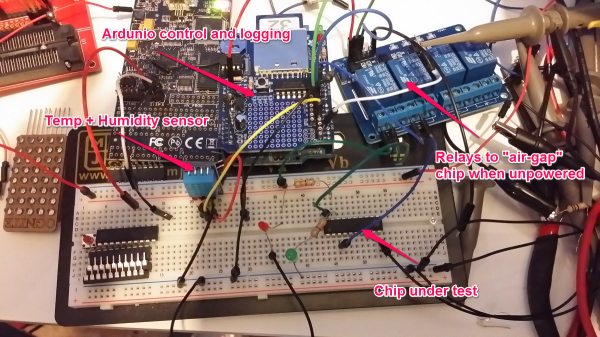
The first experiment involved writing a little bit of code for an ATTiny4313 that looked for a value in RAM on power up and light up a LED if it saw the right value. The test circuit consisted of a simple switch connected to the power pin. Initial tests were astonishing; the ATTiny could hold a value in RAM for up to 10 minutes without power.

With the experiment a success, [Josh] updated his project to use this new EEPROM-saving technique. Only this time, it didn’t work. The value hidden away in RAM would die in a matter of milliseconds, not minutes. After tearing his hair out looking for something different, [Josh] rigged up an Arduino based test circuit with humidity and temperature sensors to see if that had any effect. It didn’t, and the zombie RAM was still not-undead.

The key insight into how the RAM in an ATtiny could stay alive for so long came when [Josh] noticed his test circuit had a LED, but the actual project didn’t. Apparently this LED was functioning as a very tiny solar cell, generating a tiny bit of current that kept the RAM alive. A dark room with a flashlight confirmed this hypothesis, and once [Josh] gets his uCurrent from Kickstarter he’ll know exactly how much current this LED is supplying.

Hackaday 68k: Blinking An LED

freerun

Time for another update for the Hackaday 68k, the 16-bit retrocomputer developed on Hackaday to show off both our love for vintage hardware and our new project hosting site. There’s still invites to be had, people. Get ’em while they’re hot.

This post is going to cover exactly how complex a simple 68000 system is. The answer is, “not very.” A simple 68k system is at least as simple to design than some other homebrew systems we’ve seen around here. Yes, a 16-bit data bus means there’s more wires going everywhere, but like she said, just because it’s bigger doesn’t mean it’s harder.

There is some progress to report on the construction of the Hackaday 68k. The processor has been verified as working with a blinking LED. It’s the ‘Hello World’ of computer design, and it’s at least as complex as blinking a LED with an Arduino.

You’re gonna want to click that ‘Read more’ link.

Continue reading “Hackaday 68k: Blinking An LED”