Modifying A Printer For PCB Fabbing

ohgodmyeyes

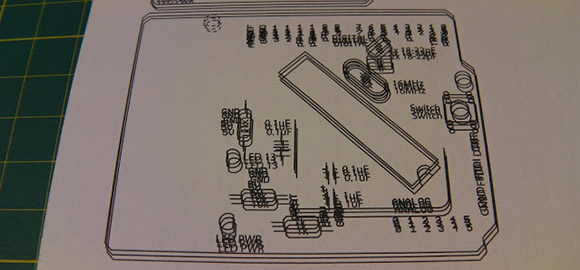
The migraine-inducing image above is the product of [Rupert Hirst]’s attempts at home PCB fabrication. He’s using the toner transfer method – printing a circuit on a piece of transparency sheet with a laser printer, setting it on a piece of copper clad board, and sending the whole assembly through a laminator. It’s a fairly straightforward process, but if you can’t run a transparency sheet through a printer multiple times your etch resist won’t hold up too well. Of course the transparency sheet must be aligned each time it goes through the printer, so [Rupert] came up with a modification that ensures laser toner goes only where it’s supposed to.

[Rupert] picked up a Samsung ML-2165W laser printer for his PCB fab shop, but printing the same image multiple times on the same transparency sheet would result in unusable masks. This problem was fixed with a few plastic shims used to hang door frames and a card stock tray that ensures the transparency sheet goes through the printer the same way every time.

We saw [Rupert]’s homebrew PCB fabrication process a few weeks ago when he sent in his six channel floppy drive MIDI synth. In his build video, [Rupert] demonstrated what is possibly the cleanest toner transfer PCB we’ve seen to date. You can check out his etching process in the video after the break.


Continue reading “Modifying A Printer For PCB Fabbing”

Building Huge Displays With LED Strips

Building RGB LED displays is one of the most interesting programming and engineering challenges we see here on Hackaday. Not only do the creators of large displays and LED cubes have to deal with the power requirements of driving a whole bunch of LEDs, but there’s also the issue of getting the frame rate high enough to display video. It’s a non-trivial task, but [Paul Stoffregen] has an interesting solution. He wrote an LED strip library that can control eight meter-long LED strips that can also be used on daisy chained Teensy 3.0 microcontrollers for really large displays.

[Paul]’s LED library works with LED strips based on the WS2811 LED controller IC. These chips are the most common controller chips for the individually controllable LED strips you can find at Adafruit or hundreds of Chinese resellers. The library requires DMA transfer to display images, so if you’re looking to build a ginormous RGB LED display, you might want to pick up a few of [Paul]’s Teensy 3.0 boards

[Paul] also created a Processing app that takes a video file and turns it into serial data for his LED strip library. You can check out a video of this app, library, and a 60×32 RGB LED display after the break.

Continue reading “Building Huge Displays With LED Strips”

Arduinofied QRP Radio Beacon

moxpd

A while back, [m0xpd] picked up an unbearably cheap AD9850 DDS module from ebay. He turned this in to a Raspberry Pi-powered radio beacon, but like so many builds that grace our pages, the trolls didn’t like using such an overpowered computer for such a simple device. To keep those trolls quiet, [m0xpd] is back again, this time using the AD9850 DDS module as a radio beacon with an Arduino.

The previous incarnation of this build used a Raspberry Pi, and as a consequence needed a level converter. This was thrown out as [m0xpd]’s own Arduino clone, the WOTDUINO – pronounced, ‘what do I know’ – is able to handle the 5 Volt IO of the AD9850.

In addition to fabbing a shield for the DDS module, [m0xpd] also constructed a transmitter shield to amplify the signal and allow the ‘duino to key out a few simple messages. It’s a quite capable device – one of [m0xpd]’s messages traveled from merry olde England to Arizona, his best ever westward distance.

A Remote-controlled, Autonomous Kite Generates Power

kite

Generating power from wind is easy – just stick a windmill on a pole and attach a generator. That’s not particularly cool, though, so [Adrien] and his team from his senior design project are using an autonomously controlled kite to generate power

The basic idea of generating electricity from a kite is to fly it around in figure-eights while unwinding the kite line from a spool. The very strong forces on the kite lines can be used to drive a generator which provides power for reeling the kite back in at a lower angle of attack. You can check out [Adrien]’s kite power theory page for a few more details on how this works.

Right now, [Adrien] and his team have a basic rig set up to generate power and are flying the kite via a joystick. Updates are coming, and you can check out the video of their RC kite in action after the break.

Continue reading “A Remote-controlled, Autonomous Kite Generates Power”

Multibooting The Raspberry Pi

berryboot

Those of us have been dual booting Linux, Windows, and OS X operating systems for a while will be familiar with bootloaders such as GRUB and its ilk. Surprisingly, though, we haven’t seen a bootloader for the most popular computer of the last year – the Raspberry Pi. It makes sense to have a bootloader for the Raspberry Pi; with dozens of different distributions from Raspbian, Occidentalis, and a bunch of  more esoteric distros, we’re surprised we’re only just now seeing a proper bootloader for the Raspi.

Berryboot is extremely simple to install – just copy it onto a FAT formatted SD card and you can install multiple OSes on your Raspberry Pi. On booting, Berryboot shows a dialog box of all the installed operating systems, with new ones able to be installed over the internet from a Berryboot menu.

You can grab Berryboot over on the gits. Berryboot also works with those Allwinner A10 single board computers, but the Hackaday tip line hasn’t seen hide nor hair of those boards.

An Industrial RepRap

rep

It may just be another 3D printer, but [Jonas] and [Simon]’s Kühling & Kühling RepRap Industrial is a cross between a work of art and a beautiful machine tool. It also looks to be a pretty nice 3D printer, to boot.

The Kühling RepRap is built out of 20mm t-slot aluminum with plastic sides that keep the machine’s internals at a toasty 70° C, just about the optimal temperature for making large, complex prints. The machine has two extruders with all the cables tucked away in 3D printed cable carriers. One really interesting bit of innovation is the tool less belt t tensioning system.

On the list of upcoming features, [Jonas] and [Simon] say they want to add a touch screen controller powered by a Raspberry Pi, and a controller that’s even more capable than RAMPS electronics boards. No word on how much a Kühling & Kühling RepRap will cost, but like any quality-looking tool, we don’t expect it to be cheap.

Watching 50 Teams Build Something Cool

Last summer, we here at Hackaday participated in the Red Bull Creation Contest. Basically, twelve teams were given webcams and instructions to build something cool. The teams live streamed their build process, and the best of the bunch won a trip to the New York Maker Faire. [Jason Naumoff], the guy behind this build-off is doing it again right now. It’s called The Deconstruction and it pits 50 teams on 6 continents to build something cool while streaming their project to the Internet.

The Deconstruction is a little bit different from Red Bull’s contest – first, the teams don’t have access to ludicrous amounts of energy drinks. Secondly, there’s no set theme for the group entries. It’s a free-for-all build off where teams can make anything they’d like.

We’ve really got to hand it to [Jason] for pulling this off. He MC’d the Red Bull Creation Contest live stream – nearly all 72 hours of it – and was entertaining right up to the very end. You can check out the official stream on the main Deconstruction site, or you can check out the individual team streams here.