Laser Camera Sees Around Corners

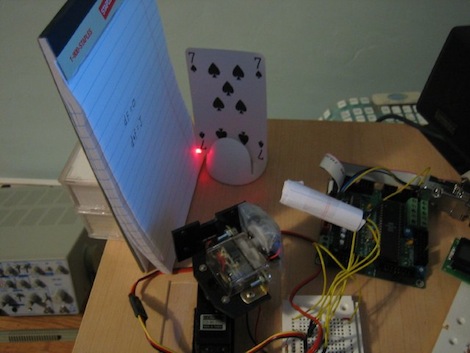
After reading over the proceedings of the 2005 SIGGRAPH, [Dan] realized he could reproduce one of the projects with $50 worth of equipment and some extreme cleverness.

[Dan]’s dual scanning laser camera operates by scanning a laser across an object. The light reflected from the object illuminates a flat surface, and this light is measured by a photocell. After measuring the resistance of the photocell, an image can be reconstructed from the light reflected off the flat surface. The result is quite ingenious, and we’re very grateful [Dan] gave us a great walkthrough with the code and theory of operation.

The project was covered in this Slashdot story a from a few years ago, and we’re surprise no one has bothered to cobble this project together. It’s a very simple build – two servos to control the x and y axes of the laser scanner, a photocell, and an ATMega board. Dan says the microcontroller isn’t even necessary, and this ‘remote imaging’ could be done with an ADC hooked up to a parallel port.

[Dan] was kind enough to to give us a video of his contraption in action. A very nice build from a very accomplished guy.
Radiation Sensor Shield For The Arduino

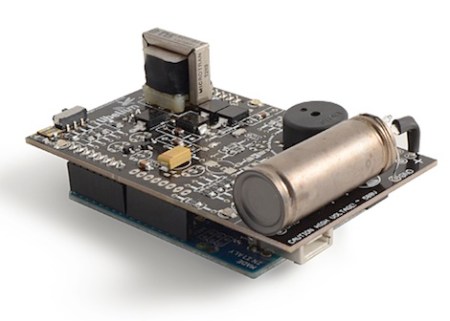
The [Libelium] team wanted to help people in Japan measure radiation in their surroundings following the nuclear accident in Fukushima. Because of the affordability and seeming ubiquity of the Arduino platform, they have been hard at work this last month trying to get their Geiger counter sensor board for an Arduino out the door. We think they’ve done a remarkable job.

A Geiger tube is a remarkably simple device, but getting the part can be a fairly expensive proposition. Thankfully, [Libelium] has already tested and verified a number of tubes from different manufacturers – very helpful if you don’t want to be tied down to one specific component.

This looks like this is just the sort of thing that the folks at [Seed Studio] wanted for an open hardware radiation detector, and [Libelium] has already shipped their first batch to the Tokyo Hackerspace. It’s good to know that help is going where it’s needed.

Video of the sensor board being tested after the break.

Continue reading “Radiation Sensor Shield For The Arduino”

Push Notifications For Snail Mail On An IPhone

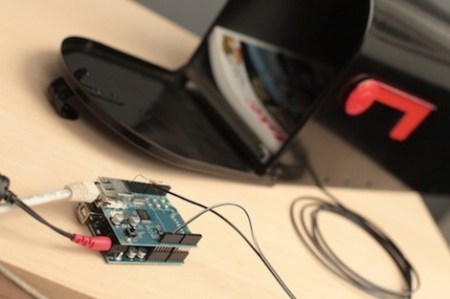
[Matt] over at Make came up with a way to send push alerts to his iPhone whenever his mailbox is opened.

The electronics are just a switch mounted to the mailbox connected to an Arduino with an ethernet shield, but the interesting part of the build is the code. [Matt] got the Arduino WebClient to request a PHP script sitting on a server. This script connects to the Prowl API to push the notification onto an iPhone.

[Matt]’s project has been up for a few months now, and we still haven’t seen any projects using an Arduino+Push combo, or really any other phone except for the iPhone. We think this could be done on an Android phone with cloud to device messaging, but that can’t be the only solution. Any hackaday readers have an idea of how to implement this outside the iOS world? What would Hackaday readers do with a microcontroller that can send push alerts to your phone?

Video of [Matt] walking us through the project after the break

Continue reading “Push Notifications For Snail Mail On An IPhone”

Fiberoptic Mouse Prevents Stray Magnetic Fields

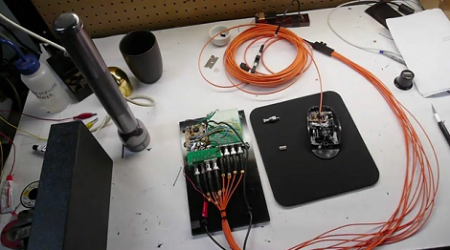
[Ben] needed an input device that would operate where electrical signals and magnetic fields wouldn’t be tolerated, so he ended up running fiberoptics instead of electricity to a mouse.

[Ben] ran some glass fiber from the mouse to quadrature encoders to get the x and y velocity. Mouse clicks are read by modifying the existing buttons with a small shutter to block light from shining through the button frame. This isn’t the first time [Ben] adapted fiberoptics to an input device. Last year, he also built a fiberoptic joystick using the same principles.

We covered [Ben]’s DIY Electron Microscope last month, and we’re wondering if these two projects are related. His project log said he was getting distorted images from the electric field coming from his cooling fan and heater. Maybe he solved that problem and is now just tracking down every last unwanted electromagnetic emission.

Video of the mouse after the break.

Continue reading “Fiberoptic Mouse Prevents Stray Magnetic Fields”

Homebrew Z80 Computer Inspires Awe

How this one missed us, we’ll never know.

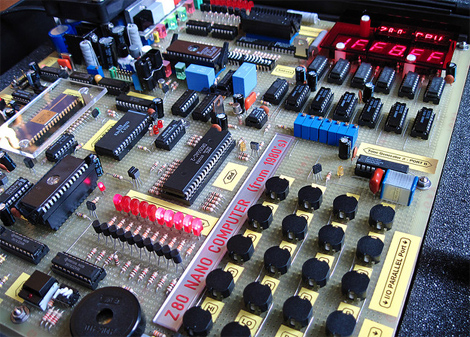
[GG] built himself a retro-styled Z80 nanocomputer over two years using all 1980’s tech. Laid out on one of the largest pieces of perfboard we’ve ever seen on a project, the computer uses a vintage Z80 CPU running at 2.5MHz, 8K ROM, 16K RAM, RS-232 and Parallel ports, an EPROM burner, and an AM95 math coprocessor for 32-bit floating point arithmetic.

We’ve seen a few homebrew computers before, including a Z80 laptop, but this blows them away. For his computer, [GG] created 8BASIC, A Basic interpreter that makes best use of the six 7-segment displays and eight 16-segment displays. The display isn’t really a limitation because [GG] also put together something in Visual Basic so his PC can communicate with his nanocomputer.

[GG] even went so far as to include error detection on the ROM and RAM, as well as an on-board power supply. If you can’t admire the dedication that went into this, at least admire the great wire porn. We’re just sad [GG] never did a proper write-up of his project. He could certainly teach us all something.

Video of [GG]’s work after the jump.

Continue reading “Homebrew Z80 Computer Inspires Awe”

A Breakout Board For Your Android Phone

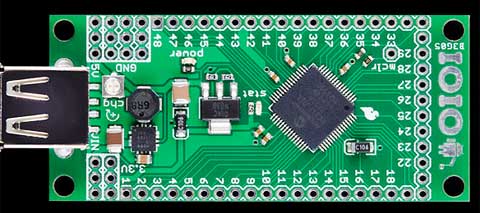
[sparkfun] announced a new board called the IOIO (pronounced “yo-yo”) this week that allows communication from your Android devices to your upcoming projects.

The board hasn’t been released yet; [sparkfun] is still pulling together documentation and waiting on their first production run. We do know that the board contains a PIC24F MCU, and will give your phone analog input,  and Digital I/O, PWM, I2C, SPI, and UART control. Communication with the board is over the USB port on your phone.

The brilliant thing about this board is that an external programmer isn’t required. Everything you connect to this board can be controlled from within Android apps. We covered Android development in a hackaday tutorial series before, so now it’s possible to put these skills to give your projects a touch screen, internet and bluetooth connections, a camera, or your phone’s accelerometers. Very slick.

Video of some basic functions demonstrating what possible with this board after the jump, but feel free to comment and tell us what you’d like to see done with this board.

512 LED Cube (again)

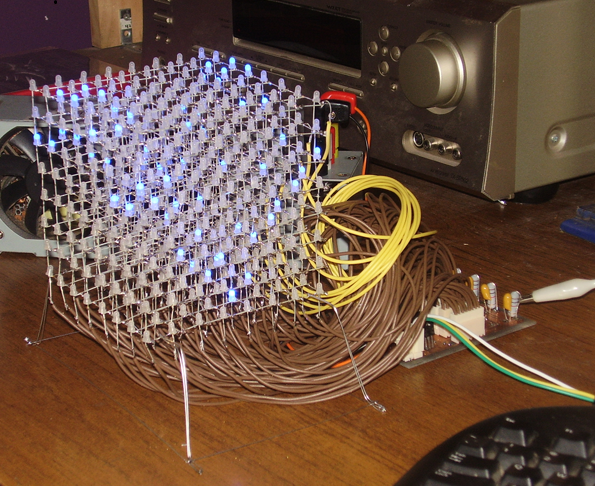
We’ve seen LED cubes before, but [nick] upped the ante with his 8x8x8 LED cube that uses only three pins on his microcontroller.

Previous LED cubes we’ve covered drove the LEDs with shift registers and latches, but [nick] used STP16CP LED sink drivers to reduce the component count. The STP16CP can control 16 LEDs each, can be cascaded off of each other, and can operate up to 30Mhz. With a component like this, you’re limited by your microcontroller and not your patience or soldering skills.

While he was waiting for his LEDs to arrive in the mail, [nick] decided he would get a head start on the animation code by plunging into MATLAB. After getting an idea of what would look good on the cube, [nick] wrote the code on his PC to send commands to the arduino controlling the sink drivers. To wrap up the project, [nick] put the cube on a very attractive wooden box stuffed with the electronics. All tolled, a very efficient and elegant build.

Continue reading “512 LED Cube (again)”