“Hello Barbie” Not An IoT Nightmare After All

Security researchers can be a grim crowd. Everything, when looked at closely enough, is insecure at some level, and this leads to a lot of pessimism in the industry. So it’s a bit of a shock to see a security report that’s filled with neither doom nor gloom.

We’d previously covered Somerset Recon’s initial teardown of “Hello Barbie” and were waiting with bated breath for the firmware dump and some real reverse engineering. Well, it happened and basically everything looks alright (PDF report). The Somerset folks desoldered the chip, dumped the flash ROM, and when the IDA-dust settled, Mattel used firmware that’s similar to what everyone else uses to run Amazon cloud service agents, but aimed at the “toytalk.com” network instead. In short, it uses a tested and basically sound firmware.

The web services that the creepy talking doll connected to were another story, and were full of holes that were being actively patched throughout Somerset’s investigation, but we were only really interested in the firmware anyway, and that looked OK. Not everything is horror stories in IoT security. Some stories do have a happy ending. Barbie can sleep well tonight.

LED Tester Royale

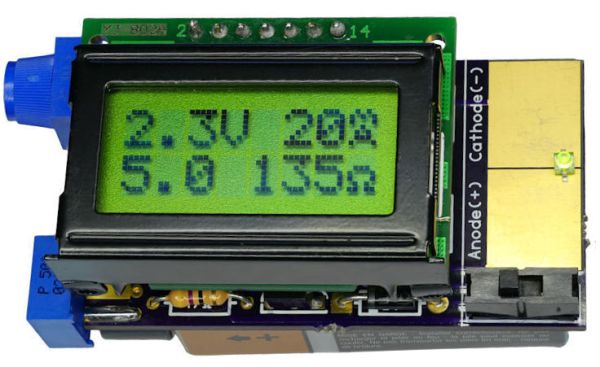
What do you get for the geek who has everything and likes LEDs? A tricked-out LED tester, naturally. [Dave Cook]’s deluxe model sports an LCD screen and two adjustable values: desired current and supply voltage. Dial these in, plug in your LED, and the tiny electronic brain inside figures out the resistor value that you need. How easy is that?

An LED tester can be as easy as a constant-current power supply, and in fact that’s what [Dave]’s first LED tester was, in essence. Set an LM317 circuit up to output 10mA, say, and you can safely test out about any LED. Read off the operating voltage, subtract that from the supply voltage, and then divide by your desired current to figure out the required resistor. It only takes a few seconds, but that’s a few seconds too many!

The new device does the math for you by adding an AVR ATtiny84 into the mix. The microcontroller reads the voltage that the constant current supply requires, does the above-mentioned subtraction and division, and displays the needed resistor. So simple. And as he demonstrates in the video below, it does double-duty as a diode tester.

This is a great beginner’s project, and it introduces a bunch of fundamental ideas: reading the ADC, writing to an LED screen, building a constant current circuit, etc. And at the end, you have a useful tool. This would make a great kit!

Continue reading “LED Tester Royale”

Rube Goldberg PC/Console Game Hack

There’s no holy war holier than establishing whether PC games are superior to console games (they are). But even so, there’s no denying that there are some good console titles out there. What if you’d still like to play them using a mouse and keyboard? If you’re [Agent86], you’d build up the most ridiculous chain of fun electronics to get the job done.

Now there is an overpriced off-the-shelf solution for this problem, and a pre-existing open-source project that’ll get the same job done for only a few bucks in parts. But there’s nothing like the fun in solving a problem your own way, with your own tangle of wires, darn it all! The details of the build span four (4!) pages in [Agent86]’s blog, so settle down with a warm cup of coffee.

Here’s the summary: an Xbox 360 controller is taken apart and turned into an Xbox controller. The buttons and joysticks are put under computer control via a Teensy microcontroller. GPIOs press the controller’s buttons, and digipots replace the analog sticks. Software on the Teensy drives the digipots and presses the buttons, interpreting a custom protocol sent over USB from the computer, which also gets some custom software to send the signals.

So if you’re keeping score: a button press on a keyboard is converted to USB, sent to a PC, converted to a custom serial protocol, sent to a Teensy which emulates a human for a controller that then coverts the signals back into the Xbox’s USB protocol. Pshwew!

Along the way, there’s learning at every stage, which is really the point of an exercise like this. And [Agent86] says that it mostly works, with some glitches in the mouse-to-joystick mapping. But if you’re interested in any part of this crazy chain, you’ve now got a model for each of them.


Cheap WiFi Devices Are Hardware Hacker Gold

Cheap consumer WiFi devices are great for at least three reasons. First, they almost all run an embedded Linux distribution. Second, they’re cheap. If you’re going to break a couple devices in the process of breaking into the things, it’s nice to be able to do so without financial fears. And third, they’re often produced on such low margins that security is an expense that the manufacturers just can’t stomach — meaning they’re often trivially easy to get into.

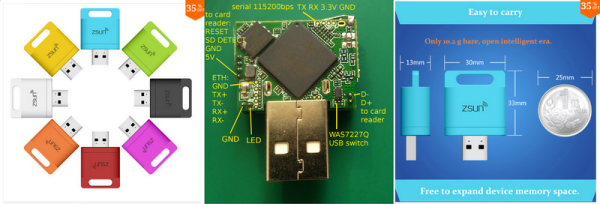
Case in point: [q3k] sent in this hack of a tiny WiFi-enabled SD card reader device that he and his compatriots [emeryth] and [informatic] worked out with the help of some early work by [Benjamin Henrion]. The device in question is USB bus-powered, and sports an SD card reader and an AR9331 WiFi SOC inside. It’s intended to supply wireless SD card support to a cell phone that doesn’t have enough on-board storage.

The hack begins with [Benajmin] finding a telnet prompt on port 11880 and simply logging in as root, with the same password that’s used across all Zsun devices: zsun1188. It’s like they want to you get in. (If you speak Chinese, you’ll recognize the numbers as being a sound-alike for “want to get rich”. So we’ve got the company name and a cliché pun. This is basically the Chinese equivalent of “password1234”.) Along the way, [Benjamin] also notes that the device executes arbitrary code typed into its web interface. Configure it to use the ESSID “reboot”, for instance, and the device reboots. Oh my!

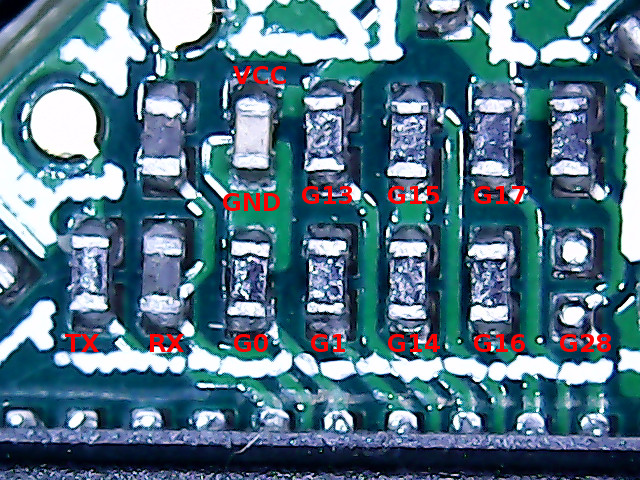
zsun_gpio_bootstrap_annotFrom here [q3k] and co. took over and ported OpenWRT to the device and documented where its serial port and GPIOs are broken out on the physical board. But that’s not all. They’ve also documented how and where to attach a wired Ethernet adapter, should you want to put this thing on a non-wireless network, or use it as a bridge, or whatever. In short, it’s a tiny WiFi router and Linux box in a package that’s about the size of a (Euro coin | US quarter) and costs less than a good dinner out. Just add USB power and you’re good to go.

Nice hack!

Bye-bye ATmega328P, Hello 328PB!

We never have enough peripherals on a microcontroller. Whether it’s hardware-driven PWM channels, ADCs, or serial communication peripherals, we always end up wanting just one more of these but don’t really need so many of those. Atmel’s new version of the popular ATmega328 series, the ATmega328PB, seems to have heard our pleas.

We don’t have a chip in hand, but the datasheet tantalizes. Here’s a quick rundown of the new features:

  • Two more 16-bit timer/counters. This is a big deal when you’re writing code that’s not backed up by an operating system and relies on the hardware for jitter-free timing.
  • Two of each USART, SPI, and I2C serial instead of one of each. Good when you use I2C devices that have limited address spaces, or when you need to push the bits out really fast over SPI.
  • Ten PWM channels instead of six. This (along with the extra 16-bit timers) is good news for anyone who uses PWM — from driving servos to making music.
  • Onboard capacitive sensing hardware: Peripheral Touch Controller. This is entirely new to the ATmega328PB chip, and looks like it’ll be interesting for running capacitive sense buttons without additional ICs. It relies on Atmel’s QTouch software library, though, so it looks like it’s not a free-standing peripheral as much as an internal multiplexer with maybe some hardware-level filtering. We’ll have to look into this in detail when we get our hands on one of the chips.

So what does this mean for you? A quick search of the usual suspects shows the chips in stock and shipping right now, and there’s an inexpensive dev kit available as well. If you write your own code in C, taking advantage of the new features should be a snap. Arduino folks will have to wait until the chips (and code support) work their way into the ecosystem.

Thanks [Peter van der Walt] for the tip!

Hacking A USB Port Onto An Old Router

Sometimes hacks don’t have to be innovative to be satisfying. We thought that [daffy]’s instructions and video (embedded below the break) for turning an old WRT54G router into an Internet radio were worth a look even if he’s following a well-traveled path and one that we’ve reported on way back when.

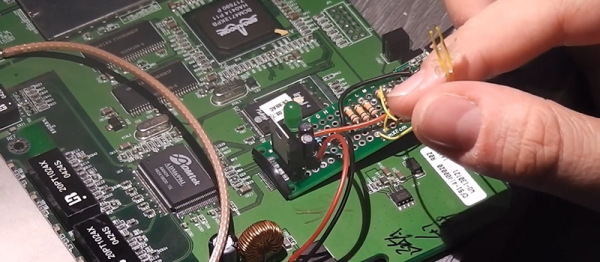
The hack itself is simple. [daffy] locates unused USB data lines, adds in a 5V voltage regulator to supply USB bus power, and then connects it all to a USB sound card. Hardware side, done! And while he doesn’t cover the software side of things in this first video, we know where he’s headed.

The WRT54G router was the first commodity Linux-based router to be extensively hacked, and have open-source firmware written for it. If you’re using OpenWRT or dd-wrt on any of your devices, you owe a debt to the early rootability of the WRT54G. Anyway, it’s a good bet that [daffy] is going to find software support for his USB sound card, but we remain in suspense to see just exactly how the details pan out.

Our favorite WRT54G hack is still an oldie: turning a WRT54G into the brains for a robot. But that was eight years ago now, so surely there’s something newer and shinier. What’s the coolest device that you’ve seen a WRT router hacked into?

Continue reading “Hacking A USB Port Onto An Old Router”

Marvin Minsky, AI Pioneer, Dies At 88

Marvin Minsky, one of the early pioneers of neural networks, died on Sunday at the age of 88.

The obituary in the Washington Post paints a fantastic picture of his life. Minsky was friends with Richard Feynman, Isaac Asimov, Arthur C. Clarke, and Stanley Kubrick. He studied under Claude Shannon, worked with Alan Turing, had frequent conversations with John Von Neumann, and had lunch with Albert Einstein.

Single_layer_ann
“Single layer ann” by Mcstrother

Minsky’s big ideas were really big. He built one of the first artificial neural networks, but was aiming higher — toward machines that could actually think rather than simply classify data. This was one of the driving forces behind his book, Perceptrons, that showed some of the limitations in the type of neural networks (single-layer, feedforward) that were being used at the time. He wanted something more.

Minsky’s book The Society of Mind is interesting because it reframes the problem of human thought from being a single top-down process to being a collaboration between many different brain regions, the nervous system, and indeed the body as a whole. This “connectionist” theme would become influential both in cognitive science and in robotics.

In short, Minksy was convinced that complex problems often had necessarily complex solutions. In research projects, he was in for the long-term, and encouraged a bottom-up design procedure where many smaller elements combined into a complicated whole. “The secret of what something means lies in how it connects to other things we know. That’s why it’s almost always wrong to seek the “real meaning” of anything. A thing with just one meaning has scarcely any meaning at all.”

useless_machine-shot0005Minsky was a very deep thinker, but he kept grounded by also being a playful inventor. Minsky is credited with inventing the “ultimate machine” which would pop up in modern geek culture and shared numerous times on Hackaday as the “most useless machine”. He inspired Claude Shannon to build one. Arthur C. Clarke said, “There is something unspeakably sinister about a machine that does nothing — absolutely nothing — except switch itself off.”

He also co-designed the Triadex Muse, which was an early synthesizer and sequencer and “automatic composer” that creates fairly complex and original patterns with minimal input. It’s an obvious offshoot of his explorations in artificial intelligence, and on our bucket list of must-play-with electronic instruments.

Minsky’s web site at MIT has a number of his essays, and the full text of “The Society of Mind”, all available for your reading pleasure. It’s worth a bit of your time, not just in memoriam of a great thinker and a wacky inventor, but also because we bet you’ll see the world a little bit differently afterwards. That’s a legacy that lasts.