Touch Lamp Tracks ISS With Style

In the comments of a recent article, the question came up as to where to find projects from the really smart kids the greybeards remember being in the 70s. In the case of [Will Dana] the answer is YouTube, where he’s done an excellent job of producing an ISS-tracking lamp, especially considering he’s younger than almost all of the station’s major components.*

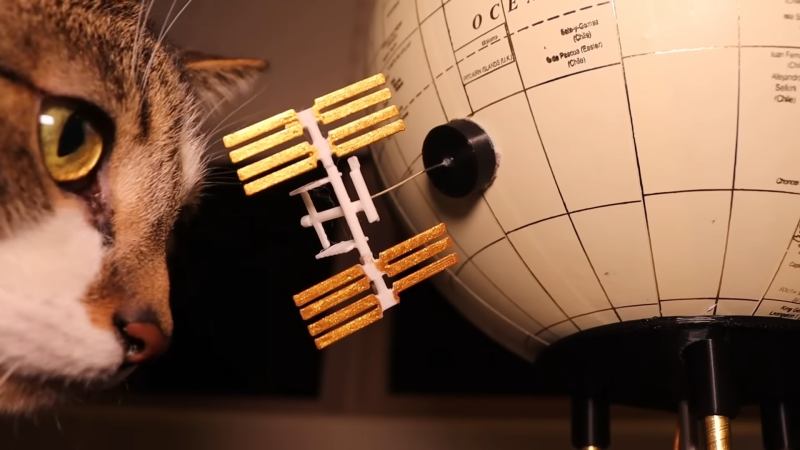
There’s nothing ground-breaking here, and [Will] is honest enough to call out his inspiration in the video. Choosing to make a ground-track display with an off-the-shelf globe is a nice change from the pointing devices we’ve featured most recently. Inside the globe is a pair of stepper motors configured for alt/az control– which means the device must reset every orbit, since [Willis] didn’t have slip rings or a 360 degree stepper on hand.  A pair of magnets couples the motion system inside the globe to the the 3D printed ISS model (with a lovely paintjob thanks to [Willis’s girlfriend]– who may or may be from Canada, but did show up in the video to banish your doubts as to her existence), letting it slide magically across the surface. (Skip to the end of the embedded video for a timelapse of the globe in action.) The lamp portion is provided by some LEDs in the base, which are touch-activated thanks to some conductive tape inside the 3D printed base.

It’s all controlled by an ESP32, which fetches the ISS position with a NASA API. Hopefully it doesn’t go the way of the sighting website, but if it does there’s more than enough horsepower to calculate the position from orbital parameters, and we are confident [Will] can figure out the code for that. That should be pretty easy compared to the homebrew relay computer or the animatronic sorting hat we featured from him last year.

Our thanks to [Will] for the tip. The tip line is for hackers of all ages,  but we admit that it’s great to see what the new generation is up to.

*Only the Roll Out Solar Array, unless you only count on-orbit age, in which case the Nakua module would qualify as well.
Continue reading “Touch Lamp Tracks ISS With Style” →

When Is A Synth A Woodwind? When It’s A Pneumatone

Ever have one of those ideas that’s just so silly, you just need to run with it? [Chris] from Sound Workshop ran into that when he had the idea that became the Pneumatone: a woodwind instrument that plays like a synth.

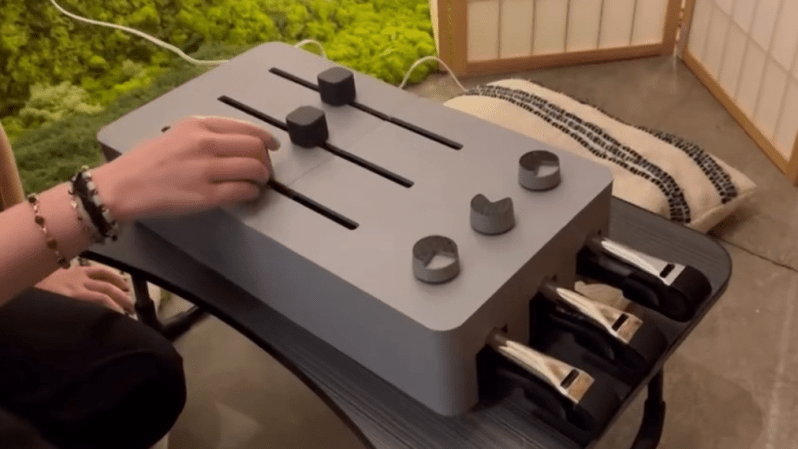
In its 3D printed case, it looks like a giant polyphonic analog synth, but under the plastic lies a pneumatic heart: the sound is actually being made by slide whistles. We always thought of the slide whistle as a bit of a gag instrument, but this might change our minds. The sliders on the synth-box obviously couple to the sliders in the whistles. The ‘volume knobs’ are actually speed controllers for computer fans that feed air into the whistles. The air path is possibly not ideal– there’s a bit of warbling in the whistles at some pitches– but the idea is certainly a fun one. Notes are played by not blocking the air path out the whistle, as you can see in the video embedded below.

Since the fans are always on, this is an example of a drone instrument, like bagpipes or the old hacker’s favourite, the hurdy gurdy. [Chris] actually says in his tip– for which we are very thankful– that this project takes inspiration not from those projects but from Indian instruments like the Shruthi Box and Tanpura. We haven’t seen those on Hackaday yet, but if you know of any hacks involving them, please leave a tip.

Continue reading “When Is A Synth A Woodwind? When It’s A Pneumatone” →

IR Point And Shoot Has A Raspberry Heart In A 35mm Body

Photography is great, but sometimes it can get boring just reusing the same wavelengths over and over again. There are other options, though and when [Malcolm Wilson] decided he wanted to explore them, he decided to build a (near) IR camera. 

The IR images are almost ethereal.
Image : Malcom Wilson.

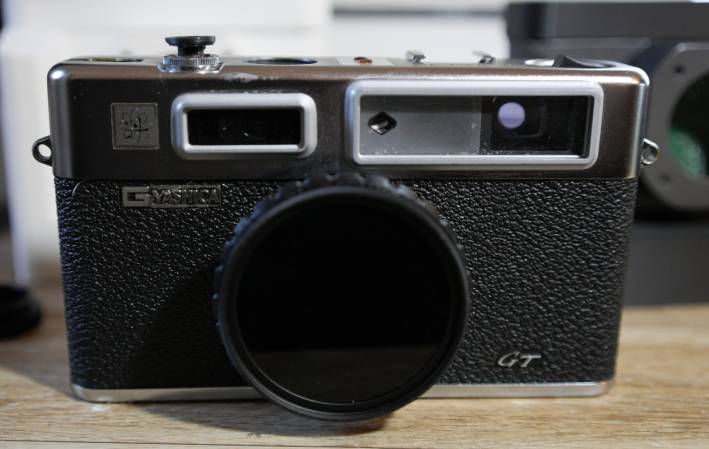
The housing is an old Yashica Electro 35 — apparently this model was prone to electrical issues, and there are a lot of broken camera bodies floating around– which hides a Pi NoIR Camera v3. That camera module, paired with an IR pass filter, makes for infrared photography like the old Yashica used to do with special film. The camera module is plugged into a Pi Zero 2 W, and it’s powered by a PiSugar battery. There’s a tiny (0.91″) OLED display, but it’s only for status messages. The viewfinder is 100% optical, as the designers of this camera intended. Point, shoot, shoot again.

There’s something pure in that experience; we sometimes find stopping to look at previews pulls one out of the creative zone of actually taking pictures. This camera won’t let you do that, though of course you do get to skip on developing photos. [Malcom] has the Pi set up to connect to his Wifi when he gets home, and he grabs the RAW (he is a photographer, after all) image files via SSH.  Follow the link above to [Malcom]’s substack, and you’ll get some design details and his python code.

The Raspberry Pi Foundation’s NoIR camera shows up on these pages from time to time, though rarely so artistically. We’re more likely to see it spying on reptiles, or make magic wands work.  So we are quite grateful to [Malcom] for the tip, via Petapixel. Yes, photographers and artists of all stripes are welcome to use the tips line to tell us about their work.

Follow the links in this article for more images like this.
Image: Malcom Wilson

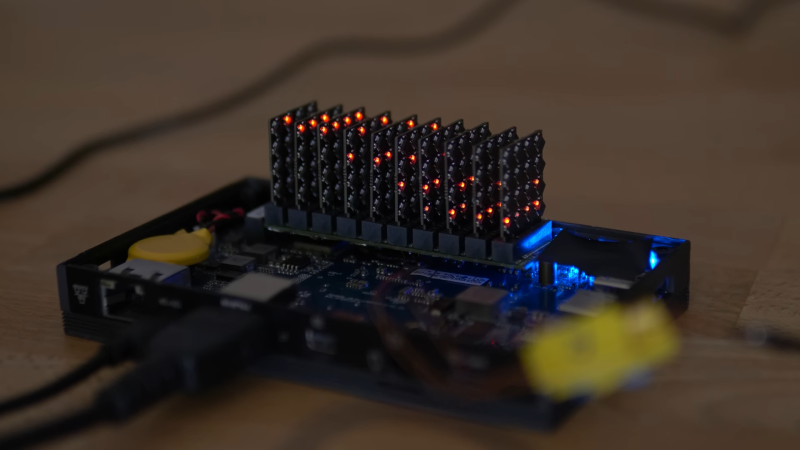
160-core RISC V Board Is The M.2 CoProcessor You Didn’t Know You Needed

Aside from GPUs, you don’t hear much about co-processors these days. [bitluni] perhaps missed those days, because he found a way to squeeze a 160 core RISC V supercluster onto a single m.2 board, and shared it all on GitHub.

OK, sure, each core isn’t impressive– he’s using CH32V003, so each core is only running at 48 MHz, but with 160 of them, surely it can do something? This is a supercomputer by mid-80s standards, after all.  Well, like anyone else with massive parallelism, [bitluni] decided to try a raymarcher. It’s not going to replace RTX anytime soon, but it makes for a good demo.

Like his previous m.2 project, an LED matrix,  the cluster is communicating over PCIe via a WCH CH382 serial interface. Unlike that project, blinkenlights weren’t possible: the tiny, hair-thin traces couldn’t carry enough power to run the cores and indicator LEDs at once. With the power issue sorted, the serial interface is the big bottleneck. It turns out this cluster can crunch numbers much faster than it can communicate. That might be a software issue, however, as the cluster isn’t using all of the CH382’s bandwidth at the moment. While that gets sorted there are low-bandwidth, compute-heavy tasks he can set for the cluster. [bitluni] won’t have trouble thinking of them; he has a certain amount of experience with RISCV microcontroller clusters.

We were tipped off to this video by [Steven Walters], who is truly a prince among men. If you are equally valorous, please consider dropping informational alms into our ever-present tip line. 

Continue reading “160-core RISC V Board Is The M.2 CoProcessor You Didn’t Know You Needed” →

Pretty purple PCBs, made in the USA

Does Made-in-America Make Sense For PCB Prototyping?

These are tough times for American hackers, and rife with uncertainty. Trade wars are on, off, on again– who can keep track? If you’re used to getting everything from China, that can really cramp your style. [Jeremy Cook] took the time to write up his experience prototyping with American-made PCBs, just in time for us to totally miss Independence Day.

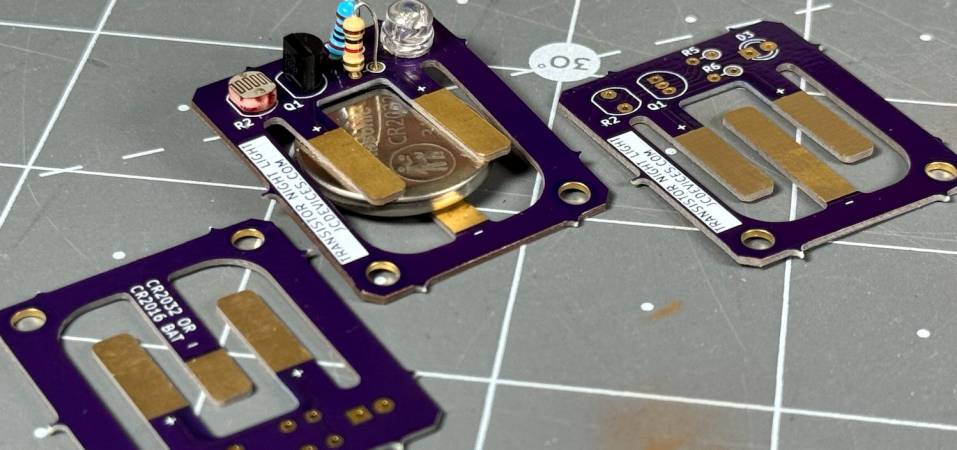
The project was a simple nightlight, using a single LED, a photoresistor, a transistor, and a CR2032 battery. The CR2032 battery does complicate things, though: [Jeremy] figured out a neat way to hold the battery using a PCB cutout, but it needs to be a 0.8 mm board. (That’s going to matter in a moment.) He’s put that PCB on GitHub if you’re interested.

To start off, JLBPCB is the Chinese clearing house of choice for [Jeremy], and they quoted a very cheap $7.10 for 20 boards. The problem was that shipping across the Pacific Ocean, plus the ever-wavering tariff charge, brought the price to $48.08. About five dollars of which was from tariffs; the rest you can put down to the cost of jet fuel and the size of the Pacific Ocean.

On the other hand, OSH Park, was able to get [Jeremy] three of their pretty purple PCBs for $7.75 all-inclusive. Overall, since he’s prototyping and does not want 20 boards this revision, [Jeremy] saves quite a lot by staying local– including the environmental impact of shipping and laxer regulations in China, if that sort of thing matters to you. 

The suprizing thing is the turnaround time: [Jeremy] got his pretty purple PCBs from OSH Park a full twenty days after ordering. Similar orders from China take only a week, which is just mind-blowing when you stop and think about the great honking ocean in the way. We could perhaps cut OSH Park some slack in that 0.8 mm boards are not the most common, but their quoted turnaround time for two-layer prototypes is minimum 12 days.

They do offer a “super-swift” option for two-layer boards, but then they lose on price. As [Jeremy] points out, there are always tradeoffs. If you’re really in a hurry, nothing’s faster than milling the boards yourself. Or you could go the old-school toner-transfer etching route.

Our thanks to [Jeremy] for the tip. If you’ve got a better way to prototype, do send us a tip about it. Also, please us know in the comments if you’ve tried an in-country PCB fabricator, and how it compared to the usual offerings from the PRC.

Daisy Chain Of Hacks Lets New Arm Board Run Doom

Running DOOM on ARM? Old hat. Running Doom (2016) on an ARM SBC? Well, that’s a bit more interesting, and [Interfacing Linux] shows us how with this handy guide, and in a video embedded below.

The ARM SBC in question is the Radxa Orion O6, which claims to be the world’s first open source ARMv9 motherboard. It has a 12-core ARM9.2 SoC from Cix, and crucially for gaming, a PCIe x16 slot to fit a graphics card. There’s onboard graphics in the SoC, of course, but that’s only going to cut it for old DOOM, not Doom (2016).

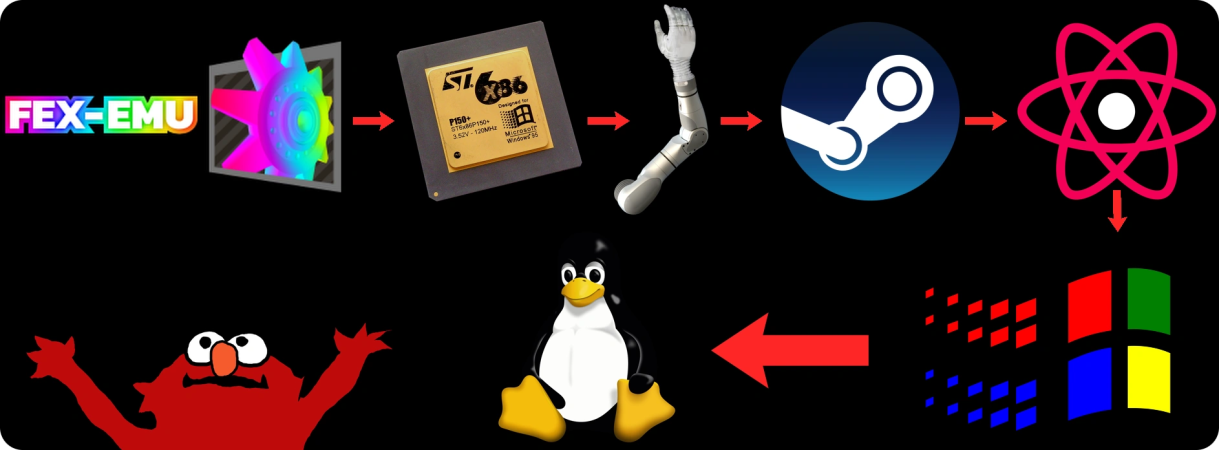
Obviously there is no ARMv9 build of this nine-year-old classic. Thus, a certain degree of hacking is required. An x86 emulation layer called FEX is used to run Steam, which includes the Proton compatibility layer to sit between the Linux system and the Windows system calls the games are making.

So, again: Windows games, running via a compatibility layer on a Linux system running on an x86 emulator, running on another Linux system, running on ARM hardware. Yeah, we’d call that a hack, and just possibly cursed. The amazing thing is that it works. As long as you use a PCI 3.0 graphics card, anyway; apparently newer ones don’t work, or at least not the one [Interfacing Linux] had to try. (Some report better luck with newer NVIDIA cards.) Which is a pity, because every game tested is GPU-throttled on this system. Considering the CPU should be handling all the emulation, that just goes to show how GPU-heavy even 10-year-old games are.

[Interfacing Linux] seems to enjoy running things where they should not; we just wrote up their SteamOS console.

This isn’t the first time a Radxa board has shown up on Hackaday either, but they don’t seem to be nearly as popular as the fruit-flavoured competition for the sort of projects we usually see. If you’ve got a good project using one of these powerful ARM boards– or anything else, don’t hesitate to send us a tip!


Software Defined Retro ROM Makes 8-bit Easy

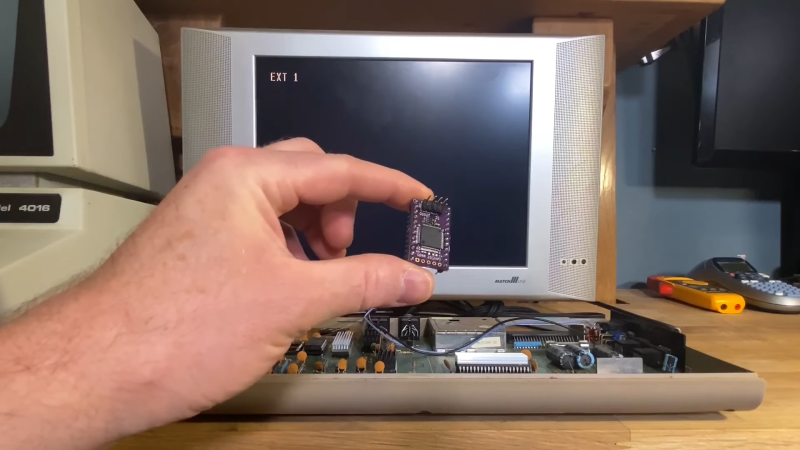
Like the rest of us, 8-bit hardware is not getting any newer, and failed ROMs are just a fact of life. Of course you can’t call up Commadore corporation for replacement parts anymore, so something is needed. [Peirs Rocks] wasn’t satisfied with the existing options, so he came up with the Software Defined Retro ROM to serve as a drop-in replacement for 2364, 2332, and 2316 ROM chips.

Physically, the Software Defined Retro ROM is a PCB that matches the footprint of the original ROM chip, and holds an STM32F4 family microcontroller with a number of extra pins facing upwards. Some of those pins are for programming, so you can flash the board in-situ without removing it from the system using a Pi Pico. The others pins are jumpers for image selection or chip configuration. Depending which STM32 you use, you can have upto 16 ROM images on the board, at whatever chip select behaviour you require. The ROM’s chip select lines could be configured at the factory to answer to HIGH or LOW, and this board can handle either with a jumper swap.

The documentation on the GitHub is very well done, for which we applaud [Piers]. Instructions and demos are also available in the video embedded below. We could certainly see this hack becoming popular in the retrocomputer community, especially as everything ages and memories continue to, uh, y’know. What were we talking about, again?

Oh, right, ROMs. You might think an mask ROM would last a very long time, but it’s been a very long time since some of these were made. Best to dump them while you still can. If the chip is really far gone electrically, you might try decoding a photograph of the die.


Continue reading “Software Defined Retro ROM Makes 8-bit Easy” →