Logic Flows, Literally, In This Water Adder

A lot of elementary electronic texts use water as an analogy for electricity. You know, pressure is voltage, flow is current, and pipe diameter is resistance. It is ironic, then, that some people use fluids to build logic gates and, in fact, you can make any logic circuit you like using nothing but water flowing through some structures. Don’t think so? Have a look at the video from [Steve Mould] below.

Fluidic logic isn’t anything new, but it has always been a bit exotic. Usually, replacing electrons with water or even air — which is a kind of fluid — means you are trying to operate in a tough environment or have some other special need. As far as we can tell, [Steve] did it just because he could, and we get that.

Continue reading “Logic Flows, Literally, In This Water Adder”

Retrotechtacular: Renewable Energy, 1948 Edition

If you’ve got 10 minutes, how about a quick break to watch a video about renewable clean electric power? Must be a recent video, right? Nope. The Coronet Instruction Film below is from 1948 and covers using rivers to generate power. Hydropower isn’t a new idea, of course, and the film starts out with an old-fashioned water wheel. That’s not really what they are driving at, though.

The announcer sounds just like the guy who narrated all the film strips you saw in school. There are some good vintage shots of Niagra Falls and some other dams. The video also makes some economic arguments about hydroelectric versus coal and why some rivers aren’t suitable for power generation.

Continue reading “Retrotechtacular: Renewable Energy, 1948 Edition”

Linux Fu: A Little Bit Of (Network) History Repeating Itself

These days, embedded systems often have networks and that can make them significantly more complex. Networks are usually pretty nondeterministic and there are a variety of oddball conditions. For example, when your public-access pick and place machine gets written up on Hackaday and you suddenly get a 50X surge in traffic, how does your network stack handle it? While there’s no silver bullet for network testing, there are some tricks that can make it easier and one of those is the tcpreplay utilities that allow you to record complex network traffic and then play it back in a variety of ways. This has many benefits, especially if you manage to capture that one thing that triggers bad behavior sporadically. Being able to play it back on demand can speed up diagnostics considerably.

General Idea

You probably know that tcpdump allows you to grab packet captures from a network interface and save them to a file. If you prefer a GUI, you probably use Wireshark, which uses the same underlying library (libpcap) to grab the data. In fact, you can capture data using tcpdump and look at it with Wireshark, although there are other tools like tcptrace or Ngrep that can work with the output, also.

While the output of the command can be a little cryptic without tool support, a program called tcpreplay can take that data and feed it back in a variety of ways. Of course, you can modify the file first — there are tools to make that easier and — if you need to — you can craft your own network traffic by hand or using one of a variety of tools. This process is often called “packet crafting.”

Continue reading “Linux Fu: A Little Bit Of (Network) History Repeating Itself”

Virtual Reality Experiment Tricks Your Feet Into Walking While Sitting Down

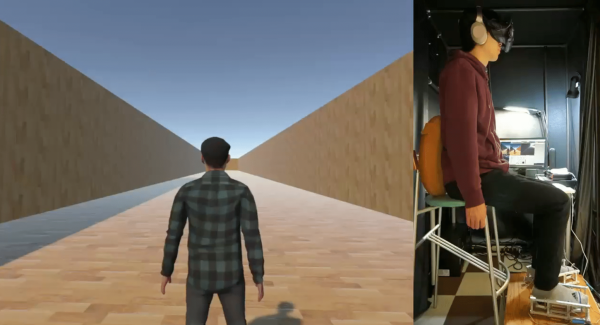
The whole idea behind virtual reality is that you don’t really know what’s going on in the world around you. You only know what your senses tell you is there. If you can fake out your vision, for example, then your brain won’t realize you are floating in a tank providing power for the robot hordes. However, scientists in Japan think that you can even fool your feet into thinking they are walking when they aren’t. In a recent paper, they describe a test they did that combined audio cues with buzzing on different parts of the feet to simulate the feel of walking.

The trick only requires four transducers, two on each foot. They tested several different configurations of what the effect looked like in the participant’s virtual reality headgear. Tests were performed in third person didn’t cause test subjects to associate the foot vibrations with walking. But the first-person perspective caused sensations of walking, with a full-body avatar working the best, compared to showing just hands and feet or no avatar at all.

Making people think they are walking in VR can be tricky but it does explain how they fit all that stuff in a little holodeck. Of course, it is nice if you can also sense walking and use it to move your avatar, but that’s another problem.

Debug ARM Virtually

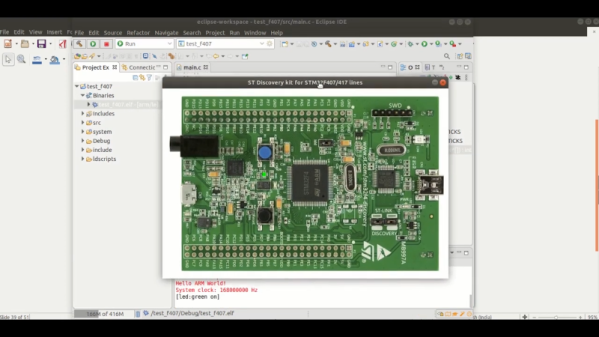
With the advent of super powerful desktop computers, many developers make use of some sort of virtual or psuedo-virtual machines (VM). We run Windows in a VM and do kernel development in a VM, too. If you are emulating the same kind of computer you are on then the process is simpler, but it is possible to run, say, ARM code on an x86 (or vice versa) but with possibly slower performance than running natively. QEMU is probably the best-known program that allows a CPU to run code targeting a different CPU, but — by default — it targets desktop, laptop, and server-class machines, not tiny embedded boards. That’s where xPack QEMU Arm comes in. It allows you to run and debug embedded Cortex-M devices in an emulated environment on a host computer.

The tool supports boards like the Maple — which means it should support bluepill, along with popular boards such as the Nucleo, some discovery boards, and several from Olimex. They have plans to support several popular boards from TI, Freescale, and others, but no word on when that will happen. You can see a decidedly simple video example from [EmbeddedCraft] of blinking a virtual LED in the video below, although you might like to mute your audio before playing it.

Continue reading “Debug ARM Virtually”

Ooohhh, That Smell: Arduino Monitors Air Quality

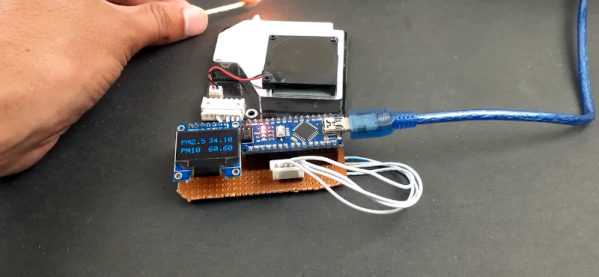
According to [Dr. Tom Lehrer’s] song Pollution, “Wear a gas mask and a veil. Then you can breathe, long as you don’t inhale!” While the air quality in most of the world hasn’t gotten that bad, there is a lot of concern about long-term exposure to particulates in the air causing health problems. [Ashish Choudhary] married an Arduino with a display and a pollution sensor to give readings of the PM2.5 and PM10 levels in the air.

The sensor uses a laser diode and a photodiode to detect and count particles, while a fan moves air through the system. If you aren’t up on pollution metrics, PM2.5 is a count of very fine particles (under 2.5 microns) and PM10 is a count of particles for 10 microns. You can find a datasheet for the device online.

Continue reading “Ooohhh, That Smell: Arduino Monitors Air Quality”

Stepper Motor Analyzer Reveals All

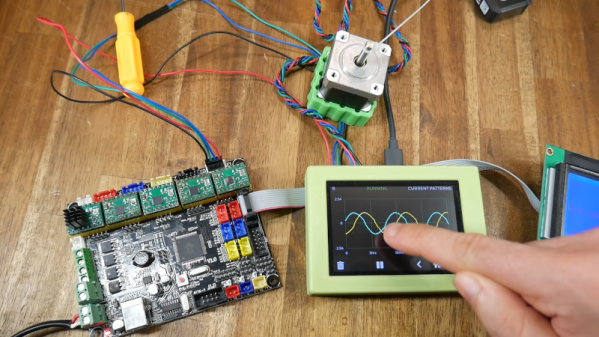
In theory, you really don’t need much to work with electronics. A scope ought to do everything. However, for special purposes, it is handy to have meters, logic analyzers, and other special-purpose instruments. If you work on motion systems like 3D printers and CNC machines, you ought to have a way to look at stepper motors. You don’t? [Zapta] has a great Simple Stepper Motor Analyzer and [Teaching Tech] has a great video (see below) that shows some of the great things it can do.

What can it do? It analyzes the motor in place and can visualize what’s happening during stepping, microstepping, and other operating modes. Connecting the instrument is easy since you just use a four-pin pass-through connector.

Continue reading “Stepper Motor Analyzer Reveals All”