Embed With Elliot: Debounce Your Noisy Buttons, Part II

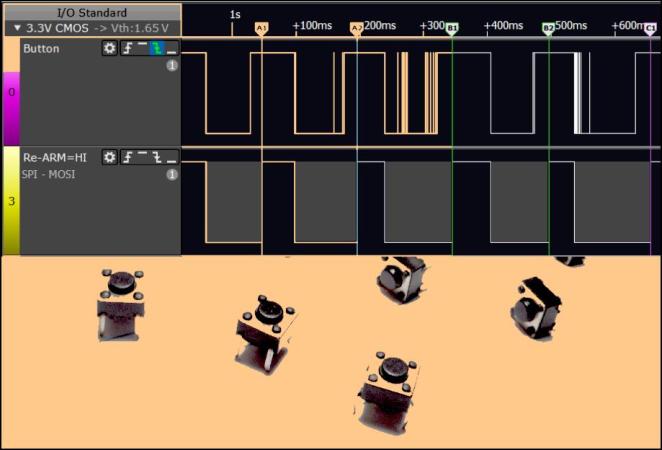
If you’ve ever turned a rotary encoder or pushed a cursor button and had it skip a step or two, you’ve suffered directly from button bounce. My old car stereo and my current in-car GPS navigator both have this problem, and it drives me nuts. One button press should be one button press. How hard is that to get right?

In the last session of Embed with Elliot, we looked into exactly how hard it is to get right and concluded that it wasn’t actually all that bad, as long as you’re willing to throw some circuitry at the problem, or accept some sluggishness in software. But engineers cut corners on hardware designs, and parts age and get dirty. Making something as “simple” as a button work with ultra-fast microcontrollers ends up being non-trivial.

And unsurprisingly, for a problem this ubiquitous, there are a myriad of solutions. Some are good, some are bad, and others just have trade-offs. In this installment, we’re going to look at something special: a debouncer that uses minimal resources and is reasonably straightforward in its operation, yet which can debounce along with the best of ’em.

In short, I’ll introduce you to what I think is The Ultimate Debouncer(tm)! And if you don’t agree by the end of this article, I’ll give you your money back.

Continue reading “Embed With Elliot: Debounce Your Noisy Buttons, Part II”
Embed With Elliot: Debounce Your Noisy Buttons, Part I

“Psst…hey buddy! Wanna see the sweetest little debouncing routine this side of Spokane? C’mon over here. Step right over those bit-shift operators, they don’t bite. Now look at this beauty right here: I call her The Ultimate Debouncer(tm)!”

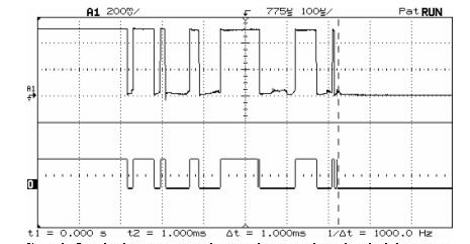
Everybody who works with microcontrollers eventually runs into the issue of switch bounce or “chatter”, and nearly everyone has their own favorite solution. Some fix it in hardware, others fix it in software. Some hackers understand chatter, and others just cut-and-paste the classic routines. Some folks even try to ignore it, and they might even get lucky, but everyone’s luck runs out sometimes.

In the next two “Embed with Elliot” installments, I’ll look a little bit at bouncing, look into doing hardware debouncing both the simple way and the right way, and build up a basic software routine that demonstrates some of the principles and which works just fine, though it’s not optimized. We’ll be laying the groundwork.

In the next installment, I’ll let you in on my personal favorite debounce routine. It’s a minor tweak on a standard, but with some special sauce that’s worth spreading around. I’ll call it the Ultimate Debouncer(tm), but will it stand up to the scrutiny of the Hackaday commenteers? (How’s that for a cliffhanger?!?)

For now, though, let’s look into switch bounce and the standard ways to fix it in hardware and software.

Continue reading “Embed With Elliot: Debounce Your Noisy Buttons, Part I”

Debounce Code – One Post To Rule Them All

Last month we asked you to send in your debounce code. You didn’t disappoint and it’s time to share the code received. There were some guideline for sending in code so if you don’t see yours here, it probably didn’t follow the rules, sorry. We also tried to weed out code that using delay loops for debounce. These tend to be a poor way to handle inputs because they monopolize the processor.

We wanted to add upvote/downvote buttons to each set of code to give some idea of a group consensus on code quality but there’s no good system available for multiple up/down vote widgets on one wordpress page. This results in a huge code dump for any one person to go through. If you’ve got any ideas on how to better organize this let us know: debounce@hackaday.com.

We make no guarantees that this code is safe to use, or that it even works. Test it carefully before using for important tasks.

Join us after the break for a whirlwind of code examples.

Continue reading “Debounce Code – One Post To Rule Them All”

Open Call: Send Us Your Debounce Code

If you’ve ever designed an embedded system with at least one button you’ve had to deal with button debouncing. This is also know as contact bounce, a phenomenon where a button press can be registered as multiple button presses if not handled correctly. One way to take care of this is with a hardware filter built from a resistor-capacitor setup, or by using a couple of NAND gates. We find that [Jack Ganssle] put together the most comprehensive and approachable look at contact bounce which you should read through if you want to learn more.

We’re interested in software solutions for debouncing buttons. This seems to be one of the most common forum questions but it can be hard to find answers in the form of reliable code examples. Do you have debounce code that you depend on in every application? Are you willing to share it with the world? We’d like to gather as many examples as possible and publish them in one-post-to-rule-them-all.

Send your debounce code to: debounce@hackaday.com

Here’s some guidelines to follow:

  • Please only include debounce code. Get rid of other unrelated functions/etc.
  • You should send C code. If you want to also send an assembly code version that’s fine, but it must be supplementary to the C code.
  • Please comment your code. This will help others understand and use it. You may be tempted to explain the code in your email but this info is best placed in the code comments
  • Cite your sources. If you adapted this code from someone else’s please include a note about that in the code comments.

As an example we’ve included one of our favorite sets of debounce code after the break. Please note how it follows the guidelines listed above.

Continue reading “Open Call: Send Us Your Debounce Code”

door spring

Compliant Contacts: Hacking Door Locks With Pen Springs

As you may have guessed given our name, we do love hacks around here, and this one is a great example of making some common, everyday things work in uncommon ways. [Nathan] sent in his hack to detect the door lock position in his basement.

Having a house that dates back to the 1890s, much of it was not very conducive to using off-the-shelf home automation devices. [Nathan] wanted a way to check the status of the basement deadbolt. He went about putting together a custom sensor using some spare parts, including a spare BeagleBone Black. Going full MacGyver, [Nathan] used springs from a ballpoint pen to craft a compliant contact for his sensor.

The pair of springs sat in the door frame and came in contact with the deadbolt; given they are springs, the exact position of the sensor was not very sensitive, as if too close it would just compress the springs slightly more. The springs were wired to the BeagleBone Black’s GPIO, acting as a switch to sense when there was conductivity between the springs through the deadbolt.

This wasn’t just a plug-it-in-and-it-works type of project, mind you; the BeagleBone Black was over 15 ft away from the sensors, lending plenty of opportunity for noise to be introduced into the lines. To combat this, [Nathan] created an RC filter to filter out all the high-frequency noise picked up by his sensor. Following the RC filter, he added in some code to handle the debounce of the sensor, as the springs have some inherent noise in them. Thanks [Nathan] for sending in your resourceful hack; we love seeing the resourcefulness of reusing things already on hand for other purposes. Be sure to check out some of the other repurposed components we’ve featured.

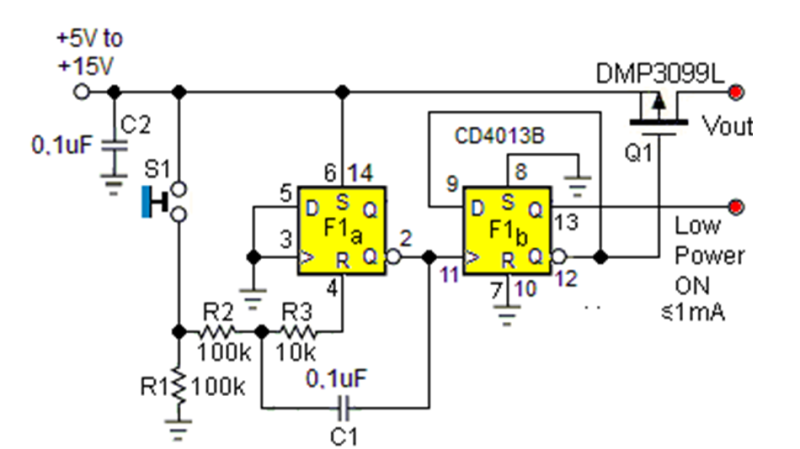
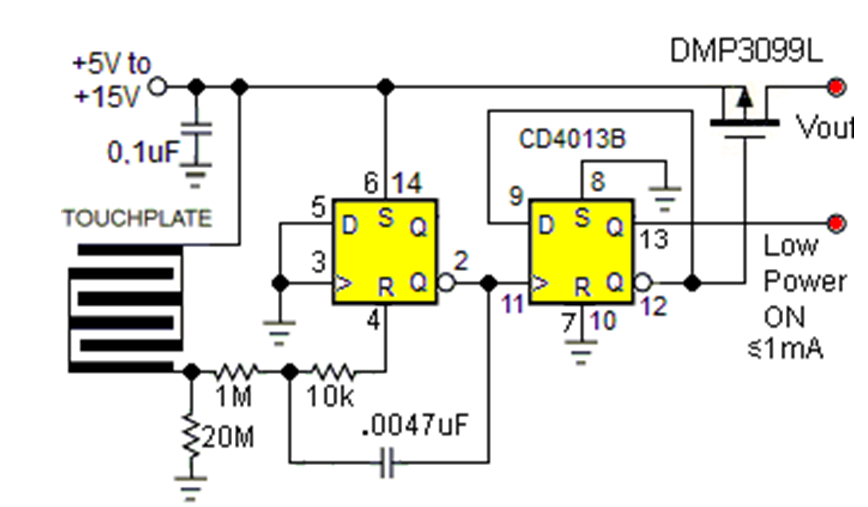
Flip Flops Make Great Soft Switches

Mechanical switches are pretty easy to understand—the contacts touch, the current flows, and Bob is, presumably, your uncle. But what about soft switches? Well, they’re not that difficult to understand either, as explained by [EDN].

You can build a touch switch quite easily with old-school chips.

The traditional softswitch takes input from a momentary single-pole pushbutton and lets you press to toggle power on and off. This operation is easy to achieve with a simple flip-flop constructed with old-school logic to create a “bistable” circuit. That means it will happily remain stable in one of two states unless you do something to make it switch.

Continue reading “Flip Flops Make Great Soft Switches”

Button Debouncing With Smart Interrupts

Debouncing button or switch inputs on microcontrollers can be a challenging problem for those first starting to program these devices. Part of the reason for this difficulty is that real-world buttons don’t behave like the idealized textbook components we first learn about, and therefore need special consideration to operate like one would expect. There are simple ways to debounce inputs like adding a delay after a button is pressed, but for more efficient use of computer resources as well as adding some other capabilities to inputs you might want to look at this interrupt service routine (ISR) method from [Lee] aka [stockvu].

The strategy with this debounce method is not simply to use a single ISR for the button input, but to activate a second timer-based ISR at that time that runs at a certain interval which timestamps any button press and checks the amount of time the button has been active. If it’s under a certain threshold the ISR assumes it’s caused by bounce and blocks the bounce. If the timestamp ages past another longer threshold it knows the button has been released. This method allows on-the-fly adaptation between long button presses and rapid button presses and is capable of debouncing both types.

For those wanting to try this out, [stockyu] has included some example Arduino code for others to use. It’s an interesting take on a solution for a common problem, and puts very little load on the microcontroller. There are about as many ways to debounce inputs as there are microcontroller platforms, though, and you can even use a 555 timer to get this job done which frees up 100% of the microcontroller’s CPU.