Home Made Oculus Rift

OpenVR: Building An Oculus Rift For Only $150

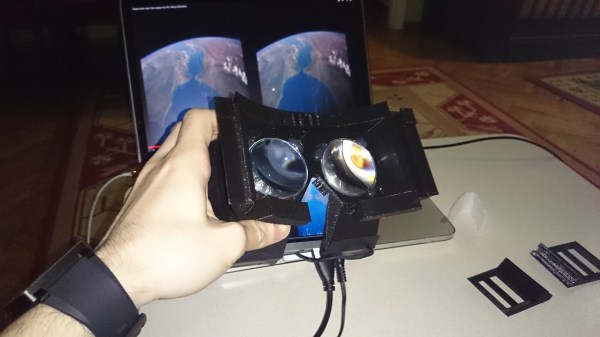
The Oculus Rift is a really cool piece of kit, but with its future held in the grasp of Facebook, who knows what it’ll become now. So why not just build your own? When the Oculus first came out [Ahmet] was instantly intrigued — he began researching virtual reality and the experience offered by the Oculus — but curiosity alone wasn’t enough for the $300 price tag. He held off until he had a useful purpose for it, and as it turns out he did — he builds and flies multicopters, for which an FPV setup would be super handy!

Other FPV setups cost close to $300 as well, so getting a device with more features just makes sense. Promptly after realizing this, he faced the Maker’s Dilemma: Buy it, or build it? To test the waters, he decided to order some aspheric lenses to do some quick tests with a smart phone and a ghetto cardboard box setup — the results were surprisingly good. No turning back now!
The hardware consists of:

  • 5.6″ 1280×800 LCD
  • 3D printed enclosure
  • 12V power adapter
  • USB to TTL
  • 50mm aspheric lenses (5X zoom)
  • Arduino Mini Pro
  • GY-85 9DOF IMU
  • Various wires, foam padding, and glue

The majority of the cost here is in the LCD, with everything else being pretty inexpensive. Once it’s all built (details on his blog), it is time to get the software, downloaded right off of GitHub. The rest is pretty self-explanatory — just take a look at the results! We’re even tempted to build one now. Videos below.

Continue reading “OpenVR: Building An Oculus Rift For Only $150”
Hacking The D-Link DSP-W215 Smart Plug

DSP-W215

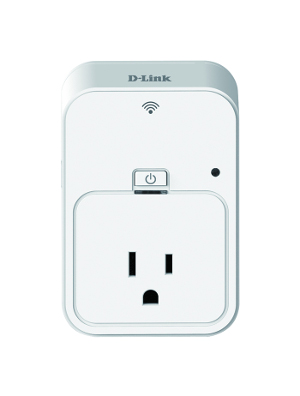
The D-Link DSP-W215 Smart Plug, a wireless home automation device for monitoring and controlling electrical outlets has just been hacked. Even though it isn’t readily available from Amazon or Best Buy yet, the firmware is already up on D-Link’s web site. The very well detailed write-up explains all the steps that led to this exploit creation.

First, the firmware was unpacked to examine the file system contents. It was found that the smart plug doesn’t have a normal web-based interface as users are expected to configure it using D-Link’s Android/iOS app. The apps however, appear to use the Home Network Administration Protocol (HNAP) to talk to the smart plug running a lighthttpd server. A look at the latter’s configuration file revealed the functions that could be called without any authentication. Another revealed that the firmware could accept an unlimited amount of POST request bytes which were copied in a fix length buffer without any performed checks. We’ll let our readers head to the original article to see where the author went from this point.

It’s Not 2015 Yet But Marty And His Hoverboard Are Already Here!

Okay now this is seriously awesome. [Rodger Cleye] has made a real working Hoverboard.

You guys might remember the recent [Tony Hawk] and [Christopher Lloyd] viral Hoverboard hoax video… Well, this isn’t that. Nope, not even close. It’s real.

The Hoverboard is a quadrotor on steroids — it features four 1200W brushless motors driving 12″ props, a massive 13.4Ah 5S Li-Po battery, and a [Marty McFly] mannequin wearing the classic red vest. He’s counter-balanced [Marty] and the battery around the rotors which makes for a surprisingly smooth flight. It even has a run-time of over 5 minutes, thanks to a whopping 83% efficiency using the 12″ props.

[Rodger] designed and simulated the entire system in eCalc before construction — He had first attempted a bi-copter design, but opted for the tried and true quad-rotor instead. The frame is made of 1/2″ PVC pipe to conserve the mass budget, but altogether it still weighs an unbelievable 20lbs! How close are we to being able to give toddlers the ability to fly?

Just take a look at the following video — we’re seriously impressed.

Continue reading “It’s Not 2015 Yet But Marty And His Hoverboard Are Already Here!”

Hackaday Links: December 15, 2013

hackaday-links-chain

Want to get a hold of a gaming controller attachment for iOS at a rock bottom price? [Dark GOD] learned that Amazon is closing out the Gameloft DUO Gamer hardware for $6 because the hardware is no longer supported by the operating system. He shows how to make it work using a Cydia app. [Thanks ProMan]

[Frank Zhao] had a cheap HDMI switch which had problems with a sagging power rail. His solution was to hack in a USB port to inject some power.

This security hack uses an Arduino with LCD screen to display a QR code. Scan it with an Android device and you no longer need keys! Here’s the code repo and a demo video.

It’s interesting to see how many places the WS28xx pixels are popping up. Here’s a crowdfunding campaign that uses a matrix of the pixels as a portable gaming display. Look somewhat familiar? We’ve seen [Retro Brad’s] earlier hardware (made to play Super Pixel Bros.) that used an LED module instead. This is probably a lot easier to drive since it uses serial data instead of multiplexing.

Next is some robot building inspiration. [IronJungle] has been hard at work building a rover that uses compass bearings for navigation.

We liked seeing a drop-in replacment uC for Ikea Dioder projects, but if you need more power under the hood, take command of those colored lights with a Raspberry Pi.

Those lucky enough to have access to a laser cutter will find this Inkscape extension for living hinges useful.

Finally, POTUS threw down the gauntlet, encouraging everyone to learn how to program by pointing them toward the Hour of Code program. We’ve long thought that everyone should have some level of coding education. Do you agree with us? Of course, getting something like this into schools is a monumental challenge, so it’s nice to see extra-curricular offerings. We also believe that Hackerspaces are among the best driving forces for getting kids a tech education. [via Adafruit]

GuruBrew’s 15 Minute Windows 8 Survival Guide

GuruBrew Windows 8 Survival Guide

One thing very common to all of us is our reliance on operating systems in our hobby life. If that OS is Windows then you could be in for quite a shakeup with Windows 8. Many readers are Linux or Apple users and couldn’t care less if Microsoft is releasing an entire paradigm shift in desktop navigation. However, you just might find yourself facing this new OS and you’ll look like you’re on training wheels if you don’t get acquainted now, and considering the number of computers being released with Windows 8 its inevitable that day will come soon.

So if you haven’t been behind the wheel of Windows 8 then checkout [Steve’s] Windows 8 Survival Guide from the Guru Brew Tech Show. This is an excellent overview of the new touch screen navigation methods you’ll find in the Windows 8 desktop including hotspots, charms and tiles to name just a few. You’ll also learn tips to get around with a mouse and keyboard. It’s not a complete tutorial on using Windows 8 but you’ll at least know how to navigate, search for apps, work with multiple apps and find tools like task manager, control panel, file explorer as well as your familiar desktop.

Follow the break to watch the short survival guide video.

Continue reading “GuruBrew’s 15 Minute Windows 8 Survival Guide”

Hackaday Links: September 15, 2013

hackaday-links-chain

First a quick announcement. We changed our “Kickstarter” category to “Crowd Funding“. We get a huge number of tips about crowd funding projects. We’re always interested in details. If you’re trying to get your crowd funding campaign on our front page make sure you’ve shared as many gritty project details (development process, problems/successes along the way, etc.) as possible . We usually prefer if this is done in a separate blog post from the campaign page itself.

Here’s a peephole hack that purportedly cost four grand. It uses a full on DSLR for the peephole hardware. Add a motion sensor and maybe you’ll be able to learn the faces of the neighbors who live on your floor. [via Gizmodo]

[Matthias] tells us that support for Rigol DS1052E oscilloscopes has been included in the 3.11 version of the Linux Kernel. Prior to this, getting the hardware to work on Linux was a hack, and a buggy one at that. For what it’s worth, here’s confirmation that support was added.

A post about reverse engineering the FitBit Aria Wi-Fi scale was sent in by [Christopher]. This makes us wonder if you could patch into a digital scale, using your own electronics to spoof the FitBit version?

We always keep our paperboard six-pack carriers so that we have a way to transport our homebrew beer. But rolling into a party with this laser-cut beer caddy which [Daniel] designed looks a lot cooler.

Texas Instruments has an MSP430 Selection Guide (PDF) which we found interesting. The first nine pages or so are pretty much just marketing, but several pages of parametric tables found after that make for a great collection of data on the hardware families. [via Dangerous Prototypes]

[Antoine] spared no expense building a coffee table that showcases his old motherboards. The illuminated glass and wood art piece rang in at around $400 in materials. We’re a little more minimalist with our home decor. We still want something along the lines of this LED matrix version.

Speaking of LED matrices, [Mario] dropped off a link to his LED Space Invaders game in the comments of last week’s Game of Light post. What we can’t figure out is why so many people hesitate to send in a tip about their awesome projects?

Controlling Real World Objects From Your Lucid Dream For $15

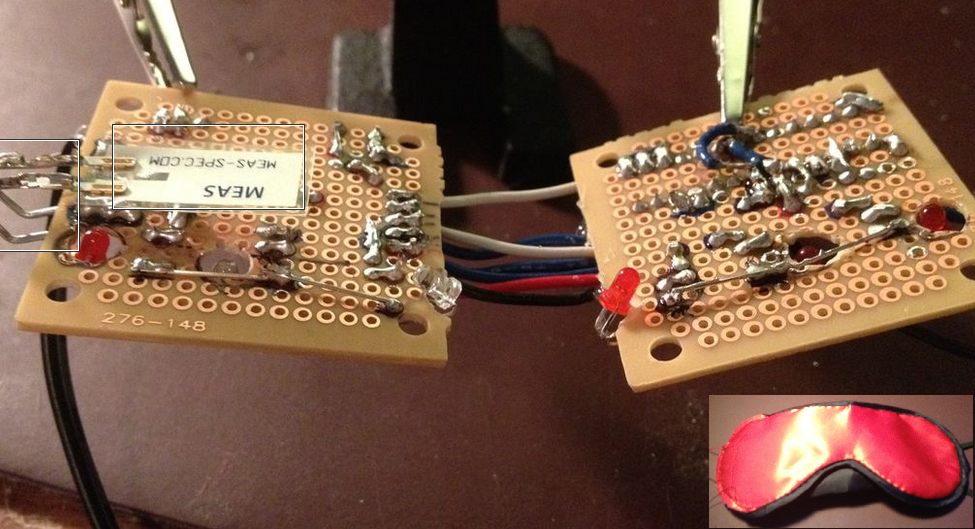
[Kyle Fredericks] tipped us about his first electronics project, a cheap and smart sleep mask that uses a vibration sensor to detect rapid eye movements.

As some of you may know, REM sleep is the part where you dream the most vividly and actively. If some external stimulation (sound, movement) is sent to you at this moment, it may help you take control of your dream by becoming aware of it. If not, your brain will create dream scenarios that incorporate this stimulus.

The interesting part of the concept is that the vibration sensor calibrates itself at the stage 2 sleep, when no eye movement occurs. This later allows a very accurate detection of the REM sleep stage, triggering a shelf stereo. Secondary buttons are even included in the mask sides.

[Kyle Fredericks] went to great lengths to document every step of the project, making it a perfect first step to learn electronics for beginners out there.