Microcontroller Enumerates As USB Printer — Can Be Programmed By Printing

avr-programming-by-printing

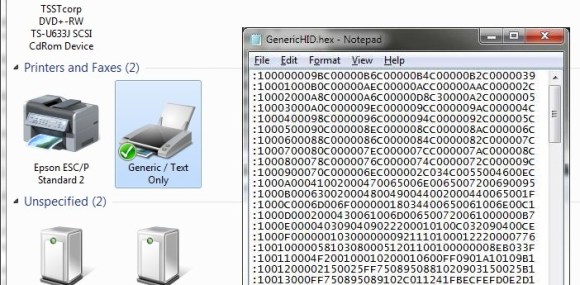
This is a fascinating concept. We’re not sure of its usefulness, but it definitely stands on its own just for the concept. [Dean Camera] just added a new HID class to the LUFA project that lets you flash AVR chips by printing to them. This means once you have a file like the one seen open in Notepad above, you can just click on File, then on Print, and the firmware will be uploaded to the chip.

[Dean] is the creator of the LUFA project and still likes to get his hands dirty hacking around with it. This idea came to him while he was exploring the concept of using the MIDI protocol to program a chip. That didn’t pan out because of the way Microsoft has handled MIDI in newer versions of Windows. But he did get the idea of making LUFA identify itself as a simple USB printer. He dug into the specification and figured out how to do that. Once Windows connects to the device it doesn’t really care what data gets sent to it. So [Dean] wrote a parser for the bootloader which could accept the incoming hex code and write it to the chip’s program memory.

Macro Assembly For AVR Chips

avr-macro-assembly

Here’s an interesting tip that can help improve your ability to write assembly code. In an effort to remove the complexity of assembly code for an AVR project [Quinn Dunki] figured out how to use macros when writing AVR code with the GNU toolchain. Anyone using AVR-GCC should keep this in mind if they ever want or need to pound out a project in assembly language.

If you look at the code snippet above you’ll see two commands that are obviously not assembly; PulseVRAMWrite and DisableVRAMWrite. These are macros that direct the assembler to roll in a hunk of code. But avr-as, the assembler used with this toolchain, lacks the ability to handle macros. That’s too bad because we agree with [Quinn] that these macros make the code easier to read and greatly reduce the probability of error from a typo since the code in the macro will be used repeatedly.

The answer is to alter the makefile to use GNU M4. We hadn’t heard of it, but sure enough it’s already installed on our Linux Mint system (“man m4” for more info). It’s a robust macro processor that swaps out all of her macros based on a separate file which defines them. The result is an assembly file that will play nicely with avr-as.

Her implementation is to help in development of the GPU for her Veronica computer project.

Hacking A Parallel Port Flash Memory Programmer

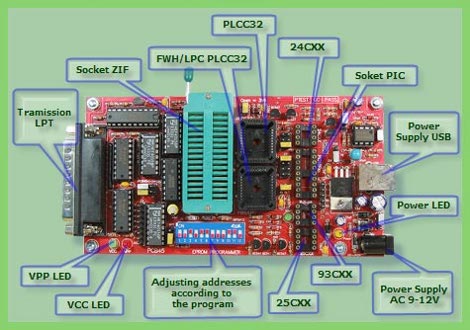
[Pulko Mandy] doesn’t use his flash ROM programmer very often, but he does use it. When he tried to get support for a new chip and the manufacturer suggested he just buy a newer version he decided to hack the programmer and it’s software instead.

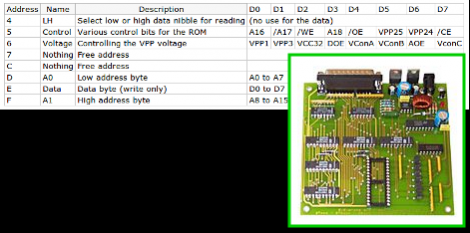
This device connects to the parallel port and was intended for use with MS-DOS systems (no wonder there’s no longer support from the company). The board uses logic chips to add read and write function. So the first step was to analyze how they connect together and come up with a set of commands. While at it he also made some changes to the board to bring the voltage more in spec and ensure the logic levels on the parallel port met the correct voltages.

His plan was to use the board with a Linux system so the parallel port interface can stay. He used what he learned from the hardware inspection to write his own interface in C++. It works with a chip he was able to use under the MS-DOS software, but he hasn’t gotten it to work with the chip that sparked this adventure. If you’re familiar with how the AT29C040A works please consider lending a hand.

HTML Based AVR Compiler Aims To Make Arduino Development On IOS Possible

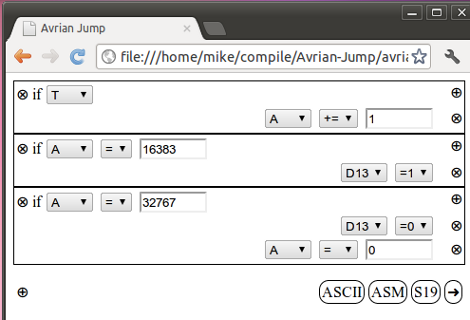
It’s surprising what lengths people will go to in order to bring functionality to their smart phones. In this case, [Tadpol] wanted a way to develop for his Arduino on an iOS device like an iPad or iPhone. He figures it’s possible to rewrite the IDE as HTML5, but since that’s a pretty large mountain to climb, he started by building a browser-based AVR compiler. It’s an interesting concept, and he’s got a working prototype up on Github for you to test. Perhaps you can throw your hat in the ring and help him with development?

The web interface uses boxes to add to the code. What you see above is three sets of commands which will blink an LED. The project, named Avrian Jump, uses a simple ladder language to feed the compiler, with several different options for output. The most interesting in our mind is a WAV file which can be used to program an AVR from the audio out of your device. That would make programming as simple as connecting the specially modified AVR to your headphone jack. There’s also an ASCII output which allows you to save your programs for later alteration, S19 output for AVRdude programming, and an assembler output for debugging purposes. It’s hard to see where this project might go, but we have to admit that the concept is intriguing.

Make W7 64 Bit Play Nice With Your Programmer

External EPROM burners are pretty handy gadgets to have around. They obviously can read and write EPROMS, but often times they will also handle a pile of PIC’s, some AVR’s, and other programmable logic like PAL/GAL and CLPD’s. While you can often find old models floating around for cheap (or free in my case) there are a few issues to be hammered out.

Typically the models you’re going to get for a song and a dance are old parallel port models that use software in MS-DOS or Windows and hasn’t been updated since. The software typically bit bangs the port using it like a 1 byte wide GPIO line, and this was a common trick, that is long gone from current operating systems by default.

[Doug] sought to find a solution to using one of these gadgets on Windows 7 X64, and lots of Google-fu, poking at libraries, and a little code modification he does just that getting his Sivava Willem EPROM programmer working like a champ on a nice new i7 with a parallel port add in card.

Hardware XOR For Output Pins On AVR Microcontrollers

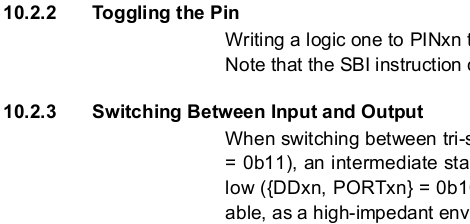
Did you know that most AVR chips have a type of hardware exclusive OR (XOR) option when it comes to the logic levels of the output pins? If you look in the datasheet (the image above is a screenshot from an ATtiny13 datasheet) you’ll find a section on Toggling the Pin. It turns out that if you set a PORT as an output, writing logic one to the corresponding PIN register will toggle the logic levels of that out. This is really easy to overlook if you’re writing in C, but I’ve been working on learning a bit of assembler language and found this to be very useful. Keep reading after the break and I’ll tell you how I happened upon this info and what it’s good for.

Continue reading “Hardware XOR For Output Pins On AVR Microcontrollers”

The Complete AVR Programmer That Fits In Your Pocket

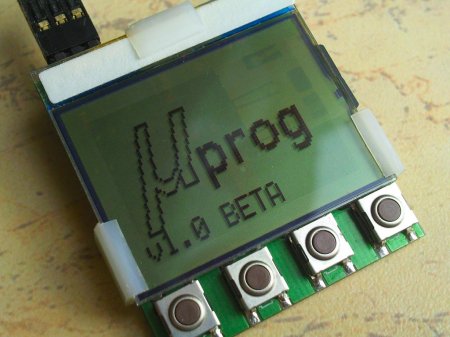
We have seen a few very nice and polished AVR based projects from [Manekinen] over the last few years. Now he has just finished his latest project, the µProg, a super tiny complete AVR programmer with a bunch of features. The µProg completely eliminates the need for a computer to program your embedded AVR chips.

The programmer fits entirely behind an LPH7779 graphics display, and accepts any FAT16/32 formatted microSD cards. Some features include, reading, writing or verifying flash, eeprom, fusebits and lockbits, it also shows amusing animations after every operation. The device is controlled with the use of 4 tactile buttons and operates on a couple of CR2032 batteries.

For an amazingly detailed write up including pictures, eagle files and firmware check out his website. The video embedded after the break has a nice demonstration of the µProg in action, showing off a few of the features and animations. You should also check out his PSU monitor and a spectrum analyser

Continue reading “The Complete AVR Programmer That Fits In Your Pocket”