Finally, An ARM-powered Arduino

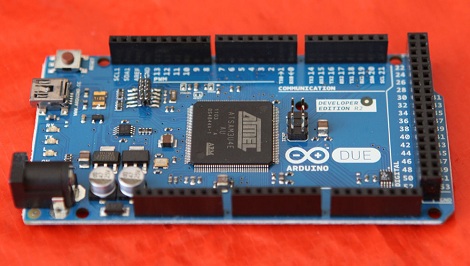
Far removed from the legions of 3D printers featured at this year’s Maker Faire in New York was a much smaller, but far more impressive announcement: The ARM-powered Arduino DUE is going to be released later this month.

Instead of the 8-bit AVR microcontrollers usually found in Arduinos, the DUE is powered by an ATSAM3X8E microcontroller, itself based on the ARM Cortex-M3 platform. There are a few very neat features in the DUE, namely a USB On The Go port to allow makers and tinkerers to connect keyboards, mice, smartphones (hey, someone should port IOIO firmware to this thing), and maybe even standard desktop inkjet or laser printers.

The board looks strikingly similar to the already common Arduino Mega. That’s no mistake; the DUE is compatible with existing shields, so connecting a RAMPS board for your 3D printer should be a snap.

Here’s a PDF the Arduino and Atmel guys were handing out at their booth. A few DUE boards have already made it into the hands of important people in the Arduino community, including 3D printer guru [Josef Prusa]. Sadly, the folks at Arduino didn’t think media personalities needed a DUE before its release, so you’ll have to wait until we get our hands on one later this month for a review.

Makerbot, Occupy Thingiverse, And The Reality Of Selling Open Hardware

Yesterday, Makerbot Industries introduced the Replicator 2, a very good-looking 3D printer that will is probably the closest thing we’ll see to a proper ‘consumer’ 3D printer for a year or so. There’s only one problem. The new Replicator 2 is rumored to be closed source. If that’s not enough, [Bre Pettis], co-founder and CEO of Makerbot Industries will be speaking at the Open Source Hardware Association conference next week with the suitably titled talk, “Challenges of Open Source Consumer Products.”

Of course, the Replicator 2 being closed source is hearesay, and we can’t blame them for closing up parts their product; they have investors to worry about and people are blatantly copying their work. There was another change in Makerbot’s operation at the press conference yesterday: Makerbot now owns everything you’ve put up on Thingiverse.

This news comes from [Josef Prusa], creator of what is probably the most widely used 3D printer in the world.

[Prusa] begins his rant with the history of the RepRap. The project began with a team of core developers headed by [Adrian Bowyer], and supported by [Zach Smith], [Adam Mayer], and [Bre Pettis]. [Boyer] gave the guys a bit of money to start Makerbot, and it’s something the guys at Makerbot have never been ashamed of. Makerbot went on to create Thingiverse, became the darlings of the Open Hardware movement, and acquired $10 million from investors.

All things change, of course, and Makerbot is no exception. Along with the (again, rumored) closed-source Replicator 2, [Prusa] pointed out the Terms of Use for Thingiverse say that Thingiverse – and thus Makerbot Industries – owns everything submitted by Thingiverse users. [Prusa] started an Occupy Thingiverse movement in response to this discovery.

Honestly, we hope [Josef Prusa] is wrong on this one. We hope the specific clauses in Thingiverse’s Terms of Use granting itself a license to do whatever it wants with uploaded Things is just a bunch of legal mumbo jumbo added in by lawyers to protect Thingiverse from being sued by crazy people. Still, if rumors are true, it may be a portent of things to come.

In any event, [Prusa] will be taking his Thingiverse things down. He plans on posting his stuff on GitHub, probably the most Open Source-friendly community in existence. You can do the same with this GitHub template for 3D printed objects.

So, learned reader of Hackaday, what do you make of this? Is Makerbot right to close up their projects? Are we finally becoming disillusioned with Open Hardware? What say you?

Making Plastic Filament At Home

There’s one problem with the popularity of plastic-extruding 3D printers such as the RepRap and Makerbot; since they’ve become so popular, the price of plastic filament has skyrocketed over the past few years. Without a way to produce filament at a hackerspace or home lab, the price of 3D printed objects will remain fairly high. Project Spaghetti hopes to rectify that by building a machine to make plastic filament for 3D printers.

The folks behind Project Spaghetti – a loose amalgamation of makers going under the title of Open Source Printing, LLC – have successfully built a machine that is able to produce short lengths of plastic filament.

Early machines used a plunger to press small pellets of ABS plastic through a heated steel pipe to produce filament. There are a few problems with this approach, especially when the temperature is set to 480F, but the team was able to make a bit of filament with this design.

Although the team is using a piston to force melted plastic out of a nozzle, they do have a screw-drive ‘plan B’ in the works. This design should allow for continuous extrusion for theoretically endless reels of plastic filament, every RepRappers dream and a neat way to win 40 grand. Continue reading “Making Plastic Filament At Home”

Toorcamp: Type A Machines

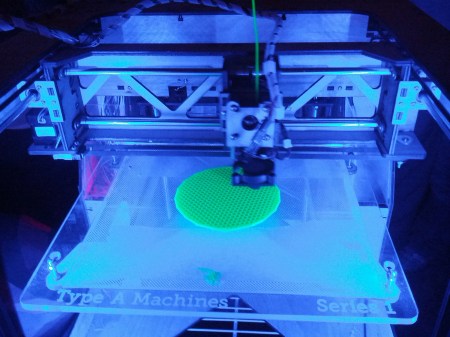
Type A Machines designs and builds 3D printers in San Francisco. [Miloh], one of the founders, brought two of their flagship Series 1 printers to Toorcamp. He printed out a variety of models including water tight cups and quadcopter arms.

The RepRap Arduino MEGA Pololu Shield (RAMPS) is used to drive the stepper motors for each axis, as well as the extruder. This is attached to an Arduino MEGA running the Marlin RepRap firmware. Type A Machines ships the printer with Polylactic Acid (PLA) filament, which is biodegradable.

On software side, you start with a 3D model in STL format. This can be exported from 3D software such as Google SketchUp or Autodesk 123D. You then need a slicer to generate G-code and machine control software to command the printer. [Miloh] used Slic3r and Repetier for his workflow, but he also pointed out a good summary of 3D printer workflows.

The Series 1 was launched at the Bay Area Maker Faire this past May. It has a print volume of 1200 mL, which is the largest print volume of any desktop printer around. The Series 1 brings another option into the low-cost 3D printer market.

TangiBot And The Perils Of Open Source Hardware

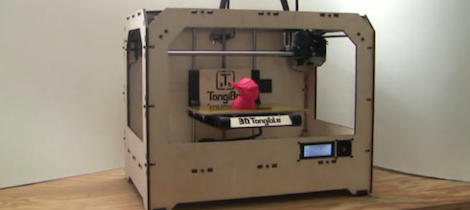
I’ve commented before on the terrible inefficiency and artificially high expense of the current crop of 3D printers. It simply doesn’t make sense to produce the plastic parts of 3D printer kits on a printer farm when there are literally thousands of Chinese injection molding companies that will make those parts cheaper. It looks like [Matt Strong] heeded my call and now has a Makerbot Replicator clone up on Kickstarter that costs $700 less than the official version. We assume the Makerbot lawyers are having a busy morning.

From the info on the Kickstarter page, [Matt] is used parts from his Makerbot Replicator to design a one-to-one copy. Every part and component on [Matt]’s TangiBot is 100% compatible – and seemingly 100% identical – with the Makerbot Replicator. Like the Replicator, [Matt] is offering a dual extruder version that allows you to print in two colors.

At the bottom of the Kickstarter page, under a section titled, “How is 3DTangible able to make a Replicator Clone?,” you’ll see [Matt]’s reasoning for cloning the MakerBot replicator. He says everything is open source, and, “MakerBot used other open source designs when designing and producing their 3D Printers.” We’ll agree that MakerBot used existing extruder designs (and improved upon them), but MakerBot was not this blatant in borrowing from the RepRap project.

For want of editorializing, I’ve complained about the stupid inefficiency of manufacturing 3D printers with 3D printers before. It was only a matter of time before someone realized current manufacturing techniques can be used to make 3D printers cheaper. [Matt] – dude – you were supposed to clone a RepRap. Makerbot has done some really incredible things for the community such as building Thingiverse and generally being an awesome cheerleader for the 3D printing community. Taking the flagship Makerbot printer and making it cheaper will not make [Matt] any friends on the Internet, but at least the laws of economics are coming to the world of 3D printers.

Thanks [Brad] for sending this in.

Melting Plastic Powder Together, One Layer At A Time

[youtube=http://www.youtube.com/watch?v=vVOtKSKyIvI&fw=470]

Here’s an interesting development in the world of 3D printers: A rapid prototyping machine that melts plastic powder together to create objects with extremely good resolution

The Blueprinter works by drawing a 0.1 mm thick layer of plastic powder over the build platform. After that, a very hot needle-shaped probe melts the plastic together. This process continues at a rate of 10mm an hour on the z axis, and a very precise plastic model eventually appears in the powder.

There is no price ( or solid release date ) for the Blueprinter, but this 3ders.org article from earlier this year tells us the price for the machine will be €9,995, with a material cost of €49 per kg. Pricey, yes, but seeing as how the RepRap community already has the techniques behind melting plastic down pat, it might now be too hard to build your own plastic sintering printer.

If you know of any current projects or builds that are trying to emulate this plastic powder melting technique, drop us a note on the tip line. We’d love to see a version of this printer up and running. Until then, you can check out the render showing a rendered Blueprinter in action, along with a demo of a plastic clip printed on this sintering printer.

Continue reading “Melting Plastic Powder Together, One Layer At A Time”

Printing And Programming A Self-balancer

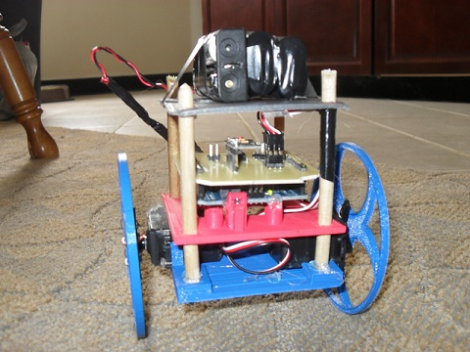
The Hackaday staff isn’t in agreement on 3d printers. Some of us are very enthusiastic, some are indifferent, and some wonder what if they’re as widely useful as the hype makes them sound. But we think [Jason Dorweiler’s] self balancing robot is as strong a case as any that 3d printing should be for everyone!

Don’t get us wrong. We love the robot project just for being a cool self-balancer. Seeing the thing stand on its own (video after the break) using an Arduino with accelerometer and gyroscope sensors is pure win. But whenever we see these we always think of all the mechanical fabrication that goes into it. But look at the thing. It’s just printed parts and some wooden dowels! How easy is that?

Sure, sure, you’ve got to have access to the printer, it needs to be well calibrated, and then you’ve got to make the designs to be printed out. But these hurdles are getting easier to overcome every day. After all, there’s no shortage of people to befriend who want nothing more than to show off their Makerbot/RepRap/etc.

Continue reading “Printing And Programming A Self-balancer”