[Ian] Shops Akihabara

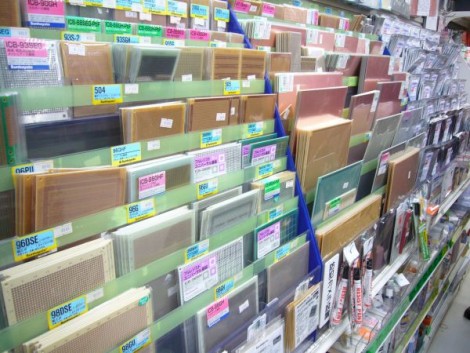
Hackaday alum and Dangerous Prototypes founder [Ian Lesnet] is in Japan and he’s been spending a lot of time at Akihabara Electric Town. For those that don’t recognize the name, this is an electronic components extravaganza with buildings packed full of small shops each specializing in different merchandise. For instance, we love this picture of a shop that carries every kind of protoboard, breakout board, and copper clad sheet imaginable. The stall next door might have nothing but LEDs, or be full of cords for every purpose.

We’ve been following [Ian’s] regular tweets about the trip. Luckily, he just posted a roundup of the Akihabara posts. Surprisingly, he restrained himself to purchasing just a few items. Part of this is a limit on the amount of stuff he can get back to the States with him. The other reason is that the prices are not necessarily less than you’d find in a catalog. He mentions that the nice thing is you can see the parts before buying them. This is useful for sizing knobs, transformers, cases, etc.

The most exciting thing in his bag is a half-dozen nixie-like VFD tubes for just $12. How much would you give to have this shopping attraction down the street from you?

If you’re interested in a video tour of Akihabara check out this one from the Tokyo Hackerspace.

[via @dangerousproto]

Weekly Roundup 12/10/11


In case you missed them the first time, here are our most popular posts from the past week.

In first place is a post that made our mothers’ wash our mouths out with soap. It is a periodic table of swearing!

Up next is a post about a micromouse robot that can run a maze faster than you would think is possible. Watch out lab rats, it’s gunning for your job.

Are regular violins too low tech? Would you rather play an instrument that could survive a few minutes with Chuck Norris and still keep playing the sweetest melodies? [Ken] created a violin out of carbon fiber that fits the bill.

Want to brake some aluminum? (or bend for the white collar folks out there.) In this post, you can see [Rupert’s] build where he has created a metal brake out of little more than bamboo and some hinges.

Last but not the least is [Zach’s] build that changes the brightness of his Christmas tree lights based on the pitch of the notes from the Star Wars theme.

R/C Blimp Uses A Party Balloon For Lift

Here’s a really tiny r/c blimp that doesn’t need several cubic feet of Helium to get off the ground.

Instructables user [masynmachien] has been building r/c blimps for over a decade now, and this latest build is meant to have the same specs as this nanoblimp. The build is based on an 11-inch party balloon that can provide about 11 grams of lift. This doesn’t allow for much leeway in terms of weight, so [masymachien] used hacked-up servos for the motors.

The blimp is an exercise in saving weight – just about every component that can be removed from the build is thrown away. The results are pretty impressive. The entire blimp weighs about 10 grams on the ground. [masynmachien] also tried a 14-inch balloon with an 808 key fob camera with very good results.

The blimp looks pretty good when flying around a room. [masymachien] seems to have a lot of control from a minimal component count. You can check out the party blimp in action after the break.

Continue reading “R/C Blimp Uses A Party Balloon For Lift”

Simulating PenTile RGBG Displays

Here’s an interesting experiment that lets you simulate PenTile displays on a normal LCD monitor. [Barrett Blackwood] wanted to test out how some graphics look on PenTile RGBG displays with different pixel densities. These PenTile RGBG matrices are sometimes used in OLED displays. For instance, the Nexus One smart phone features a display of this type. Because red, green, and blue OLEDs emit different intensities of light, the pixels are laid out differently from LCD panels in order to balance the color mixing. Our eyes see the green light very well, and so green sub-pixels are made much smaller than their red and blue counterparts.

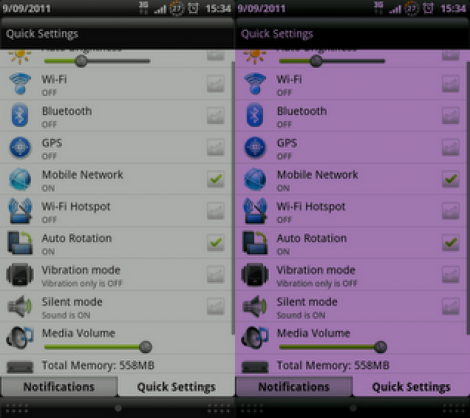
Because the hardware layout is different, some graphics appear to have crosshatching artifacts in them when viewed on the PenTile displays. [Barrett] made the example above to simulate how graphics look on a traditional LCD screen (image on the left), and how they appear on the PenTile scren (image on the right). The magenta hue seen above is a result of resizing the image. Since the simulation method turns off 1/3 of the green pixels in the image, resizing it ruins the careful calculation. It must be view at a 1:1 ratio to see the image correctly, at which point the magenta magically disappears.

Pyxis 3 Hits Beta; Rebranded As Gadgetos

The beta version of Pyxis 3 is now available. Skewworks continues to develop the ARM operating system, and with the transition to version 3 they’ve given it a new name: Gadgetos. One big difference from Pyxis 2 is that the new kernal is closed source. But they’ve taken steps to ensure that the OS is still hardware independent. This is done by reworking the kernel to allow driver loading at run time from an SD card.

The user interface has also changed a bit. Gadgetos relies entirely on a context-based menu system. The minimum input hardware requires a touchscreen LCD and one tactile button. By holding that button, a menu pops up in the center of the screen. This menu is different based on where it is called (this is where context comes in). If you’re at the desktop screen, you get options to load programs, etc. If you pull up the menu while running an application you’ll see the options available for that app. To see more about the new navigation system check out the video after the break.

Continue reading “Pyxis 3 Hits Beta; Rebranded As Gadgetos”

Lighted Fan Pull Saves You From Flailing Around In The Dark

lighted-fan-pull

Like many people, [yardleydobon] had a hard time locating his ceiling fan’s pull chain at night when his room is completely dark. Rather than continue to flail around blindly grasping for the chain, he decided to find a way to illuminate it instead.

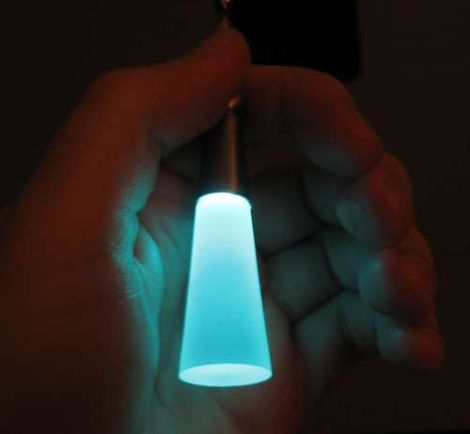
He started off by disassembling a solar garden light, retaining the solar cell, photoresistor, and batteries. After paring down the electronics to the bare essentials, he mounted them inside a plastic battery storage case which he attached to the outside of the fan’s lamp. [yardleydobon] then ran a pair of wires from the electronics box down to end of the chain, where he added an LED and a translucent pull to diffuse the light.

He admits that it’s not the nicest looking modification around, but it does the job in a pinch. He has some ideas that he may put into play if he has the time to revise the design, and we bet that many of you do as well. If so, be sure to share them in the comments.

Continue reading “Lighted Fan Pull Saves You From Flailing Around In The Dark”

Buzzer Project For Classroom Team Games

Want to host a Jeopardy tournament with your friends? Looking to add a bit more fairness to your school’s knowledge bowl? Perhaps you should build some buzz-in hardware of your own.

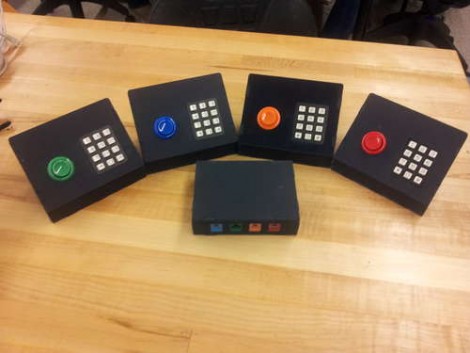
Here you can see [Matt Hanson’s] take on this idea. He used one Arduino to gather not just buzzer info, but also keypad data from four satellite controllers. Each has an RJ45 jack, allowing it to connect tot he base unit with an Ethernet patch cable. We like the color coding that [Matt] chose, which matches the color of the arcade button to the keystone jack on the base. And of course the fantastic look of the water-jet cut cases isn’t lost on us either.

You may wonder why he included a key pad on each controller? It looks like he and a few others worked together to develop a team-based math game for use in school.