Lunar Lander Remade

[youtube=http://www.youtube.com/watch?v=CnKzeHPgWy8]

For those that are lucky enough to remember it, Lunar Lander was a fantastic game. Though it had simple vector graphics and highly repetitive game play, it kept us captivated. We probably lost entire weeks of our lives competing with friends to be the best. Well, now we can relive that experience with a physical version of the game. [Lain] built this fantastic arcade style game to replicate Lunar Lander’s game play exactly. The style of the project is fantastic with giant analog meters and dials giving real time feedback.  You even get a prize if you complete all 3 levels. You can get plenty of build details by going through his blog. Maybe he should hook up with the folks that built the Apollo landing computer replica to build the ultimate simulator.

[thanks Mike]

AVR ISP Programming Via Arduino

ardunio avr isp programming

We found this Arduino AVR ISP programmer particularly interesting. AVR microcontrollers can utilize an interface called In-System-Programming. ISP allows the chip to be programmed or reprogrammed while in an actual circuit via a pin header. Atmel’s solution is the AVR ISP MKII programing tool. The MKII can also be reprogrammed just as an AVR. The difference here is that most people are not likely to modify the MKII to be used as anything but a programmer. On the other hand if you already have the Arduino, fetch the avr.isp.03 firmware and AVRdude. Then program a device, for example an ATtiny13 using the Ardunio as the programmer. All the project information is provided under the CC BY-NC-SA 3.0 license. On a related note we covered a Microcontroller cheat sheet which covers AVR devices and ISP pinouts.

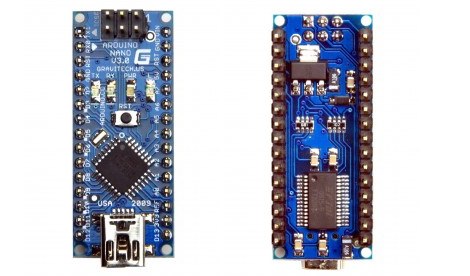
Arduino Nano Updated

The official Arduino Nano design has been updated to version 3.0. Like other new Arduino designs, it’s using the ATmega328 instead of the ATmega168. It’s also a slightly more reasonable $35. The small board is designed to be plugged directly into a breadboard and accessed via mini USB cable. This new design is also two layers instead of four making it easier to produce and modify. The new Nanos will ship at the end of the month.

Strobit Wireless Widget Project

strobit (Custom)

Strobit looks like it could be a project to keep an eye on. The entire project is open source, including the hardware. The aim is to build a low cost, low power, wireless enable arduino powered widget. This seems like it could really cut down on the development time of many projects we’ve seen here. Development is still ongoing but it looks like they’ve already implemented some mesh networking similar to the zigbee systems.

[via hackaday flickr pool]

Smart Can Crusher

[vimeo http://vimeo.com/4821403%5D

[Mangonha] has put together this interesting project involving aluminium can recycling (translated, sortof). They’re using an arduino to tally up how much aluminium they have accumulated. That information is then passed on and displayed on a google map. There are families that go around collecting the cans as a means of income, and this system could be very helpful to them. They state that their goal is to eventually have restaraunts and more families included. We’re a bit curious about how helpful this really is. How is that information actually changing the actions of the collectors? Would a simple flag on your door or window signalling enough cans to pick up or not be just as effective?

[via the Make flickr pool]

Home Power Monitoring

powermonitor

Reader [john] finished up his home power monitor over the holiday weekend. It uses a pair of current transducers clamped onto the mains. These output 0-3V and are read by the Arduino’s ADC. The Arduino averages samples over a 20 second period, calculates power used, and uploads it using an Ethernet Shield. The shield can’t do DNS lookups, so he uses a WRT54G to negotiate with the remote webserver. He admits that the system could be more accurate; it can’t detect small loads like wall warts. He also says that money could be saved by talking serial to the router instead of over ethernet. Here are the current usage charts.

You can find many power monitor projects like this in out Home Hacks category.

WTF-O-meter

wtf-button

Here’s something every office probably needs. Ours does at least. It’s a WTF counter. When the office gets just a little too weird, someone hits the button and it gets logged. It’s probably pretty easy to judge the day by the WTF chart. The button is connected to an Arduino that updates the status on a local web server. We can imagine a nice bar graph of WTFs per day, or possibly a pie chart with normal time vs WTF time. Unfortunately, imagining is all we’re going to do. They didn’t include any examples of the visualizations. Can you imagine saying something to a co worker just for them to promptly march over and slap the WTF button? Maybe we don’t need one.