Essential Bluetooth Hacking Tools

Security-Hacks has a great roundup of essential Bluetooth hacking tools. As they point out, Bluetooth technology is very useful for communication with mobile devices. However, it is also vulnerable to privacy and security invasions. Learning the ins and outs of these tools will allow you to familiarize yourself with Bluetooth vulnerabilities and strengths, and enable you to protect yourself from attackers. The list is separated into two parts – tools to detect Bluetooth devices, and tools to hack into Bluetooth devices. Check out BlueScanner, which will detect Bluetooth-enabled devices, and will extract as much information as possible from those devices. Other great tools to explore include BTCrawler, which scans for Windows Mobile devices, or Bluediving, which is a Bluetooth penetration suite, and offers some unique features like the ability to spoof Bluetooth addresses, and an L2CAP packet generator. Most of the tools are available for use with Linux platforms, but there are a few you can also use with Windows.

[via Digg]
Teenager Invents Vehicular Antitheft System

We are very inspired by the story of [Morris Mbetsa], an 18-year-old Kenyan who’s invented the “Block & Track”, an antitheft and tracking system for vehicles that’s phone-based. [Mbetsa] has no formal training, but he’s been a lifelong inventor and tinkerer. [Mbetsa] combined voice, DTMF, and SMS text messaging technologies with cellphone based services to allow the owner to control the vehicle’s electrical system remotely. The owner, using his cellphone, can take control of the ignition, and disable it at any time. Other features include the ability to lock the car remotely, and the capability of dialing into the car and listening in on any conversations taking place within the vehicle. [Mbetsa] is currently looking for funding to take his invention to the next level; we’re eager to see what he’ll come up with next.

[via Digg]

Honeybike: Bicycle Thief Honeypot


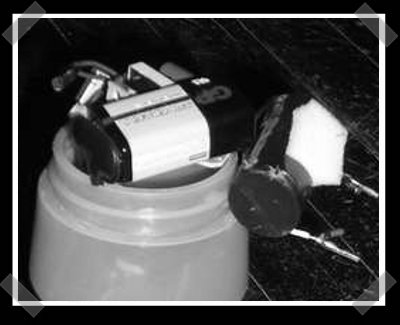
[liseman] decided to build a honeypot for bicycle thieves. He mounted a pay as you go cell phone and a gutted stun gun inside a water bottle. When the phone is dialed, the stun gun is activated thanks to a tap on the vibration motor inside the phone. He also installed some tracking software on the phone so the bike can be traced when stolen.
Location of the stun gun probes depends on certain assumptions: will the thief ride off on the bike, or simply toss it in the back of a truck. (Check your local laws if you’re contemplating doing this yourself.)

IPhone Pwnage Tool 2.0 Released


Earlier today, the iPhone Dev Team teased that they wouldn’t release their latest Pwnage Tool until Sunday. Since this was yet another in a week long bit of teasing, we were somewhat surprised when a few hours later they posted a rather relaxed Thanks for waiting :) post announcing that Pwnage Tool 2.0 is available. Here’s a direct link to the tool and a mirror courtesy of [_BigBoss_].

According to TUAW, Pwnage Tool 2.0 will activate, jailbreak, and unlock first generation iPhones running any firmware up to and including version 2.0. Unfortunately, it will not unlock an iPhone 3G (at least, not yet). iPhone 3G owners can still use the tool for activation and jailbreaking (so you can run 3rd party apps not supported by Apple and the new iPhone App Store).

So far, skimming through the 1322 comments on their announcement post, I’ve not seen any complaints or death threats about the tool bricking iPhones, but one should still proceed with caution. According to one update to the post, some people either get an error 1600 from iTunes or they notice a “failure to prepare x12220000_4_Recovery.ipsw” in the log. They’ve provided a workaround, however. If this happens to you, simply mkdir ~/Library/iTunes/Device Support or alternately nuke all the files in that already extant folder and re-run Pwnage Tool.

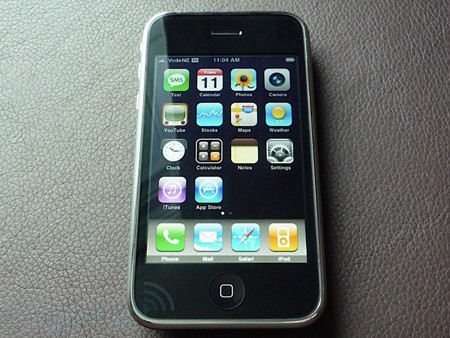
UPDATE: Image is from Engadget’s iPhone review we covered earlier.

Creating Web Applications For The IPhone

[Dominiek ter Heid] wanted to prototype an application for the iPhone that incorporated GPS. He experimented, and came up with a step-by-step tutorial on how to create a web application that would push GPS information to his iPhone through the use of JavaScript and AJAX. This tutorial will save web hackers who want to play with the iPhone 3G a lot of grief. Using Cocoa Touch, and a CSS/JavaScript pack called IUI, he successfully created a web application that looks native to the iPhone and is able to grab GPS information. The application integrates the GoogleMaps API with the GeoNames database. We look forward to seeing the types of creative applications that this prototype will inspire. What sort of web application would you want to create for the iPhone?

[via digg]

OpenMoko Usability Review

[Dave Fayram] has put out two videos covering the interface of the FreeRunner from OpenMoko. For those unfamiliar, we’ve covered it a few times before. It is an opensource mobile platform that includes a full X server. They encourage people to make their own software and even release the CAD files for chassis modification.

He points out some glaring faults and compares it to his iPhone. Some of the major faults he has listed and shown are:

  • Bezel around screen makes input difficult.
  • Extremely slow interface
  • Can’t play mp3s.
  • On screen keyboard is tiny.

It is marketed at around $400 so the comparison to an iPhone seems legitimate. We do need to keep in mind, however, that the FreeRunner is opensource. The more support we show to them, the better it will get. The thought of an opensource handheld platform, comparable to an iPhone is quite enticing. At this point though, the comparison is pretty one sided. Hopefully more software development and support from the community will make this device something to get very excited about.

[via Daring Fireball]

SIM Card Reader


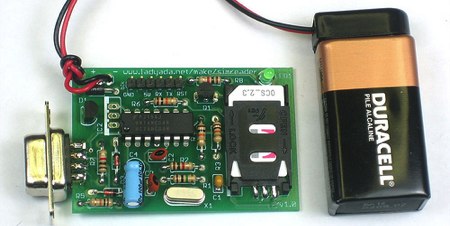
Adafruit Industries just announced their next kit: a SIM card reader. Using the kit, you can read or write any SIM card. You could use this for fun things like recovering deleted contacts and SMS messages. The kit looks like a very straight forward design (based on [Dejan]’s work); the only chip is a hex inverter and the board is powered by a regulated 9V battery. With all through-hole components, it should be easy to assemble. You can talk to it using the board mounted serial port or connect to the extra pin header using an FTDI USB cable just like the Boarduino. The FTDI option is bus powered, so you won’t need the battery. [ladyada] has collected some resources in case you want to learn more about smart cards.