Vintage Monoscope Tubes Generate Classic TV Test Patterns Once Again

Night creatures and insomniacs of a bygone era may fondly recall a TV test pattern appearing once [Jack Parr] or [Steve Allen] had had their say and the local TV station’s regular broadcast day had concluded. It was affectionately known as the Indian Head test pattern, for the stylized Native American, resplendent in a feathered headdress, that featured prominently in the graphic.

Unknown to most viewers was exactly how that test pattern and others like it were generated. But thanks to [Rich “The Lab Guy” Diehl] and his monoscope restoration project, we can all share in the retro details. It turns out that while some test patterns were merely a studio camera trained on a printed card, most were generated by a special tube called a monoscope. It functioned in basically the same manner as a studio camera, but rather than scanning the incident light of a scene with an electron beam, the image was permanently etched into a thin aluminum plate. [Rich] laid hands on two vintage monoscope tubes, one containing the Indian Head test pattern, and set about building a device to use them. “The Chief” can hold either tube in a Faraday cage of thin, flexible PCB material and 3D-printed parts, with supporting electronics like the power supply and video amplifiers in an aluminum chassis below.

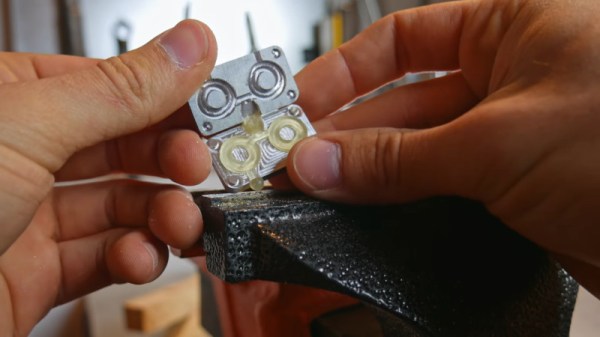
It’s a nice piece of work and a great lesson in how it used to be done, and the lithophane of the Indian head is a nice touch. Hats off to [The Lab Guy] for build quality and great documentation, including a detailed video series that starts with the video below. If you need a little more background on how video came to be, [Philo Farnsworth]’s story is a good place to start.

Continue reading “Vintage Monoscope Tubes Generate Classic TV Test Patterns Once Again”

Radio Controlled Wheelbarrows Tear Up The Track

The wheelbarrow is a trusty companion to the gardening set, helping move heavy loads to and fro. [James Bruton] has an active imagination however, deciding to build a motorized racing barrow, and challenging his friends to do the same (Youtube link, embedded below).

[James] went with a straightforward design, fitting two wheels to the rear, and powering them with brushless inrunner motors. The original front wheel was then fitted with a caster mechanism to allow the barrow to be skid steered. A pair of lithium polymer batteries provide the juice, with [James] using VESC skateboard ESCs to run the motors. The whole contraption is radio controlled, with an Arduino handling the mixing for steering duties.

The motorized barrow performed well against its competition, a propeller-powered barrow from [Tom Stanton] and a leaf-blower propelled barrow from [Ivan Miranda]. Inclement weather did cause some issues, but the trio were kind enough to treat us to a destruction derby with their racing machines.

You may be familiar with [James]’ earlier work on the openDog project. Video after the break.

Continue reading “Radio Controlled Wheelbarrows Tear Up The Track”

Pitting 8-Bit Chess Games Against Modern Foes

UltraChess is a vintage chess game for the 8-bit MSX platform, running on the Z80. [flok] wondered just how capable the game really was, and set forth to test it against a variety of other chess engines.

Having been designed in the 1980s, UltraChess is far from up-to-date as far as the chess software world is concerned. By using the OpenMSX emulator to run the game, [flok] was able to implement scripts to read and write the gamestate in UltraChess, and make it compatible with the Universal Chess Interface. This would allow UltraChess to be played off against a variety of other chess engines to determine its approximate ELO rating.

The scripts worked well, and are available on Github for those who wish to tinker further. Unfortunately, [flok] has thus far been unable to determine a rating for UltraChess, as it has lost every single game it has played against other chess engines. This is unsurprising given the limited processing power available, but we’d love to see a tweaked and hotrodded Z80 chess program take on the same challenge. If you’ve done such a thing, let us know, or alternatively  you might like to try playing like Harry Potter.

Improving A Cheap Frequency Counter With GPS

Frequency counters are useful tools for anyone that finds themselves regularly working with time-variant signals. There are a huge range available, from cheap eBay specials to expensive lab-grade hardware. [itakeyourphoto] had a counter on the lower end of the cost spectrum, and decided to make some improvements with the help of GPS (Youtube link, embedded below).

The fundamental weakness of a cheap frequency counter is usually the internal reference against which all other signals are measured. The more accurate this is, the more accurate the counter will be. [itakeyourphoto] determined that a great way to generate a reasonably good reference frequency was by using a uBlox GPS module. Once locked on to satellites, it can use a numerically controlled oscillator to output any frequency up to 15MHz with good accuracy.

The cheap frequency counter in question used a 13 MHz internal reference, so the uBlox module was programmed to match this. [itakeyourphoto] reports that it compares favorably to his higher-end GPS-disciplined oscillators, displaying very little drift or other aberrations.

We see plenty of clocks using GPS for its accurate time, but we’ve seen projects that attempt to go even further than that, too. Video after the break.

[Thanks to jafinch78 for the tip!]

Continue reading “Improving A Cheap Frequency Counter With GPS”

A Different Way To Privately Chat Over Telegram

If you’ve had the need to send secure, private messages in recent times, you might have considered using Telegram. However, using such a service means that, if discovered, it’s well known what manner of encryption you’re using, and there’s a third party involved to boot. [Labunsky] walks a different path, and built a covert channel within Telegram itself.

[Labunsky] likens their process to the process used in the film Seventeen Moments of Spring, in which a flower placed in an apartment windows indicates a spy has failed their mission. In this case, instead of a flower in a window, one user blocks another to signal them. By switching the blocked status on and off, messages can be sent, albeit in a slow and convoluted way.

It’s more of a proof of concept than a practical way to message people over Telegram. With that said, it does work, and it might just keep the security services monitoring your chats confused for a few extra weeks. Or, it would, if we hadn’t written an article about it. Perhaps consider using zero-width characters instead.

Windows Utility Helps ID Serial Ports

The humble serial interface has been around for a very long time, and will stay with us in one form or other for the foreseeable future. It was easy enough to keep track of back in the days when a computer only had one, or perhaps two COM ports. However, in this day and age of USB-programmable microcontrollers, it’s likely you’ve got COMs coming out the wazoo. Thankfully, [Amr Bekhit] has put together a utility to help solve this problem.

[Amr’s] utility is called Serial Port Monitor, and it does what it says on the tin. When new serial ports are enumerated in Device Manager, a system tray notification pops up noting the number of the newly attached COM port. Additionally, it maintains a list of ports sorted in order of the newest first, and also features a right-click menu that allows the launching of various terminal programs.

It’s a useful tool to keep in your back pocket that can prove particularly so when programming many devboards at once, or any other time when you find yourself dealing with a mess of serial devices.

Incidentally, if you find yourself having continual headaches with USB-to-Serial adapters on Windows, this might just be your problem. Happy hacking.

Footnote: In light of this article, the author would like to formally apologise to [Cosmos2000] for permanently disabling COM1 on his main programming rig. Sorry, friend.

Modern Evolution Of The Classic Water Rocket

Whether it was home-built from scraps or one of the various commercial versions that have popped over up over the years, there’s an excellent chance that the average Hackaday reader spent at least a couple of their more formative summers flying water rockets. You might not have realized it at the time, but with shirt soaked and head craned skywards, you were getting a practical physics lesson that was more relatable than anything out of a textbook. Water rockets are a great STEM tool for young people, but in a post-Fortnite world, the idea could use a little modernization to help keep kids engaged.

With his entry into the 2019 Hackaday Prize, [Darian Johnson] hopes to breathe some new life into this classic physics toy. His open source kit would provide a modular water rocket intended for a wide range of ages thanks to various payloads and upgrade options. The younger players would be content to simply see it take off, but high school students could outfit the craft with an electronic payload to capture performance data or an automatic parachute.

[Darian] has been building and flying rockets with his own children and other youth in community for years now, and has found them to be a huge hit. They became so popular that he started thinking of a way to not produce them in larger quantities, but make them stronger so they would survive more flights.

Of course, the fuselages are easy enough; there’s no shortage of one-liter bottles you can recycle. But for the nose cone, fins, and ultimately even the launch pad, [Darian] turned to 3D printing. This allows him to continually optimize the design while delivering repeatable performance. When he had a semi-printable water rocket on his hands, he started to wonder if he could get older kids interested by adding some electronics into the mix.

His current proof of concept is a flight data recorder using a Adafruit nRF52 Bluefruit LE Feather, a BMP280 sensor to determine altitude via barometric pressure, and an SD card breakout for local data storage. Long term, [Darian] wants to be able to stream flight data to student’s phones over Bluetooth, with the SD card providing a local copy which can be analyzed after the flight.

[Darian] has leaned heavily on the open source community for the various components of his water rocket kit, and is dedicated to giving back. He hopes that his final kit will allow communities to create engaging STEM activities at little to no cost. This includes creating a repository of lesson plans and designs contributed from others experimenting with water rockets. It’s a noble goal, and we’re excited to see how the project progresses.