BBC Covers An Old-school Hacker

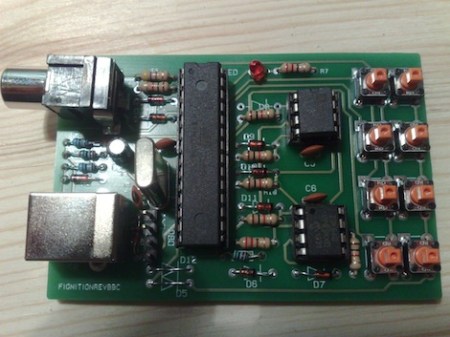
Yesterday, the BBC posted an article on [Julian Skidmore]’s AVR-based homebrew computer.

[Julian]’s project uses an AVR and a derivative of Forth to recreate the capabilities of the 8-bit computers of yesteryear. With 8kB of RAM, [Julian] got a TV-out up and running, and even included code for a Lunar Lander game.

We’re happy for [Julian] getting some notoriety as an old-school solder monkey, but we’re wondering why the BBC is covering a project not unlike the something that could be seen on hackaday once a week. Could it be the first inkling of respect for the hacker and DIY community in the general public’s eye?

In any event, we love the initiative shown in [Julian]’s quote at the bottom of the BBC article: “Building the machine is a way to learn the essentials of what a computer is all about.” If you want to understand something, you’ve got to build it yourself. Truer words…
A Beginner’s Guide To LED Matrices

led_tutorial

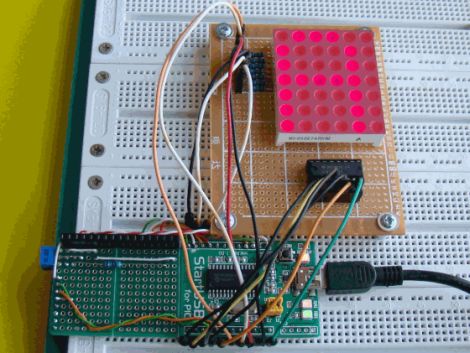
[Rajendra Bhatt] wrote in to share a tutorial he put together demonstrating the basics of using LED dot matrix displays. While this subject might be old hat to many out there, his helpful walkthroughs are geared more towards beginners who are exploring various electronics concepts for the first time.

He explains the theory behind LED displays using a PIC-driven 5×7 matrix as an example. He discusses persistence of vision and how tricking the human eye can save you quite a bit of time and a whole lot of pins. Multiplexing is broken down into its most basic steps, which [Rajendra] illustrates by showing how a letter would be drawn on the LED display one column at a time. The use of a ULN2803A Darlington Array is also discussed, and he details why it is used when pulling the five columns of LEDs to ground.

The only portion of the tutorial we thought could be expanded upon was the programming section. While he does show how each letter of the alphabet can be displayed via a series of five hex values, he does not cover the “why” part of the process. Obviously while anyone familiar with binary and hex can figure it out in pretty short order, we think that it would be a great place to pause and expand the readers’ knowledge even more.

Overall it’s a useful tutorial, and most beginners would likely find it quite helpful.

DIY Lightbox Repurposes Useless Scanner

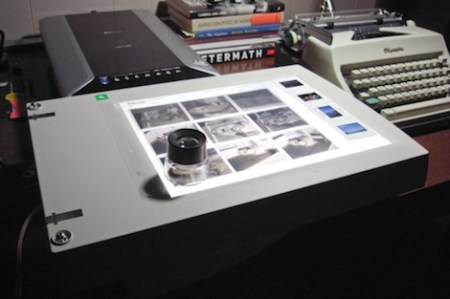
[James] didn’t like losing detail when scanning in photographic negatives, so he repurposed an old scanner and turned it into a lightbox.

The Flickr set of the build shows [James] installing a compact fluorescent bulb in the body of the scanner. Aluminum foil reflects the light, and the scanner glass is painted white for diffusion. [James] is quite happy with the result, and is amazed by the detail seen in the negatives under magnification instead of scanning.

We’re trying to figure out [James]’s though process in deciding to build a light box, and the best we can come up with is the hackaday mantra of, “Of course I can do that myself.” Even though he seems happy with his project, we’re wondering how hackaday readers would improve it. Maybe several dozen red, green, and blue LEDs to adjust the color temperature? Post your ideas in the comments.

9v IR Tester

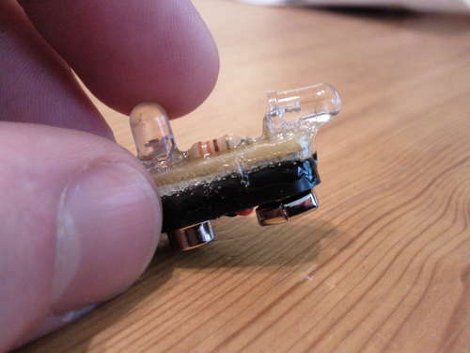
Whenever you are working with infrared, you sometimes need to see it, and thats kind of hard. Most people would jump up and say “camera”, but that is not always the best solution. For instance my phone camera is so filtered its near useless for IR, and my DSLR will only take a full blast source and present a dim glow. Wanting something a bit easier [Candymanproducitons] whipped up a little IR tester that fits on top of a standard rectangle 9V battery.

A simple circuit containing nothing more than a LED, resistor, and a IR photo-transistor was assembled on some perforated circuit board, then mounted on top of a battery clip with some epoxy. The end result is a compact and robust tool that will be very handy in the shop, though we think a little spot for your scope probe would be super.

9 volt batteries, with their internal design and locking / polarized terminals are usually a mainstay of electronic tinkerers, and often pop up in cool and compact projects like my lm386 amp in a battery shell from last year. So what can you do with them?

Vintage AM Radio Restoration

radio_restoration

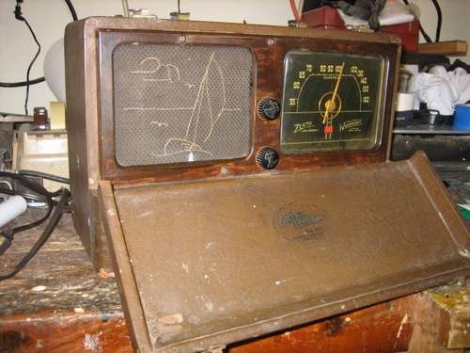
Instructables user [knife141] enjoys restoring vintage electronics in his spare time, especially old radios. AM radios tend to pique his curiosity the most, and in this tutorial, he discusses the restoration of an old radio from the early 1940s.

While people would likely assume that the vacuum tubes in a radio this old are the source of poor performance, he has found that most units he repairs suffer from bad capacitors. He says that the old electrolytic, paper, and wax caps used in these radios were never meant to last more than a few decades, let alone 70 years.

He always starts the process off by discharging the caps and replacing the power cord, both as a safety measure. He was pretty sure the capacitors were bad in this radio, so he swapped all of them out, regardless of condition. All of the internal wiring was then checked over, and any damaged cables were replaced or covered with heat shrink tubing.

With that done, he powered on the radio and was happy to find that the distortion he previously experienced was completely eliminated. With the electronics taken care of, he tackled the radio’s asbestos insulation by encapsulating it with varnish. Attention was then turned to the exterior, where he cleaned and buffed the leather, refinished the face plate, and polished the dial’s cloudy glass.

While it’s not exactly a hack, we always like seeing vintage electronics given new life, and we’re always cool with saving these sorts of things from rotting in a landfill.

Hacking Analog Phones For VOIP

analog_phone

[Tyler] has been using Google Voice extensively for some time now, but he hasn’t quite found a microphone/speaker setup he is happy with. He tried a headset, but that just didn’t do it for him.

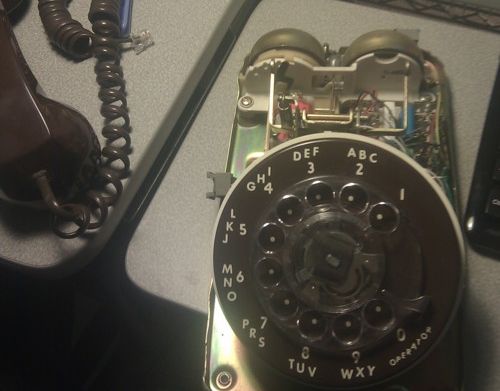
While browsing around at his local thrift store, he came across an old Model 500 rotary phone for just a few dollars and decided it just might do the trick. Once disassembled, he mapped out the circuitry and got busy wiring up the handset to a pair of 3.5 mm stereo plugs – one each for the earpiece and microphone.

Once everything was reassembled, he hooked it up to his computer and gave it a spin – success!

While he is happy with how the phone works at the moment, he already has plans for improving it. He is currently looking for a way to use the handset hook to disconnect calls as well as a way to implement the rotary dial for number entry. We think that hacking a Bluetooth headset would easily take care of the first part, as well as eliminate the need for any sort of wired interface to his PC. It would also make it dead simple to use with any other Bluetooth-enabled device such as a cell phone.

We’re pretty sure he is open to implementation suggestions, so let us know what you think.

Relay Calculator

Calculators are a handy tool to have around in just about every application. We often take them for granted today, but even when I was a kid they were still sort of expensive devices that you put thought into buying. Illustrating just how far we have come is this awesome Relay Calculator brought to us by [Team 619].

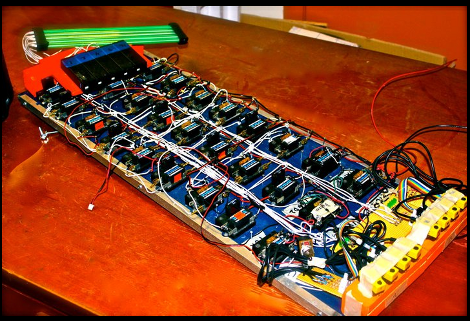
Featuring an optical slider input system, the user can select any two 4 bit numbers and can add or subtract them. Logic is carried out by a couple handfuls of relays setup to be AND, OR, or XOR gates, which are then linked together to build adders.

Output is in binary as well, in the form of lights, though we cant really tell if those are some form of tubes or if they are just rods lit on end. Either way if you require a lot of nibble math and want a conversation starter this suits the bill quite niceley. Otherwise you can keep hooking up more and more relays and maybe one day make your own relay computer.

Join us after the break for a quick video!

Continue reading “Relay Calculator”