Real-Time FPGA Finger Detection

The student projects that come out of [Bruce Land]’s microcontroller- and FPGA-programming classes feature here a lot, simple because some of them are amazing, but also because each project is a building-block for another. And we hope they will be for you.

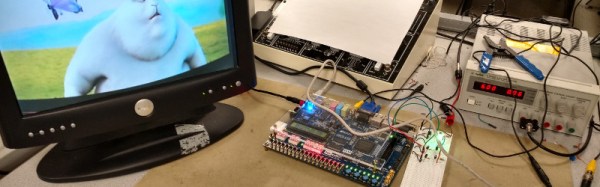
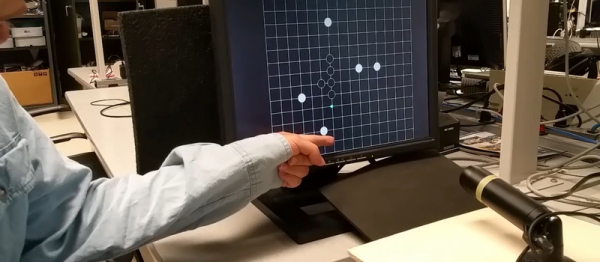
This time around, [Junyin Chen] and [Ziqi Yang] created a five-in-a-row video game that is controlled by a pointing finger. A camera, pointed at the screen, films the player’s hand and passes the VGA data to an FPGA. And that’s where things get interesting.

An algorithm in the FPGA detects skin color and, after a few opening and closing operations, comes up with a pretty good outline of the hand. The fingertip localization is pretty clever. They sum up the number of detected pixels in the X- and Y-axis, and since a point finger is long and thin, locate the tip because it’s going to have a maximum value in one axis and a minimum along the other. Sweet (although the player has to wear long sleeves to make it work perfectly).

How does the camera not pick up the game going on in the background? They use a black-and-white game field that the skin-color detection simply ignores. And the game itself runs in a Nios embedded processor in the FPGA. There’s a lot more detail on the project page, and of course there’s a demo video below.

We love to follow along with Prof. Land‘s classes. His video series is invaluable, and the course projects have been an inspiration.
Continue reading “Real-Time FPGA Finger Detection”

Hand Gestures Play Tetris

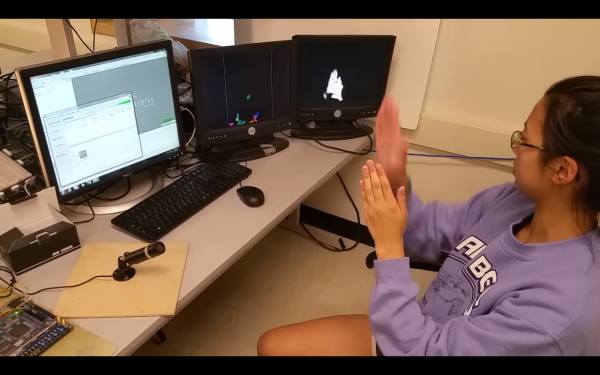
There are reports of a Tetris movie with a sizable budget, and with it come a plentiful amount of questions about how that would work. Who would the characters be? What kind of lines would there be to clear? Whatever the answers, we can all still play the classic game in the meantime. And, thanks to some of the engineering students at Cornell, we could play it without using a controller.

This hack comes from [Bruce Land]’s FPGA design course. The group’s game uses a video camera which outputs a standard NTSC signal and also does some filtering to detect the user. From there, the user can move their hands to different regions of the screen, which controls the movement of the Tetris pieces. This information is sent across GPIO to another FPGA which uses that to then play the game.

This game is done entirely in hardware, making it rather unique. All game dynamics including block generation, movement, and boundary conditions are set in hardware and all of the skin recognition is done in hardware as well. Be sure to check out the video of the students playing the game, and if you’re really into hand gesture-driven fun, you aren’t just limited to Tetris, you can also drive a car.

Continue reading “Hand Gestures Play Tetris”

Computers Beating Computers At Cricket

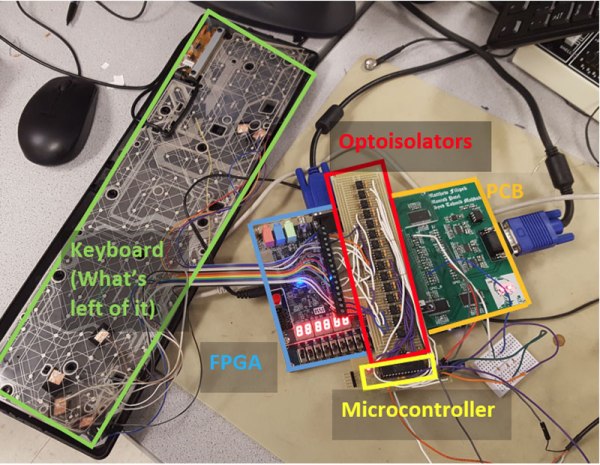
Some see gaming as the way to make AI work, by teaching computers how to play, and win, at games. This is perhaps one step on the way to welcoming our new gaming overlords: a group of Cornell students used an FPGA to win a computer cricket game. Specifically, they figured out how to use an FPGA to beat the tricky batting portion of the game in a neat way. They used an FPGA that directly samples the VGA output signal from the gaming computer, detecting the image of the meter that indicates the optimum batting time. Once it detects the optimum point to press the button, it triggers a hacked keyboard to press a button, whacking the ball to the boundary to score a six*.

Continue reading “Computers Beating Computers At Cricket”

Using An FPGA To Generate Ambient Color From Video

We should all be familiar with TV ambient lighting systems such as Philips’ Ambilight, a ring of LED lights around the periphery of a TV that extend the colors at the edge of the screen to the surrounding lighting. [Shiva Rajagopal] was inspired by his tutor to look at the mechanics of generating a more accurate color representation from video frames, and produced a project using an FPGA to perform the task in real-time. It’s not an Ambilight clone, instead it is intended to produce as accurate a color representation as possible to give the impression of a TV being on for security purposes in an otherwise empty house.

The concern was that simply averaging the pixel color values would deliver a color, but would not necessarily deliver the same color that a human eye would perceive. He goes into detail about the difference between RGB and HSL color spaces, and arrives at an equation that gives an importance rating to each pixel taking into account its saturation and thus how much the human eye perceives it. As a result, he can derive his final overall color by looking at these important pixels rather than the too-dark or too-saturated pixels whose color the user’s eye will not register.

The whole project was produced on an Altera DE2-115 FPGA development and education board, and makes use of its NTSC and VGA decoding example code. All his code is available for your perusal in his appendices, and he’s produced a demo video shown here below the break.

Continue reading “Using An FPGA To Generate Ambient Color From Video”

A Raspberry Pi In An FPGA

Somehow or another, the Raspberry Pi has become a standardized form factor for single board computers. There are now Raspberry Pi-shaped objects that can do anything, and between the Odroid and bizarre Intel Atom-powered boards, everything you could ever want is now packaged into something that looks like a Raspberry Pi.

Except for one thing, of course, and that’s where [antti.lukats]’s entry for the 2016 Hackaday Prize comes in. He’s creating a version of the Raspberry Pi based on a chip that combines a fast ARM processor and an FPGA in one small package. It’s called the ZynqBerry and will, assuredly, become one of the best platforms to learn FPGA trickery on.

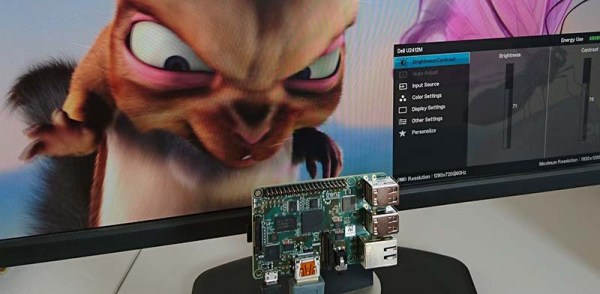
Xilinx’ Zynq comes with a dual-core ARM Cortex A9 running around 1GHZ, and from that fact alone should be about comparable to the original Raspberry Pi. Also inside the Zynq SoC is a very capable FPGA that [antti] is using to drive HDMI at 60hz, and can stream video from a Raspberry Pi camera to a display.

Last year for the Hackaday Prize, [antti] presented some very cool stuff, including a tiny FPGA development board no bigger than a DIP-8 chip. He’s hackaday.io’s resident FPGA wizard, and the ZynqBerry is the culmination of a lot of work over the past year or so. While it’s doubtful it will be as powerful as the latest Raspberry Pis and Pi clones, this is a phenomenal piece of work that puts an interesting twist on the usual FPGA development boards.

The HackadayPrize2016 is Sponsored by:

When Difference Matters: Differential Signaling

We have talked about a whole slew of logic and interconnect technologies including TTL, CMOS and assorted low voltage versions. All of these technologies have in common the fact that they are single-ended, i.e. the signal is measured as a “high” or “low” level above ground.

This is great for simple uses. But when you start talking about speed, distance, or both, the single ended solutions don’t look so good. To step in and carry the torch we have Differential Signalling. This is the “DS” in LVDS, just one of the common standards throughout industry. Let’s take a look at how differential signaling is different from single ended, and what that means for engineers and for users.

Single Ended

Collectively, standards like TTL, CMOS, and LVTTL are known as Single Ended technologies and they have in common some undesirable attributes, namely that ground noise directly affects the noise margin (the budget for how much noise is tolerable) as well as any induced noise measured to ground directly adds to the overall noise as well.

By making the voltage swing to greater voltages we can make the noise look smaller in proportion but at the expense of speed as it takes more time to make larger voltage swings, especially with the kind of capacitance and inductance we sometimes see.

Differential

diff4

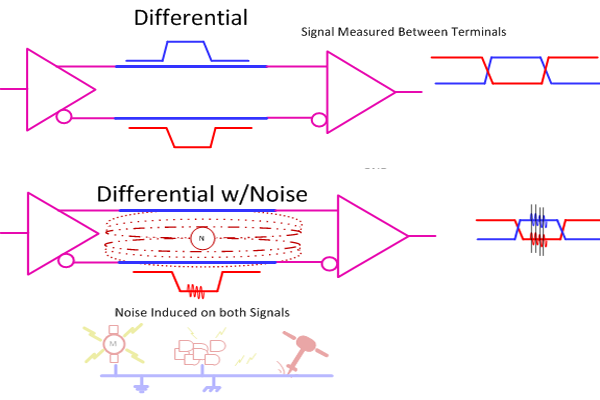
Enter Differential Signaling where we use two conductor instead of one. A differential transmitter produces an inverted version of the signal and a non-inverted version and we measure the desired signal strictly between the two instead of to ground. Now ground noise doesn’t count (mostly) and noise induced onto both signal lines gets canceled as we only amplify the difference between the two, we do not amplify anything that is in common such as the noise.

Continue reading “When Difference Matters: Differential Signaling”

Crawl, Walk, Run: Planning Your First CPU Design

I’ve worked with a lot of students who want to program computers. In particular, a lot of them want to program games. However, when they find out that after a few weeks of work they won’t be able to create the next version of Skyrim or Halo, they often get disillusioned and move on to other things. When I was a kid, if you could get a text-based Hi-Lo game running, you were a wizard, but clearly the bar is a lot higher than it used to be. Think of the “Karate Kid”–he had to do “wax on, wax off” before he could get to the cool stuff. Same goes for a lot of technical projects, programming or otherwise.

I talk to a lot of people who are interested in CPU design, and I think there’s quite a bit of the same problem here, as well. Today’s commercial CPUs are huge beasts, with sophisticated memory subsystems, instruction interpreters, and superscalar execution. That’s the Skyrim of CPU design. Maybe you should start with something simpler. Sure, you probably want to start learning Verilog or VHDL with even simpler projects. But the gulf between an FPGA PWM generator and a full-blown CPU is pretty daunting.

Continue reading “Crawl, Walk, Run: Planning Your First CPU Design”