How To Grow Your Own EL Wire DNA Helix Lamp

el-wire-helix-lamp

[LucidMovement] was looking for some crystal-based artwork and just couldn’t seem to find anything that fit the bill, so he decided to build something himself.

The inspiration for his desk lamp came from something we’re all familiar with, a DNA double-helix. To grow the crystals he built a helix-shaped growing substrate out of nichrome and EL wires, submerging them in a warm alum solution. Once he had a nice set of crystals, he mounted it in an acrylic tube, filling the air space with clear silicone to seal off the display. He then mounted the silicone-filled tube on top of a rotating acrylic stand that he had cut for the project. The stand is made from several sheets of acrylic and contains both the gearing for movement as well as RGB LEDs to light the display from the bottom.

The lamp looks great when sitting idle, but when he powers it on it really shines (no pun intended). [LucidMovement] put a ton of work into the lamp, and offers up all sorts of tips, tricks, and considerations for anyone looking to build their own. Be sure to check out his writeup for plenty more details, and stick around to see a short video of the lamp in action.

Continue reading “How To Grow Your Own EL Wire DNA Helix Lamp”

Keeping Axolotl Healthy And Cool

The real life Mudkip Wooper Pokemon seen above is an axolotl, a salamander-like animal that lives in only one lake near Mexico City. These adorable animals can be bred in captivity, but keeping them is a challenge. [LRVICK] decided he didn’t want to throw down hundreds of dollars for an aquarium cooler so he built his own out of parts usually used for keeping computers nice and cold.

Commercial aquarium coolers that would meet the requirements start around $300 and go up from there. Not wanting to spend that much, [LRVICK] found a 77 Watt Peltier cooler for $5 and figured he could make it work. Off-the-shelf parts for water cooling CPUs were used to construct the aquarium cooler – a water block on the cold side, a huge heat sink and fan for the hot side, and a bunch of tubing goes up to the tank.

Now [LRVICK] has an axolotl housed in a very professional-looking aquarium that is a steady 65 degrees. He’s got a very nice build, and the axolotl looks very happy.

DIY Clapper Is The Ideal Gift For The Laziest Person In Your Life

diy-clapper

If you haven’t yet wrapped up your Christmas shopping, you may want to consider building [AlanFromJapan’s] implementation of the ever-classic “Clapper”. With its theme song burned into the brain of anyone old enough to remember the 80s, the clapper was a wonderful device that certainly put the “L” in laziness.

Looking for an excuse to play around with an opamp and microphone [Alan] decided to build his own version of the Clapper based off this similar circuit, which he calls the ClapClap. He built the device using an electret mic that feeds a signal through a small amplifier on the way to the ADC of an ATmega328 microcontroller. The mcu constantly polls the ADC looking for the sound of clapping hands, a solution that works, but isn’t as clean as [Alan] wanted.

He went back to the drawing board, this time building a circuit around an ATtiny2313 microcontroller. Most of the other components remained the same, though the new, smaller design sports some nice PCBs he had made at Seeedstudio. Rather than constantly polling the ADC, this version of the ClapClap looks for peaks in the signal coming from the mic to identify the clapping of hands.

He says that the newer version works great, though he still has a software bug or two that need fixing before he parks himself on the couch for all eternity.

Controlling Your Christmas Lights Without Ever Getting Off The Couch

remote-xmas-tree-light-switch

14 year-old [Connor Smith] has been busy this holiday season, thinking up ways to improve the lighting situation at home.

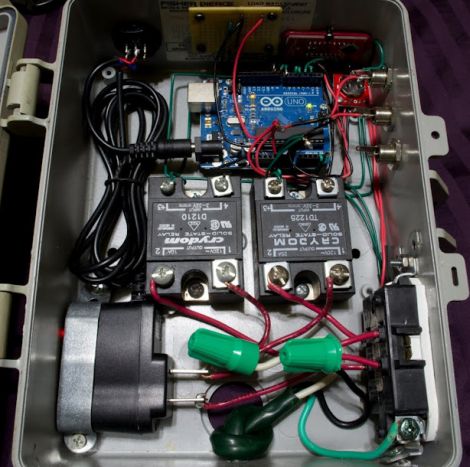
A few weeks ago he put together this 3-channel light controller to toggle his parents’ external lights, incorporating an Arduino for control. The Arduino was used to switch the channels on and off at specified intervals in order to create a simple light show on the house’s exterior. Not satisfied with just a few strings of blinky lights, he took his controller back inside for some additional modifications.

He had grown tired of crawling behind the Christmas tree to plug and unplug it every day, and decided to make things easier on himself. He stripped the IR receiver out of an old VCR and interfaced it with the Arduino in his light controller using the IRremote library. After taking a bit of time to decode the values for two infrequently used buttons on his TV remote, he had himself a Christmas tree light switch that he could activate from across the room.

Check out the short video below to see his remote switch in action.

Continue reading “Controlling Your Christmas Lights Without Ever Getting Off The Couch”

CheerLights: Synchronizing Christmas Lights Around The Globe

cheerlights-synchronized-christmas-lights

They say that the holidays are a time to gather with others, which usually translates into spending time with friends and family. The folks at ioBridge Labs thought that while friends and family certainly are a big part of the holidays, it would be pretty cool to gather together flocks of strangers by using the Internet to synchronize their Christmas lights.

Participation in CheerLights is pretty easy, requiring little more than an Internet connection, some GE G-35 Color Effects lights, an Arduino, and an ioBridge. While those are the recommended components, an Arduino Ethernet shield will handle networking just as well. There really are no restrictions when it comes to hardware, so if you are so inclined, it should be relatively easy to roll your own display using simple RGB LEDs and a µC of your choosing.

The colors are dictated by the group’s Twitter feed, which can be found at http://twitter.com/#!/@cheerlights. Whenever a message is sent to @cheerlights along with a color, all of the light displays listening in will change simultaneously.

We really like the idea, and think it would be pretty cool to see this sort of program rolled out on a neighborhood or street-wide level, so you could see dozens of strings changing colors all at once.

If you’re interested in checking out CheerLights’ current color, be sure to take a gander at their live stream here.

[via BuildLounge]

Geared System Adds RFID To Regular Door Locks

[Flowolf] added an auto-locking RFID entry system to his front door. He used our favorite fabrication system, acrylic and threaded rod (we also like to throw in aluminum angle bracket from time to time). The support structure mounts underneath the escutcheon plate for the lockset, keeping the main acrylic sheet flat against the door.

An RFID reader and Arduino run the system, with a button inside to unlock the door. But if power were to fail, you will still be able to get in or out manually. When you are using the electronic system, a stepper motor connected to the geared lock knob by a chain is what grants access, then revokes it again five seconds later. The wire going up out of the this image is for a switch that lets the unit sense when the door is closed.

As shown in the video after the break, you can turn the auto-lock feature off. But we’d like to see an emergency entry feature, like a knock-based lock, because eventually you will leave without your keys!

Continue reading “Geared System Adds RFID To Regular Door Locks”

Pee-light Gives Guidance For Nocturnal Tinkles

This light is a rather dim LED module whose purpose is to give you a very small bit of illumination when using the restroom at night. If you rely on it instead of using the overhead lighting in the bathroom, you’ll be able to find your way back to bed with your night-vision undisturbed.

[Fred] built the project as a way to learn more about using MSP430 microcontrollers. The protoboard seen above has a pair of female pin headers designed to accept an MSP430-PIR board, which uses the low-power microcontroller to monitor a PIR motion sensor. The chip can be reprogrammed and [Fred] did just that, using the USB dongle side of the eZ430-F2013 dev stick. Now when the sensor detects motion the chip first checks the light-dependent resistor on the protoboard to see if it’s dark in the bathroom. If so, it switches on the LED and sets a timer to shut if off again.

The system runs on a 9V battery, which is a bit under-powered for the 12V-spec’ed LED module. But [Fred] says the light it produces is just the right intensity.

[Thanks Jeremy]