Failing To Make A Fanless PC

The discerning modern gamer’s quest is to find a quieter computer without sacrificing performance. That proves challenging when modern components are highly efficient at producing monumental quantities of thermal energy. So the typical solution ends up moving enough air through the computer to create a rather tumultuous racket. So why have fans at all? Well, as [Billet Labs] demonstrates, that’s not necessarily a good idea. 

The build begins with a block of aluminum which, with a bit of hand-metal work, may become the base of the PC “case.” A dry-fit of the aesthetically modified parts taken from a previous attempt at a fanless PC reveals the steampunk aesthetic that defines the build. On final assembly, a large amount of thermal paste under the flex ATX power supply and 6mm of thermal pads under the motherboard provide passive cooling to the block of aluminum they are attached to

The cooling loop begins with three radiators: a big one, a small one, and a slightly smaller one. But raw metal PC radiators are difficult and expensive to come by these days. Some paint stripping and polishing will fix that problem. A few hand-made mounting brackets complete the aesthetic. All three radiators are stacked above the motherboard, and on top of each other, positioned horizontally to encourage passive airflow through them.

Continue reading “Failing To Make A Fanless PC” →

Block, Shmock — Just Pump Water Over The Chip

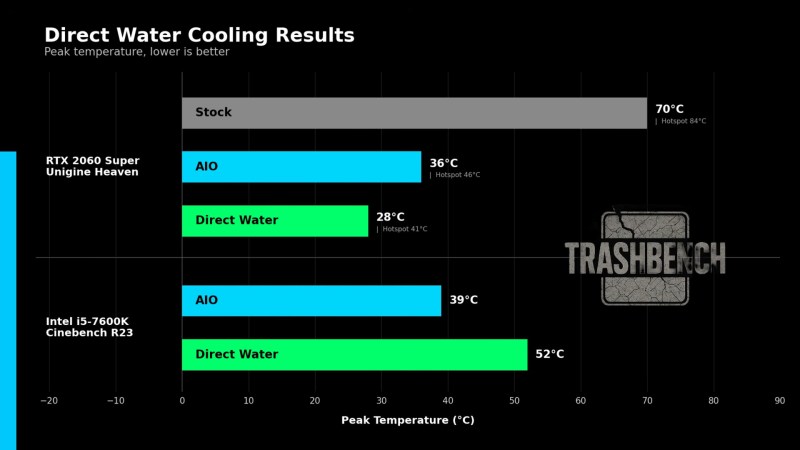
If you’re water cooling a PC, it’s generally accepted that you need some interface between the coolant and the chips — a water block of copper or aluminum that carries the heat-removing fluid. What if you just…didn’t? That’s what [TrashBench] asked with his direct water cooling experiment. Instead of integrated pump or copper water block, he just epoxied a 3D printed pipe fitting onto his bare GPU and CPU.

The results are interesting: while the directly-cooled GPU outperforms the professional system by a decent margin, the same technique fails when applied to the CPU. It also leaks and nearly ruins his hardware, but those are the risks you take when doing mad science, and it’s nothing more epoxy can’t fix. In any case, the fact that directly exposing chips to liquid can cool them down isn’t exactly a revelation. People have been dunking computers in oil for years, but the fact that he sees such a difference between CPU and GPU is quite interesting. [TrashBench] has his own theory in the video, but what do you think is going on here?

In any case, if he continues his direct cooling experiments he’s still going to need a radiator, and if we may be so bold, we would like to recommend a giant metal snake.

Continue reading “Block, Shmock — Just Pump Water Over The Chip” →

NVIDIA’s New AI Servers Run On Hotub Coolant And Don’t Need Evaporators

When people start ranting about AI, you can be sure a few things are going to come up during the two-minutes hate: job loss, higher power bills, the neverending tide of low-effort slop, and wasting precious freshwater. Well, NVIDIA wants to take away that last one, beacause the all-water cooled Ruben architecture won’t need any evaporative cooling— coolant can stay in a closed loop, and never needs to be cooled below 45 C, or 113 F.

This sort of coolant loop should be familiar to anyone who has ever built a water-cooled PC or PlayStation: there’s a glycol-water mix, water blocks, and a radiator to reject heat to the environment. NVIDIA doesn’t mention if their new servers come with RGB lighting, but we’d like to imagine it’s an option. The big difference — aside from the rainbow LEDs– between a Ruben server and your old gaming rig is that in these racks, everything is on a waterblock. If there’s a chip on the motherboard generating heat, it’s getting rid of it into the same cooling water. Cooling water, that we have to emphasize, needs only be cooler than the chips themselves: in this case, they’re talking 45 C on the cold side, and 55 C headed out of the racks. (That’s 113 F to 131 F for all the bald eagles reading this.)

Given the required temperature drop is so modest, there’s no need for the evaporative chillers that have given AI data centers such a bad name in water conservation circles. Just like in a water-cooled PC, ambient-temperature air running over dry heat exchangers– also known as big honkin’ radiators–is able to handle the cooling, so no water is lost. Since everything is on waterblocks, there’s no need for cooling air, either, and the server farms need only be air conditioned to the degree required to make them comfortable to work in.

If you think NVIDIA is making this change because they suddenly care about water conservation, think again. The press release makes their motivations very clear: cooling costs money, and running this hot saves a lot of it. We’re talking four mil US a year for a 50 MW hyperscaler. One might suspect that this sort of thermal regime could limit the lifetime of the hard-working NPUs, but since they’ll be obsolete in a few years anyway, that’s not likely a big concern, especially not for NVIDIA.

We’ve actually seen hotter fluids used to cool computers before– coffee, for one. Water cooling also isn’t new in the data center world; we took a look at it a few years back. Things are clearly heating up now, though.

Testing The Pressure Limits For Glass In Water Cooling Blocks

Many people who use water cooling in their computer systems like to go full-bore with ‘aquarium’ aesthetic, which includes adding a window to their cooling blocks so that they see the water flowing through the window from behind the case’s window. Traditionally PMMA acrylic is used for these windows, as it’s quite durable and easy to handle.

Using glass offers some advantages over acrylic, but has its own disadvantages, most of all that it’s hard to process, but also that it’s known for shattering quite easily if pushed beyond its limits.

This is why [der8auer] as a manufacturer of such water blocks has now spent a few years investigating the viability of using glass for this purpose. First and foremost is safety, with an early prototype glass water block suddenly shattering without clear cause.

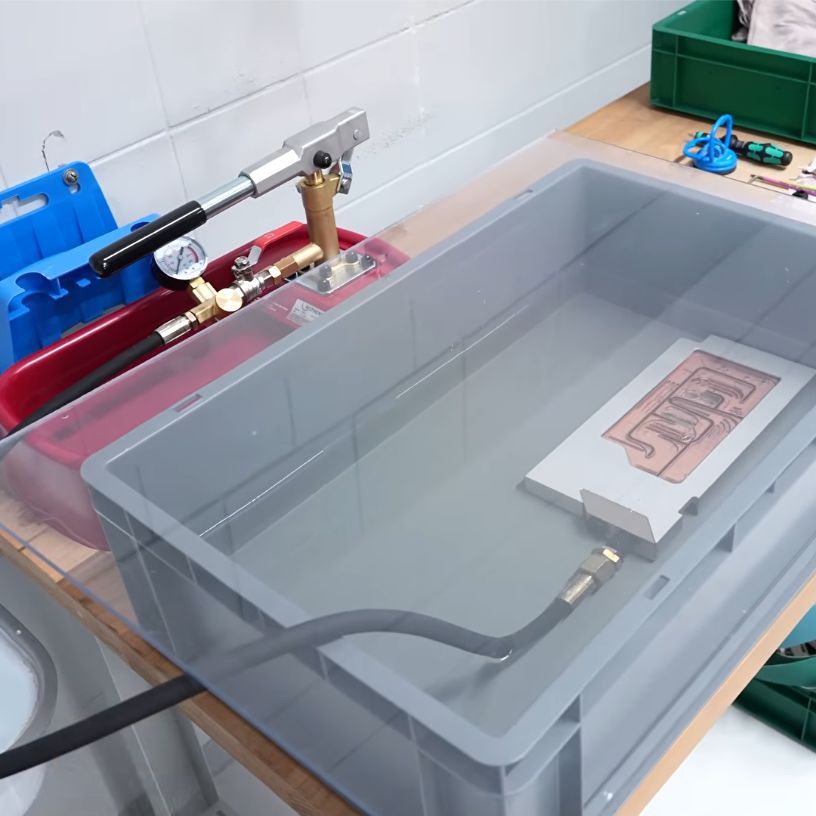
Although normally the water cooling loop is only expected to experience pressures of about 600 mbar, the new glass windows that are now entering mass-production had to be tested to their breaking point. This involves pumping water into a few test blocks until they fail, using the test rig that you can see above.

First the big GPU water block was tested, with the acrylic version breaking at around 8-9 bar, while the glass plate shattered at around 5 bar. The failure mode was also interesting, with the glass plate shattering into fragments, while the two acrylic plates tested failed in a completely different location and manner.

A smaller water block with glass window failed at about 10 bar, demonstrating mostly that smaller glass windows are a lot sturdier. Effectively glass windows in water cooling loops are viable, and they also do not suffer from e.g. discoloration, but you do give up a big chunk of your safety margin if your water cooling loop suffers a major pressurization event. Which of course should never happen, but we’re definitely looking forward to the upcoming field trials of these new water blocks.

Continue reading “Testing The Pressure Limits For Glass In Water Cooling Blocks” →

Inside A Compact Intel 3000 W Water-Cooled Power Supply

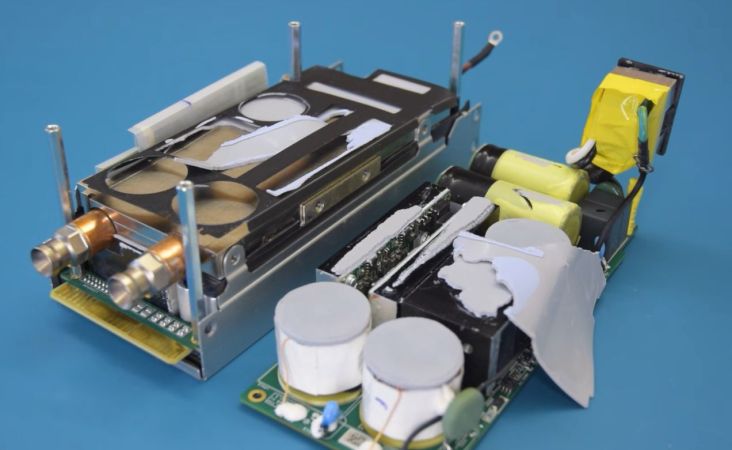
Recently [ElecrArc240] got his paws on an Intel-branded 3 kW power supply that apparently had been designed as a reference PSU for servers. At 3 kW in such a compact package air cooling would be rather challenging, so it has a big water block sandwiched between the two beefy PCBs. In the full teardown and analysis video of the PSU we can see the many design decisions made to optimize efficiency and minimize losses to hit its 80 Plus Platinum rating.

For the power input you’d obviously need to provide it with 240 VAC at sufficient amps, which get converted into 12 VDC at a maximum of 250 A. This also highlights why 48 VDC is becoming more common in server applications, as the same amount of power would take only 62.5 A at that higher voltage.

The reverse-engineered schematic shows it using an interleaved totem-pole PFC design with 600 V-rated TI LMG3422 600V GaN FETs in the power stages. After the PFC section we find a phase-shifted full bridge rectifier with OnSemi’s SiC UF3C065030K4S Power N-Channel JFETs.

There were a few oddities in the design, such as the Kelvin source of the SiC JFET being tied into the source, which renders that feature useless. Sadly the performance of the PSU was not characterized before it was torn apart which might have provided some clues here.

Continue reading “Inside A Compact Intel 3000 W Water-Cooled Power Supply” →

EnderSpark: Convert Your Broken Creality FDM Printer Into An EDM Machine!

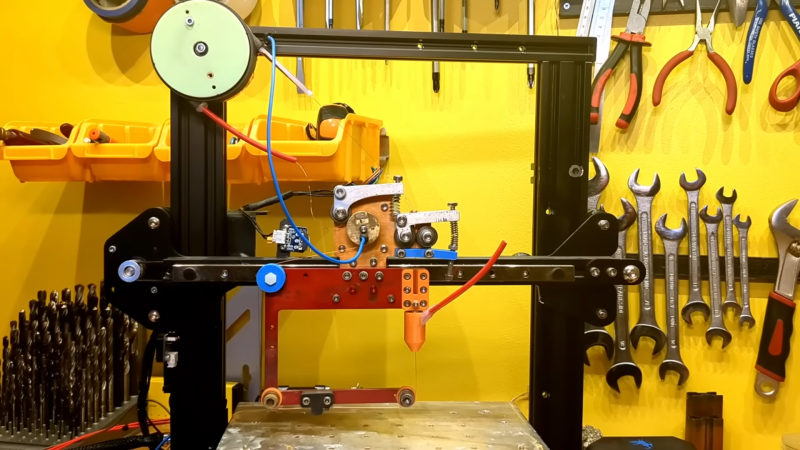
EDM (Electrical Discharge Machining) is one of those specialised manufacturing processes that are traditionally expensive and therefore somewhat underrepresented in the DIY and hacker scenes. It’s with great delight that we present EnderSpark, a solution to not one but two problems. The first problem is how to perform CNC operations on hard-to-machine materials such as hardened metals (without breaking the bank). The second problem is what to do with all those broken and forgotten previous-generation Creality Ender 3D printers we know you have stashed away.

To be honest, there isn’t much to a cheap 3D printer, and once you ditch the bed and extruder assembly, you aren’t left with a lot. Anyway, the first job was to add a 51:1 reduction gearbox between the NEMA 17 motors and the drive pullies, giving the much-needed boost to positional accuracy. Next, the X and Y axes were beefed up with a pair of inexpensive MGN12H linear rails to help them cope with the weight of the water bath.

Continue reading “EnderSpark: Convert Your Broken Creality FDM Printer Into An EDM Machine!” →

PC Watercooling Uses Everything But CNC Machining

Names and labels are difficult. Take this “3D Printed” water-cooling loop by [Visual Thinker] on YouTube. It undeniably uses 3D printing — but it also uses silicone casting and laser-cut acrylic, too. All of these are essential parts, yet only 3D printing gets top billing in his thumbnail. At least the version we saw, anyway; the A/B testing game YouTubers play means that may change.

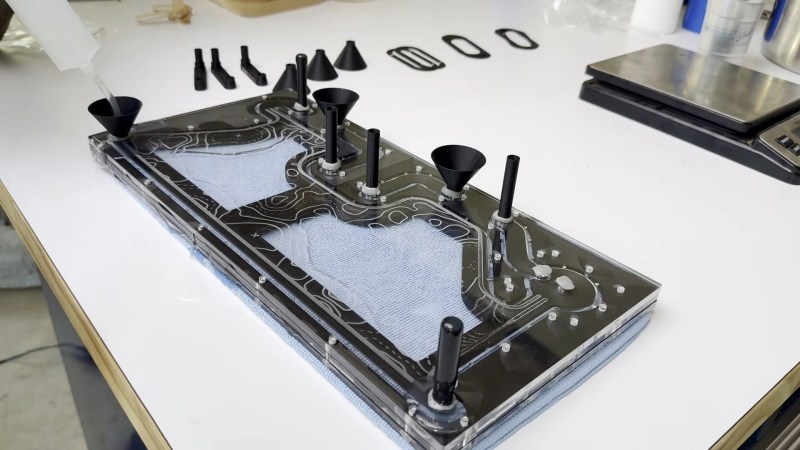
Perhaps that’s simply due to the contrast with [Visual Thinker]’s last build, where the “distro plate” that acts to plumb most of the coolant was made of layers of CNC-routed acrylic, held water-tight with O-rings. Not wanting to wait for his next build to be fabricated, and not wanting to take up CNC machining himself, [Visual Thinker] fell back on tools many of us have and know: the 3D printer and laser cutter.

In this project, the end plates of the cooling loop are still clear acrylic, but he’s using a laser cutter to shape them. That means he cannot route out gaps for o-rings like in the last project, so that part gets 3D printed. Sort of. Not trusting the seal a 3D printed gasket would be able to give him, [Visual Thinker] opts to use his 3D printer to create a mold to cast a seal in silicone. Or perhaps “injection-mold” would be a better word than cast; he’s using a large syringe to force the degassed silicone into the mold. The end part is three pieces: a 3D printed spacer holding two acrylic plates, with the cast-silicone gasket keeping the whole thing water-tight to at least 50 psi, 10x the operating pressure of his PC.

After that success, he tries replacing the printed spacer with acrylic for a more transparent look. In that version only temporary shims that are used to form the mold are 3D printed at all, and the rest is acrylic. Even if you’re not building a water-cooled art PC, it’s still a great technique to keep in your back pocket for fluid channeling.

In some ways, this technique is the exact opposite of the copper-pipe steampunk builds we’ve featured previously. Those were all about pretty plumbing, while with a distro plate you hardly need pipes at all. Like any water-cooled project, it’ll need a radiator, which could be a hack in and of itself.

Continue reading “PC Watercooling Uses Everything But CNC Machining” →