The Inner Workings Of Servo Motors

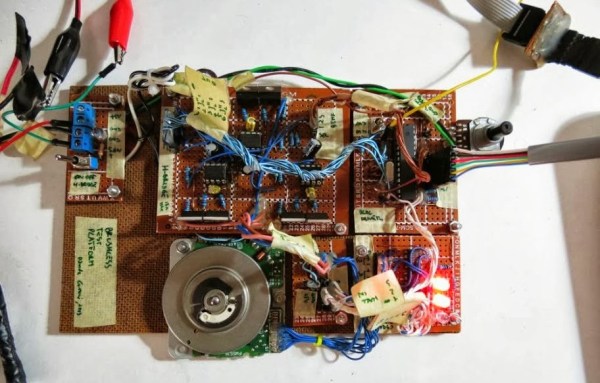
Servos seem to be the go-to option when adding motors to hobby projects. They’re easy to hack for continuous rotation for use in a robot, but with the control board intact they are fairly accurate for position-based applications. But do you know how the hardware actually works? [Rue Mohr] recently published an article that looks at the inner world of the servo motor.

As you know, these motors use a voltage, ground, and signal connection for control. The position of the horn (the wheel seen on the servos above) is dependent on that control signal. The duty cycle of a 20 ms pulse decides this. Inside the housing is a control board capable of measuring this signal. It’s got a chip that monitors the incoming PWM pulses, but that’s only half of the equation. That controller also needs feedback from the horn to know if its position is correct or needs to be changed. Integrated with the gear box that connects the motor to the horn is a potentiometer. It’s resistance changes as the horn turns. Knowing this, it is possible to fine tune a servo by altering that resistance measurement.

Cheap Spark Detector For Alpha Particles

[JAC_101] wrote in to let us know that the Truely Mad Scientist’s LVL1 Splinter Group just built a simple Alpha Particle detector.  The detector is a high voltage DC spark gap that is triggered by ionizing radiation. Making one of these detectors involves gutting a cold cathode power supply for some high voltage AC, then bumping that source up to crazy high voltage DC with a Cockcroft-Walton generator.  Once the spark gap distance is carefully adjusted it will light up brilliantly with the introduction of a radioactive source, we are told. There are no videos, or even pictures of the thing running, but we found this one that is pretty darn cool. Maybe all that spark-gap related RF killed their camera or something, their page at least promises videos soon.

In the mean time check out Truely Mad Scientist’s LVL1 Splinter Group’s ionizing cloud chamber for more radioactive fun.

Using StellarisWare With The Launchpad

In our last Stellaris how-to we got the board working and set some registers to turn on the LED. This time we’ll start using StellarisWare Driverlib, which provides drivers for the microcontroller’s peripherals including GPIOs, UARTs, ADCs, and so on. These libraries make it easier to control the peripherals. We’ll build the Driverlib project, create a project from scratch to use the library, and run a simple LED blinking example.

Continue reading “Using StellarisWare With The Launchpad”

Getting Started With The Stellaris Launchpad

We’ve already given an overview of the Stellaris Launchpad, but lets look at the first steps to running code on the device. First we’ll get the development software working, then we’ll build and run a very simple example.

TI allows use of the full version of their IDE, Code Composer Studio, with the Launchpad’s on-board debugger. To work with Stellaris microcontrollers, you’ll also need to grab StellarisWare. This free software package contains support for the Stellaris devices including peripheral drivers, a USB library, and code examples. Finally, you’ll need the ICDI drivers to communicate with the debugger. TI has all the required software for this board available here. See the TI getting started directions for a walk-through of how to install the required software.

Continue reading “Getting Started With The Stellaris Launchpad”

L.I.O.S.: The Ten-ish Dollar Robot.

We love cheap stuff here. Who doesn’t? [Oscar Rodriguez Parra] does too, and wrote in to show us his super cheapey robot L.I.O.S. The build was for the AFRON design challenge, which involves building a 10 dollar robot to teach students robotics. The winners of the challenge were neat and all, but they all look too fancy flaunting their molded plastics and electronics breadboards.

[Oscar’s] design is super simple, LDRs as eyes, a PIC12F683 to do the brainin, LEDs for indicators and a couple modded servos to drive the wheels. An extraordinarily complex cardboard flap roller helps the cart turn, but probably isn’t going to see much aside from smooth flooring. The electronics are mounted using one of our favorite techniques, the paper perf board (very similar to the substrate free technique).

Check out the video after the jump to see LIOS in action. This is an excellent introduction to robotics for any classroom. Thanks [Oscar]!

Continue reading “L.I.O.S.: The Ten-ish Dollar Robot.”

Test Your Project’s Mettle With A Protected Dummy Load

For a power hungry project the supply is sometimes a pretty big unknown. Whether stapling together a few different power supplies to meet a current requirement, or designing a system from the ground up: a big power supply can be quite a dangerous thing. It helps to have some kind of a dummy load to really shake down the electronics and get an idea of how hot things get or test stability before trusting the supply to run your stuff. [Paulo Oliveira] has constructed just such a thing, a slick looking adjustable constant current load.

Following the popular LM324 circuit from [David Jones] at EEVblog [Paulo] decided to make use of the two spare op-amps to provide both a thermal overload and a cooling fan circuit. We have seen other tweaks to [David]’s circuit in the past but through some resistors and MOSFETs [Paulo] can now load up to 7A (limited by resistor wattage). We would have used a really crazy server vacuum fan to make it genuinely frightening to push heavier loads. Thanks [Paulo]!

Beginner’s Look At On-Chip Debugging

As your embedded applications get more complicated an On-Chip Debugger will save you a lot of time when things don’t run quite right. On-Chip Debugging (OCD) is just what it sounds like — a way to run your program on the target chip that lets you pause execution to examine values and change them if need be. The Arduino has no built-in method of using OCD, but the AVR chips used by the boards do. The caveat is that you need a proper AVR programmer to access the Debug Wire protocol, or a JTAG interface for some of the larger chips. In this case I’m going to be using an STM32 Discovery Board to give you an overview of OCD. But this will work the same way for any chip that has hardware debugging capabilities. Many IDE’s have debugging support built right in so that you can use a nice GUI as you work. But often these are just a front end for the command line tools I’ll be using. Join me after the break and we’ll get started.

Continue reading “Beginner’s Look At On-Chip Debugging”