Hackaday’s Duelling Marble Mazes Are Dead

Well, the whole RedBull Creation contest has finally wrapped up. We’re back home and fully recovered from our weekend at MakerFaire. I want to thank the Redbull crew for making the weekend very fun and the crew from Squidfoo for being an awesome team.

Now that all the “thank you” statements are out of the way, lets talk about what happened. Kids trashed our game. Right off the bat we noticed our construction wasn’t going to hold up to the abuse. It was designed, built, and tested in such a short time that we really had no idea how it would hold up under the weight of the masses. As it turns out, we should have gone much, much, more rugged. It was destroyed almost immediately.

Continue reading “Hackaday’s Duelling Marble Mazes Are Dead”

Controlling Your Webcam With An Old Guitar Hero Pedal

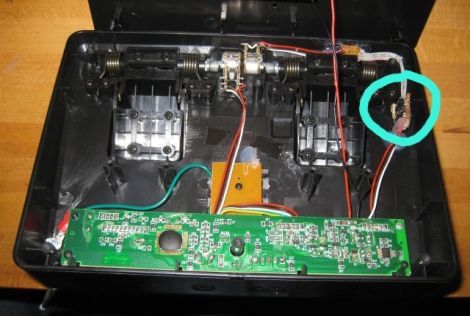
Hackaday reader [Tom Price] often uses Skype to communicate with family near and far, but he was getting tired of adjusting his webcam each time his kids moved out of frame. While the solution he came up with isn’t fully automated, it is hands-free, which is good enough for his purposes.

[Tom] was looking around for an electronic foot pedal of some sort when he came across a wireless 3rd party Guitar Hero peripheral that happened to fit the bill. Using an Arduino library created by [Bill Porter], he was quickly able to get the toy to communicate with an Arduino-flashed Atmega8, but things kind of fell flat when it came time to relay signals back to his computer. Using another Atmega8 along with the PS2X library, he was able to emulate the Guitar Hero controller that his foot pedal was looking for.

With the pedal portion of his project wrapped up, he focused on his webcam. [Tom] mounted the camera on a small servo, which he then wired up to the receiving end of his foot pedal rig. As you can see in the video below, he can now pan his camera across the room with a tap of his foot, rather than leaning in and manually adjusting it.

Continue reading “Controlling Your Webcam With An Old Guitar Hero Pedal”

Escape From New York: Hackaday Edition

Woo we’re home from Maker Faire! The Hackaday boss man [Caleb] and [Scott], [Phil], and [Andrew] from Squidfoo are back in Springfield, Missouri. I’m safely back in the bosom of Appalachia in Pensyltucky, and we hope every one else at Maker Faire NYC 2012 made it back home safely.

Don’t think this is the end of our coverage of Maker Faire, though. Honestly, the Internet situation was terrible at Maker Faire, and between tethering on my droid and a MiFi, I was lucky to post what I did. There’s more stuff coming down the pipe, and now that I have a decent connection we’ll be posting more videos to the Hackaday YouTube channel.

Of course this wouldn’t be a proper Hackaday post without a hack, therefore I will humbly submit something I discovered around the Delaware Water Gap: Every GPS unit has a setting to avoid New Jersey. All you have to do is enable the ‘avoid toll roads’ setting. Yes, it’s an easy modification to preserve your health and sanity, lest you accidentally find your way into a suburban swampland.

Hackaday At The World MakerFaire In NY

For the next two days, [Caleb Kraft] and [Brian Benchoff] will be wandering around the World MakerFaire  in NY. Primarily stationed at the booth meant to show off our winning entry into the Redbull Creation contest, we hope to find some interesting things for you to read about.

We’ve already scoped out the MakerFaire and met a few people so we’re eager for the gates to open today and let in the flood of enthusiastic people. Speaking of floods, its been raining quite a bit so we’ve got our fingers crossed that we’ll get some clear patches so we can enjoy the things that require a little more space, like the “Centrifury” from North Street Labs.

While everything is going on here, it can be hard to sit down and write a worthwhile article, so those probably won’t appear until monday. In the meantime though, we will be uploading random amusing things as we find them to our youtube account.

Continue reading “Hackaday At The World MakerFaire In NY”

Hands On The Stellaris Launchpad

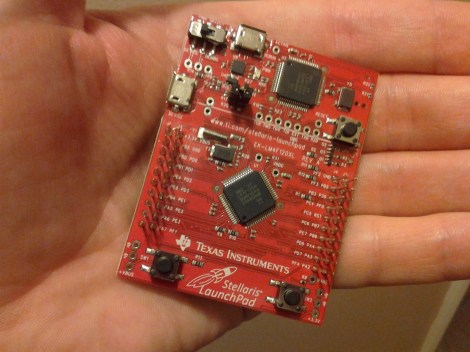
We just got our hands on a Stellaris Launchpad. We had placed an order when the preorder was originally announced, but the marketing folks at TI reached out an offered to send us one a bit sooner and took them up on it. We’ve embedded a quick unboxing video after the break but read on for some info that didn’t make it into that clip.

The look and feel of the board and its packaging are almost exactly the same as the MSP430 version of the Launchpad. But why not? After all it worked so well the first time. This board hosts an ARM Cortex-M4 processor. The two buttons on the bottom are user buttons, the one on the upper right is a reset button. The top of the board is the programmer, with a micro USB port for connectivity. The kit also includes about a 2′ cable for this connection. Next to that jack is a switch that selects a power source. You’ll also notice a USB port to the left, this because the processor includes USB functionality, with a free library available from TI. Power can come from the programmer/debugger USB port, or from this device USB port. There are dual pin headers to either side on the face of the board, and pin sockets on the back which break out pins of the processor. Just below the reset button is a RGB LED, and a clock crystal has also been populated just above the chip.

When plugged in via the programmer’s USB port the PWR LED lights up as does the RGB LED. The firmware that ships on the device fades through a range of colors and the user buttons scroll through a set of predefined colors. The device enumerates as: “Bus 002 Device 005: ID 1cbe:00fd Luminary Micro Inc.” on our machine. But if you connect it via the device USB jack it enumerates as: “Bus 001 Device 015: ID 04e8:689e Samsung Electronics Co., Ltd GT-S5670 [Galaxy Fit]”. Interesting.

We have no idea if there are programming tools for flashing the board using a Linux box, but we’ll be trying to figure it out. If you have some info please share it in the comments.

Continue reading “Hands On The Stellaris Launchpad”