Electronics Tutorial Two-fer: Soldering Skills And Wires

electronics_tutorial_twofer_soldering_skills_and_wires

There is a plethora of electronics tutorials scattered about online. Sometimes it can be hard to separate the good ones from the bad, and the enlightening from the misinformed. We recently came across a pair that we found helpful, and thought they would appeal to anyone starting off in electronics.

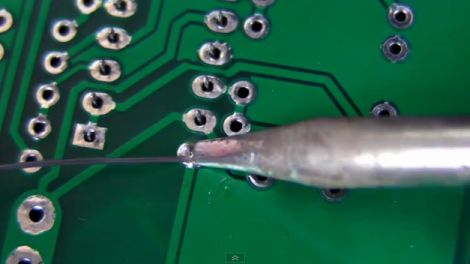
In this video tutorial, [Dave Jones] at the EEVblog covers soldering, detailing good practices and common mistakes to avoid when working with through-hole components. As the second video in a series he picks up where part one left off, excitedly demonstrating the ins and outs of good soldering skills.

Hackaday reader [grenadier] is working on a series of beginner’s electronics tutorials, and this week’s entry covers wiring. He discusses wire types, gauges, and even provides a nifty self-computing chart that calculates power loss based on the length and gauge of the selected wire. Before wrapping things up, he briefly touches on fuses and the pitfalls of choosing wire that’s not up to the task at hand. While you’re over there looking over his tutorial, be sure to check out the Junkbox, there’s plenty of awesome stuff to be had!

Livescribe Shuts Down Developer Program

[Kelly] sent in a tip saying that Livescribe, the company behind a remarkable smartpen able to record handwriting, was shuttering the developer program by taking down their dev forums and removing the SDK, taking away the ability to write custom apps. [Kelly] posted about this on her blog.

Livescribe has a thriving community around it and the pens themselves have had some incredible hacks, like Zork played on an Echo smartpen.

Livescribe’s official reason for shutting down the development program is to concentrate on, “cloud access, storage and services.” While we’re still wondering why Livescribe would sideline the developers that give a platform more functionality, it’s astonishing that a company would take down the SDK and delete the dev forums of their own product.

Although the largest Livescribe development and hacking forum has been shut down, we fully expect an independent forum to pop up within the week. We’ll be sure to post a link to that forum when we get word of it. If you know where the new forum is, be sure to send it into the tip line.

New Conductive Ink Allows Circuit Prototyping With A Pen And Paper

roller_ball_circuit_drawing

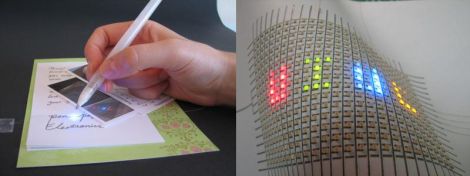
Why spend time etching circuit boards and applying solder masks when all you really need is a rollerball pen and some paper? That’s what University of Illinois professors [Jennifer Lewis and Jennifer Bernhard] were asking when they set off to research the possibility of putting conductive ink into a standard rollerball pen.

The product of their research is a silver nanoparticle-based ink that remains liquid while inside a pen, but dries on contact once it is applied to a porous surface such as paper. Once dry, the ink can be used to conduct electricity just like a copper trace on a circuit board, making on the fly circuit building a breeze.

Previous ink-based circuit construction was typically done using inkjet printers or airbrushing, so removing the extra hardware from the process is a huge step forward. The team even has some news for those people that think the writable ink won’t hold up in the long run. The ink is surprisingly quite resilient to physical manipulation, and they found that it took folding the paper substrate several thousand times before their ink pathways started to fail.

While we know this is no substitute for a nicely etched board, it would be pretty cool to prototype a simple circuit just by drawing out the connections on a piece of paper – we can’t wait to see this come to market.

Electronics Lessons For Beginners

electronics

Hackaday reader [grenadier] wrote in to share a series of tutorials he is working on, where he discusses the basics of electricity and electronics. The first lesson titled, What is Electricity?” has been wrapped up, and is available for free on his site.

For any of our regular readers, the lesson will seem pretty basic (and likely full of things to nitpick). However, we imagine his lessons would be quite helpful to anyone looking to expand their electronics know-how.

Now don’t get us wrong, we love the series of electronics tutorials that Jeri has been periodically releasing, but we think there’s plenty of room on the Internet for other willing teachers as well. If his first lesson is any indicator, his tutorials will be easy to understand, sprinkled with a little bit of humor, and chock full of fun videos that demonstrate the subject at hand.

Take a quick look his way if you get a chance – you or someone you know might find his tutorials and reference guides insightful.

[Image courtesy of Electronicsandyou]

The Passing Of Bob Pease

We are saddened by the recent passing of [Bob Pease]. You may not be familiar with the man, but his work has touched your lives in more ways than you can count. As an electronics engineer who specialized in analog components he was responsible for hardware that made some of the electronics in your life possible, and designed components that you’ve probably used if you dabble in electronic design.

EDN has a lengthy obituary celebrating his life and accomplishments. [Bob] was part of the 1961 graduating class at MIT. He started his career designing tube amplifiers before finding his way to a position at National Semiconductor about fifteen years later. Throughout his career he worked to promote education about analog electronics both through written text, and more recently as the host of Analog by Design, an online video program where a panel of experts discuss the ins and outs of electronics.

[Bob] was killed in an automobile accident on June 18th at the age of 70.

[via Make]

360 Degree Photography Uses Very Easy Post-processing

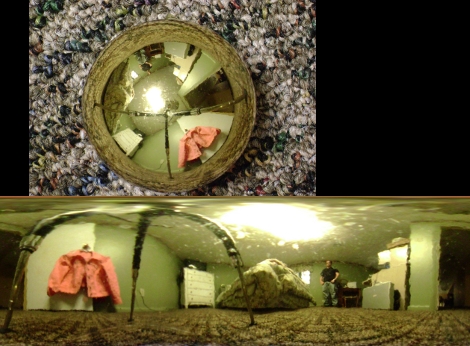
[Pixel_Outlaw] has been working on a method to capture 360 images with his camera. He’s using a shiny Christmas ball ornament to reflect the entire room into the lens of the camera. In the unwrapped image you can make out the three legs of his tripod. In that snapshot he laid the ornament on the floor and pointed the camera straight down from above.

What catches our attention is the post processing he used to unwrap the image. He loaded up The Gimp, an open source image manipulation program, and used just three steps to unwrap the image. First he cropped the picture so that it was square and the spherical ornament was perfectly centered. Then he ran the polar coordinates filter. Finally he scaled the image, setting the width to be Pi times the height. Works pretty darned well for something that doesn’t take much fiddling.

The ornament wasn’t perfectly smooth (or maybe it was a bit dirty) but you can get a much better starting image if you use a bulb with a silver reflector like we saw in this older hack.

Mouse And HDD Combo Show Off Your Data Gluttony

databot_mouse

So we know you’ve got a lot of porn on your computer, but just how much is a lot? This concept mouse and hard drive combo aims to show you just how much digital junk you have acquired through physical feedback.

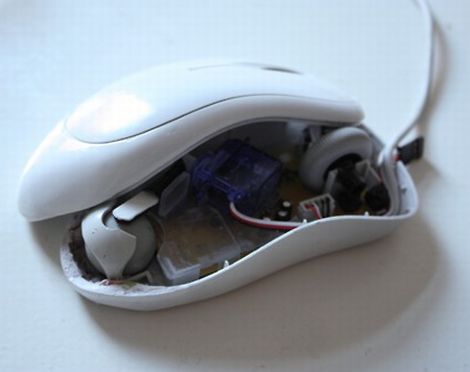
The DataBot mouse looks like a typical run of the mill scroll mouse that you might get with a new computer. Inside however, the designers have added a small servo which alters the ease with which the ball moves. The more files you have stuffed into the folder you are moving around, the more the mouse resists, giving you a sense of the physical “weight” of your computer’s contents.

The DataBot hard drive gives you a sense of how full your computer is by growing and shrinking based on space usage. During file transmissions the hard drive blinks its LEDs to indicate how fast or slowly your files are moving. When the inevitable file access error occurs, the LEDs switch to a bright red hue and the drive shakes to indicate there is a problem afoot.

With the price of data storage decreasing by the day, it’s easy to get lost in a glut of information without realizing just how much data you have. This is definitely an interesting way to get a different look at your data consumption.

Check out the videos below to see the pair in action.

[via Dvice]

Continue reading “Mouse And HDD Combo Show Off Your Data Gluttony”