Hacking A Ham Radio

For Christmas, [Lior] received a Baofeng UV5R radio. He didn’t have an amateur radio license, so he decided to use it as a police scanner. Since the schematics were available, he cracked it open and hacked it.

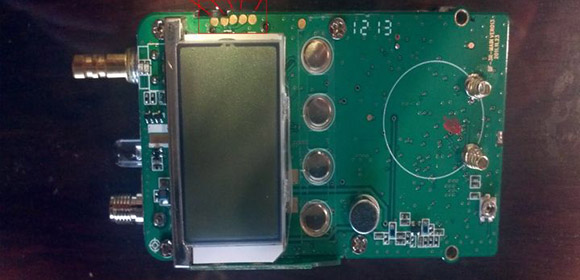
This $40 radio communicates on the 136-174 MHz and 400-480 MHz bands. It uses a one-time programmable microcontroller and the RDA1846 transceiver. With the power traces to the MCU cut, [Lior] was able to send his own signals to the chip over I2C using an Arduino. He also recorded the signals sent by the stock microcontroller during startup, so that he could emulate it with the Arduino.

Once communication was working on an Arduino, [Lior] decided to get rid of the stock microcontroller. He desoldered the chip, leaving exposed pads to solder wires to. Hooking these up to the Arduino gave him a programmable way to control the device. He got his radio license and implemented transmission of Morse Code, and an Arduino sketch is available in the write up.

[Lior] points out that his next step is to make a PCB to connect a different microcontroller to the device. This will give him a $40 radio that is fully programmable. After the break, check out a video of the hacked radio in action.

Continue reading “Hacking A Ham Radio”

Arduinofied QRP Radio Beacon

moxpd

A while back, [m0xpd] picked up an unbearably cheap AD9850 DDS module from ebay. He turned this in to a Raspberry Pi-powered radio beacon, but like so many builds that grace our pages, the trolls didn’t like using such an overpowered computer for such a simple device. To keep those trolls quiet, [m0xpd] is back again, this time using the AD9850 DDS module as a radio beacon with an Arduino.

The previous incarnation of this build used a Raspberry Pi, and as a consequence needed a level converter. This was thrown out as [m0xpd]’s own Arduino clone, the WOTDUINO – pronounced, ‘what do I know’ – is able to handle the 5 Volt IO of the AD9850.

In addition to fabbing a shield for the DDS module, [m0xpd] also constructed a transmitter shield to amplify the signal and allow the ‘duino to key out a few simple messages. It’s a quite capable device – one of [m0xpd]’s messages traveled from merry olde England to Arizona, his best ever westward distance.

Weightless, The Hopefully-not-vaporware Internet Of Things Chip

Weightless

Imagine a single chip able to interface with your Ethernet, USB, and serial devices, turn those connections into wireless radio signals with miles of range, able operate off a single AA battery, and costs less than $2. That’s the promise of the Weightless special interest group that wants to put several hopefully not vaporware radio chips in the hands of everyone on the planet.

Long-range wireless networks are a tricky thing; for home networks, Bluetooth and WiFi reign supreme. Venturing into the outdoors, or really any place more than a few hundred feet from a WiFi repeater is a challenge, though. If you’re trying to send data to a fleet of automobiles, track an endangered animal, or make a smart power grid, your only real option is a cell phone tower with very high costs in hardware and battery life.

Weightless hopes to change that with a small radio chip that includes a MAC, PHY, and all the components necessary to turn just about any digital connection into a wireless link between devices. The radio will operate in the spectrum left behind by UHF TV (470 – 790MHz), and the folks working on already have some reference designs etched into silicon.Don’t expect this to replace WiFi, cellular, or Bluetooth, though: according to the getting to know Weighless book, the designers are aiming for a data rate of only a few kB/s.

Still, it’s a great use of now unused spectrum, and would fill a huge gap in what is readily possible with homebrew Internet of Things things.

Tip ‘o the hat to [Mark] for sending this one in.

Arduino As An Inexpensive Ham Radio Frequency Counter

[Todd Harrison] really has our number. Like him, we don’t want to spend money when we don’t have to, and hacking our own solutions is a lot more fun anyway. This time around he’s helping out a friend who is a ham radio enthusiast. The friend’s radio didn’t come with a frequency display, and buying the add-on would cost more than the radio did. So [Todd] has set out to build an Arduino frequency counter for a Kenwood TS-520S HF ham radio.

This post (and the video found after the break) doesn’t cover the entire project. It’s rather involved just to make sure that [Todd’s] initial idea is viable so he spends about 35 minutes explaining the problem, then measuring the radio outputs and testing to see that the Arduino can read them accurately. Because the radio has a very large range of operation, [Todd] will need to add external component to facilitate this. That extra circuit design will be the topic of the next project segment.

Continue reading “Arduino As An Inexpensive Ham Radio Frequency Counter”

BladeRF, Your Next Software Defined Radio

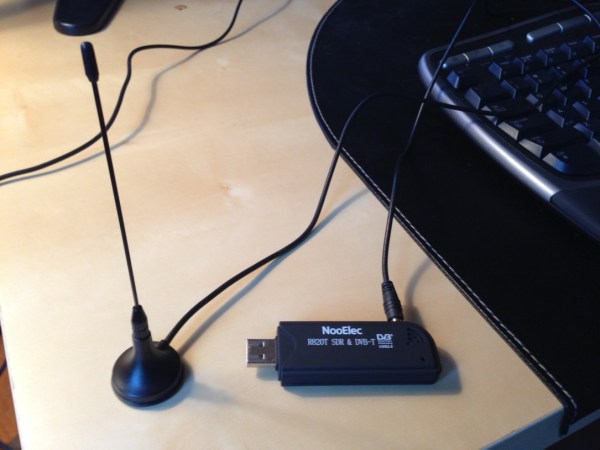
By now you might have a bit weary of your small and inexpensive TV tuner dongle software defined radio. Yes, using a USB TV dongle is a great introduction to SDR, but it has limited bandwidth, limited frequency range, and can’t transmit. Enter the bladeRF, the SDR that makes up for all the shortcomings of a USB dongle, and also serves as a great wireless development platform.

The bladeRF is able to receive and transmit on any frequency between 300 MHz and 3.8 GHz. This, along with a powerful FPGA, ARM CPU, and very good ADCs and DACs makes it possible to build your own software defined WiFi adapter, Bluetooth module, ZigBee radio, GPS receiver, or GSM and 4G LTE modem.

It’s an impressive bit of kit, but it doesn’t exactly come cheap; the bladeRF is available on the Kickstarter for $400. The folks behind the bladeRF seem to be doing things right, though, and are using their Kickstarter windfall for all the right things like a USB vendor ID.

There’s a video of two bladeRFs being used as a full duplex modem. You can check that out after the break.

Continue reading “BladeRF, Your Next Software Defined Radio”

Great Antenna For Software Defined Radio Is Really Easy To Make

The University of Kent’s hackerspace, TinkerSoc, recently had a talk on software-defined radio using an incredibly inexpensive USB TV tuner. Of course this is nothing new to Hackaday readers, but they did manage to build one of the best antennas for their TV dongle. It’s a discone antenna, and is perfectly suited for tuning into a whole bunch of really cool things such as weather balloons and aircraft transponders.

The idea discone antenna looks exactly like its namesake; a metal disk attached to a metal cone. Of course with the frequencies the RTL software-defined radio deals with, it’s rarely necessary to build antennas out of sheet metal. The team at TinkerSoc built their discone out of galvanized garden wire and attached it to the input of their TV tuner.

All the dimensions for their discone antenna were gleaned from [ve3sqb]’s antenna design programs. Since TinkerSoc designed their antenna for 110 MHz, it ended up being pretty large. For higher frequencies, though, a discone antenna become fairly small and more than portable enough for a mobile rig.

Adding Shoulder Buttons To An RC Transmitter

radio

[Gerard] does puppeteering and animatronics work, and to remotely control his creations and characters he uses an off-the-shelf remote control radio. It’s you basic 6-channel setup, but [Gerard] wanted a way to control eye blinks and other simple actions with the press of a button. Sure, he could use the toggle switches on his transmitter, but he wanted something that wouldn’t require turning a servo on and off again. To fix this problem, [Gerard] added shoulder buttons to his transmitter with only a little bit of soldering.

[Gerard]’s transmitter uses toggle switches to send a signal on channels five and six. To add his push buttons, he simply drilled a hole in the plastic enclosure, installed a pair of push buttons, and wired them in parallel to the toggle switches.

Now [Gerard] has momentary switches on channels five and six, perfect for making his creations blink. Since the buttons are wired in parallel with the switches, flicking the switches to the ‘on’ position in effect takes the button out of the circuit, just in case the transmitter gets jostled around.