[Balint] Is Starting A Software-defined Radio Tutorial Series

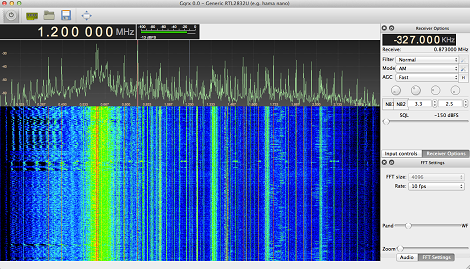
A few months ago, we saw a hack where a $20 USB TV tuner was transformed into a software-defined radio capable of reading GPS signals, listening to radio transmissions between aircraft and a control tower, and even a simple FM radio. This project is a perfect introduction to the RTL-SDR and Ham radio scene, but getting these projects up and running can be a bit overwhelming for anyone who hasn’t played around with this before. [Balint] is tackling this problem head on with a series of YouTube tutorials to get SDR noobs up and running with GNU Radio and the Realtec USB TV tuner.

To demonstrate the power of software-defined radio, [Balint] is using GNU Radio and the USB TV tuner that started it all, the Ezcap EZTV668 (conveniently back in stock at DealExtreme, but other options exist). Because software-defined radio is a touch confusing for a beginner to wrap their head around, [Balint] is beginning his tutorial series by explaining radio sources, sinks, and the GNU Radio interface.

Already, [Balint] has put up 5 tutorials and made the flowgraph files available in his gr-baz project. He’s doing a wonderful job opening up the software-defined radio scene to beginners, but he’s still looking for some feedback. If you have a suggestion on what [Balint] should cover next, leave a note in the YouTube comments and we’re sure [Balint] will get around to that eventually.

Reading RFID Cards From Afar Easily

RFID hacking has been around for years, but so far all the builds to sniff data out of someone’s wallet have been too large, too small a range, or were much too complicated for a random Joe to build in his workshop. [Adam]’s RFID sniffer gets around all those problems, and provides yet another reason to destroy all the RFID chips in your credit cards.

The project was inspired by this build that took a much larger RFID reader and turned it into a sniffer capable of covertly reading debit cards and passports from the safety of a backpack or briefcase. [Aaron]’s build uses a smaller off-the-shelf RFID reader, but he’s still able to read RFID cards from about a foot away.

[Aaron]’s build is very simple consisting of only an Arduino and SD card reader. [Aaron] is able to capture all the data from an RFID card, write that data to the SD card, and emulate a card using his RFID cloner.

What’s really impressive about the build is that [Aaron] says he’s not a programmer or electrical engineer. His build log is full of self-denegration that shows both how humble [Aaron] is and how easy it is for anyone with the requisite skill set to clone the bank card sitting in your wallet. We don’t know about you, but you might want to line your wallet with aluminum foil from now on.

FTA Dish Used To Receive L-band Amateur Radio

[David Prutchi] has an FTA (free-to-air) satellite dish. This means he can tune and watch freely available satellite television feeds. But this sounds much better than it actually is. There isn’t much that’s broadcasted unecrypted from satellites with the exception of a collection of religious channels. But he still uses the dish by using the FTA satellites to calibrate the alignment, then repositioning it to receive L-Band radio transmissions with his own add-on hardware. In the image above it’s the spiral of wire attached to the dish’s collector.

The satellite transmissions are picked up on the KU-band by an aftermarket horn that [David] purchased for this purpose. To add his own helix receiver he cut a square mounting plate that fits around the horn. This plate serves as a reflector and ground plane, and also hosts the helix connector which picks up the L-band transmissions. He had to be creative with routing the first few inches of the helix but it looks like he manages to get some pretty good performance out of the hardware.

[via Hacked Gadgets]

Controlling Robots With A TRS-80

[DJ Sures], mastermind behind the EZ-B Bluetooth Robot controller, sent in a really interesting build where he controls a robot with a 1983 TRS-80 computer.

The robot in question is [DJ Sures]’ adorable WALL-E we’ve seen before. WALL-E is controlled through a Bluetooth connection to a desktop PC with the EZ-Builder hardware and software package.

To get the Trash-80 talking to WALL-E, [Sures] connected a tiny Bluetooth module to the TX pin of the 6402 UART. It’s a very, very simple modification that adds a Bluetooth serial connection to one of the first notebook computers. After syncing the TRS-80 and WALL-E to the computer running EZ-Builder, it’s a piece of cake to make the robot respond to the clanging of a 30-year-old keyboard.

There’s a video of [DJ Sures] going over his build after the break with a wonderful demo of WALL-E freaking out to a little dubstep. Check that out after the break.

Continue reading “Controlling Robots With A TRS-80”

Improving A Software Defined Radio With A Few Bits Of Wire

Impressed by the recent advances in the software defined radio scene, [Jason] picked up a $20 USB TV tuner dongle to check out his local airwaves. Unfortunately, the antenna included with the little USB dongle is terrible at receiving any signal other than broadcast TV. [Jason] wanted to improve his reception, so he got some wire and made his own discone antenna.

The discone antenna is ideally suited for [Jason]’s setup – properly constructed, it’s able to receive over the entire 64 to 1700 MHz band the RTL-SDR dongle is able to read. To construct his antenna, [Jason] checked out [VE3SQB]’s list of antenna design programs, got the dimensions of his antenna, and set to work attaching wire to PVC pipe.

The antenna is a massive improvement over the stock antenna included with the TV tuner dongle. After mounting his discone at the far end of his back yard, [Jason] started picking up a few blips from the transponders of passing aircraft.

Putting A Software Defined Radio On A Mac

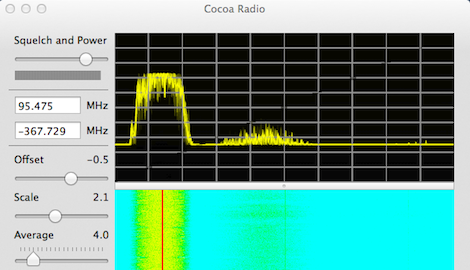
A few months ago [Antti Palosaari] discovered cheap USB TV tuners could be used as a software-defined radio. Since then, we’ve seen these TV tuners receive signals from GPS satellites and even the signals between air traffic control and passenger aircraft. Like everything cool, Mac support for these drivers is slightly terrible so [hpux735] wrote his own Cocoa app to support these amazing dongles.

[hpux735]’s driver is a port of the osmocom driver, repackaged as a native Cocoa app so the terribly fickle libusb and other dependencies aren’t needed. All the code is up on GitHub, ready for you to start playing around with SDR.

As far as tutorials for those wading into the deep waters of software-defined radio, a number of how-to guides have popped up over the last month to get SDR noobs up and running quickly. Here’s a few of the best ones we’ve seen:

[braingram] put up an Instructable for Ubuntu users.

For people who have a Windows box lying around [balint] put up a getting started guide.

There’s a slightly more thorough Windows guide here.

Most of the development in the TV tuner SDR community is happening on the RTLSDR subreddit, and there’s more than enough info there to do just about anything with these TV tuner dongles. If you come up with a novel use for one of these dongles, send it in on the tip line.

Build Your Own Radar System

How we missed this one is anybody’s guess, but one of the presentations at DEFCON last year covers a DIY radar build. [Michael Scarito] talks about the concepts behind radar, and then goes on to show that it’s not too hard or expensive to build a setup of your own. We’ve embedded his 45 minute talk after the break.

The two large pieces of hardware above should look familiar. They’re descendents of a favorite hacking project, the cantenna. The can-based long-range antenna is most popular with WiFi applications, but we’ve seen it used for Bluetooth as well and it’s not surprising to see it here. The rest is a lot of sensing hardware and enough math crammed into the coding to make your ears droop.

If you make it far enough (exactly 39 minutes into the talk) [Michael] shares some links for more information on the build. We think living vicariously is enough for us, but if you manage to build your own setup don’t forget to post a project log!

Continue reading “Build Your Own Radar System”