Cramming A Pi Zero Into A Cheap Handheld Game

At this point, we’ve seen the Raspberry Pi jammed into what amounts to every retro game system, handheld or otherwise, that was ever released. While they’re always fun builds, invariably somebody will come along who is upset that the original hardware had to be gutted to create it. It seems as if with each post, a classic gaming aficionado out there has his or her heart broken just a bit more. Will no one put an end to the senseless slaughter of Game Boys?

As it so happens, not all hardware modders are such unconscionable brutes. [Starfire] recently sent his latest creation into the tip line, and it’s designed specifically to address the classic gaming massacre in which Hackaday has so shamefully been a collaborator.  His build sacrifices a portable Genesis built by AtGames, and turns it into a Raspberry Pi Zero portable running RetroPie.

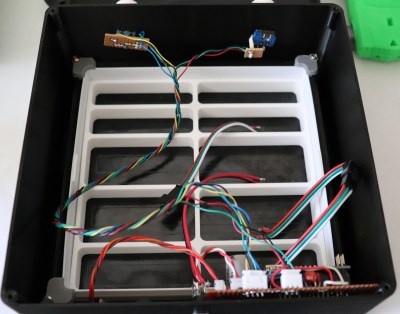
Opening up the back panel of his portable Pi shows an incredible amount of hardware smashed into the tiny package. Beyond the obvious Pi Zero, there’s a iUniker 2.8-inch LCD, a 2,200 mAh battery, a two-port USB hub, a Teensy microcontroller, a USB sound card, an audio amplifier, a LiPo charging module, and a boost converter. [Starfire] measured peak power consumption to be 500 mA, which should give about a 3.5 hour run time on the 2,200 mAh battery.

This is all the more impressive when you realize the original AtGames PCB is still in the system, albeit with the center cut out for the Pi’s LCD to fit in. Rather than having to figure out a new way to handle input, [Starfire] simply connected the existing inputs to the digital pins on the Teensy and used some code to convert that into USB HID for the Pi. A few case modifications were necessary, namely the removal of the battery compartment from the back panel and covering up the original SD card slot and ports; but otherwise the finished product looks completely stock.

If you don’t mind tearing into a real Game Boy to make your portable Pi, you can check out a few of the stand out examples which we’ve covered here in the past.

Continue reading “Cramming A Pi Zero Into A Cheap Handheld Game”

Nintendo Switch Gets Making With Labo

Over the years, Nintendo has had little trouble printing money with their various gaming systems. While they’ve had the odd misstep here and there since the original Nintendo Entertainment System was released in 1983, overall business has been good. But even for the company that essentially brought home video games to the mainstream, this last year has been pretty huge. The release of the Nintendo Switch has rocketed the Japanese gaming giant back into the limelight in a way they haven’t enjoyed in a number of years, and now they’re looking to keep that momentum going into 2018 with a killer new gaming accessory: a cardboard box.

Some of the contraptions feature surprisingly complex internal mechanisms.

Well, it doesn’t have to be a box, necessarily. But no matter which way you fold it, it’s definitely a piece of cardboard. Maybe a few bits of string here and there. This is the world of “Nintendo Labo”, a recently announced program which promises to let Switch owners create physical objects which they can interact with via specially designed software for the console.

The Labo creations demonstrated in the bombastic announcement video make clever use of the very unique Switch hardware. The removable Joy-Con controllers are generally still used as input devices, albeit in less traditional ways. Twisting and tilting the cardboard creations, which take varied forms such as a fishing rod or motorcycle handlebars, relays input to the appropriate game thanks to the accelerometers and gyroscopes they contain.

Many of the more complex contraptions rely on a less-known feature of the controller: the IR depth camera. By pointing the controller’s camera inside of the devices, the motion of internal components, likely helped along by IR-reflective tape, can be tracked in three dimensions. In the video, the internal construction of some of the devices looks downright intimidating.

Which leads into the natural question: “Who exactly is this for?”

Clearly some of the gadgets, not to mention the folded cardboard construction, are aimed at children, an age group Nintendo has never been ashamed to appeal to. But some of the more advanced devices and overall concept seems like it would play better with creative teens and adults looking to push the Switch in new directions.

Will users be empowered to create their own hardware, and by extension, associated software? Will hackers and makers be able to 3D print new input devices for the Switch using this platform? This is definitely something we’ll be keeping a close eye on as it gets closer to release in April.

The popularity of the Switch has already given rise to a surprising amount of hacking given how new the console is. It will be interesting to see if the introduction of Labo has any effect on the impressive work already being done to bend the console to the owner’s will.

Continue reading “Nintendo Switch Gets Making With Labo”

Big Trak Gets A New Brain

If you were a kid in the 1980s you might have been lucky enough to score a Big Trak — a robotic toy you could program using a membrane keyboard to do 16 different motions. [Howard] has one, but not wanting to live with a 16-step program, he gave it a brain transplant with an Arduino and brought it on [RetroManCave’s] video blog and you can see that below.

If you want to duplicate the feat and your mom already cleaned your room to make it a craft shop, you can score one on eBay or there’s even a new replica version available, although it isn’t inexpensive. The code you need is on GitHub.

Continue reading “Big Trak Gets A New Brain”

Home Decorating With Tiny Arcade Cabinets

Thanks to the general miniaturization of electronics, the wide availability of cheap color LCD screens, and the fact that licensing decades old arcade games is something of a free-for-all, we can now purchase miniature clones of classic arcade cabinets for about $20 USD. In theory you could play these things, but given they’re less than 4 inches in height they end up being more of a desk novelty than anything. Especially since it seems like most of the effort went into making the cabinet itself; a classic example of “form over function”.

Unfortunately, if you want to buy these little arcade cabinets to use as decoration for your office or game room, they aren’t particularly well suited to the task. The “demo” mode where the game plays itself doesn’t last for very long, and even if it did, the game would chew through batteries at an alarming rate. [Travis] decided to tackle both issues head on by powering his Tiny Arcades over USB and locking them into demo mode.

The stock power for the Tiny Arcade comes from three AAA batteries, or 4.5 V. This made it easy enough to run over  5 V USB, and a four port USB charger is used to provide power to multiple machines at once. Forcing the game to stay in demo mode wasn’t much harder: a 555 timer was used to “push” the demo button with a frequency of every 10 seconds or so to keep the game up and running. A simple timer circuit was put together in the classic “dead bug” style, and sealed up with liquid rubber so it would play nice with the insides of the Tiny Arcade.

Since his little machines wouldn’t need their stock power switches anymore, [Travis] rewired the speaker lead through it. So now the machine stays on and in demo mode as long as it’s plugged into USB power, and you can flip the switch on the back to turn off the sounds. Perfect for sitting up on a shelf or the corner of your desk.

Usability issues not withstanding, there’s a pretty big (no pun intended) following for micro sized arcade cabinets. We’ve seen projects ranging from modding a Game Boy Advance to even tinier scratch builds.

Continue reading “Home Decorating With Tiny Arcade Cabinets”

How The Hero Droid BB-8 Rolls

By now we’ve come to expect a bountiful harvest of licensed merchandise to follow every Star Wars film. This year’s crop included many flavors of BB-8 so every fan can find something to suit their taste. At the top of this food chain is a mobile interactive “Hero Droid BB-8”. For those who want to see how it works, [TheMikeSenna] cracked open his unit to feed our curiosity.

Also called “Spin Master BB-8” for the manufacturer, this toy is impressively sophisticated for its price point. The video surveyed the mechanical components inside the ball. Showing how the droid travels, and how the head articulates.

Continue reading “How The Hero Droid BB-8 Rolls”

Fingerling Disemboweled For Your Entertainment

Due to the graphic nature of this post, small children and the elderly may want to leave the room. One of the hottest toys this holiday season has been gutted like a fish so that we may better understand the nature of its existence. Or maybe just what kind of sensors and motors the craftsmen over at WowWee managed to cram into a “robot” with an MSRP of only $15 USD.

[Josh Levine] mercilessly tears a Fingerling Monkey limb from limb on his blog, and points out some interesting design decisions made. While some elements of the toy are rather clever, there’s a few head-scratchers to be had inside the Fingerling. It’s interesting to see the final results of a decision process that had to balance the relatively rough life such a toy will live with the ever crucial cost of production.

The eyelids are particularly well thought out, operated by charging a coil under a magnet which is embedded in the plastic. Opening and closing the eyelids without a separate motor or gearbox is not only easier and cheaper, but prevents the possibility of damage if a child attempts to force open the eyes or otherwise manipulate the mechanism.

Other cost saving measures include the use of foil tape as a capacitive sensor, and simple ball-filled tilt sensors to detect orientation rather than an expensive accelerometer.

Interestingly, other parts of the toy seem overengineered in comparison. A cam and limit switch are used to detect when the Fingerling’s head has turned to its maximum angle, when it would have been cheaper and easier to simply detect motor stall current.

If you’re interested in seeing what makes popular toys tick, we’ve got a number of plaything tear downs which are sure to keep you satiated until the next big holiday toy rolls around.

Continue reading “Fingerling Disemboweled For Your Entertainment”

Fidget Spinner Becomes A Brushless Motor; Remains Useless

Your grandmother means well. But by the time she figures out something’s a fad, it is old news. So maybe you got a fidget spinner in your stocking this year. Beats coal. Before you regift it to your niece, you could repurpose it to be a motor. Technically, [B.Aswinth Raj] made a brushless motor, although it isn’t going to fly your quadcopter anytime soon, it is still a nice demonstrator.

You can see a video below. The idea is to put magnets on the spinner and use an electromagnet to impart energy into the spinner which is on a piece of threaded rod left over from your last 3D printer build. A hall effect sensor determines when to energize the electromagnet.

A brushed motor uses a spring-loaded brush to carry current through to the motor’s coils and keep the magnetic field oriented properly. A brushless motor works differently. There are several schemes that will work, but the one [Raj] uses is the most common. He adds fixed magnets on the rotor then uses an electromagnet to provide the correct push at the right time. A practical brushless motor will likely have more than one coil, though, and the controller has to do a particular sequence to move the rotor around the rotation.

If you want to see the insides of a real motor, we looked at how to rewind them earlier. If you’d rather repurpose your spinner to something more practical, you could always make some music.

Continue reading “Fidget Spinner Becomes A Brushless Motor; Remains Useless”