Running X86 Apps On Windows RT Devices

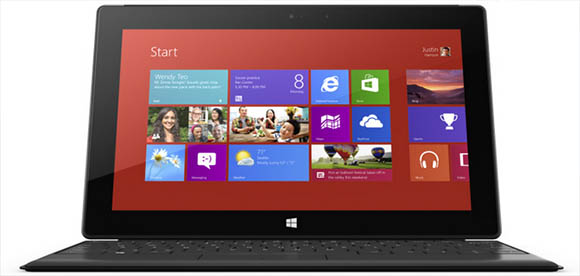
Windows RT, the version of Windows being loaded onto ARM-powered tablets and netbooks such as the new Microsoft Surface, has one drawback: there are tens of thousands of apps written for x86 hardware that simply won’t run on this new ARM-powered architecture. While this may present a problem for hospitals, banks, and other institutions needing a proper Wintel platform, we’re wondering how to get classic games such as Civ III and Age of Empires running on these new tablets.

It seems with a lot of black magic, [mamaich] over at the XDA Developers forum has a solution for us. He’s created a tool for running x86 Win32 apps on Windows RT. Basically, he’s created an x86 emulator for ARM devices that also passes Windows API calls to Windows RT.

So far, [mamaich] has been playing some classic Windows games on his Windows RT box, including Heroes of Might and Magic 3 and Space Cadet Pinball from Windows 95. A few utility apps such as 7Zip and WinRAR also work.

[mamaich]’s plans for his build are to make x86 emulation more automatic without the need for a separate launcher tool. Then, finally, we’ll have the perfect portable platform for RTS games.
A Guide And Helper Script For ARM Cross Compiling Toolchain On A Mac

mac-arm-toolchain-script

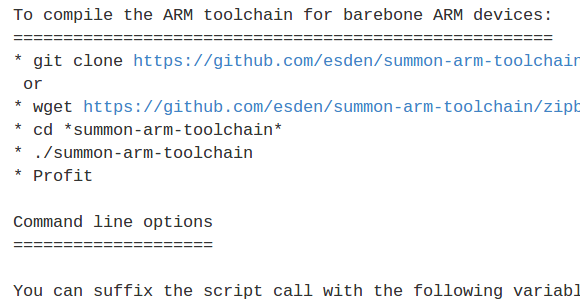
[Mitchell Johnson] wanted to develop for the STM32F4 Discovery board on his Mac. There are a few ready-to-use options when it comes to the ARM toolchains, but he couldn’t find one that satisfied all of his needs. After working out all the kinks he wrote a guide and tweaked a script to install the ARM tools on a Mac.

The problem he had with some of the pre-packaged tool chains is that they didn’t support the hardware floating point functionality of STM’s Cortex-M4 chips. To get around this without doing his own ground-up build (which can be quite a challenge) he forked the Summon Arm Toolchain script and modified it to include ST-Link support in the build. One of the things that we like about that script is it installs the tools in a sub-directory of your home directory. This way if you already have another ARM toolchain you can switch between the two by tweaking your PATH variable.

Unsigned Code Running On Windows RT

unsigned-code-on-windows-rt

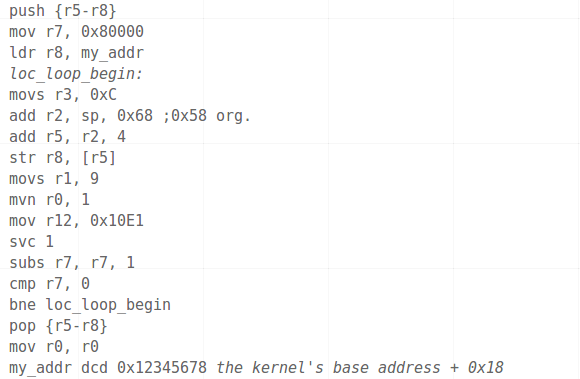
A crack has been found in the armor of Windows RT. This subset of Windows 8 is designed to run on ARM processors. The payload listed in the image above allows you to run unsigned desktop applications on the OS.

We haven’t seen very much about the Windows RT package, so it’s nice to hear [Clrokr’s] thoughts on it. As far as he can tell the system has not been watered down from its Intel-aimed (x86) counterpart. Rather, RT seems to be a direct port with what is called “Code Integrity” mechanisms switched on. There is a kernel-level setting, barricaded behind UEFI’s Secure Boot, which determines the minimum software signing level allowed to run on the device. This is set to zero on a Windows 8 machine, but defaults to 8 on an ARM device. [Clrokr] uses a debugger to insert the code seen above into a DLL file in order to reset that minimum signing value to 0.

Do you have a project in mind for which this is useful? We’d love to hear about it in the comments!

[via Reddit]

ARM Powered Rack Mount USB Test Equipment

developing-rack-mount-pcb-testing-tools

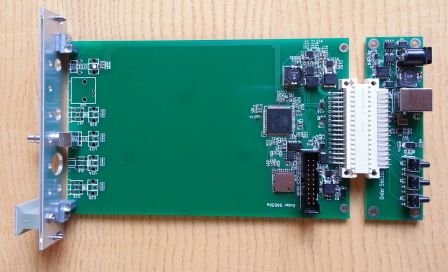
This is a device which [Limpkin] has been developing at his day job. It’s a high-speed testing interface for use with Physics experiments. We find it interesting because it uses an ARM microcontroller to implement CDC and MSD over USB.

The design is in two parts to make it work in a rack-mount situation. That big white connector allows cards to be swapped out. You can see the board on the right has a USB-A connector. When plugged in this enumerates as a control device (CDC) and a mass storage device (MSD) using fat32 as a file system.

The platform is being developed with open hardware and open source software in mind. If you’re working on a project that uses either of these USB functionalities this makes a swell reference. The ARM Cortex-M3 chip that he’s using is an AT91SAM3U but it should not be too hard to port the code for other similarly-capable ARM processors.

Building An ARM Cross Compiler On OSX

arm-cross-compiler-for-osx

We’ve tried building our own ARM cross compiler on a Linux box and it’s no picnic. Luckily there is a free cross compiling toolchain available through Mentor Graphics (formerly called Code Sourcery G++). But those looking to develop on a Mac aren’t so lucky. There is help via a script, and [Michael] wrote a guide detailing how to use crosstool-ng to build an ARM toolchain on Mountain Lion.

Crosstool-ng is a script which automates much of what is needed when compiling all the different components. But there is a some groundwork that needs to be in place before you can run it. For instance, some of the tools that ship with OSX aren’t entirely compatible with the GNU tools the script is looking for. One example is ‘grep’. Mountain Lion has the BSD version of grep but it is missing a few of the GNU version’s commands used by crosstool-ng. [Michael] will guide you through this and a handful of other issues until you have a functioning toolchain up and running.

Hola! From A Spanish Speaking Drawing Arm

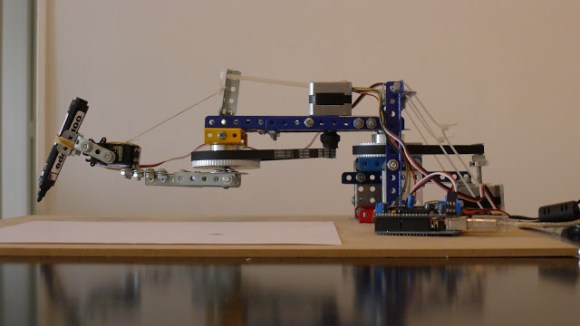
[Acorv] wrote in to tell us about his latest hack, a robotic arm that writes with a marker. In the video after the break, the arm is set to copy whatever someone writes in a touchpad. As you might guess from this video, the hack is written up in Spanish, but it’s nothing your favorite translator can’t handle if you don’t speak the language.

This robot it the result of improvements on his first drawing arm ‘bot featured here. The basic kinematics stayed the same in the arm’s second iteration, but the resolution was greatly improved by using belts to achieve a gear reduction. The second build also features mechanical reinforcement with an Erector-set style building set known as [Mekanex].

A simple hobby servo moves the marker up or down, and control is achieved through, you guessed it, an Arduino with a motor shield! Although from a different time, the way this arm is used is reminiscent of a mechanical writing automaton from long ago. Continue reading “Hola! From A Spanish Speaking Drawing Arm”

Netduino Gets A Huge Upgrade

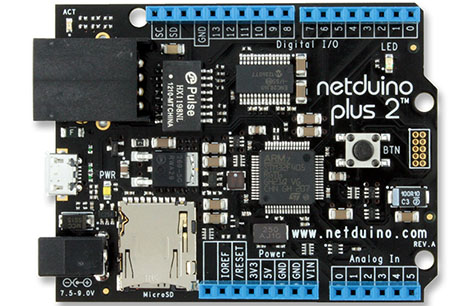
The Netduino, a dev board built around the .NET Micro framework with the goal of being compatible with Arduino shields just got a huge upgrade.

The new Netduino Plus 2 features an upgraded STM32 ARM Cortex-M4 uC running at 168 MHz, improving on the original Netduino’s ARM7 running at 47 MHz. In addition to some more processing power, the STM32-based microcontroller has twice the RAM and six times as much Flash memory. Also, Ethernet (10Mbps), a MicroSD card port, and of course compatibility with all Arduino shields – including the new Arduino ‘Revision C’ boards for the Leonardo – remains intact.

In keeping with the design goals of the Netduino, the new board uses the .NET Micro Framework running under Windows. It looks like OS X and Linux users won’t be left out in the cold for long, though; there’s a project to port the .NET Micro stuff over to Mono.

Tip ‘o the hat to [Jason] for sending this one in.