It’s Now Imperative That You Copy That Floppy

In the early 1990s, Don’t Copy That Floppy was an anti-piracy campaign that attempted to connect with computer-savvy youth through the power of hip-hop. While somewhat difficult to imagine given our current draconian Digital Rights Management (DRM) hellscape, warning kids about the potential legal ramifications of duplicating floppy disks containing copyrighted software was seen as necessary since at the time there was usually nothing preventing users from simply copying the contents of one disk to another.

Unfortunately 30+ years down the road, we’re now finding that somebody really should have been backing up some of those disks. Which is why the University of Cambridge of launched the Future Nostalgia project and produced Copy That Floppy! — a phenomenal guide on preserving the contents of floppy disks while we still can.

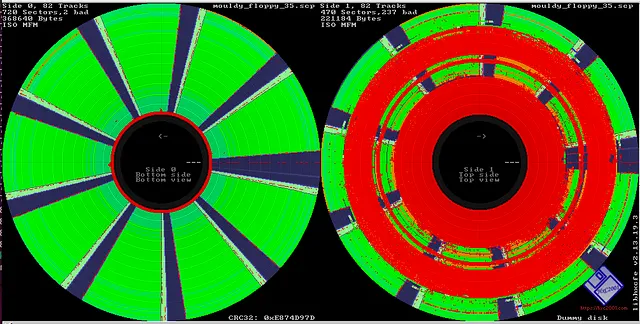
Visualizing a disk’s flux stream can identify debris and damage.

There’s no telling how much data could potentially be lost to time because its stuck on such an antiquated and fragile storage media, and the situation only gets worse with the passage of time. The problem isn’t just that modern computers don’t have floppy drives. The disks themselves degrade with age, a process which is accelerated if they aren’t stored properly.

As such, Copy That Floppy! only briefly touches on the most ideal situation — that is, buying a USB floppy drive and making copies of the bog standard 3.5 inch disks you might come across. It then moves right on into more advanced topics, such as interfacing with less common drive types, how to safely clean floppies, and the use of advanced tools such as Greaseweazle to analyze captured disk images.

We’ve seen demonstrations of some of these techniques before, and a few years back Adafruit got interested in floppy preservation with modern hardware. But in-depth guides like these that pull all that information together into one place are valuable resources.

A Primer On Optical Storage Data Preservation

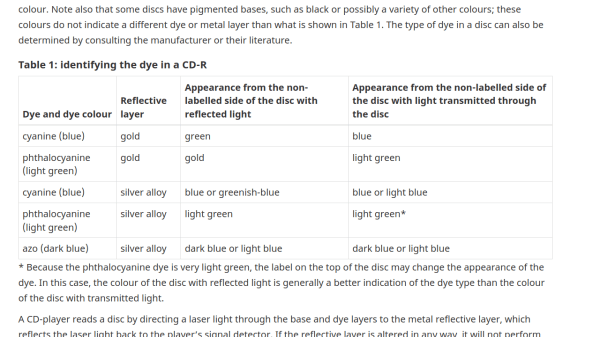
Picking a storage medium for data preservation can be a conflicting time. Sure, they say optical storage tends to last, but it can’t be as straightforward as just burning everything onto Blu-Rays, right? Here’s a paper from Canadian Conservation Institute, teaching you the basics of using compact disks for data storage, it appears, without missing a single detail, and taking about ten minutes to read.

Here, you will learn about the different kinds of disks available and how their manufacturing-inherent qualities affect their preservation capabilities. Are dual-layer DVDs better than single-layer ones, or is it the opposite? How do CDs compare? And what about Blu-Ray disks? Wonder no more, here you will get answers to questions you didn’t known to ask. Data preservation is a game of numbers to preserve numbers, and this paper also outlines how to properly record, store, and test your disks to raise your chances.

Whether you’re only looking to delve into data preservation, or trying to improve your own policies, this looks like is a perfect document for you. After all, if you’re not aware of the best practices, you might end up having to digitize old floppies or even LaserDisks – not that those aren’t fun journeys to read about, of course, and we recommend it. Data preservation isn’t just about optical disks, of course – it’s a practice with a rich history.