It’s Now Imperative That You Copy That Floppy

In the early 1990s, Don’t Copy That Floppy was an anti-piracy campaign that attempted to connect with computer-savvy youth through the power of hip-hop. While somewhat difficult to imagine given our current draconian Digital Rights Management (DRM) hellscape, warning kids about the potential legal ramifications of duplicating floppy disks containing copyrighted software was seen as necessary since at the time there was usually nothing preventing users from simply copying the contents of one disk to another.

Unfortunately 30+ years down the road, we’re now finding that somebody really should have been backing up some of those disks. Which is why the University of Cambridge of launched the Future Nostalgia project and produced Copy That Floppy! — a phenomenal guide on preserving the contents of floppy disks while we still can.
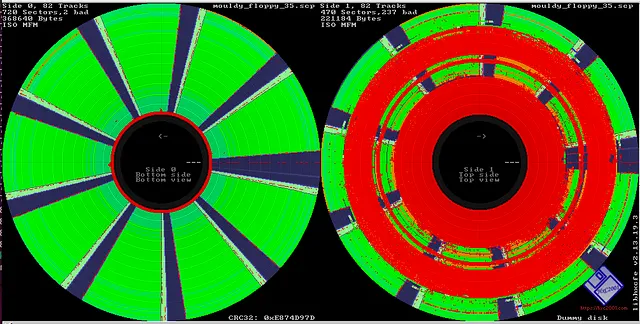
Visualizing a disk’s flux stream can identify debris and damage.

There’s no telling how much data could potentially be lost to time because its stuck on such an antiquated and fragile storage media, and the situation only gets worse with the passage of time. The problem isn’t just that modern computers don’t have floppy drives. The disks themselves degrade with age, a process which is accelerated if they aren’t stored properly.

As such, Copy That Floppy! only briefly touches on the most ideal situation — that is, buying a USB floppy drive and making copies of the bog standard 3.5 inch disks you might come across. It then moves right on into more advanced topics, such as interfacing with less common drive types, how to safely clean floppies, and the use of advanced tools such as Greaseweazle to analyze captured disk images.

We’ve seen demonstrations of some of these techniques before, and a few years back Adafruit got interested in floppy preservation with modern hardware. But in-depth guides like these that pull all that information together into one place are valuable resources.
HamsterOS Crams Complete Graphical Desktop Onto 1.44 MB Floppy

It’s not every day that there’s a new OS in the works for 386 and 486-era hardware, but [John Swiderski] let us know he working hard to bring HamsterOS to retrocomputing enthusiasts everywhere.

HamsterOS targets a November 2026 release.

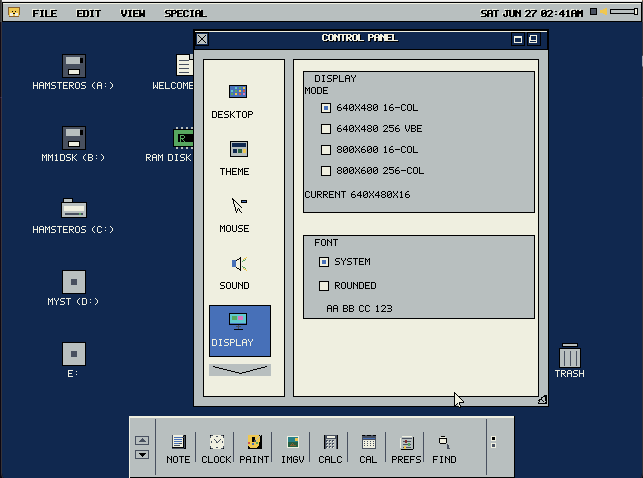
HamsterOS is a tiny but full-featured multitasking 32-bit graphical operating system that fits on a single 1.44 MB floppy disk. It’s designed as a floppy-first OS, but can easily be installed to a hard drive and includes a suite of native applications. There’s even DOS support!

The list of features is impressive, many of which are targeted at making life a little easier for those working with vintage hardware. One example we like is the CMOS crash counter, which automatically forces the system into a basic VGA safe mode after three consecutive failed boot attempts.

Speaking of making vintage computing a little easier to handle, [John] also released HamsterWeazle, a free GUI front-end for Greaseweazle, the open-source USB device that makes interfacing to old floppy drives easy. If you’re finding yourself intrigued by software like HamsterOS but wondering how you’d write to a 1.44 MB floppy without already having some old hardware up and running, Greaseweazle over USB — and HamsterWeazle to make it much more user-friendly — is one way you’d do it.

We recently featured GentleOS, a charming and streamlined graphical OS aimed at vintage hardware that makes a point of showing what’s possible when new ideas meet old hardware. If you have a retrocomputing project you want to show off, custom OS or otherwise, let us know on our tips line!

Overhead photo of a Tandon TM100-1 Floppy Drive and a 5,25" Floppy

How To Revive A Tandon Floppy Drive

In this episode of [Adrian’s Digital Basement], we dive into the world of retro computing with a focus on diagnosing and repairing an old full-height 5.25-inch floppy drive from an IBM 5150 system. Although mechanically sound, the drive had trouble reading disks, and Adrian quickly set out to fix the issue. Using a Greaseweazle—a versatile open-source tool for floppy disk diagnostics—he tests the drive’s components and explores whether the fault lies with the read/write head or electronic systems.

The repair process provides fascinating insights into the Tandon TM100-1 floppy drive, a key player in vintage computing. Adrian explains how the drive was designed as a single-sided unit, yet hints at potential double-sided capability due to its circuit board, raising possibilities for future tweaks. Throughout the video, Adrian shares handy tips on ensuring proper mechanical maintenance, such as keeping lubrication in check and ensuring correct spring tension. His attention to detail, especially on termination resistors, provided vital knowledge for anyone looking to understand or restore these old drives.

For fans of retro tech, this episode is a must-watch! Adrian makes complex repairs accessible, sharing both technical know-how and nostalgic appreciation. For those interested in similar hacks, past projects like the Greaseweazle tool itself or other Amiga system repairs are worth exploring. To see Adrian in action and catch all the repair details, check out the full video.

Continue reading “How To Revive A Tandon Floppy Drive”

A beige computer with a CRT monitor. A black LCD sits atop a stack of 3 devices next to it and a set of power control switches (the orange light up kind). There appear to be 8 floppy drives available.

Flux Is Your Friend For Archiving Old Floppy Disks

Nothing screams retrocomputing quite like floppy drives. If you want to preserve some of your favorite computing memories like that paper you wrote about the joys of the Information Superhighway, [Shelby] from Tech Tangents has a detailed dive into how to preserve the bits off those old floppies.

Back in the day, the best way to get data off an old drive was to fire up an old computer. Now, with new devices specifically designed for harvesting data off of old floppies like the KryoFlux and the Greaseweazle, you can get the full flux map of the disk. With this, you can build binary image files and actually pull files and duplicate disks from vintage systems.

Some systems, like PCs, Macs, and Commodores are well-understood and are simple to preserve, while others take quite a bit of work to figure out. [Shelby] walks us through some of the more common disk formats as well as some real oddballs like Microsoft Adventure which features inconsistent formatting as a form of early DRM (boo).

Want to do your own preservation? We’ve covered a couple different methods in the past.

Continue reading “Flux Is Your Friend For Archiving Old Floppy Disks”