Single Button, Handheld Gaming Console

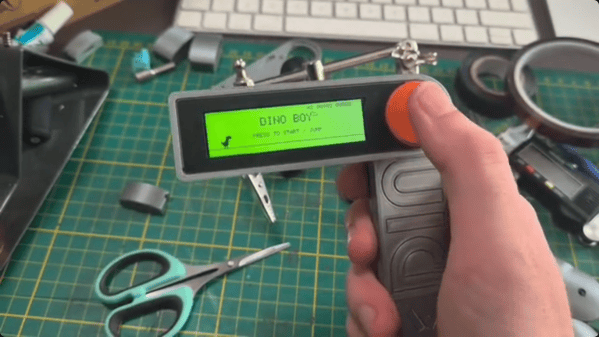
Those of us who grew up in the 70s and 80s might be familiar with the Atari 2600 console and its now relatively unrecognizable (by modern standards) controller with only a single button and stiff whole-hand joystick. By comparison, the Steam Deck has somewhere around 24 buttons and two joysticks depending on how they are counted. But even the Atari might be providing more user inputs than are really necessary for quality gaming. Take a look at the Dinoboy, a handheld console with only a single button.

Part of what makes this system work is that it’s playing the classic dinosaur jumping game first included in Google Chrome which loads when the browser can’t connect to the Internet, and the user’s single input was the space bar. In this case, the handheld has its single button where the user’s thumb naturally rests. The console itself is in two parts, hinged where the button is placed. When unfolded, the top half reveals a wide screen and the bottom half is held by the hand. The screen supports two color formats, a black and white style and another which replicates the dot matrix display of the original Game Boy.

The small handheld console has another trick up its sleeve too. [Paul], the system’s creator, built it as a way to stop doomscrolling so along with having this quick-deploying game on hand, there’s also an NFC tag hidden near the hinge which, when swiped passed a phone, also turns that phone’s airplane mode on. It’s a double-whammy of removing the gamer from the dark patterns and algorithms dominating the mainstream Internet. And, this isn’t [Paul]’s only dinosaur jumper console either. We recently featured a similar (but much larger) build of his housed in a classic arcade-style cabinet.
Pong-like Cabinet For Classic Dinosaur Jumper

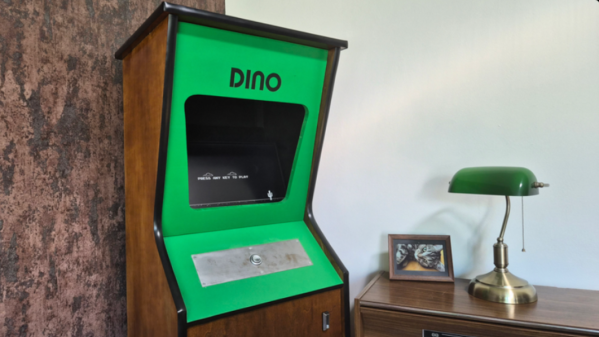
Back when Google ran a functional search engine, there used to be all kinds of quirky, fun antics hidden in their products. From Easter eggs in certain search results, to a flight simulator hidden in Google Maps, to funny, engaging April Fools jokes, it was a lighter, less corporate time. Now, though, to recreate any of that early Google magic, we have to do it on our own, and [Paul] has come up with an arcade cabinet for the classic Google Chrome dinosaur game that does just that.

Although the Dinosaur Game is still available in modern versions of Google Chrome, it lends itself almost perfectly to an arcade cabinet. Built from 18 mm plywood, the cabinet is standard DIY arcade fare with a built-in shelf to house the electronics and a 4:3 flatscreen monitor for a display. The Raspberry Pi 3B is also just enough to run the game, but the software running on it is unique. The Pi runs an operating system called FullPageOS, which automatically loads a modified version of the Dino jumper in full-screen mode. It’s been changed to look more like an arcade game than a browser Easter egg, with features like a leaderboard and an automatic-play screensaver mode, and the build is rounded out by a cactus-shaped scratching post to accompany the cabinet.

As for gameplay, we couldn’t ask for a simpler user interface. A single button is all that’s needed for this game, and it’s surprisingly engaging. It is a bit large for a single-button game, even with its reduced-width cabinet, so if you’re looking for something smaller, you could always base it on a tabletop arcade system instead.

Siri Controlled Arduino Using Ruby

siri-proxy-ruby-arduino

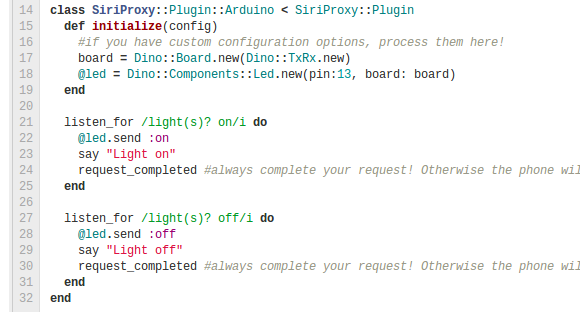
This snippet of Hello World code lets [Nico Ritschel] turn the Pin 13 LED on his Arduino on and off using Siri, the voice-activated helper built into iPhones. The trick here is using the Ruby programming language to get Siri Proxy talking to Arduino via the USB connection. He calls the project siriproxy-arduino.

On one end of the hack resides SiriProxy, a package not approved by Apple which is capable of intercepting the Siri messages headed for Apple’s own servers. The messages are still relayed, but a copy of each is available for [Nico’s] own uses. On the other side of things he’s building on the work of [Austinbv’s] dino gem; a Ruby package that facilitates control of the Arduino. It includes a sketch that is uploaded to the Arduino board, opening up a Ruby API. The collection of code seen above defines the pin with the LED connected and then listens for a specific Siri commands to actuate it.

Take a look at [Nico’s] explanation of the module in the video after the break.

Continue reading “Siri Controlled Arduino Using Ruby” →

Light Bulb Efficiency Exhibit Updated With LED Bulb Option

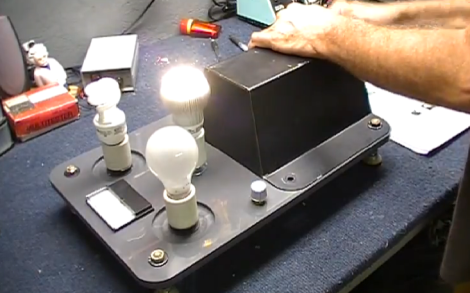
It seems like tinkerers are always being tapped to build or repair exhibit hardware. This time around it’s [Dino’s] turn. He’s been asked to alter a light bulb efficiency demo so that it includes an LED option.

The idea here is that you crank a generator to power different types of light bulbs. There’s an ammeter built in, but possibly the best feedback is knowing how hard you have to crank to illuminate the most inefficient choice. As it stands there is a toggle switch to choose between incandescent and CFL bulbs. [Dino’s] solution is to use a three-position rotary switch. He removes the toggle switch and replaces it with a socket for the LED bulb. A new location for the rotary switch is chosen and he does a bit of work to get it mounted securely. If you haven’t worked with this type of switch before he takes the time in the video after the break to explain how they work.

Continue reading “Light Bulb Efficiency Exhibit Updated With LED Bulb Option” →

[Dino] Builds A Fetch-O-Matic For This Month’s Make

Perennial Hackaday favorite [Dino] has an article in this months Make magazine. It’s an automated ball launcher that allows you to play fetch with your dog without wearing your arm out.

The powerhouse inside [Dino]’s ball launcher is a windshield wiper motor powered by an 18 Volt cordless drill battery pack. When a ball in dropped into the hopper, it turns on a switch sending some power to the motor.

The swing arm that actually launches the ball is anchored to the frame of the ball launcher with a spring. This stores energy for one half of a rotation of the motor until the arm rotates half way around inside the box. Then, the arm quickly accelerates and launches the ball across the yard.

[Dino] says he’s working on training his dog to drop the ball into the chute after retrieving it, creating a perpetual game of fetch. At least until the battery runs down, that is. Video after the break.

Continue reading “[Dino] Builds A Fetch-O-Matic For This Month’s Make” →

[Dino’s] Talking Box(es)

[Dino] is about three-quarters of the way through his talking box project. He’s completed one of the two boxes, and is showing off the technique he uses to marry motion with sound in order to mimic flapping lips with the box top.

You may remember [Dino’s] first look at the EMIC2. It’s a single-board text to speech module which is what provides the voice for the box. But what fun is that without some animatronics to go along with it? So [Dino] started playing around with different concepts to move the box top along with the speech. This is easier said than done, but as you can see in the video after the break, he did pull it off rather well. He built a motor control circuit that takes the audio output of an LM386 amplifier chip and translates it into drive signals for the motor. The shaft is not directly connected to the lid of the box. Instead it has a curved wire which is limited by a piece of string so that it doesn’t spin too far. It lifts the lid which is hinged with a piece of cloth.

Continue reading “[Dino’s] Talking Box(es)” →

EMIC2 Text To Speech Module

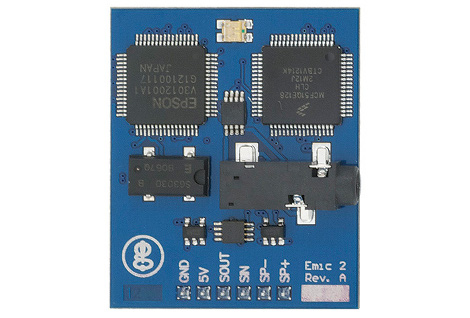
This is the EMIC2 text-to-speech module. You can see from the logo on the bottom left it’s the latest gadget coming out of [Joe Grand’s] Grand Idea Studios. [Dino] tipped us off about his first experience with a prototype of the board. He’s driving it with an Arduino and the video after the break shows that the sound rendering is high quality and the words are very easy to understand. One of the things that we think is interesting is that the serial communications used to drive the board are not uni-directional. In fact, there’s a serial terminal that provides documentation on how to use the chip. Obviously this is most suited to the Arduino, which always has a PC-side terminal window available to it.

[Joe] himself shows some of the potential for the board. He gave new life to a broken toy by replacing its internals with a PIC-based circuit to drive the EMIC2. That video is also found after the break. He’s just using the demo clips, but from that you will get a good idea of the vocal modulations this device is capable of. The board rings up at $60 and is available from Parallax.

Continue reading “EMIC2 Text To Speech Module” →